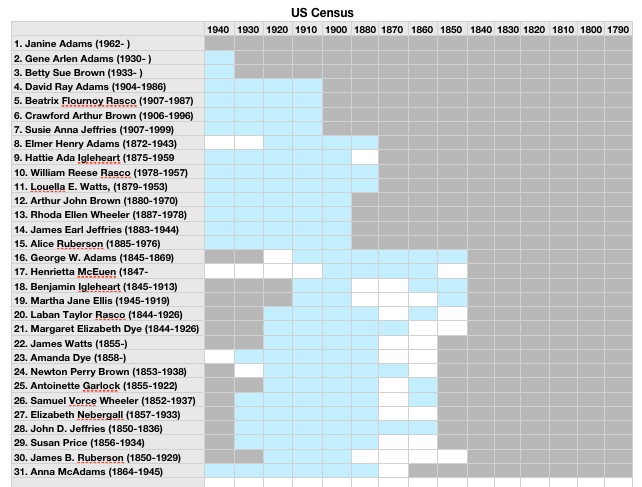
 I wrote this post, which is one of the most-read posts on this blog (more than 31,000 views!), way back in 2013. It got a great response, so I thought I’d run it again for newer readers. For me, being able to see at glance which documents I’ve found (or need to find) for my ancestors has been really helpful. I hope you find the post useful!
My memory is not what it used to be. And I’m finding the more family history research I do, the more I’m duplicating effort. In the process of researching one person, another person will pop into my mind. I’ll look for a record for that person, rejoice in finding it, then realize I’d already found it!
So in an effort to avoid that, as well help me in my never-ending quest to not feel overwhelmed about my genealogy research, this past weekend I created a series of progress-tracking spreadsheets. I was inspired by Miriam’s Census Spreadsheet, which is a Google Doc. I’m a Mac user and I used the Numbers program (similar to Excel) to create three spreadsheets (so far) that track progress, by ancestor, on finding the following records:
Sheet 1: BMD
- birth records
- marriage records
- death records
- burial records
- grave photos
Sheet 2: Censuses
On the first table (pictured above) I have a row for each ancestor (this is a work in progress…I’ve been adding info a generation at a time and up to my great-great grandparents), and a column for each U.S. Census. I fill in the square in blue if that record was found. A grey square indicates the ancestor wasn’t alive for that census. A blank (white) square indicates I still need to find this record. I also have a table of state censuses, so I can note those.
Sheet 3: Military
Here I track what military records I’ve found for each ancestor, by war or conflict. This one’s definitely a work in progress.
Going through this process helped me realize how much census work I’d done and how much more work I had to do to find birth, marriage and death records. I think these charts will help me feel a sense of accomplishment and also help me hone in on work that needs to be done. I’ll keep adding ancestors from Reunion, until I’m caught up, and then plan to keep up with the spreadsheet as I find more records.

Thank you for reposting this!
It is exactly what I need to organize my research. I have found myself ‘discovering’ the same document for the same person/ family, too. Frustrating, but so telling of getting interrupted in my research and not recording where I left off.
Yay! I’m glad you found it helpful, Helen!
Thank you! I need something like this!
You are so welcome, Janet!
This is great! Going to start on mine. Thank you!
Nita, I’m so glad it inspired you!
Thank you for the repost, this is completely do-able! I’m getting ready to go through my surname folders and make sure there aren’t any holes in the first 5 generations, so this will be so helpful to help keep track.
Thanks for posting. I already have and completed my spreadsheet for the U.S. Census. I may make a few adjustments after reviewing your spreadsheet. Recently, I prepared a BMD spreadsheet. I plan to make some adjustments based on example you posted. I still need to prepare a spreadsheet for the military service. Again, thanks for posting.
Will these spreadsheets work on a PC laptop? Are they easy to use as I’m not too computer literate? How much would they cost?
Sorry, Sherry, this isn’t a spreadsheet I’m offering for sale. I’m just presenting it as an example of something readers could create for themselves.
Perhaps you could adapt the (free) ‘Records Checklist for 4-generation Ancestral Chart (Pedigree Chart)’ – scroll down to the link near the bottom of https://www.judywebster.com.au/downloads.html.
I have your original post about this bookmarked to refer back to regularly as I try to stay on track! I need to get my genealogy mojo back, you may have given me a bit more of a kick up the backside to get on with it!
It makes me happy that this post gave you a little kick in the backside, Marion. Good luck with your research!
This is a great way to *focus* on my progress. It was kind of fun to see I had accomplished something, even if I feel “lost in the weeds.” Thank you, as always, for the inspiration!
You’re right, Patty. That visual reminder of all you’ve accomplished can be motivating!
I also use a similar system, but my BDM chart includes ‘Will/Probate records’. I also distinguish between civil BDM records and church records of baptism, marriage and burial, because the two series often have different/extra details. Perhaps the difference is greater in Britain, which is where most of my ancestors lived.