• BLOG
  • ABOUT
    • Privacy Policy

Organize Your Family History

Stay focused and happy while exploring your roots

The irresistible ScanSnap SV600

November 26, 2013 By Janine Adams 1 Comment

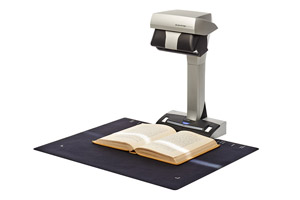
SV600_mat1I’m not a big early adopter of technology. Well, I did have an original iPad, but I didn’t get my iPhone until the 4S.

But since the Fujitsu ScanSnap SV600 contactless scanner was introduced just last month, I’ve found myself really wanting one. This scanner allows you to scan books, photographs, and documents without risk to the original. Documents rest on a surface and the scanner scans from above. Sounds like magic to me.

Today, it’s front of mind for two reasons: I have a family history book that my aunt lent me (“The Family of Edward Hampton Rasco and Connexions,” published in 1967) and she wants it back. I was thinking of potentially photocopying it, but what I’d really like is to be able to scan it.

Also today, a client showed me her marvelous collection of letters her father wrote during World War II.  She wants to have them scanned and make a book of them for her family members. This seems like a great application for the SV600.

One of the features that makes the scanner so appealing is that it will automatically straighten pages. In other words, the curvature of the page that naturally occurs when it’s bound into a book disappears, thanks to the included software. It also allows you to easily erase your fingers (used to hold a book open) from the image, and detects page turning, so you can turn the page and scan without having to press the button. (Check out this video from DocumentSnap.com’s review to see what I mean.)

I have a ScanSnap S1500M sheet-fed scanner and I love it. (It’s a precursor to the iX500.) But it’s only good for those items I feel safe sending through the sheet feeder. I imagine being able to easily and safely scan scrapbook pages, old photos, fragile letters, and pages of books using the SV600 and my heart goes pitter-patter. It’s surprisingly inexpensive for what it is. Right now it’s selling for just over $600 on Amazon. Stay tuned!
Filed Under: Challenges, Excitement, My family, Preservation Tagged With: family photos, rasco, resources, scanners, ScanSnap SV600

Pin the tail on the family tree

October 31, 2013 By Janine Adams Leave a Comment

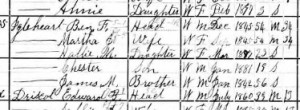
igleheart1900Today I had a little time to do some genealogy research, but I couldn’t decide what to work on. So I opened my family tree in my Reunion software, looking for inspiration. I noted the right sidebar had a listing of people on my tree, sorted alphabetically by last name.
I closed my eyes, scrolled up and down a few times on the sidebar and then clicked. The person I landed on was Martha Jane Ellis (1845-1919), my great great grandmother. I set to work looking at her record, looking for missing information. I pulled out the file folder for Martha and her husband, Benjamin Franklin Igelheart (1845-1913) and continuing the process of marrying my paper and electronic files. I also started adding information on siblings into Reunion, something I didn’t do in my first recording of data.

Randomizing my selection feels like a nice piece of serendipity. I sometimes prefer that to a systematic approach. It feels more fun to me and this is all about fun, right?

Filed Under: Challenges, General, My family Tagged With: ellis, getting started, Igleheart, overwhelm, record keeping, research

Marrying my electronic and paper files

October 10, 2013 By Janine Adams 4 Comments

Store census documents by pressing Print, rather than SaveI used to be a paper gal. But when it comes to my genealogy records, I’ve stopped pressing the Print button. At the moment almost all my genealogy research is being done online, so I’m really understanding the utility of clicking Save rather than Print.

Part of the reason I’ve been able to make the shift is that I’ve set up a good electronic file system. That gives me confidence that I’ll find what I need on my hard drive.

Switching from paper to electronic has ramifications in at least a couple of areas. It means that it’s changing how I do things from this point forward. That’s no problem. But it also means I have a backlog to deal with. In the past, I’d print and file census documents and other resources I found online, rather than save them electronically. While all the information are recorded in my software (I use Reunion), the source documents themselves might be in a file or might be on my hard drive.

So this week, I’ve been working on marrying the two systems. It’s going to be a long process. What I’m doing is taking out a file folder for a couple and going through the documents, making sure they’re included in my software and seeing if they’re on my hard drive. If they’re not, I’m finding them online and saving them within my file structure.

I’m also taking the opportunity to do one other thing while I’m in there. As I look at census documents, I’m adding siblings of my ancestors to my family tree software, something I blogged about doing a few months ago.

This may sound really tedious to you, but I’m having a good time. It’s allowing me to reacquaint myself with various couples and really pay attention to all their kids, not just my direct ancestor. It’s also giving me the chance to clean up my hard drive and re-file errant files (and move some documents that accidentally ended up in my Genealogy folder). I’m not going through each line systematically. To keep it interesting, I’m jumping from family to family, choosing file folders as my whims take me.

Since I’m no longer printing newly found documents, I guess I’m slowly phasing out my paper files. And that’s okay with me. My hard drive is fast, spacious, orderly, and backed up both to an external hard drive via Time Machine and to a remote computer via Crash Plan Pro.

I’m looking forward to the comfort of having everything on my hard drive. Since I store my paper files in a closet a few steps from my desk, I also love that my data will be at my fingertips whenever I’m using my computer. It’ll be great when I travel, especially if I take research trips, to have all that information available to me. I believe this will be time well spent.

Filed Under: Challenges, Excitement, My family, Organizing Tagged With: electronic files, filing, paper files, record keeping, source documentation

Preserving photos and documents

September 10, 2013 By Janine Adams Leave a Comment

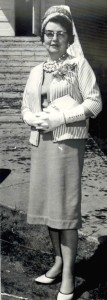
BeaAdamscroppedMy father was recently sent a packet of aging newspaper clippings and some photographs by a cousin. She was cleaning out her mother’s home after a downsizing (her mother is my grandfather’s sister) and thought my father would enjoy the clippings and photos about his parents, Dave and Bea Adams. There were also a couple of clippings about my father, Gene Adams.

They were delightful to look at and read. My grandfather had published a small-town weekly newspaper (The Franklin County Graphic) and several of the clippings were humorous essays by him, about my grandmother. Real treasures. There were also photographs, probably taken by my grandfather who was also the newspaper’s photographer, of my grandmother all dolled up. I knew her as very casual dresser, so they were really fun to see. I’ve included one with this post–I don’t know why there’s a veil attached to her hat.

Anyway, I wanted to treat these treasures properly. The newspaper clippings are yellowing and getting fragile. They were mushed together with the photos in an envelope. Fortunately, I have a few resources that I’d purchased to help me make sure these items get the proper treatment. They include:

  • The book, How to Archive Family Keepsakes, by Denise May Levenick, The Family Curator
  • The kit, How to Declutter Your Photos Like an Archivist, from Sally Jacobs, The Practical Archivist
  • The Document Preservation Kit, from Shop Family Tree

Thanks for these resources, I’ve done the following with my treasures:

  • I’ve put the newspaper clippings into an archival folder, separated from the photos, and will have them photocopied onto archival paper. (They’re too big for my scanner.) They’re safe in an archival box.
  • I’ve put the photographs into a labeled archival envelope in an archival box.

This is making me want to get my hands on more documents and photos. My mother has a box of them in her closet that I think I’ll bring home with me next time I visit.


Filed Under: Challenges, General, My family Tagged With: Adams, keepsakes, newspaper clippings, photographs

  • « Go to Previous Page
  • Page 1
  • Interim pages omitted …
  • Page 22
  • Page 23
  • Page 24
  • Page 25
  • Page 26
  • Interim pages omitted …
  • Page 34
  • Go to Next Page »

about me

I'm Janine Adams, a professional organizer and a genealogy enthusiast. I love doing family history research, but I find it's very easy for me to get overwhelmed and not know where to turn next. So I'm working hard to stay organized and feel in control as I grow my family tree.

In this blog, I share my discoveries and explorations, along with my organizing challenges (and solutions). I hope by sharing what I learn along the way I'll be able to help you stay focused and have fun while you do your research, too.

tags

30 x 30 Adams amy johnson crow anniversary Brown cemetery census Civil War conferences connections dna electronic files Evernote excitement Family Curator family photos genealogy tools getting started goals How They Do It Igleheart Jeffries keepsakes learning opportunities maps newspapers NGS organizing aids overwhelm paper files planning quick tips rasco record keeping research research log research trip resources RootsTech social history source documentation Stacy Julian technology time management vital records

join the facebook community!

join the facebook community!

My organizing business

Learn more about my organizing business, Peace of Mind Organizing®.

Subscribe by RSS

  • RSS - Posts
  • RSS - Comments

© 2026 Janine Adams


Loading Comments...