• BLOG
  • ABOUT
    • Privacy Policy

Organize Your Family History

Stay focused and happy while exploring your roots

How They Do It: Amy Johnson Crow

July 4, 2017 By Janine Adams 8 Comments

Today’s entry in my How They Do It series is an interview with Amy Johnson Crow, professional genealogist and blogger at AmyJohnsonCrow.com. I really enjoy Amy’s blog, where she offers really great and practical advice, and I was privileged to do a video interview with her for her blog when we were both at RootsTech earlier this year. I hope you enjoy reading this interview as much as I did. I wholeheartedly agree with her assertion that Simple is good!
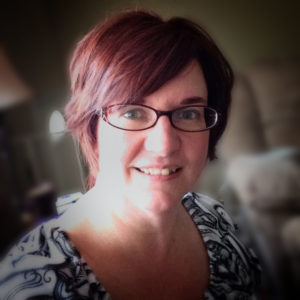
How They Do It: Amy Johnson CrowHow They Do It: Amy Johnson Crow

How long have you been doing genealogy?

I’ve been interested ever since I was little. My grandma was the unofficial family historian in the family and she told me a lot of stories. I did my first “real” research in 1990 and became certified in 1995.

What’s your favorite part of doing genealogy?

The hunt. I love taking a research problem, figuring out how to approach it, finding resources, and putting it all together.

Do you consider your genealogy research well organized?

Fairly. I try to always go into it with some sort of objective. “Who are Matilda’s parents?” “Where was John in 1850?” “Why is there a gap in the ages of these children?” It helps me not go down the research rabbit hole as often (but it still happens!)

What type of software do you use for organizing your genealogy research?

I’m kind of between genealogy software programs right now. For organizing my research and my notes, I use Excel for timelines (I would be lost without timelines) and Word for my notes.

Do you keep a research log? If so, what format?

My notes are all in Word. I don’t keep a separate log, but I integrate it into my notes. I’ll add the title, etc. of whatever I’m looking at, why I’m looking at it, and what I found (and what I didn’t find).

Do you have a tree on Ancestry? If so, is it public or private? Why?

I have several trees on Ancestry. One is public, the rest are private. The public tree is for cousin bait and DNA. The private trees are for my “works in progress” and trees where I’m helping someone.

What’s your biggest challenge when it comes to organizing your genealogy?

Digital files, especially photos. I’ve been known to take dozens or even hundreds of photos when I’m researching or at a cemetery. I organize them by general category, but it’s the specific tagging that trips me up. There are times when I *know* I have a photo of a particular type of tombstone, but I can’t find it.

What’s your biggest piece of advice to beginning genealogists in terms of keeping track of their research?

Get in the habit of copying or scanning the title page of whatever book you’re using. Also note when you *don’t* find something.

What do you think is the most important thing for people to do to stay organized when it comes to family history research?

Find a method that works for them. Some people have to organize by family, while others go by location or record type. (I’m more of a location-based organizer myself, but I know that doesn’t work for everyone.)

If you were starting out new as a genealogist what would you do differently?

I would have started out with better citations. Back when I first started, my genealogy software allowed all of 8 characters to record a source. So many of my earliest citations were “stone” or some code that I later had no idea what it meant. It wasn’t a whole lot of fun trying to figure out where some of those facts came from!

Do you keep paper or electronic files (or both)?

Both. As techie as I am, I still love some paper.

Are you folder or binder person for your paper files?

Folders. I find them more flexible for how I organize.

Do you use Evernote, One Note or any other electronic organizing system for your genealogy? If so, how do you use it?

I’ve dabbled in Evernote, but I don’t use it regularly.

Do you have a dedicated space in your home for doing genealogy research? What’s it like?

I have my own home office. (I joke that the best piece of office equipment that I have is my door!) I’m actually scaling it back and getting rid of an entire bookcase of books (donating them to a couple of different libraries.) I love books — I am a librarian, after all — but I find that having a workspace that’s more “minimal” helps with my work.

Do you have anything to add?

There’s a lot to be said for organizing how it makes sense and is comfortable for you. However, I would encourage people not to make their systems too complicated. If another researcher or a family member ever has to go through your papers later and it isn’t clear how things are organized, that’s when research ends up getting tossed. Simple is good.

Amen, sister! A great example both of a simple organizing strategy and the kind of practical advice that Amy shares on her blog is one of her favorite posts (and mine), The Easy, Low-Tech Way to Label Scanned Photos. Organizing systems don’t have to be complicated–in fact we think it’s better if they aren’t!
 

Filed Under: Challenges, Excitement, Genealogy tips, Organizing Tagged With: amy johnson crow, How They Do It, organizing aids

Help for going paperless

June 27, 2017 By Janine Adams Leave a Comment

Paperless Genealogy GuideI’ve been researching every day as part of the current 30 x 30 challenge and was just thinking about how grateful I am that all my documents are organized digitally. Five years ago, when I kept and organized paper versions of everything (and let my digital files fall where they may on my hard drive), researching took more effort. I stored my files in a rolling file cart, which I would roll out from my office closet to my desk. I would have to pull out folders, I would print, I would file. I’d roll the cart back. Just handling the paper took precious time away from my research.

Now that everything is digital, I sit at my desk and just get going. I’m downloading and renaming, not printing. I’m still filing, but electronic filing takes moments because I have a solid file structure. I know where everything is and it’s not taking up any physical space. As a professional organizer, I find great peace in this.

If that sounds good to you but you’re not there yet, I’d like to offer you some help for going paperless with your own research. Earlier this year I wrote, with scanning expert Brooks Duncan of DocumentSnap, the Paperless Genealogy Guide, a 44-page downloadable pdf. We published it in February in conjunction with the talk we gave at RootsTech (Go Paperless: Streamline and Digitize Your Genealogy). It’s detailed and quite complete and available instantly for only $9. You can read more about it (and buy it!) at the Paperless Genealogy Guide page at Brooks’ website.

Filed Under: Genealogy tips, Organizing, Technology Tagged With: Brooks Duncan, electronic files, genealogy tools, paperless, record keeping, technology

Formal citations: Do it for those who follow

June 9, 2017 By Janine Adams 18 Comments

In response to my blog post, How Important are Formal Citations?, reader Karen Cavanaugh sent me an excellent email about why she’s taken the trouble to format her sources in the format prescribed by Evidence Explained and how she makes it easier on herself. I liked it so much, I asked whether I could turn it into a guest post. She graciously said yes, so I present to you Organize Your Family History’s  first guest post. Take it away, Karen!

I had been aware of the Evidence Explained book and used the website in the past but resisted implementing the standard in documenting my sources as it seemed so demanding and required more detail than I was accustomed to doing.  I found it too tedious to master and just the weight and scope of the book made it harder to commit.

But one day as I was organizing some files I found an old family history created by a distant cousin using the old Family Tree Maker.  It included some new information on my family and boy, was I excited.  Until I looked at sources.  Dismay!  The sources were so skimpy as to be useless – I had a hard time deciphering them.  I made calls to libraries and repositories in the respective area but no one could identify the one citation I needed.  As a last resort I went down to the Allen County Public Library and found a very helpful person who was able to guess at the reference it was alluding to, took me to the shelf and there is was!  Lesson learned.

I have always documented my sources (I have about 950 in Reunion) but this experience made me wonder if I was doing the best I could in my own work and convinced me to look at EE again.  Like you, I tried the templates in Reunion but found them restrictive and especially difficult to modify the punctuation so they printed in a readable and standard manner.

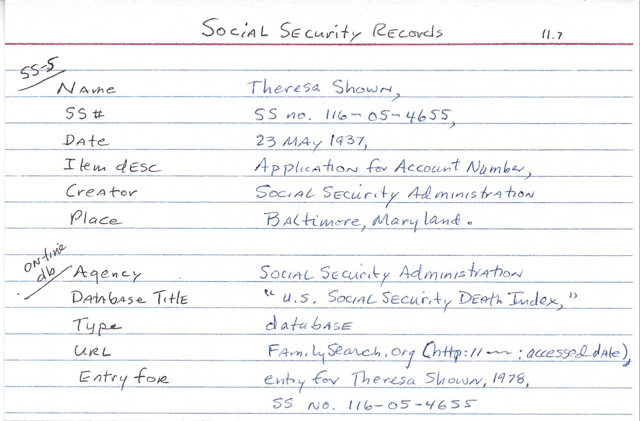
Even after studying many of the sections of the book and trying to understand the logic behind it all, I still struggled to find an efficient way to implement it.  Then one day I tried creating a 4” x 6” cards (see photo) for each major kind of source and rather than having to pick up the heavy book and look it up each time, I could use the cards as guides.  And so I did and it worked.  After adopting this aid and entering all my new sources using these cheat cards I was able to remember many of the formats without consulting the cards and now can write many of the sources from memory.

Making Evidence Explained easier

I put the cards in one of those cheap 4″ x 6” photo books that cost about a dollar and can flip through them quickly.  I love not having to return to looking them up in EE.

On the sample card the top portion guides a citation for a SS-5 (application for SS number) and is substantially different than the second citation for an on-line entry found in the SS Death Index.  Why is that important?  Because the application will contain the applicant’s birth date and place, the names of mother and father, and date of application.  The SS Death Index just provides the name, SS number, date of death and state where SS was issued.  If I were reviewing the sources in a book or report, the citation for the application would jump out at me.  I’d definitely want to consult that record!

In Reunion I now use the free form format to create a source.  I also do a lot of copy and pasting the citations from on-line sites into Reunion, particularly FamilySearch as they seem to have adopted much of the EE standard.  Often I use your idea of copy and paste in the preview section in the source window.  Over couple of days I was able to edit all 950 sources in my family file and am very pleased with the results.

The most important benefit to me is that my sources now are standard and consistent when I use the Book feature or report features in Reunion.  I am confident any researcher coming behind me will be able to locate the source without difficulty.

Another benefit is the EE citation will include the access date and this has been helpful on several sites such as Find A Grave because contributors often come back to add more information and that helps prompt me to remember to return to the site periodically for a particular ancestor.  And last, I noticed the EE citation often includes the birth and death dates of the person to help tell same-name ancestors apart.  For example, I have many John Boyers in my tree and now when I review sources it is clear to which person it refers (John Boyer 1785-1826).

I don’t hesitate to modify the EE format when I need to.  Often I will add a brief comment such as “this book contains four sections the pages of which are renumbered at the start of each section.”

A brief note about me: I am a “Roots generation” genealogist and the daughter of a career officer who served in WW II and a mother born in Texas.  I am retired from Parkview Health System in Fort Wayne, Indiana.  My current project is digitizing my father’s 300 letters he wrote home during the war.  I give presentations on my journey to discover his service record to genealogy groups, Air Force associations, and anyone else who cares to listen!  I have a son in Denver and twin sister in Indianapolis.

I think this is great food for thought and makes the idea of using the Evidenced Explained format less daunting and more compelling. I think I would probably use Evernote, rather than index cards, but the idea of using a “cheat sheet” to make it easier remains the same. Thank you, Karen!

Filed Under: Challenges, Genealogy tips, Organizing Tagged With: evidence explained, genealogy tools, guest post, karen cavanaugh, source documentation

How They Do It: D. Joshua Taylor

June 6, 2017 By Janine Adams 6 Comments

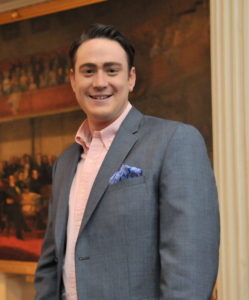
If you watch Genealogy Roadshow, you’re probably familiar with D. Joshua Taylor, a regular on the show. If you’re a member of genealogical society, you’re probably familiar with him, since he is a past president of  the Federation of Genealogical Societies. If you go to genealogy conferences, you may have heard him speak, since he’s a popular speaker in our field.

I had the pleasure of hearing him present four talks at the Genealogy Society of Southern Illinois’s annual conference in 2015. I blogged about his substantial time management wisdom shortly after the conference–and in that post revealed that I learned through one of his talks that Josh and I are cousins!

Josh obviously has a very impressive resume. (And he’s in his mid-thirties!) He is currently the president of the New York Genealogical and Biographical Society, America’s second oldest genealogical association. I was thrilled when he accepted my invitation to contribute a How They Do It interview. I bet you’ll be as impressed as I am that he took a year away from his research to focus on organizing his research materials. Enjoy!

How They Do It: D. Joshua Taylor

How long have you been doing genealogy?

More than 20 years at this point – though on a professional basis for the past 12.

What’s your favorite part of doing genealogy?

The unpredictable nature of “what’s next” in the process. Solving one question always leads to more – resulting in a perpetual process of discovery.

Do you consider your genealogy research well organized?

Yes! But only because I took a year away from research to focus specifically on organizing my materials. I find it impossible to conduct thorough research without a structured organization system in place.

What type of software do you use for organizing your genealogy research?

A variety of things. I use apps such as Trello to organize specific research projects; software programs like Roots Magic and Heredis to manage my family tree database, and a variety of spreadsheet and database tools to track my notes and documents.

Do you keep a research log? If so, what format?

Absolutely. My research log is part of a customized database I built for my research notes. However, it all started as a spreadsheet and then grew from there.

Do you have a tree on Ancestry? If so, is it public or private? Why?

Yes, though not a complete version of my tree. I keep a few online trees online at a time – all of which are strictly based in projects I am actively researching. These projects are largely private (though I don’t mind sharing when asked).

What’s your biggest challenge when it comes to organizing your genealogy?

Maintaining consistency within my organization system. The quantity and variety of materials can easily become overwhelming. My unwritten personal rule is that a research “trip” or “session” is never complete until I have spent the time analyzing and filing the materials I located. This forces me to consistently keep my materials orderly – but sometimes life gets in the way and the piles start to slowly build.

What’s your biggest piece of advice to beginning genealogists in terms of keeping track of their research?

Avoid being too specific. Why? Because your family history journey will eventually cross other geographic regions, multiple surnames, various record types, and other items that won’t easily fit into a strict tracking system. Leave the breadcrumb trail wherever possible.

We often narrow our focus too much on a single family or trying to find a particular maiden name. For example, we sometimes become so focused on finding a specific maiden name or a birth date but in reality, those might be very difficult (if not impossible) to find. So as such, we have to realize that we will need to venture “away” from the path we have planned as researchers.

What do you think is the most important thing for people to do to stay organized when it comes to family history research?

Never lose sight of the legacy you are building. Your research notes are just as important (if not more so) than the actual documents you uncover. Therefore, it is key that you find ways to organize and preserve those materials alongside the records you uncover.

If you were starting out new as a genealogist what would you do differently?

I’d avoid trying to research so many lines at once. The need to focus on a few families changed the way I could tackle specific research problems. A pedigree can be nearly unending, so taking it a piece at a time from the very beginning would have been a much better approach.

Do you keep paper or electronic files (or both)?

Both. I love paper and I also love the convenience of electronic files. My organization system allows me to keep a current paper file alongside a digital version of every document. While it requires diligence to keep both in sync, the payoff is well worth it.

Are you folder or binder person for your paper files?

Well…both. My documents that I know are attached to the tree end up in binders, organized by number. However my research notes for active projects are all in folders. I consider these to be active research files, while the binder is a more permanent solution.

Do you use Evernote, One Note or any other electronic organizing system for your genealogy? If so, how do you use it?

I have used both One Note and Evernote in the past and will sometimes use Evernote for specific projects. To me, the ability to tag notes by specific surnames, localities, and repositories was the key way I used Evernote – as an active storage place for my notes, thoughts, etc.

Do you have a dedicated space in your home for doing genealogy research? What’s it like?

Yes. In addition to my computer, my space includes binders of all my documents (to my left), key research aids and books (to my right), and my file cabinets of active research files (behind me). In addition, I have a dry-erase board on the wall I use to keep track of active research notes, projects, etc. My desk consists of an “inbox” where new documents and other materials are placed until they are filed.

Do you have anything to add?

Only this – the need to create an organization system that works for your research project is so essential. Different projects require varied approaches. The search for an individual’s parents might require a different approach than a complete study of an individual’s descendants.

There are lots of great nuggets in there, but  one that really jumped out at me was “My unwritten personal rule is that a research “trip” or “session” is never complete until I have spent the time analyzing and filing the materials I located.” I know that in the past I’ve happily gathered new documents and information without properly processing it, though I try hard now to focus on analysis, not discovery. Josh’s discipline in analyzing and organizing all his research materials is inspirational!

Filed Under: Challenges, Excitement, Genealogy tips, Organizing Tagged With: How They Do It, Joshua Taylor, organizing aids

  • « Go to Previous Page
  • Page 1
  • Interim pages omitted …
  • Page 31
  • Page 32
  • Page 33
  • Page 34
  • Page 35
  • Interim pages omitted …
  • Page 69
  • Go to Next Page »

about me

I'm Janine Adams, a professional organizer and a genealogy enthusiast. I love doing family history research, but I find it's very easy for me to get overwhelmed and not know where to turn next. So I'm working hard to stay organized and feel in control as I grow my family tree.

In this blog, I share my discoveries and explorations, along with my organizing challenges (and solutions). I hope by sharing what I learn along the way I'll be able to help you stay focused and have fun while you do your research, too.

tags

30 x 30 Adams amy johnson crow anniversary Brown cemetery census Civil War conferences connections dna electronic files Evernote excitement Family Curator family photos genealogy tools getting started goals How They Do It Igleheart Jeffries keepsakes learning opportunities maps newspapers NGS organizing aids overwhelm paper files planning quick tips rasco record keeping research research log research trip resources RootsTech social history source documentation Stacy Julian technology time management vital records

join the facebook community!

join the facebook community!

My organizing business

Learn more about my organizing business, Peace of Mind Organizing®.

Subscribe by RSS

  • RSS - Posts
  • RSS - Comments

© 2026 Janine Adams


Loading Comments...