• BLOG
  • ABOUT
    • Privacy Policy

Organize Your Family History

Stay focused and happy while exploring your roots

What to do with original documents after scanning

June 10, 2022 By Janine Adams 9 Comments

I do most of my research online, so this hasn’t come up a lot. But this week I’m going through documents that had lived in my parents’ home and my aunt’s home and some of them are original vital records. I did my first group of ten a couple of days ago and scanned and processed them. And then I had to decide what to do with the originals.

This morning I went through the little stack one by one and followed my gut about those I wanted to file into the paper files I have left over from before I processed everything digitally and those I would feel comfortable discarding.

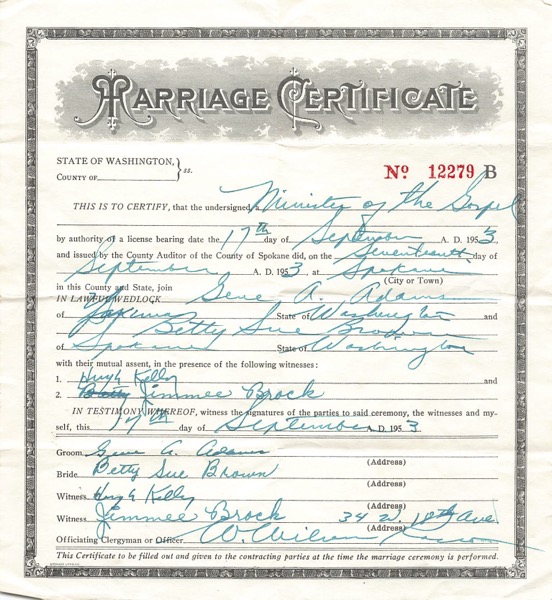
In truth, I could discard any of them, since I’ve captured the images. But my gut tells me to hang on to those documents that have original writing or signatures. An example is my parents’ marriage certificate, shown above. They were married by father’s uncle and I think he filled out the form. I don’t have a good, logical reason for this decision. It just feels right because these documents feel special. I have the space in my file cart and the files are already created, so it will be a simple matter to file them. If I have to create a new file folder label and put it on a folder to file something, I might feel like more trouble than it’s worth.

This is a matter of personal preference and I understand that my preferences might change. (And you may have a completely different preference.) If I end up with a lot more and it feels too laborious, I may revisit this criterion!
Filed Under: Challenges, Organizing, Preservation Tagged With: Adams, paper files, vital records

Giving MyHeritage photo tools a spin

April 20, 2022 By Janine Adams Leave a Comment

There are so many amazing options for online research. Some, like FamilySearch and Chronicling America, are free. Others are fee-based. I’ve subscribed to Ancestry for a dozen years or more and always feel like it’s a worthwhile investment. More recently, I’ve started subscribing to Newspapers.com and just reupped. (I love newspaper research.)

But it was not until recently that I subscribed to MyHeritage. I was actually given a subscription to MyHeritage by the company gratis. They approached me about doing a Facebook Live presentation and about partnering with them for a week-long special promotion to my readers. (That promotion will be going out on Friday–if you’re not already on my mailing list, I encourage you to subscribe so you’ll get the offer in your inbox). When they asked me to partner with them, I requested free access so I could try it out before recommending it to my readers.

So I’ve been using MyHeritage a bit–not a ton because I haven’t had a lot of time for researching in the past couple of months. But I love that they have rich databases (16.9 billion records!) and also some pretty spectacular photo tools.

To test those out, I uploaded a couple of photos from my hard drive.

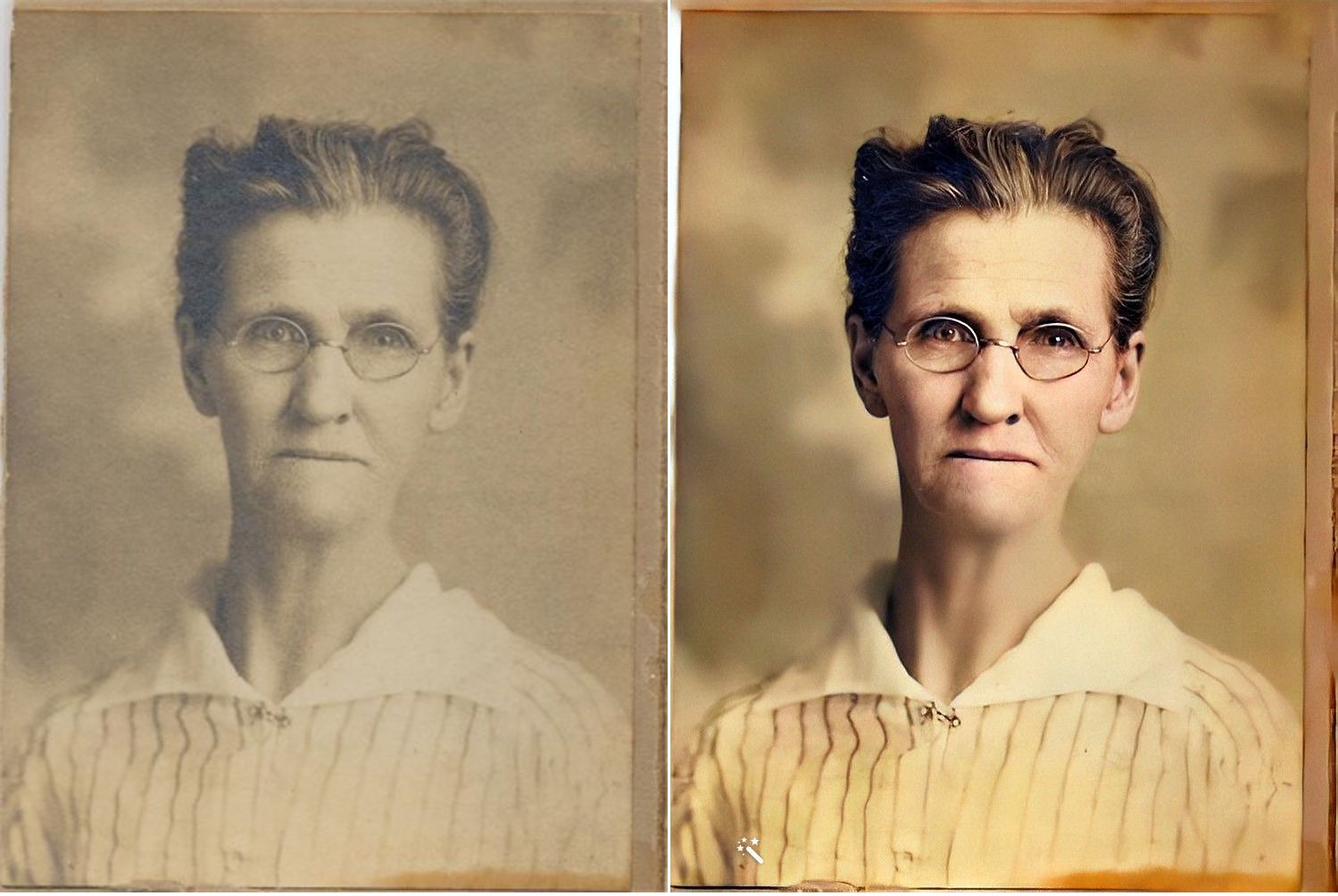
First, here’s a sepia-toned photo of my second great grandmother, Jennie Nebergall Wheeler (1857-1933) taken in 1917. I uploaded it to MyHeritage and used the Colorize, Repair and Enhance tools to improve the photo. The results are pretty remarkable, in my opinion.

I now feel like I can look into Jennie’s eyes and imagine a conversation with her, something that never felt possible with the old photo.

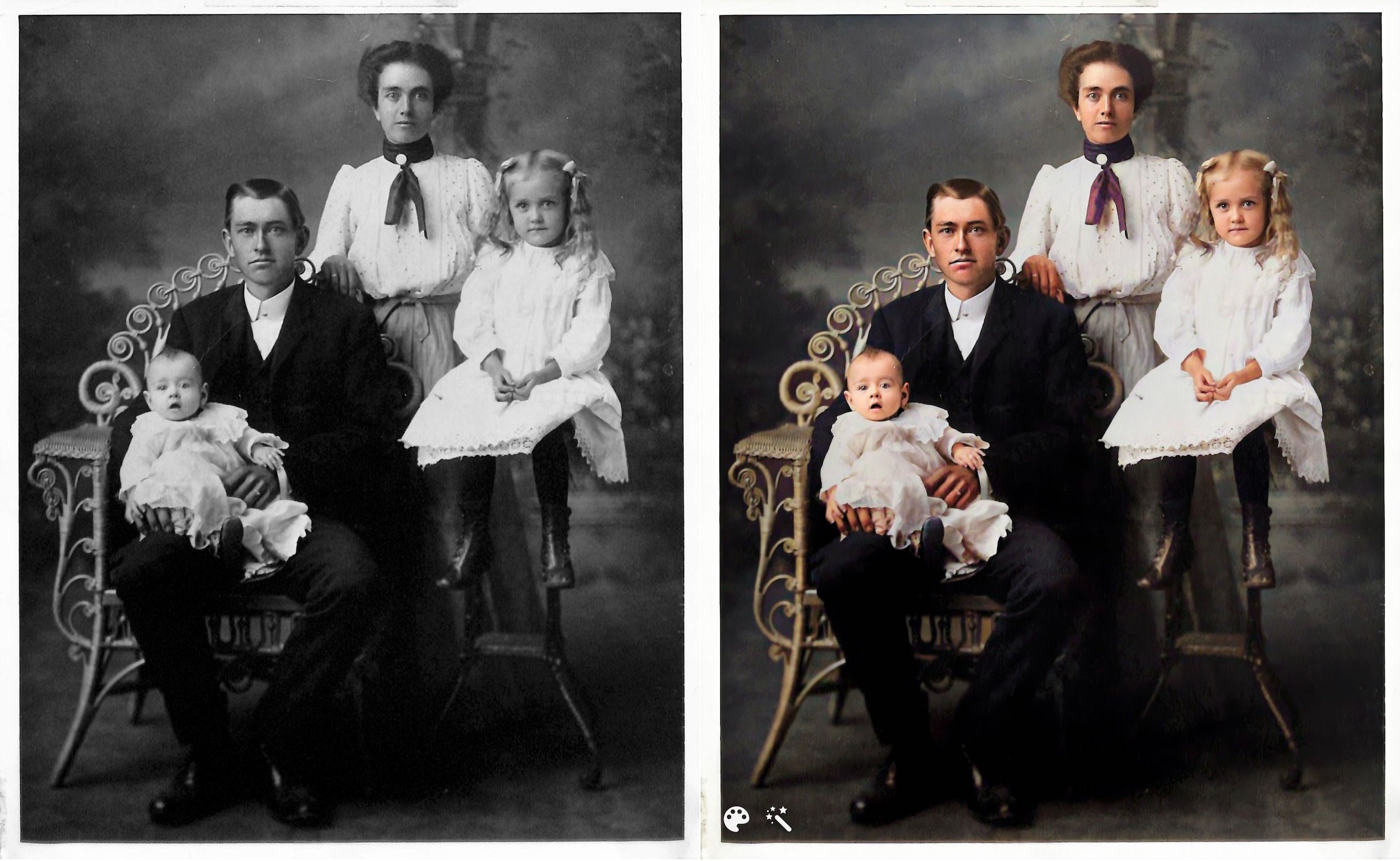
Here’s another example. This is the William Reese Rasco family in 1907. This photo graced the mantle at my aunt’s house for many years. My aunt recently moved and gave this photo to me. I consider it one of my treasured possessions. The baby in the photo is my maternal grandmother, Beatrix Rasco Adams (1907-1987).

This one feels a little different to me. It might be because I’m so familiar with the photo and the fact that the original photo is black and white (rather than sepia), but the improvement doesn’t feel quite as dramatic. It is fun to see what color my great great grandmother’s scarf might have been, though!

I downloaded the improved photos to on my hard drive and am storing them with the originals with the word Enhanced added to the end of the file name. I can’t wait to upload more photos. Since these two photos are portraits, improving them didn’t add a whole lot of information. But I know from watching Photo Detective Maureen Taylor’s Facebook Live for MyHeritage that these enhancements can bring out clues in photos that aren’t easily seen in the originals.

Another photo feature that MyHeritage has introduced is animation. You upload a still photo and they will animate the individual or individuals in the photo. Here’s an example, using the photo of my great grandmother Jennie.

https://organizeyourfamilyhistory.com/wp-content/uploads/2022/04/1917-photo-Jennie-Nebergall-Wheeler-location-unknown-Color-Restored-Enhanced-Repaired-0-Enhanced-Animated.mp4


And here’s my great aunt Lessie Rasco, from the portrait above.

https://organizeyourfamilyhistory.com/wp-content/uploads/2022/04/Rasco-2-Enhanced-Animated.mp4

I’m a bit on the fence about the utility of this one. But it is pretty fun and I imagine it might make sharing the photos a little more interesting for non-genealogy-focused relatives

Have you used these photo tools? What do you think?

Again, if you’re on my mailing list, you’ll receive an email from me on Friday with a special link for a really great discount on a MyHeritage subscription (for new MyHeritage subscribers only.) Full disclosure: they will share the revenue from your subscription with me. If you aren’t on the list, you can sign up here or in the form that pops up when you scroll to the bottom of this page. When you sign up for the mailing list, you’ll also get a short series of daily emails from me, along with a end-of-the-month email with links to the previous month’s blog posts. You can unsubscribe at any time.


Filed Under: Excitement, Genealogy tips, Preservation, Technology Tagged With: family photos, genealogy tools, myheritage, photos

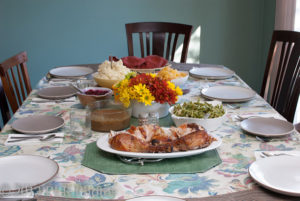
At Thanksgiving, we can create history for our descendants

November 23, 2021 By Janine Adams Leave a Comment

I originally wrote this post five years ago, and I like repeating it on Thanksgiving where we might once again be getting together for a meal with our loved ones. Happy Thanksgiving to all my readers!

This Thanksgiving week, I’ve been thinking about how the ordinary lives of my ancestors are endlessly fascinating to me. As I slowly plow through my great great grandfather’s Civil War pension file, I get very excited when I come to a form he filled out 125 years ago that has a little extra information in it (like the names and birth dates of his children). Any peek into what his life was like is a special treat.

It got me thinking about how mundane aspects of our lives today might be really interesting 100 years from now to the people below us on the family tree.

Of course, we fill out fewer paper forms now. And genealogy will probably look very different in the twenty-second century. But I think photos and records will always be valuable.

This year, as we celebrate Thanksgiving (or really just go about our lives), we have the opportunity to create history for our descendants. We can be mindful of our legacy as we’re taking pictures. We can take care to label them (or add metadata to digital photos) so future generations know who the people in the photos are. We can do oral history interviews and carefully preserve them with labels for future generations.

If you have older relatives around your Thanksgiving table, I urge you to ask questions and preserve those conversations for generations to come (as well as for your own genealogy research). I sure wish I had. Wouldn’t it be great to put your hands on a recorded interview with one of your ancestors? You could be the person making that possible for your descendants.

Thanks to smartphone technology, it’s so easy for us to record conversations and take videos. Let’s do that while we can and mindfully tag and back up those recordings. (And hope that the medium will still be readable decades from now.)

As much as I urge my organizing clients to part with paper or other items that don’t serve any purpose any longer, I do sometimes encourage them to hang on to documents or photographs that might be of interest to their descendants. I encourage you to be mindful of that and store those items that so that they might be passed on to family-history-minded descendants when you pass.

Remember: Every day we have the opportunity to create history.

Photo by Robert and Pat Rogers via Flickr. Used under Creative Commons License.

Filed Under: Challenges, Preservation, Reflections Tagged With: family photos, keepsakes, planning, social history

Going through my box of inherited items: step two

October 5, 2021 By Janine Adams Leave a Comment

In August, I blogged about taking the first step to process a box of inherited items. I’m using the process I learned from Stacy Julian in her terrific RootsTech talk last year (you can read all about it in her blog post How to BEGIN with the BOX). Her process allows you get started on something that can feel very overwhelming.

I promised that when I took step two, I would post about it.

According to Stacy’s methodology, step two (after sorting the contents of the box into categories in step one) is to go through the items in a category and assess the value of each item, then note the needed actions. Here’s the secret sauce of the whole thing: You put the items that you most want to take action on–the most interesting or thrilling or beneficial finds–and put them in an Action file. And you’re allowed to have no more than 10 items in the Action file. Once you have that many items, you stop the assessment process and take action.

I want to take a moment to say how brilliant I think that is. Since you put the best stuff in the Action file and limit the number you can put there, then the Action file pretty much only contains stuff you really want to do. And there’s a built-in trigger (10 items) to get started taking action. Stacy says in her blog post that you should follow your heart and intuition in terms of deciding what goes into the Action file.

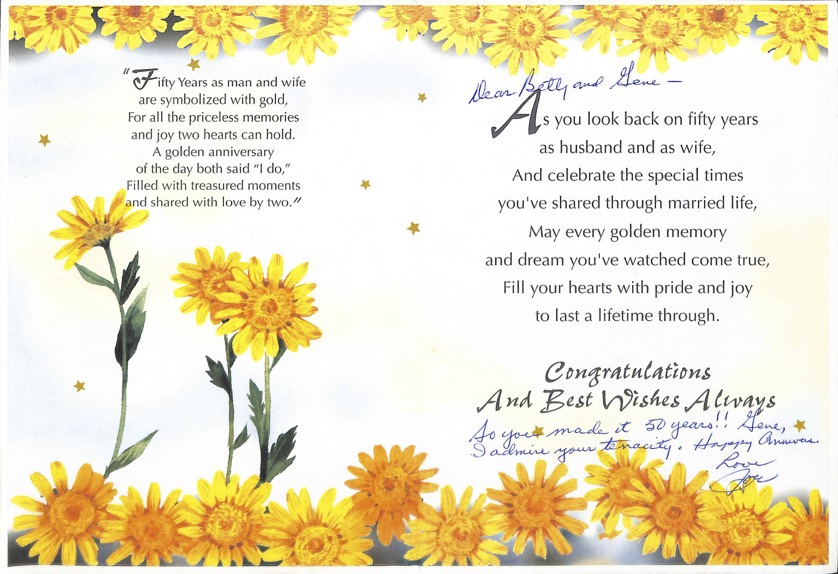
So in my efforts, I immediately gravitated to the Written Stuff file, as opposed to the Picture Stuff. That’s just my nature. I found a 50th anniversary card (pictured at the top of this post) from my mother’s brother with a snarky inscription that was so typical of my Uncle Joe. You can click on the image to see it larger, but I’ll tell you that the inscription says, “So you made it to 50 years!! Gene, I admire your tenacity. Happy anniv. Love, Joe”. I scanned the card and sent it to his kids.

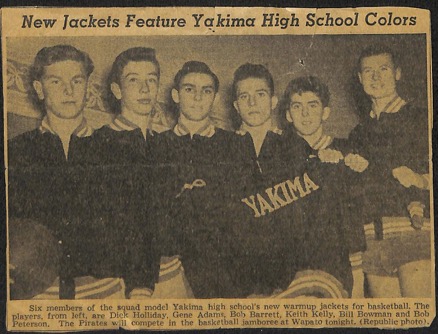
Among the Written Stuff were some old newspaper clippings that were fun, though of little genealogical value, including one that shows the new jackets of the Yakima (Washington) High School basketball team circa 1949, with basketball players, including my father, Gene Adams (who is 91!), modeling them. I decided to scan the clipping and email it to my brother (who is a big fan of sports uniforms) and then put it aside to take to my father when I see him later this month.

Here’s that clipping. My dad is second from left.

I just kept going through the stuff, noting the actions and putting some of them in the Action folder. I actually ended up taking action on all the Written Stuff (I don’t think there were even 10 items) because when I started looking at the Picture Stuff I got overwhelmed.

I’m feeling great about the Written Stuff and will systematically start going through the Picture Stuff. Since the photos overwhelm me, I know that I will benefit from using Stacy’s methodology and I know that a timer will be my best friend. I’ll work on it just 10 or 15 minutes at a time. When I get finished, I’ll post again!


Filed Under: Challenges, Excitement, My family, Organizing, Preservation Tagged With: family photos, organizing aids, overwhelm, paper files, resources, Stacy Julian

  • « Go to Previous Page
  • Page 1
  • Page 2
  • Page 3
  • Page 4
  • Page 5
  • Interim pages omitted …
  • Page 11
  • Go to Next Page »

about me

I'm Janine Adams, a professional organizer and a genealogy enthusiast. I love doing family history research, but I find it's very easy for me to get overwhelmed and not know where to turn next. So I'm working hard to stay organized and feel in control as I grow my family tree.

In this blog, I share my discoveries and explorations, along with my organizing challenges (and solutions). I hope by sharing what I learn along the way I'll be able to help you stay focused and have fun while you do your research, too.

tags

30 x 30 Adams amy johnson crow anniversary Brown cemetery census Civil War conferences connections dna electronic files Evernote excitement Family Curator family photos genealogy tools getting started goals How They Do It Igleheart Jeffries keepsakes learning opportunities maps newspapers NGS organizing aids overwhelm paper files planning quick tips rasco record keeping research research log research trip resources RootsTech social history source documentation Stacy Julian technology time management vital records

join the facebook community!

join the facebook community!

My organizing business

Learn more about my organizing business, Peace of Mind Organizing®.

Subscribe by RSS

  • RSS - Posts
  • RSS - Comments

© 2026 Janine Adams


Loading Comments...