• BLOG
  • ABOUT
    • Privacy Policy

Organize Your Family History

Stay focused and happy while exploring your roots

Processing newspaper articles (screencast)

August 27, 2017 By Janine Adams 6 Comments

Last week I blogged about how I’ve been finding newspaper articles about my father’s family in Olympia, Washington, in the first part of the 20th century. Despite being the state capital, Olympia’s newspaper has a decidedly small-town feel. I was able to find a couple of dozen (if not more) articles about my family, each of which gives me a little nugget of information and a little more of a sense of how they lived.

This morning, I created a twelve-minute screencast of how I process these articles. If you haven’t set up a process yourself, you might find it helpful.

As I said in the screencast, this is one of probably many ways to do it and it’s not necessarily the best way, but it works for me.

To summarize the steps, here’s what I do:

  • Click on the article in Genealogy Bank
  • Click the PDF button to get a pdf of the full page
  • Open the page in Preview
  • Zoom in on the article itself
  • Use Grab to take a screenshot of just the article, in an easily readable size
  • Name the full-page pdf, using my file-naming protocol, and file it in the Surnames folder
  • Copy the name and paste into the filename of the zoomed-in snip, adding the word “snip” to the first part of the file name
  • Add one fact from the article in Reunion, creating a source record for the article
  • Paste the source information from the Reunion source record into the Comments section of the two image files in Finder
  • Move the full-page and the snip file from the Surnames folder to the appropriate subfolder for the person mentioned in the article
  • Drag the image files into the Multimedia area of the source record in Reunion
  • Glean the rest of the information, attaching the newly created source to each fact

Watching the screencast will probably make that more understandable.

I hope you find it helpful. Please let me know if you have any questions!
Filed Under: Challenges, Genealogy tips, My family, Organizing, Technology Tagged With: Adams, electronic files, newspapers, organizing aids, research, source documentation, technology

Help for going paperless

June 27, 2017 By Janine Adams Leave a Comment

Paperless Genealogy GuideI’ve been researching every day as part of the current 30 x 30 challenge and was just thinking about how grateful I am that all my documents are organized digitally. Five years ago, when I kept and organized paper versions of everything (and let my digital files fall where they may on my hard drive), researching took more effort. I stored my files in a rolling file cart, which I would roll out from my office closet to my desk. I would have to pull out folders, I would print, I would file. I’d roll the cart back. Just handling the paper took precious time away from my research.

Now that everything is digital, I sit at my desk and just get going. I’m downloading and renaming, not printing. I’m still filing, but electronic filing takes moments because I have a solid file structure. I know where everything is and it’s not taking up any physical space. As a professional organizer, I find great peace in this.

If that sounds good to you but you’re not there yet, I’d like to offer you some help for going paperless with your own research. Earlier this year I wrote, with scanning expert Brooks Duncan of DocumentSnap, the Paperless Genealogy Guide, a 44-page downloadable pdf. We published it in February in conjunction with the talk we gave at RootsTech (Go Paperless: Streamline and Digitize Your Genealogy). It’s detailed and quite complete and available instantly for only $9. You can read more about it (and buy it!) at the Paperless Genealogy Guide page at Brooks’ website.

Filed Under: Genealogy tips, Organizing, Technology Tagged With: Brooks Duncan, electronic files, genealogy tools, paperless, record keeping, technology

Filling in the history in your ancestors’ timelines

April 19, 2017 By Janine Adams 7 Comments

A couple of years ago, at RootsTech, I learned about HistoryLines. I was intrigued and signed up for a subscription. Then I pretty much forgot about it. (I blogged about it back then.)

HistoryLines creates a timeline for your ancestor (after you upload a GEDCOM or fill in data on an ancestor), referencing the historical events and social history of the time in which your ancestor lived.

This week I received a notification that my subscription was going to autorenew. I went to the site, intending to cancel since I never used it. But once I started exploring, I realized that this really is a tool I’d like to use.

This past quarter I focused almost exclusively on my great great grandfather, George Washington Adams (1845-1938) and his children. When I called up a HistoryLines story for him today I really enjoyed the context it placed his life in. I can see doing this for many of my ancestors, especially those I’ve studied more in depth. (So many of my ancestors seem like just names and dates to me, though I’m trying to change that.)

If you’re intrigued, here’s a promotional video from HistoryLines.

If you try it out, let me know what you think!

Filed Under: Excitement, Genealogy tips, Technology Tagged With: excitement, genealogy tools, organizing aids, resources, social history, technology

My (very informal) research log

April 4, 2017 By Janine Adams 21 Comments

A few commenters have asked me for samples of my research log. I hesitate to supply it because mine is so informal and not necessarily a good example for others to follow. But in the spirit of helping others, I offer it up.
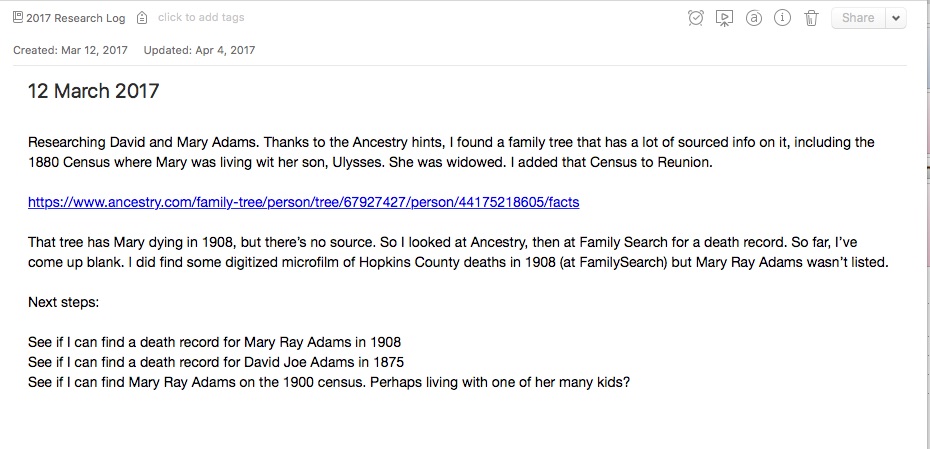

I keep my log in Evernote. I have a notebook there called “2017 Research Log” and each time I do some research I try to create a log entry. I create a new note in the aforenamed notebook and head it with the date. Then I just type notes that I think might be useful in the future. I try to include what I was looking for, what I found and what next steps would be.

Here’s why it works for me:

  • First and foremost, it is easy for me to keep up. I just jot some notes to my future self and don’t get hung up on filling out a complicated spreadsheet or making sure I have every bit of information. For me, making it easy enough so I’ll actually do it trumps making it more complete.
  • It’s searchable, so I can easily search by person or surname. I could tag it by locality, family line or other category, though so far I haven’t done that.
  • Did I mention it’s easy?

Here’s a screenshot of a recent entry that’s fairly representative.

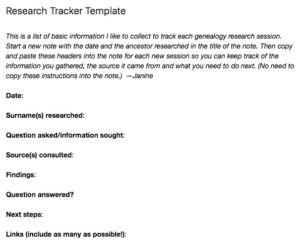
My genealogy research logI used to use a template in Evernote, one that I created when I was partnering with the dear departed Springpad. (I put that template at the top of this post; click on the image to make it bigger.) But I find I do better writing free form–I think it brings more information out of me.

Earlier this year I was experimenting with using the Log function in Reunion, also writing free-form notes, but I’ve discovered I prefer Evernote. I use Evernote on a daily basis for various aspects of my life and business, so I’m very comfortable with it.

I should mention that one downside to using Evernote as a research log is that it’s not sortable. It is searchable and taggable, but I can’t sort it like I could a spreadsheet. So far that hasn’t been an impediment to me.

I don’t think there’s any one right way to do a research log, but I’m pretty sure there are better ways than mine. But it’s working well for me at the moment.

If you are a spreadsheet person and aren’t intimidated by the opportunity to enter a lot of data, by all means check out Thomas MacEntee’s amazing research log spreadsheet.

Also, if you haven’t already feel free to join my Genealogy Research Loggers Facebook group for more conversations about research logs (as well as some samples from others).

For detailed information on how I organize my own genealogy research (including my research log), check out my Orderly Roots Guide, How I Do It: A Professional Organizer’s Genealogy Workflow, available for $19.99.

Filed Under: Challenges, Genealogy tips, Organizing, Technology Tagged With: Evernote, excitement, genealogy tools, organizing aids, research, research log, resources

  • « Go to Previous Page
  • Page 1
  • Interim pages omitted …
  • Page 12
  • Page 13
  • Page 14
  • Page 15
  • Page 16
  • Interim pages omitted …
  • Page 27
  • Go to Next Page »

about me

I'm Janine Adams, a professional organizer and a genealogy enthusiast. I love doing family history research, but I find it's very easy for me to get overwhelmed and not know where to turn next. So I'm working hard to stay organized and feel in control as I grow my family tree.

In this blog, I share my discoveries and explorations, along with my organizing challenges (and solutions). I hope by sharing what I learn along the way I'll be able to help you stay focused and have fun while you do your research, too.

tags

30 x 30 Adams amy johnson crow anniversary Brown cemetery census Civil War conferences connections dna electronic files Evernote excitement Family Curator family photos genealogy tools getting started goals How They Do It Igleheart Jeffries keepsakes learning opportunities maps newspapers NGS organizing aids overwhelm paper files planning quick tips rasco record keeping research research log research trip resources RootsTech social history source documentation Stacy Julian technology time management vital records

join the facebook community!

join the facebook community!

My organizing business

Learn more about my organizing business, Peace of Mind Organizing®.

Subscribe by RSS

  • RSS - Posts
  • RSS - Comments

© 2026 Janine Adams


Loading Comments...