• BLOG
  • ABOUT
    • Privacy Policy

Organize Your Family History

Stay focused and happy while exploring your roots

Quick Tip #9: Use a timer!

October 27, 2020 By Janine Adams 4 Comments

Here’s the next in my occasional series of bite-size Quick Tips. Click on the Quick Tips tag for my other Quick Tips. Because I tend to write longer posts, I wanted to provide a quick-to-read (and quick-to-write) post every couple of weeks on a small topic that pops into my head. This is one I use literally every day, in many aspects of my life.

Use a timer to stay focused

It’s so easy to fall down a rabbit hole when you’re researching and the next thing you know hours have passed and it’s past your bedtime (or you’ve missed a meal). Sometimes the likelihood of a long session is enough to stop you from starting a research session altogether.

Setting a timer can really help. It has two benefits: It reminds you to stop when the timer goes off. And knowing the timer will be going off soon is often enough to keep you from falling down that rabbit hole in the first place. When you’re tempted to stray, you can make a note to follow up on later and get back to to your research focus.

I almost always set a timer before a genealogy research session because I usually can’t afford to spend hours on a research session, no matter how enjoyable it is (or badly I want to solve a problem). I use the timer on my iPhone or Apple Watch, but you can ask Google (or Alexa) to set a timer you or use an old-fashioned kitchen timer.

Photo by Sam Dan Truong on Unsplash

Filed Under: Genealogy tips, Organizing Tagged With: organizing aids, quick tips, time management

Reminder: You can let go of “should”

August 28, 2020 By Janine Adams 6 Comments

It’s natural to ask about questions about organizing (your genealogy or anything else) that start with the word “should.” Should I organize my documents this way or that way? Should I store things here or there? Should I focus on this or that?

When I try to answer a question that starts with should, the answer is almost always, “It depends.” Because it’s all about what will work for you.

I encourage my clients (and anyone else who will listen to me) to let go of the word should. And to also let go of asking questions that start with, “What’s the right way to…” or What’s the best way to….”

Because here’s the thing: I can’t tell you what you should do. Only you know what’s right for you. It can be much more beneficial to think in terms of what you’d like to do, or what you think will work best for you, rather than what you should do. Especially when it comes to organizing your genealogy research, the thing you should do (in my opinion) is the thing that works well for you and that you can keep up.

For example:

  • Maybe you’ve always heard that you should store your paper documents in binders, but you have trouble keeping up with that. Let go of that should and consider using file folders or scanning your documents.
  • Maybe you think you should print every document for the sake of posterity but you’re overrun with unfiled paper. You can let go of that should, particularly if your electronic documents are already organized.
  • Conversely, maybe you’ve heard you should scan every bit of paper and store files electronically, but you’re overwhelmed by the prospect. Bye bye, should. You can let your paper files be sufficient. Or just start storing new files electronically and leaving your papers unscanned.
  • Maybe you’re told you should keep a research log, but you just can’t get yourself to do it. A research log can be hugely beneficial. But don’t beat yourself up if you don’t have one just because you think you should.

In other words, set yourself up for success and do what works for you. Decide what your priorities are (accessibility for you, accessibility for others, ease of use, etc.) and focus your organizing systems on those priorities. Don’t do something just because someone told you you should if it doesn’t seem like it will work for you.

All that said, there are some genealogy shoulds that I think you should pay attention to:

  • You should cite your sources so you can find them again and know where your facts came from (but you don’t have to cite them perfectly if that’s getting in the way of citing them at all).
  • You should back up your electronic data in case of a crash. (I use an external hard drive and automated cloud storage.)

Genealogy is supposed to be fun. Don’t let the shoulds drag you down. Make your own choices and own them. And keep yourself open to new ways of doing things. (See what I did there? I told you all sorts of things I think you should do, without using that word. Take what works for you and let go of the rest.)

[If this is feels familiar, it’s because I initially published this post on May 17, 2016. Then I published it again on November 6, 2018 with a different title. It’s a message that really resonates with me right now, so I wanted to repeat it.]

Filed Under: Genealogy tips, Organizing, Reflections Tagged With: goals, organizing aids, overwhelm, research log, source documentation

The benefits (and challenges) of cleaning up your research area

August 19, 2020 By Janine Adams 1 Comment

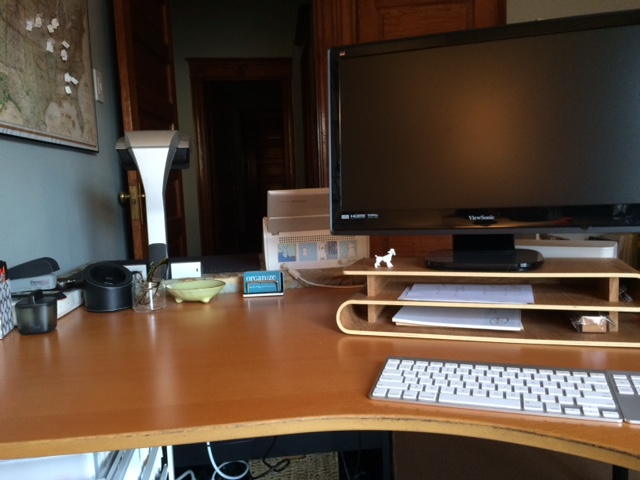
Over on my organizing blog, I’m doing a Tiny Projects challenge, in which each day this week I am accomplishing one tiny organizing project in my home and blogging about it. Today, I tackled the reach-in closet in my office. (You can read about it and see the before and after pictures here.) That closet holds mostly genealogy stuff.

Since I don’t print or download genealogy documents, I don’t have a lot of paper genealogy clutter. But when I spent a half hour creating order in that closet I realized that I have some genealogy-related projects lurking in there that weren’t even on my radar.

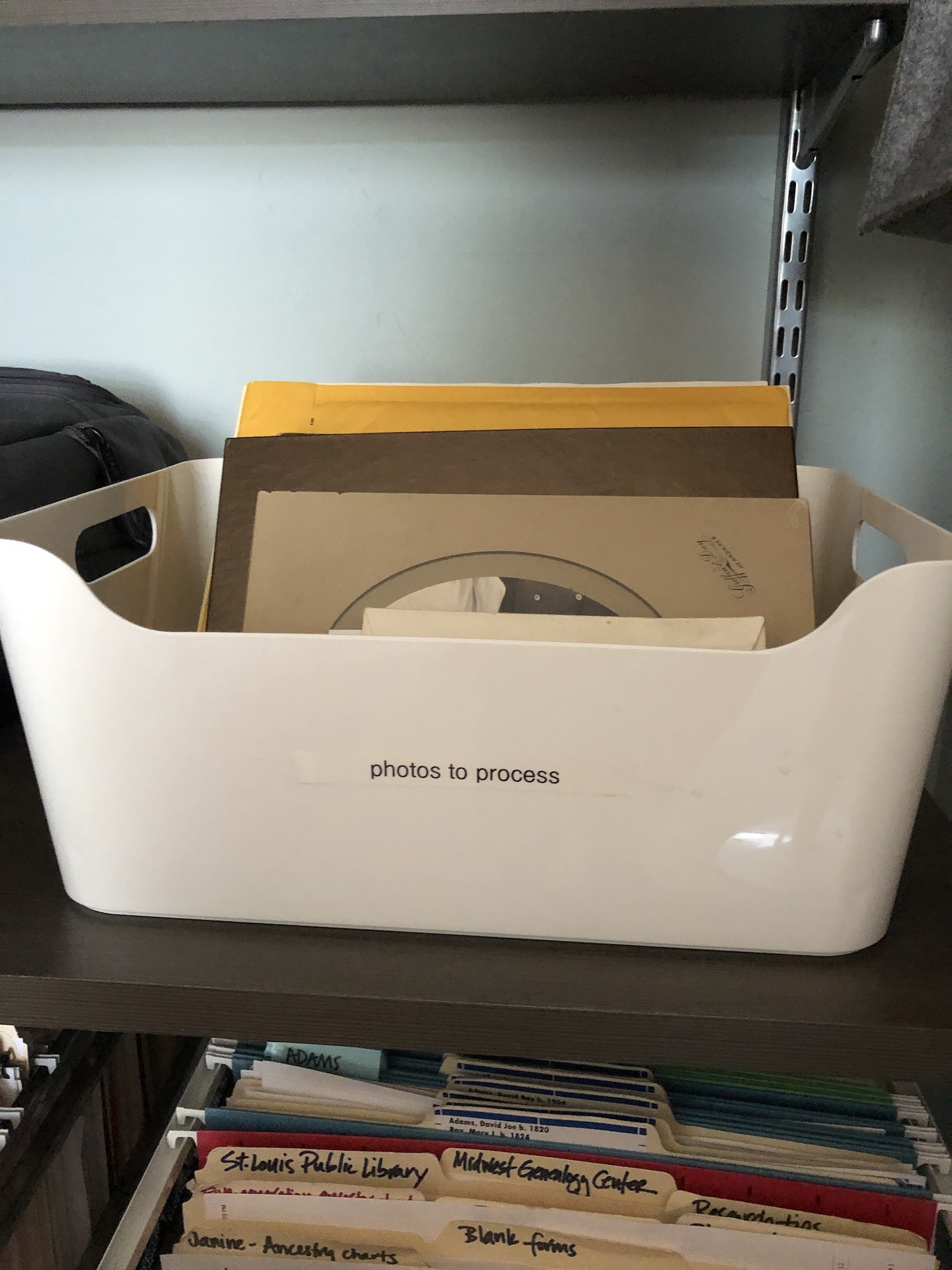
I discovered that I had a bunch of photos of ancestors–I didn’t look at them carefully but they look to be 50-100 years old or more. I’m sure they were passed along to me by a relative and my intention is to scan and file them in my genealogy filing system. They were scattered on the surface of the main shelf in the closet. That closet is equipped with an Elfa system (I blogged about that back in the day when I installed it). There is one larger shelf that could serve as a desk. So while I was tidying and organizing, I gathered up the photos and put them in a container that I labeled “photos to process” and placed it on the main shelf so it can’t hide from me.

I also have a container full of genealogy journals to read. I added to it today. It’s really just the two publications that the National Genealogical Society sends to its members, as well as the Missouri genealogical society’s journal. Back in January 2019, I vowed to skim them, but in fact I haven’t.

I feel I need to fish or cut bait here. Either I carve out some time to read them (perhaps during an October 30 x 30 challenge?) or decide I’m not going to read them and then find them a home with someone else.

I rather like the idea of devoting 30 minutes a day for a month (or less if it goes more quickly) to see what I can glean from these publications. But it can’t be this month!

I’m really glad I cleaned out this closet, but I’m a little sad that two big projects emerged (the photos and the journals). I can’t believe I’m complaining about it, though. These are treasures I’m fortunate to possess, not burdens to be dealt with!

If it’s been awhile since you cleaned up your genealogy space, you may have some pleasant surprises hiding in there!

Filed Under: Challenges, Organizing Tagged With: family photos, organizing aids

How I process Newspapers.com articles

July 10, 2020 By Janine Adams 25 Comments

I’ve been doing a lot of research on Newspapers.com recently. I downloaded a number of articles about my maternal grandparents, Crawford and Susie (Jeffries) Brown, who lived in Spokane, Washington, from 1936 until their deaths in the 1990s. My mother, Betty Sue Brown Adams, was born in Missouri in 1933, but the family to Spokane when she was three and lived there until she left for college.

The Spokesman-Review, Spokane’s daily paper, is part of Newspapers.com Publisher Extra collection. I did a seven-day free trial with them and when it was over I still I had research I wanted to do, so I signed up for a 30-day subscription for $19.99. (I didn’t want to spend $60 for a six-month subscription.) With the clock ticking, I’ve been downloading articles and also working through my backlog of downloaded articles. In doing so much research on Newspapers.com, I’ve developed a method of downloading and processing the articles that I thought I’d share with you here with some screenshots in case it’s helpful.

As always, I’m sharing what works for me…that doesn’t make it the right way or the best way. And it doesn’t mean I won’t change it up later. But this is what I’m doing now. (Several years ago, I did a screencast of how I process newspaper articles from Genealogy Bank, which was slightly different. If you’re interested, you can check it out here.)

When you find an article on Newspapers.com, you have the option to clip the article so that you find it later on Newspapers.com and others can see it (you can also download, share or save on Ancestry.com by clipping an article), or you can print or save the article. Because I don’t plan to keep my Publisher’s Extra subscription and because I prefer to download everything to my hard drive, I choose to the download the article and also to download the entire page it is on, for context. Here’s what I do:

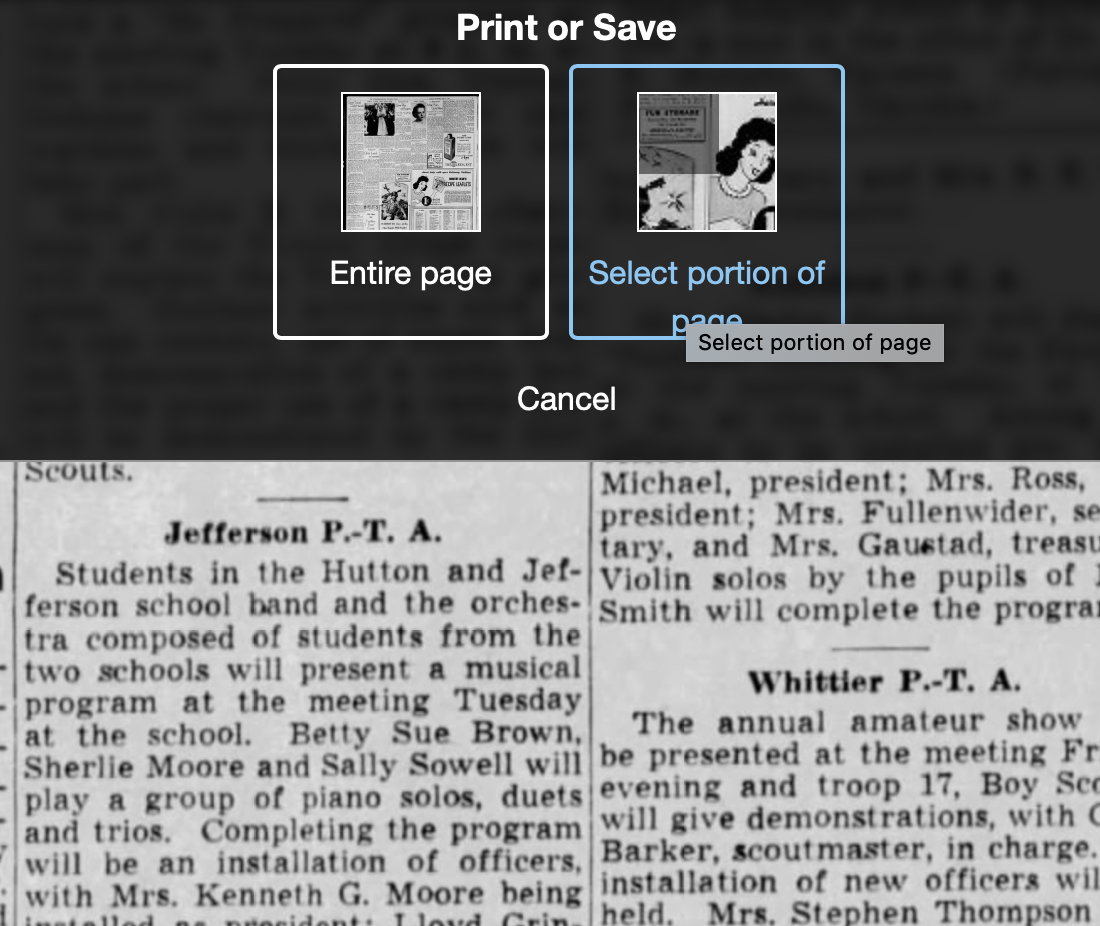
Once I’ve found an article that I want to save (in this example, it’s a 1943 article about my ten-year-old mother performing in a musical program at a PTA meeting), I click on Print/Save.

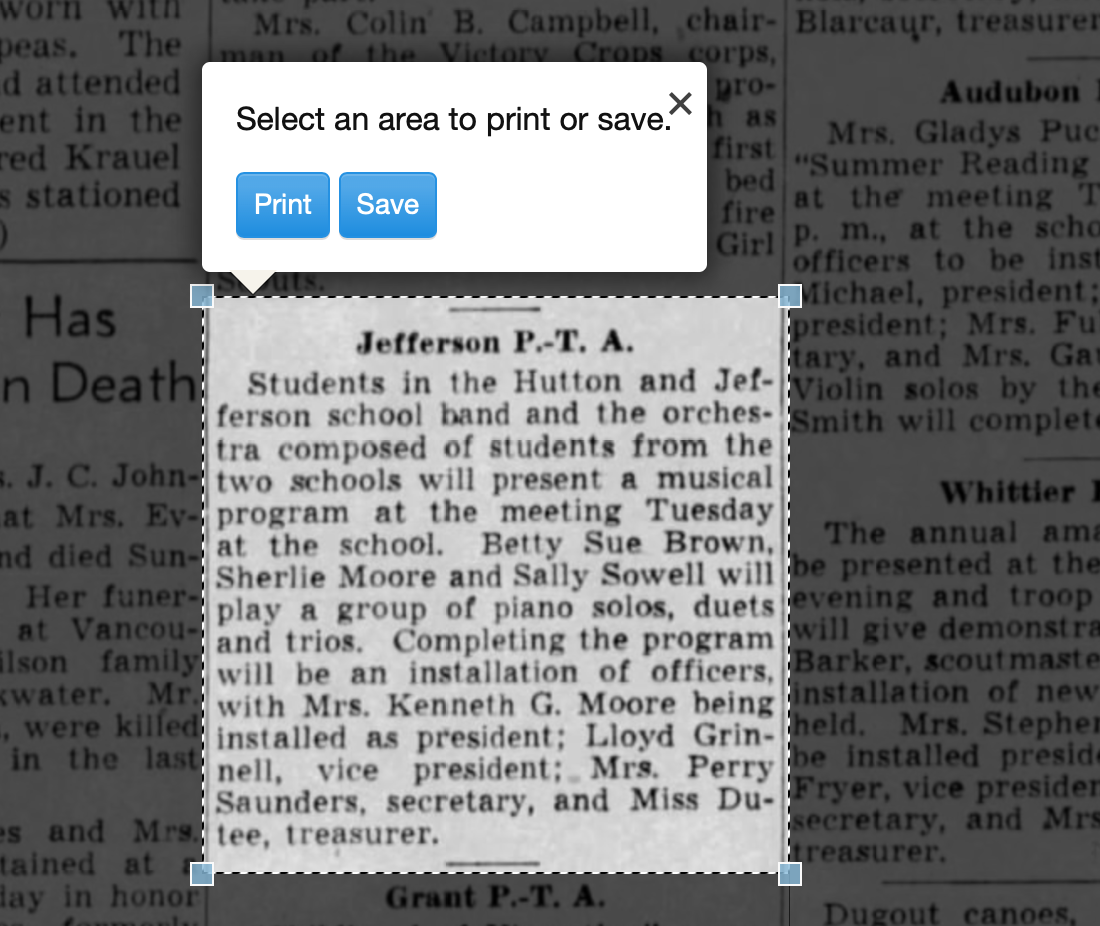
Then I click on Select portion of page. (Click on any of these images to make them larger.)

Processing an article from Newspapers.com Step OneThen I outline the article using Newspaper.com’s grab tool and click Save.

Processing an article from Newspapers.com Step One

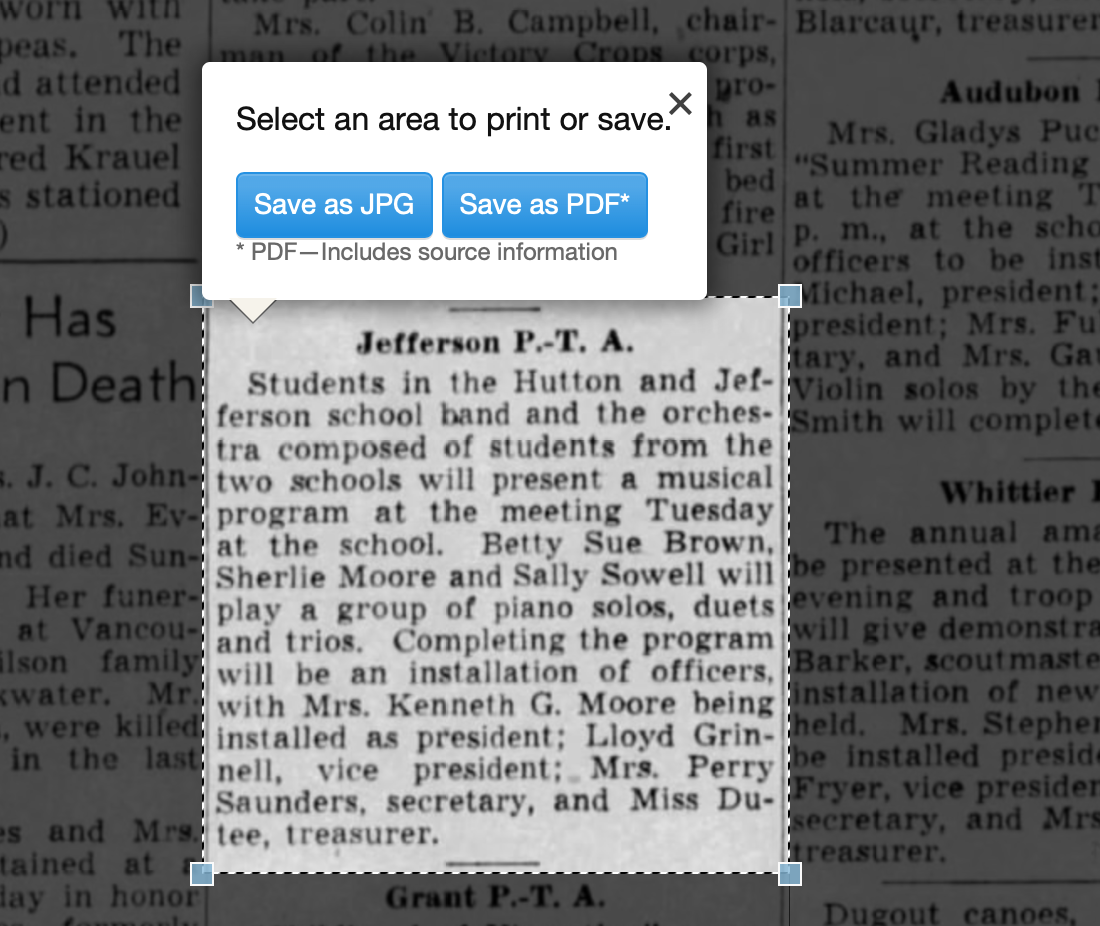
Once I click Save, I’m given an option of saving it as a jpg or a pdf. When you save as a pdf, the source information is included. I always save a clip as a pdf.

Processing an article from Newspapers.com Step Three

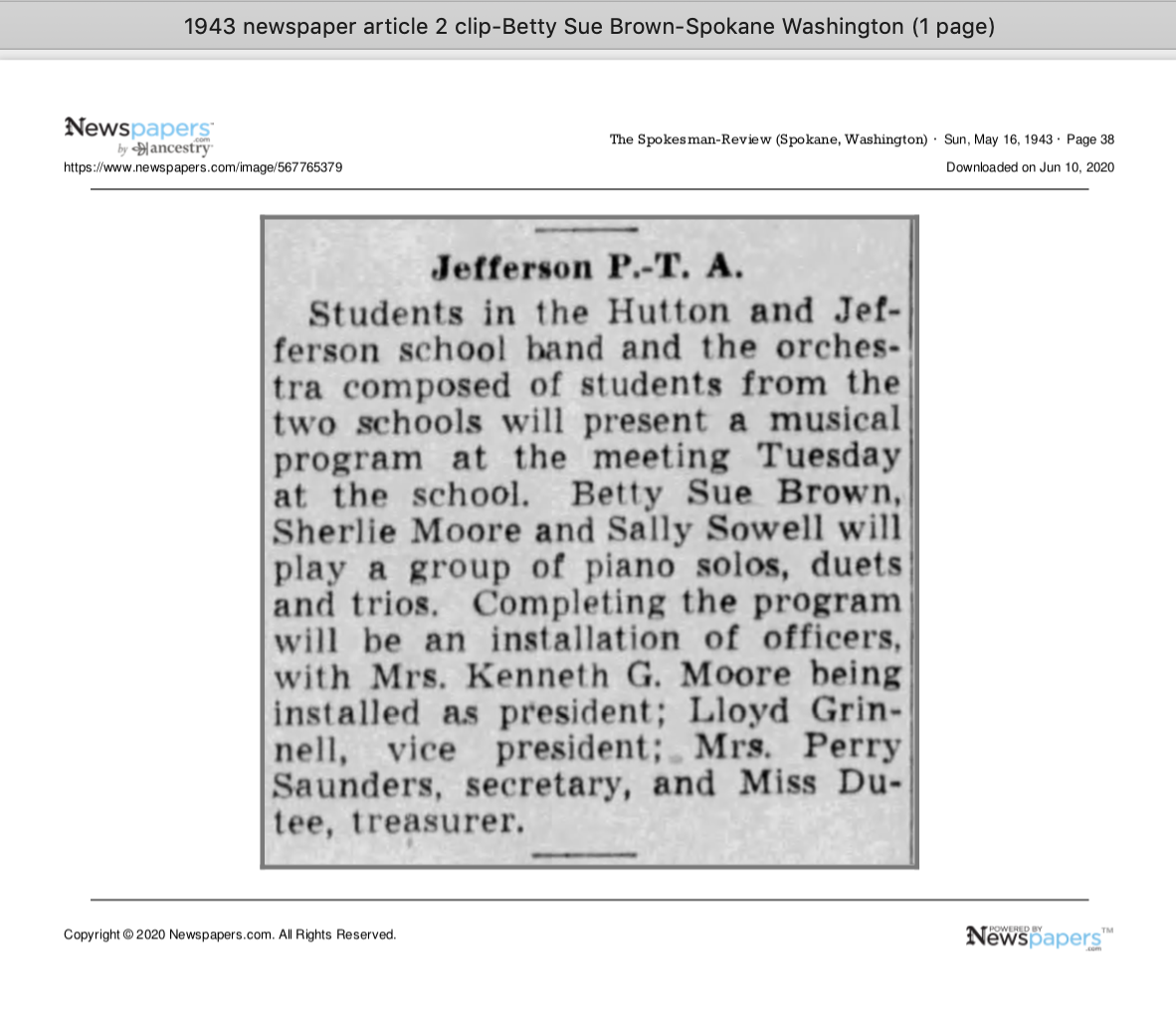
Once I click Save as PDF, the article is downloaded to my hard drive. When I open it, it looks like this:

Processing an article from Newspapers.com Step Four

You can see that Newspapers.com has included the newspaper title, date, and page number of the article, as well as the date it was downloaded and the URL for the image. This is really helpful when I create the source citation in Reunion, the genealogy software I use on my Mac. Notice that I have changed the filename of the article per my file-naming protocol. I always put “clip” in the filename for the clipped articles, since I will also download the entire page using the same filename (minus “clip”). I save the article in my Surnames folder.

Next, I go back to newspapers.com, click on Print/Save again, and this time select Entire Page. Then I’m asked if I want to save it as a jpg or pdf. I always save the whole page, as a jpg. That’s just my personal preference.

Processing an article from Newspapers.com Step FourOnce I click Save as JPG, the page is downloaded and I change the filename to match the clip’s filename (omitting the word “clip.”)

Now it’s time to glean information from the article and add it to Reunion.

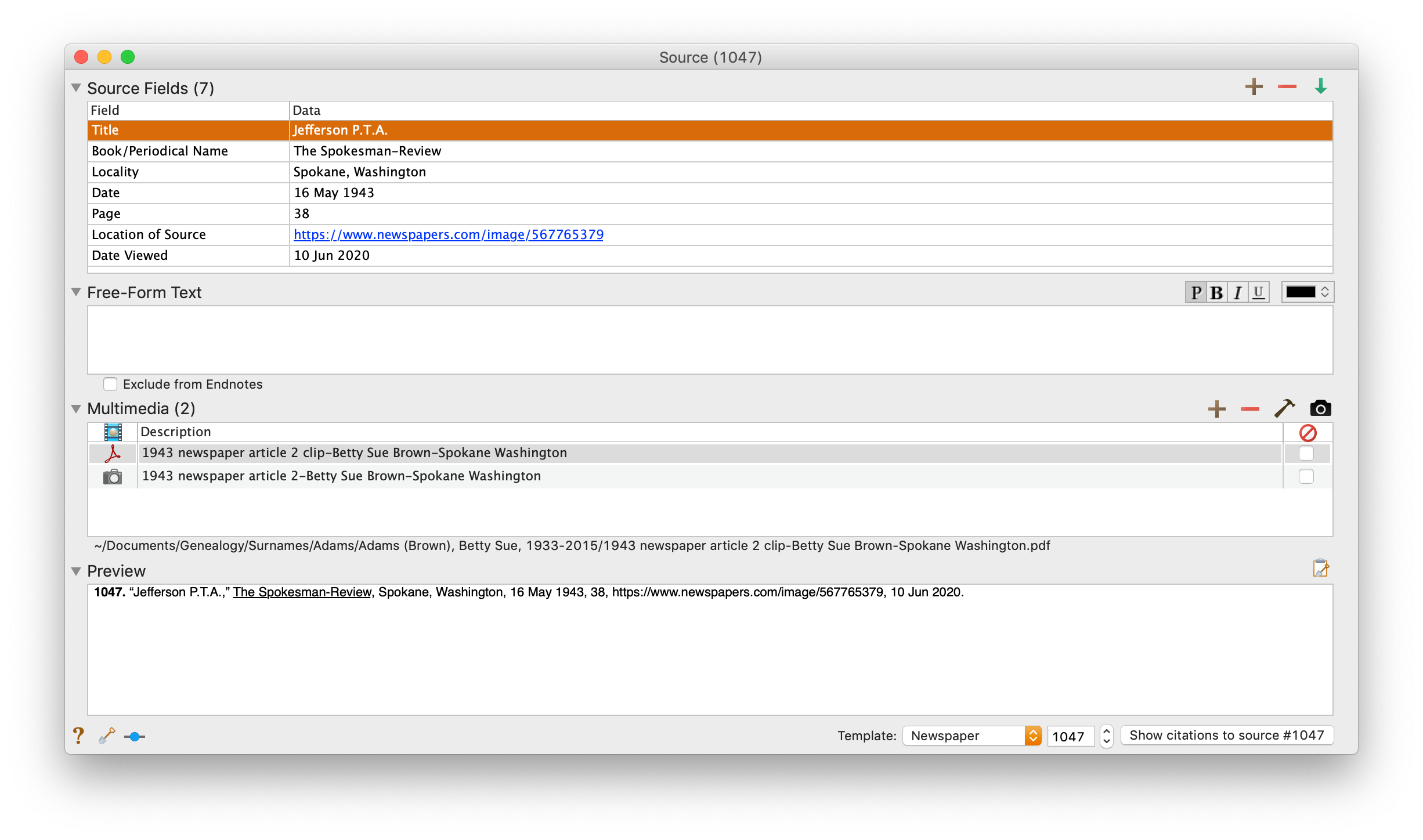
I take a fact from the article, enter it into Reunion and create a source citation. In Reunion, I use the template for Newspapers to create my source citations. So here’s what the source record for this article looks like (again, click any image for a larger view):

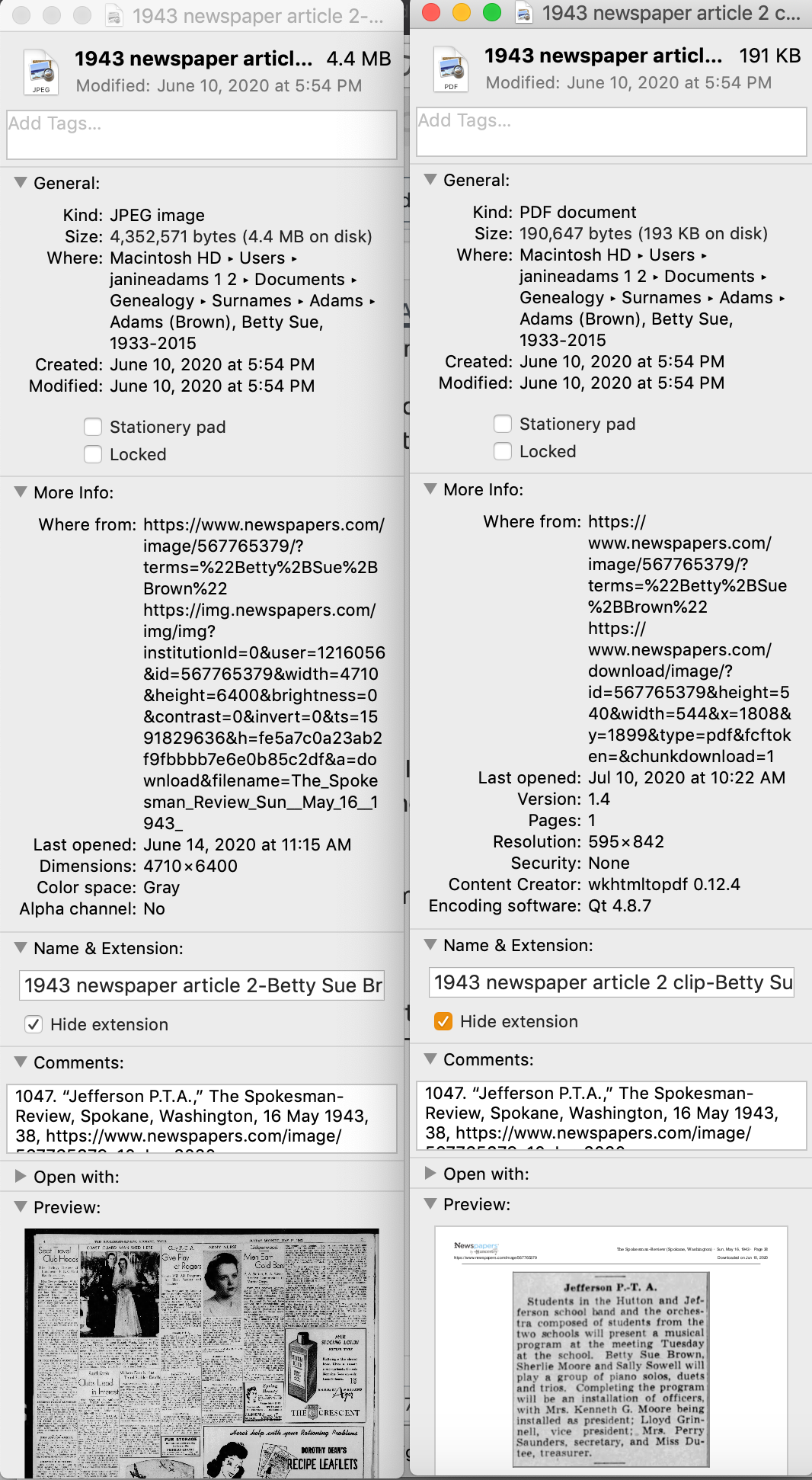
Processing an article from Newspapers.com Step FiveNote that I have attached both files, the clip and the whole page, as multimedia files in the source citation, by simply dragging them from the Finder. But before I do that, I do one other thing. I click on the little clipboard icon in the Preview pane and I paste the citation into the metadata of the file. Here’s how I do that.

I highlight the two files (article and whole page) in Finder, right (or control) click on them and then select Get Info. That brings up the metadata for those files. I paste the source citation in the Comments field. This is really helpful later on if I want to see which source a particular file is attached to.

Processing an article from Newspapers.com Step Six

Then I drag the files into the source record. After I’ve gleaned all the information from the articles, I file them in my folder structure.

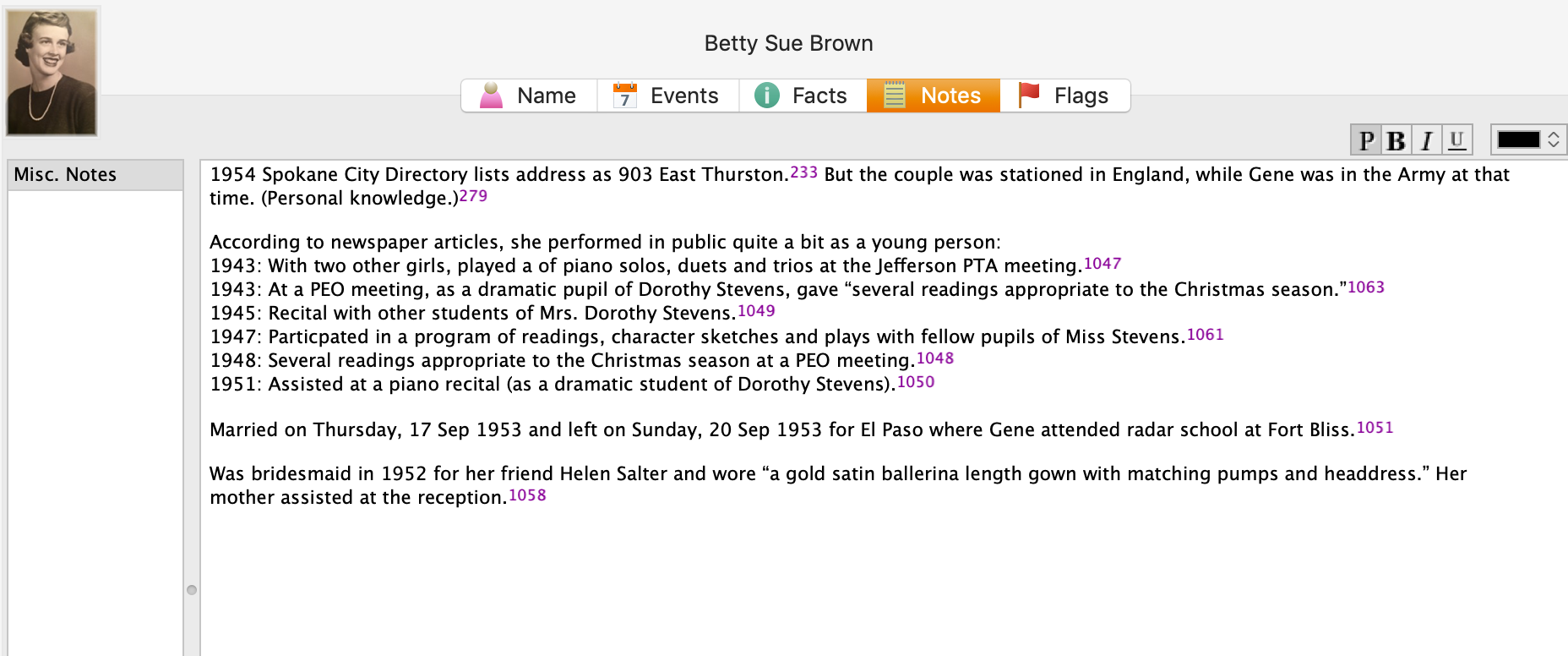
A final note: In this particular example, you might be curious how I entered this tidbit about a musical program in Reunion. Under Residence in the Events tab, I added the date of the newspaper article and Spokane, recording that my mother lived in Spokane on 16 May 1943.Ā  But I took it a little further. This was one of six Spokesman-Review articles I found about my mother performing as a girl. So in the Notes tab I also created a little listing of those performances. Here’s a screenshot:

Processing an article from Newspapers.comI don’t know if it looks complicated laid out like this, but it really isn’t. I pretty easily got into the rhythm of it. The process can get a little tedious, but I think it’s worth the effort to have both the clip and the whole page downloaded. The little nuggets you get from newspaper research can really paint a great picture!


Filed Under: Challenges, Genealogy tips, Organizing, Technology Tagged With: Brown, electronic files, genealogy tools, newspaper clippings, newspapers, organizing aids, research, source documentation

  • « Go to Previous Page
  • Page 1
  • Interim pages omitted …
  • Page 10
  • Page 11
  • Page 12
  • Page 13
  • Page 14
  • Interim pages omitted …
  • Page 43
  • Go to Next Page »

about me

I'm Janine Adams, a professional organizer and a genealogy enthusiast. I love doing family history research, but I find it's very easy for me to get overwhelmed and not know where to turn next. So I'm working hard to stay organized and feel in control as I grow my family tree.

In this blog, I share my discoveries and explorations, along with my organizing challenges (and solutions). I hope by sharing what I learn along the way I'll be able to help you stay focused and have fun while you do your research, too.

tags

30 x 30 Adams amy johnson crow anniversary Brown cemetery census Civil War conferences connections dna electronic files Evernote excitement Family Curator family photos genealogy tools getting started goals How They Do It Igleheart Jeffries keepsakes learning opportunities maps newspapers NGS organizing aids overwhelm paper files planning quick tips rasco record keeping research research log research trip resources RootsTech social history source documentation Stacy Julian technology time management vital records

join the facebook community!

join the facebook community!

My organizing business

Learn more about my organizing business, Peace of Mind OrganizingĀ®.

Subscribe by RSS

  • RSS - Posts
  • RSS - Comments

© 2026 Janine Adams


Loading Comments...