• BLOG
  • ABOUT
    • Privacy Policy

Organize Your Family History

Stay focused and happy while exploring your roots

How They Do It: Lisa Louise Cooke

January 10, 2018 By Janine Adams 3 Comments

The latest addition to my How They Do It series of Q&As is with Lisa Louise Cooke, CEO of Genealogy Gems. Lisa is a prolific podcaster (she hosts both the Genealogy Gems podcast and the Family Tree Magazine podcast), author (her books include The Genealogist’s Google Toolbox and Mobile Genealogy), as well as a blogger and speaker. Lisa has an immense amount of genealogy knowledge and when she interviewed me recently for the Family Tree Magazine podcast, I asked her to do a How They Do It interview. I was thrilled when she agreed!

Since it’s a new year, I’ve changed up the questions just a little. Enjoy reading Lisa’s terrific answers!

How They Do It: Lisa Louise Cooke

How They Do It: Lisa Louise Cooke

How long have you been doing genealogy?

I got bit by the genealogy bug when I was 8 years old. I was the only kid in my class spending her allowance on death certificates!

What’s your favorite thing about being a genealogist?

It’s quite a challenge to pick just one favorite aspect of genealogy. But I think it would have to be working the puzzle and piecing together the past. I thrive on the challenge, and particularly enjoy using technology in creative ways to accomplish my goals. A close second is pulling my ancestors back from obscurity. When you consider it only take a generation or two for someone to completely be forgotten, it’s incredibly rewarding to ensure that doesn’t happen.

What’s your biggest challenge when it comes to organizing your genealogy?

It’s changed a lot in the last few years. It used to be paper posed the biggest challenge. But these days it’s definitely photo storage. Not only are we digitizing more of our past photos, we are taking photos of today’s memories at a break-neck rate. Those images are the family history of the future. And while technology offers answers, it’s constantly evolving. So, the method we thought was a good solution just a few years ago may already look outdated. I think most folks never dreamed ten years ago that they would have the mountain of digital images they have today.

What is your favorite technology tool for genealogy?

Land sakes, that’s a hard one for me! Honestly, my favorite tool is the one that is solving today’s challenge. But generally speaking, it’s still Google. And as I say in my book The Genealogist’s Google Toolbox, it’s really a toolbox of tools rather than just one tool, though they do come from one source, Google. On a daily basis, it’s Google search; nearly every day it’s Google Books; and Google Earth follows closely behind. Their power is only limited by your imagination.

These days many folks think “oh, I know how to Google!” But I find in most cases they are just scratching the surface. Like all tech, Google is constantly evolving. So, to really maximize it, you have to stay current and not rely just on what you did even a year ago.

If you were starting out new as a genealogist what would you do differently?

I’m fortunate, in that at a very young age I interviewed my oldest relatives. I also cited my sources. I find that those are the most common regrets genealogists have. For me, if I had the opportunity to do something differently, it would be to have taken more photos with my grandmother, and to have audio recorded the interviews.

How do you keep track of clues or ideas for further research?

I use Evernote to track items I find along the way that I want to set aside (so I don’t get off track) and return to later. But it’s not just how you track them. Success really comes from scheduling dedicated time to return to them. If you know in your heart of hearts you’re never going to do that, you’ll be tempted to jump down the rabbit hole right then and there. But if you regularly schedule “BSO Time” as I call it (Bright Shiny Objects) on your calendar and stick to it, you will trust yourself, and resist the temptations along the way. When it comes to BSOs found in books, I track those in Google Books’ “My Library” feature.

How do you go about sharing your personal research with cousins or other interested parties?

Video. Period. Successfully sharing genealogy is all about telling your ancestor’s stories in a way that speaks to your intended audience: Non-Genealogists! Most people get resistance and eye-rolling to hearing about their genealogy because they want to share the way they like to share, not the way a non-genealogist would be able to appreciate. Plus, video is the perfect tool for sharing online through social media – and that’s where your family is hanging out!

What’s your biggest piece of advice to genealogists in terms of organizing their research?

Do it as you go. And whatever method you choose to use to organize your stuff, do it consistently!

Do you have a dedicated space in your home for doing genealogy research? What’s it like?

Lisa’s office bookshelf

I have a separate office in our home that is devoted to genealogy and all the roles that genealogy plays in my life, personally and professionally with Genealogy Gems. It’s comfy, carpeted (which I need for podcasting), features a bright sunny window, a wall of book shelves and a walk-in closet. Most importantly, it’s decorated with anything and everything that inspires me and makes me happy. I spend too much time in there to not make it a haven.

I love the idea of BSO time: scheduled time where you explore the bright shiny objects you found along the way. What a great way to keep from being distracted. I’m also inspired to use video to share family stories. That’s an excellent idea.

Thank you, Lisa, for sharing your insights!

Filed Under: Challenges, Excitement, Genealogy tips, Organizing Tagged With: How They Do It, Lisa Louise Cooke, organizing aids

Join me for the What the Pros Know workshop!

December 29, 2017 By Janine Adams Leave a Comment

I was tickled pink to be asked by Family Tree University to host a workshop called What the Pros Know: Genealogy Organization Tips. In this one-hour workshop, which will start on January 29, I interview four prominent genealogy experts. Each interview will focus on a particular aspect of genealogy organization. It’s designed to provide some great practical tips that will help you make your genealogy more organized and streamlined.

The experts are:

  • Denise Levenick, on organizing family archives
  • Joshua Taylor, on time management and streamlining your research
  • Drew Smith, on organizing the research process and
  • Thomas MacEntee on using research logs

Also included in the workshop is the opportunity to ask questions in the workshop’s online forums; I will be on hand to answer them.

Click here to learn more and sign! [registration is closed]

Filed Under: Excitement, Genealogy tips, Organizing Tagged With: Denise Levenick, Drew Smith, Family Curator, family tree university, Joshua Taylor, learning opportunities, organizing aids, Thomas MacEntee

How They Do It: Drew Smith

December 5, 2017 By Janine Adams 6 Comments

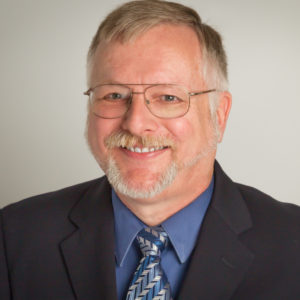
This final How They Do It interview of 2017 is with Drew Smith, genealogist, writer, speaker and podcaster. Drew literally wrote the book about genealogy organizing. He is the author of Organize Your Genealogy: Strategies and Solutions for Every Researcher (Family Tree Books, 2016). You may also know him from the Genealogy Guys podcast, which he presents every other week with cohost George G. Morgan. (Alternate weeks he hosts the Genealogy Connection podcast.) Drew is also a frequent speaker and has a genealogy resume as long as my arm. (You can read his full bio at the Aha! Seminars website.)

I was so pleased he agreed to do this interview. I love how much he and I are on the same page when it comes to organizing family history research!
How They Do It: Drew Smith

How long have you been doing genealogy?

Since 1992

What’s your favorite part of doing genealogy?

Solving puzzles by putting together pieces of evidence.

Do you consider your genealogy research well organized?

I have been more organized recently, but when I started I didn’t know the best way to organize, so I have a lot of papers and files that I still need to go through that I have collected over the years.

What type of software do you use for organizing your genealogy research?

I have RootsMagic to keep track of my genealogical conclusions, Dropbox for my files, and Evernote for my random notes and ideas.

Do you keep a research log? If so, what format?

I have not been regularly maintaining a research log, although I do recommend to everyone that they keep one. I do keep some of that material in Evernote, and I have also begun to use Evidentia to track my research methods.

Do you have a tree on Ancestry? If so, is it public or private? Why?

I have gone back and forth on having a public vs. private tree numerous times, and now I have a public tree that has a major disclaimer on it that asks people not to treat everything in it as well researched. I feel that the benefits of having a public tree outweigh the negatives, as I may be discovered by a distant cousin this way.

What’s your biggest challenge when it comes to organizing your genealogy?

It can be so much fun in discovering something new that it can be easy to forget all of the processes for recording what the information is, where it was found, etc.

What’s your biggest piece of advice to beginning genealogists in terms of keeping track of their research?

Try not to go off in too many different directions at the same time.  Focus on one line at a time, and one person.

What do you think is the most important thing for people to do to stay organized when it comes to family history research?

The most important thing is to have a simple, well thought out system for keeping files in both digital and paper form.

If you were starting out new as a genealogist what would you do differently?

I would make certain to make electronic copies of all papers, as digital files are easier to find than paper files.

Do you keep paper or electronic files (or both)?

I have both, although I feel that paper files are only important if they are one-of-a-kind documents, such as original copies of vital records. Otherwise, everything else can exist as electronic files, and be printed if needed.

Are you folder or binder person for your paper files?

I’m a folder person because I find it easier to move folders back and forth between the file drawer and my desk. And all my bookshelves are taken up by books!

Do you use Evernote, One Note or any other electronic organizing system for your genealogy? If so, how do you use it?

I’m a regular user of Evernote. I use it not only for genealogy but also for work-related projects and for items for home and personal care. I use it for grabbing useful genealogy blog postings, for keeping track of genealogy subscriptions and renewal dates, and for any ideas that might pop into my head on who to research next or what idea to pursue.

Do you have a dedicated space in your home for doing genealogy research? What’s it like?

I have my own home office where I do all my research. A desk for my 27″ iMac and an additional monitor of equal size. A side credenza that has two file drawers and space on top for my current projects. A small whiteboard on the wall where I write the things I want to be focused on. Between the credenza’s two file drawers are a trash can and a brand-new shredder. On the other side of the home office is a bookcase with my most used books, and another desk that houses a wireless printer. And next to my primary computer desk is a former printer stand that has a UPS and cable modem/router below it, and a flat space on top for my office assistant, Oxford the cat, to sleep while I work.

Do you have anything to add?

Genealogists should start to organize their research by starting simple and starting small, and building up from there. Otherwise, it’s too easy to become overwhelmed.

I love that Drew makes space for his cat, Oxford, in his workspace. It probably pleases me too much that even Drew Smith has trouble using a research log consistently. Thanks, Drew, for sharing your answers this month!

This has been a fun year of questions and answers in the How They Do It series. I plan to create a post this month about the themes that have emerged. Watch for new interviews in 2018!
Filed Under: Challenges, Excitement, Genealogy tips, Organizing Tagged With: Drew Smith, How They Do It, organizing aids

Backing up Evernote on a Mac (updated)

November 28, 2017 By Janine Adams 4 Comments

I like storing important files on my hard drive, not in the cloud. Call it unreasonable, but I have a distrust of the cloud. Yet I love Evernote, the cloud-based note-taking and information storing app. In fact I depend on it for many facets of my personal, business, and genealogy lives. So I was thrilled when reader Corbin Dodge, J.D., was kind enough to spell out instructions for backing up Evernote to your hard drive, after I expressed my fear of what would happen if Evernote vanished, in a comment on my blog post How I store my genealogy information. I went through all the steps of Corbin’s clear and detailed instructions and now have such peace of mind knowing that my notes are safe and easily accessible outside of the Evernote app. (I back up my hard drive to an external hard drive and to the cloud.) I didn’t want this valuable information to remain buried in the comments, so Corbin has graciously agreed to let me reprint them here. [Note: Evernote issued an update which changed the way the backup is created. This post has been updated to include the new instructions.]

I share your concerns re: what if an app goes belly up (what nightmares are made of!).

One thing I admire about Evernote is that it is easy to backup your notes so they’re accessible even if the app goes away. To do this on Mac:

(1) select the “Notes” heading in the sidebar

(2) On mac, hold down the command key and the “A” key at the same time, which will select all notes (on PC, hold down the control key and the “A” key at the same time)
(3) On the main menu bar, click “File”, then select “Export notes…”
(4) A window will pop up. There is a drop-down box labeled “Format”. It gives you 2 options. Choose “HTML”
(5) Save*

To access the backups, click on any note in the folder. It will open in your default browser. You can backspace out the note name in the url to get the full table of contents of every note that was backed up. Not as smooth to browse as the app, but reassuring to know your notes are accessible even if Evernote goes away! It also saves the images, albeit as a separate image file

*I’ve found this folder structure works well to organize backups for my various apps:
Dropbox / Backups / Evernote / 2017-09-27 Evernote Backup

Selecting the HTML format is a safeguard in case Evernote ceases to exist. The alternate option is to save them as “Evernote XML Format (.enex)”, which is an Evernote-specific file format which saves more metadata about each note (e.g., notebooks, tags, author), so this choice could be useful if you ever need to restore lost notes into Evernote (i.e., if their sync ever messes up). The downside to .enex is that it’s not a universally-friendly file format, so it wouldn’t do you much good if Evernote ever goes kaput.

p.s., an added benefit of backing your notebooks up in HTML format is that you can easily go back and retrieve a previous version of any single note without affecting all of your Evernote notebooks (which would be the case if you didn’t select “HTML” in step 3.

You can learn about Corbin’s digital marketing business at corbin-dodge.com and read about his adventures renovating his 100+ year home at eastwoodbungalow.com. Thank you, Corbin!


Filed Under: Genealogy tips, Technology Tagged With: Evernote, genealogy tools, organizing aids, technology

  • « Go to Previous Page
  • Page 1
  • Interim pages omitted …
  • Page 18
  • Page 19
  • Page 20
  • Page 21
  • Page 22
  • Interim pages omitted …
  • Page 43
  • Go to Next Page »

about me

I'm Janine Adams, a professional organizer and a genealogy enthusiast. I love doing family history research, but I find it's very easy for me to get overwhelmed and not know where to turn next. So I'm working hard to stay organized and feel in control as I grow my family tree.

In this blog, I share my discoveries and explorations, along with my organizing challenges (and solutions). I hope by sharing what I learn along the way I'll be able to help you stay focused and have fun while you do your research, too.

tags

30 x 30 Adams amy johnson crow anniversary Brown cemetery census Civil War conferences connections dna electronic files Evernote excitement Family Curator family photos genealogy tools getting started goals How They Do It Igleheart Jeffries keepsakes learning opportunities maps newspapers NGS organizing aids overwhelm paper files planning quick tips rasco record keeping research research log research trip resources RootsTech social history source documentation Stacy Julian technology time management vital records

join the facebook community!

join the facebook community!

My organizing business

Learn more about my organizing business, Peace of Mind Organizing®.

Subscribe by RSS

  • RSS - Posts
  • RSS - Comments

© 2026 Janine Adams


Loading Comments...