• BLOG
  • ABOUT
    • Privacy Policy

Organize Your Family History

Stay focused and happy while exploring your roots

Help for going paperless

June 27, 2017 By Janine Adams Leave a Comment

Paperless Genealogy GuideI’ve been researching every day as part of the current 30 x 30 challenge and was just thinking about how grateful I am that all my documents are organized digitally. Five years ago, when I kept and organized paper versions of everything (and let my digital files fall where they may on my hard drive), researching took more effort. I stored my files in a rolling file cart, which I would roll out from my office closet to my desk. I would have to pull out folders, I would print, I would file. I’d roll the cart back. Just handling the paper took precious time away from my research.

Now that everything is digital, I sit at my desk and just get going. I’m downloading and renaming, not printing. I’m still filing, but electronic filing takes moments because I have a solid file structure. I know where everything is and it’s not taking up any physical space. As a professional organizer, I find great peace in this.

If that sounds good to you but you’re not there yet, I’d like to offer you some help for going paperless with your own research. Earlier this year I wrote, with scanning expert Brooks Duncan of DocumentSnap, the Paperless Genealogy Guide, a 44-page downloadable pdf. We published it in February in conjunction with the talk we gave at RootsTech (Go Paperless: Streamline and Digitize Your Genealogy). It’s detailed and quite complete and available instantly for only $9. You can read more about it (and buy it!) at the Paperless Genealogy Guide page at Brooks’ website.
Filed Under: Genealogy tips, Organizing, Technology Tagged With: Brooks Duncan, electronic files, genealogy tools, paperless, record keeping, technology

My digital workflow

March 24, 2017 By Janine Adams 26 Comments

Digital workflow for genealogyWhen Brooks Duncan and I spoke at RootsTech last month about going digital with genealogy research, it became apparent to me from the questions that digital workflow is an individual thing. I’ve developed a work flow that works well for me, so I thought I’d share it here. I’m not suggesting I do things The Right Way (I don’t know if there is a right way, especially for hobbyists), but I wanted to show you what works for me. I know that I love seeing examples of how people handle their own workflow, so in the spirit of sharing, here’s mine.

When I find a digital document online–let’s say it’s a census document that I found at Ancestry–I take the following steps after ascertaining that it’s pertinent to my research:

  1. I click Save to download the document to my computer’s desktop.
  2. I rename the file immediately so that it reflects my simple file-naming protocol (year document type-ancestor name-location).
  3. I immediately file the document in my file structure (Genealogy/Surnames/[Ancestor’s surname]/[Ancestor’s name]
  4. I analyze the document and enter the first fact into my Reunion software.
  5. I create a source for that fact, using Reunion’s templates.
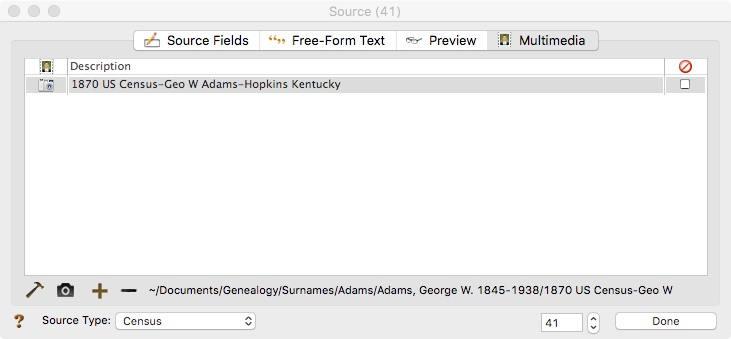
  6. I drag the image of the file into the Multimedia section of the Reunion source screen for that source. (That’s an example of the Reunion source screen at the top of this post.)
  7. I enter all other facts I find in the document into Reunion, using the same source number for each fact I find in that document.
  8. I click Preview in the Reunion source screen for that source and copy the citation and paste it into the metadata of the image file on my hard drive.

I added that last step after RootsTech, adapting a suggestion made by an audience member at our talk. I hadn’t thought about noting on the image what the source number and citation is. I think it’s a great idea and now I intend to go to back and do that for all my sources.

This eight-step work flow takes me from discovery through processing the document. It means that I don’t have stray documents on my hard drive with nonsensical file means. It also means I can easily a find a document when I want to. And it helps me see what documents are missing. Having the confidence that I can find a document I’ve saved allows me to feel good about not printing it, which cuts down on my paper clutter. (And, yes, I backup my hard drive daily, both to the cloud and to an external hard drive.) This workflow was about five years in the making, but I’m very satisfied with it!

For more in-depth information on how I organize my own genealogy, including a detailed look at my digital workflow, check out How I Do It: A Professional Organizer’s Genealogy Workflow, a 37-page downloadable available for $19.99.

Filed Under: Challenges, Organizing, Technology Tagged With: electronic files, organizing aids, record keeping, source documentation

Introducing the Paperless Genealogy Guide

February 10, 2017 By Janine Adams 2 Comments

Paperless Genealogy GuideI’ve partnered with “Mr. Paperless,” Brooks Duncan of DocumentSnap, to create a guide to going paperless in your genealogy research. I think it will be really helpful for those who would like to go paperless but feel overwhelmed by the prospect.

Brooks and I are presenting a session at RootsTech today (Go Paperless: Streamline and Digitize Your Genealogy) and we worked on the presentation and the guide at the same time.

You can read all the details about the Paperless Genealogy Guide over at DocumentSnap and download it for $9 there.  The guide covers how to name and find your digital documents, along with different types of scanners, and strategies for protecting your precious documents. And it ends with a checklist to walk you through the actions you need to get going.

My genealogy life is much easier now that almost all of my documents are in digital form. I can carry all my research with me, find it easily, read it easily (no more magnifying glass!) and determine very easily what I have and don’t have for a particular ancestor.

If that sounds good to you, hop on over and check out the Paperless Genealogy Guide! It can be yours instantly for $9.

Filed Under: Excitement, Genealogy tips, Organizing, Technology Tagged With: Brooks Duncan, electronic files, genealogy tools, paperless, record keeping, technology

Recording negative research

December 6, 2016 By Janine Adams 12 Comments

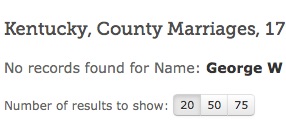
badsearchAs someone who tries to be an organized genealogist, I think one of the hardest things to remember to do is to make a note of my fruitless searches. When you do a search and get no results, the natural thing to do is to plow ahead and tweak the search and try again or to try searching another collection (or another ancestor).

But if you take the time to document that negative search, you might save yourself from duplicating that fruitless search in the near future (and therefore save yourself some time).

To me, the tricky part is figuring out how to record it. If you’re faithful about a research log (high five!), it seems fairly straightforward to include it in your log.

But if you’re one of those people (and I have to admit to being one of them) who doesn’t record everything faithfully in a log, you might have to devise a system specifically for negative research.

Here’s what I’m going to try. Using Evernote, I’ve created a Negative Research notebook in my Genealogy stack. I’ll try to remember to create a note when I spend time on fruitless research, making note of what I searched for and where, what the results were and when I did the search. By putting surnames in the note, I’ll easily be able to access the note on a simple search in Evernote, if I’m looking for information I stored there on a specific family member.

One caveat: I’m often searching sites like Ancestry.com or FamilySearch.org, so I need to bear in mind that they’re constantly adding new collections. So just because a search came up blank one day doesn’t mean that it won’t bear fruit a year (or more or less) down the road. Periodically, I’ll try to remember to check out my Negative Research notebook and see if it’s time to try that search again.

I’m hopeful this system will help me save precious research time.

How about you? Do you record your negative research? If so, how do you do it?

Filed Under: Challenges, Genealogy tips, Organizing Tagged With: record keeping, research, research log

  • « Go to Previous Page
  • Page 1
  • Interim pages omitted …
  • Page 6
  • Page 7
  • Page 8
  • Page 9
  • Page 10
  • Interim pages omitted …
  • Page 15
  • Go to Next Page »

about me

I'm Janine Adams, a professional organizer and a genealogy enthusiast. I love doing family history research, but I find it's very easy for me to get overwhelmed and not know where to turn next. So I'm working hard to stay organized and feel in control as I grow my family tree.

In this blog, I share my discoveries and explorations, along with my organizing challenges (and solutions). I hope by sharing what I learn along the way I'll be able to help you stay focused and have fun while you do your research, too.

tags

30 x 30 Adams amy johnson crow anniversary Brown cemetery census Civil War conferences connections dna electronic files Evernote excitement Family Curator family photos genealogy tools getting started goals How They Do It Igleheart Jeffries keepsakes learning opportunities maps newspapers NGS organizing aids overwhelm paper files planning quick tips rasco record keeping research research log research trip resources RootsTech social history source documentation Stacy Julian technology time management vital records

join the facebook community!

join the facebook community!

My organizing business

Learn more about my organizing business, Peace of Mind Organizing®.

Subscribe by RSS

  • RSS - Posts
  • RSS - Comments

© 2026 Janine Adams


Loading Comments...