• BLOG
  • ABOUT
    • Privacy Policy

Organize Your Family History

Stay focused and happy while exploring your roots

How I store my genealogy data

October 24, 2025 By Janine Adams 17 Comments

I originally wrote this post in 2016 and nine years later I’m amazed how little has changed about how I handle my electronic genealogy data. The only differences are that I’m using a newer version of Reunion, I moved my research notes from Evernote to Apple’s Notes app, and I use Backblaze, rather than CrashPlan Pro. Otherwise this method has stood the test of time and I have no regrets!
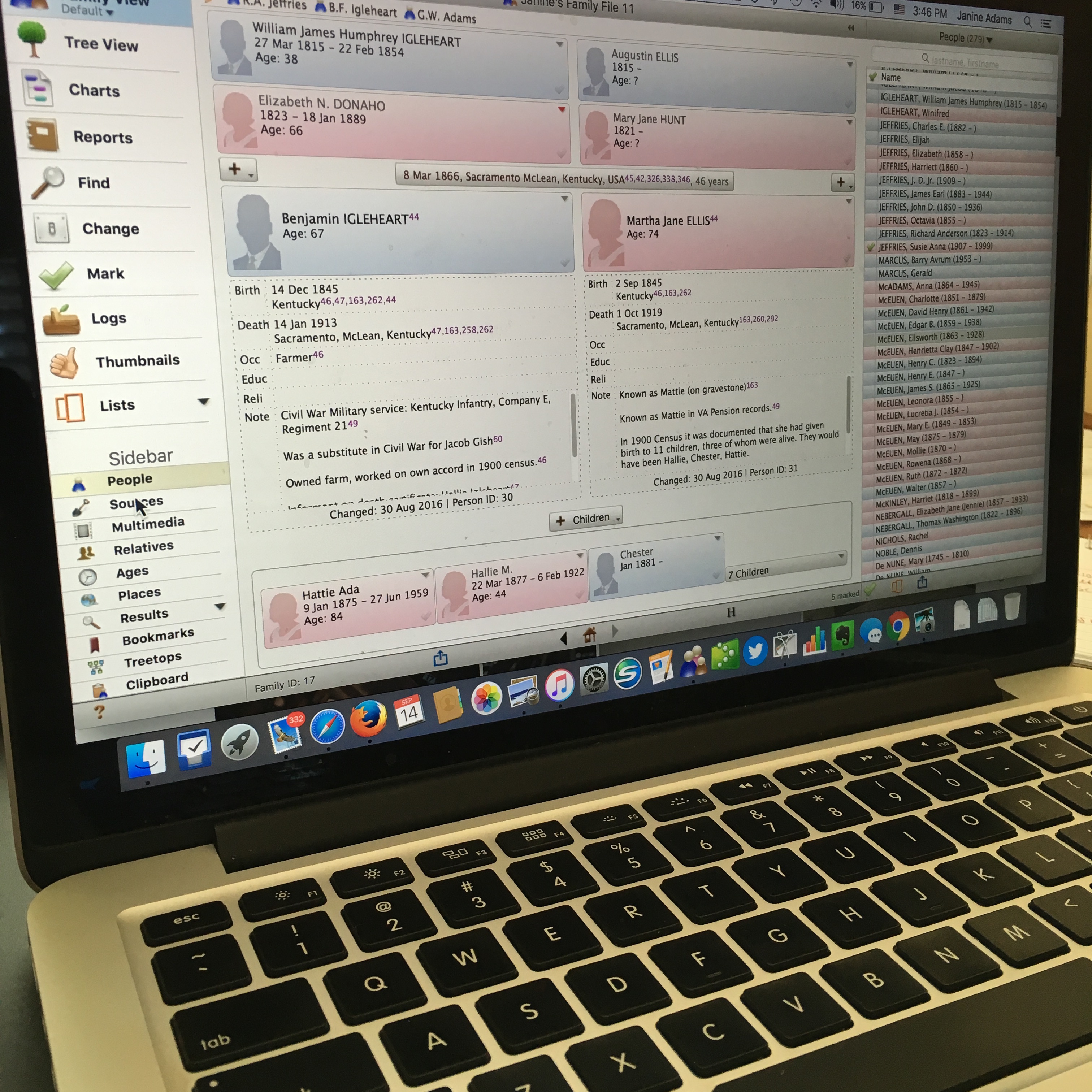
reuniononmac90I love organizing my family history research electronically. As I’ve mentioned here many times, I try not to print digital documents and instead store everything electronically where I can have easy access to it.

I don’t think I have been clear when I talk about storing my genealogy data electronically that I’m not talking about storing it as a family tree on Ancestry or Family Search. I’m talking about storing it on my hard drive.

To me, it would be folly to rely on an outside service to store my precious genealogy data. If the only copy of my information was at Ancestry, I would be required to renew my subscription to access my own data. Even storing all my information at a free site like Family Search feels risky to me. It’s conceivable that they could change their terms of service to something unacceptable to me. Or start charging for access. Or simply vanish. Another place that some people store their genealogy documents is Evernote. I think that can be a great way to have easy, searchable access to information. But I wouldn’t store genealogy documents on Evernote that I don’t also have on my hard drive. They could go belly up. (It happened with Springpad.)

I enter all of my data into family-tree software that resides on my laptop’s hard drive. I use Reunion 11, a Mac program. It can sync with the iPhone and iPad using the ReunionTouch app. I haven’t yet installed ReunionTouch because I take my Mac with me on research trips. I like that storing my data on my computer, rather than an online service, is that the information is accessible even when I don’t have an internet connection (if I have my computer with me).

Of course, I back up my hard drive, both on an external hard drive and with an online backup service (CrashPlan Pro). Backing up is critical.

I’m not saying that my way is the right way or the best way. But I’ll share with you my process for storing info, in case you find it helpful or interesting. So far, it’s working well for me.

When I find a sourced piece of information pertinent to my research this is what I do:

  1. Add the information to the appropriate person(s) in Reunion (or add a person if need be).
  2. Cite the source in Reunion.
  3. Download the information (or scan it if I found it in paper form).
  4. Attach an image of the source document to the source citation in Reunion.
  5. File the digital document in that ancestor’s electronic folder on my hard drive, copying it if it applies to more than one ancestor.
  6. Scour the source for further information.
  7. Make a note in Evernote if it sparks potential further research.

So far this feels good to me and I haven’t second guessed it.

How do you store your family tree information?

Filed Under: Challenges, Organizing, Technology Tagged With: electronic files, organizing aids, record keeping, technology

Quick Tip #45: Have a genealogy email address

November 7, 2024 By Janine Adams 6 Comments

Here’s the next in my occasional series of bite-size Quick Tips. Click on the Quick Tips tag for my other Quick Tips. Because I tend to write longer posts, I wanted to provide a quick-to-read (and quick-to-write) post every now and then on a small topic that pops into my head. This one could turn into a time saver!

Create an email address for genealogy

Keeping track of email is a challenge for the best of us. (You do not want to see how many emails I have in my inbox right now!) One way you can make genealogy life a little easier is to create a dedicated email address specifically for emails related to your research. So if you are reaching out to cousins, repositories, or DNA matches you send your inquiries from that address and use that address on any contact forms. How you create a new email address and filter the responses depends on your email client, so I won’t go into that here. I just want to plant the seed that having an email address dedicated to genealogy might make your life a little bit easier!.

Filed Under: Genealogy tips Tagged With: quick tips, technology, time management

Do you use Reunion?

March 29, 2024 By Janine Adams 2 Comments

If you’re like me and use Reunion for Macintosh as your genealogy software, you’ll probably be interested in learning that there is a virtual Reunion Users Group organized by the San Diego Genealogy Society that meets on Zoom. It’s free and open to the public and the next meeting is on Tuesday, 2 April 2024 at 12 pm Pacific time. The topic will be on the new version of the software, Reunion 14, and the speaker will be Anne Alves. Here’s the page with a link to register.

I am so grateful to reader Marian Kowalski who frequently shares great tips and resources. I appreciate her taking the time to email me about this users group. If you have ideas for blog posts or want me to share resources of interest, please don’t hesitate to reach out to me at janine@organizeyourfamilyhistory.com.

Other great learning resources for Reunion include Leister’s ReunionTalk forum and the Reunion Software Users Group on Facebook. My How I Do It: A Professional Organizer’s Genealogy Workflow is a 37-page pdf download explaining how I organize my genealogy research. Since I use Reunion, all the examples are shown in Reunion 13.

If you recommend other Reunion resources, please share them in the comments!

Filed Under: Genealogy tips, Technology Tagged With: genealogy tools, learning opportunities, Reunion, technology

Is Ancestry accurate?

November 14, 2023 By Janine Adams 6 Comments

I wrote this post four years ago and felt it was worth sharing again. You might be interested to read the comments on the original post because, as usual, readers added valuable information and perspective.

ancestry.com logoWhen I was at the Kentucky Historical Society research room in June, I overheard a conversation between a librarian and a patron. The patron, who displayed a certain amount of naiveté about genealogy research when he asked the librarian whether there was an index to everything in the library, proudly told the librarian that he’d been researching on Ancestry.com for years. The librarian’s response made me raise my eyebrows. He said, with a disapproving tone of voice, “A lot of stuff is wrong there; you can’t really trust those online sites.” I was so surprised by that statement that I wrote it down.

This felt all kinds of wrong to me for a couple of reasons. One is that, in one sentence, he invalidated this man’s genealogy experience. The other is that it’s just not true. I probably should have spoken up and argued the point, but I was in a library…it didn’t feel the place for a debate.

But it got me thinking about the notion that online sites like Ancestry or Family Search are inaccurate. I think that the librarian was referring to the family trees that can be found on the sites. Sure, trees are only as good as the practices of the genealogist who created them (or, in the case of Family Search, added to them). Many are not accurate. That’s why I ignore them.

Ancestry is typically the first place I go for source documents when I’m doing online research. It has millions of documents that provide evidence to prove facts in my genealogy research. I usually find them via search, either on a person or in the card catalog. I almost never even look at hints. And I carefully evaluate the suggested records that come up when I’ve clicked on a document in a search. (Usually, they are for the person I’m researching and are hugely helpful.)

Ancestry, along with Family Search, are fundamental to growing my research when I’m researching online (and I’m usually researching online). I was shocked to hear this authority figure completely dismiss online sites.

I was recently talking with a genealogy friend about her quest to solve a mystery. It became apparent that she was using online trees (in combination with DNA matches) as a main avenue for trying to solve the mystery. The conflicts among the trees were frustrating her. I suggested she back away from the trees and look for documents that could prove her suppositions. For me, the documents in Ancestry, not the trees, are where the value lies.

Of course, we must evaluate the documents and the evidence found in them. Good genealogists question everything. Is there inaccurate information on Ancestry? Of course–the family trees are full of them. Do the hints or suggested records sometimes apply to the wrong person? Yes!

But to describe Ancestry as inaccurate is, well, inaccurate. Everything you find in any repository (online or otherwise) must be evaluated. If you use Ancestry as tool to find documents that you then analyze, you’re on the path to success, in my opinion. However, if your starting point at Ancestry is looking at family trees, you may find yourself in the weeds.

My annual subscription to Ancestry is up for renewal this month. I always give it some thought and I always renew. I’m fortunate to be able to afford it; if I were looking to economize, though, Ancestry would probably be the last subscription I’d drop.

What about you? Do you think that the online sites get a bad rap? How do you make sure you’re getting good information from them?


Filed Under: Genealogy tips, Reflections, Technology Tagged With: Ancestry, genealogy tools, online research, research, technology

  • Page 1
  • Page 2
  • Page 3
  • Interim pages omitted …
  • Page 20
  • Go to Next Page »

about me

I'm Janine Adams, a professional organizer and a genealogy enthusiast. I love doing family history research, but I find it's very easy for me to get overwhelmed and not know where to turn next. So I'm working hard to stay organized and feel in control as I grow my family tree.

In this blog, I share my discoveries and explorations, along with my organizing challenges (and solutions). I hope by sharing what I learn along the way I'll be able to help you stay focused and have fun while you do your research, too.

tags

30 x 30 Adams amy johnson crow anniversary Brown cemetery census Civil War conferences connections dna electronic files Evernote excitement Family Curator family photos genealogy tools getting started goals How They Do It Igleheart Jeffries keepsakes learning opportunities maps newspapers NGS organizing aids overwhelm paper files planning quick tips rasco record keeping research research log research trip resources RootsTech social history source documentation Stacy Julian technology time management vital records

join the facebook community!

join the facebook community!

My organizing business

Learn more about my organizing business, Peace of Mind Organizing®.

Subscribe by RSS

  • RSS - Posts
  • RSS - Comments

© 2026 Janine Adams


Loading Comments...