
• BLOG
  • ABOUT
    • Privacy Policy

Organize Your Family History

Stay focused and happy while exploring your roots

Do you use Reunion?

March 29, 2024 By Janine Adams 2 Comments

If you’re like me and use Reunion for Macintosh as your genealogy software, you’ll probably be interested in learning that there is a virtual Reunion Users Group organized by the San Diego Genealogy Society that meets on Zoom. It’s free and open to the public and the next meeting is on Tuesday, 2 April 2024 at 12 pm Pacific time. The topic will be on the new version of the software, Reunion 14, and the speaker will be Anne Alves. Here’s the page with a link to register.

I am so grateful to reader Marian Kowalski who frequently shares great tips and resources. I appreciate her taking the time to email me about this users group. If you have ideas for blog posts or want me to share resources of interest, please don’t hesitate to reach out to me at janine@organizeyourfamilyhistory.com.

Other great learning resources for Reunion include Leister’s ReunionTalk forum and the Reunion Software Users Group on Facebook. My How I Do It: A Professional Organizer’s Genealogy Workflow is a 37-page pdf download explaining how I organize my genealogy research. Since I use Reunion, all the examples are shown in Reunion 13.

If you recommend other Reunion resources, please share them in the comments!
Filed Under: Genealogy tips, Technology Tagged With: genealogy tools, learning opportunities, Reunion, technology

Creating a quickbar button in Reunion

September 12, 2017 By Janine Adams 12 Comments

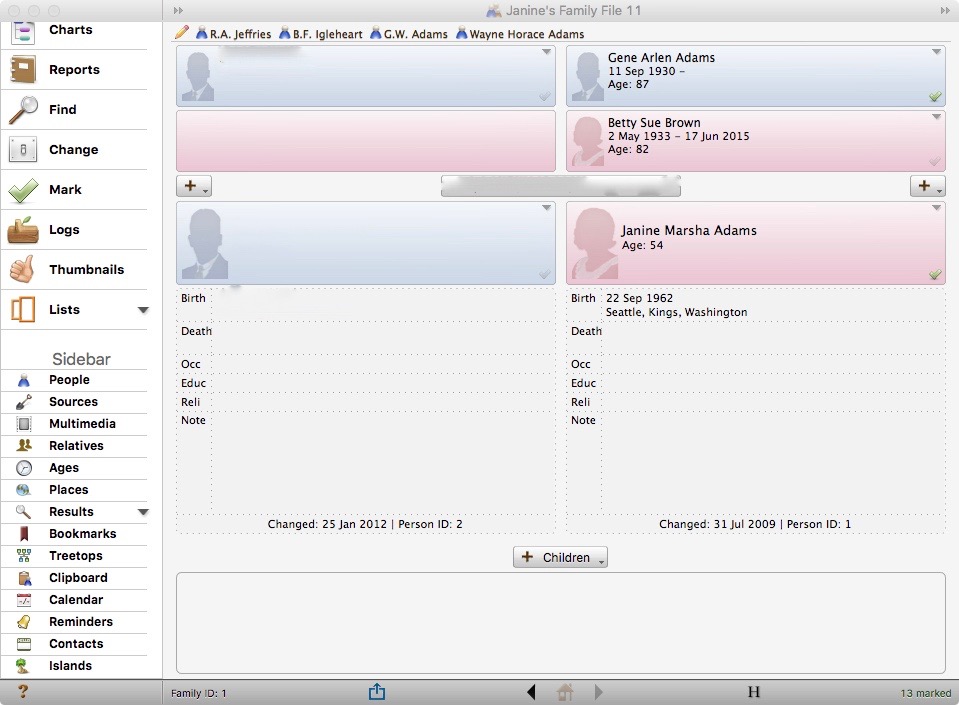
Creating a quickbar button shortcut in ReunionI use Reunion on my Mac to keep track of my family tree. It’s the only software I’ve used, so I don’t have a basis of comparison, but I really like it.

My default view is the Family View and when I open the program, it starts at the base of the tree, with the records for my husband and me. At a session at the Midwestern Roots conference last year, I learned about creating a shortcut so that I can easily click on a person from anywhere on my tree to access their record. Reunion calls the area at the top of the screen the quickbar and it calls the individual name you put there a quickbar button.

I created quickbar buttons for my three ancestors for whom I have Civil War pension files because I access them a lot. I also added one for my great grandfather’s half-brother, Wayne Horace Adams (1907-1976), because otherwise to get to him, I have to first click on the red arrow to access his mother (his father’s second wife), which is a tiny hassle. (This year I’ve been trying to figure out Horace’s late childhood/early adulthood, so I’ve been spending time with him.) Click on the picture at the top of this post to see a larger photo of my opening Family View screen with the quickbar buttons at the top. (To protect my husband’s privacy, I blurred out his info and our marriage date.)

It’s extremely easy to add a quickbar button. Within the Family View just click on the person in question and drag him/her to the quickbar at the top of the screen. Reunion will ask you to give the quickbar button a name. To remove it, just drag it to the trashcan icon on the Mac. You can also click the little pencil icon on the far left of the quickbar to edit the buttons on it. And if you click the question mark icon you see in that edit menu, you’ll get lots more information on the quickbar.

I have found this to be so helpful, especially since I’m focusing on one family line this year. My great great grandfather G.W. Adams is the nexus of my research this year, so I click on his name pretty much every session. It’s really nice not to have to click my way up my tree to him!

Filed Under: Genealogy tips, Technology Tagged With: genealogy tools, Reunion, software

about me

I'm Janine Adams, a professional organizer and a genealogy enthusiast. I love doing family history research, but I find it's very easy for me to get overwhelmed and not know where to turn next. So I'm working hard to stay organized and feel in control as I grow my family tree.

In this blog, I share my discoveries and explorations, along with my organizing challenges (and solutions). I hope by sharing what I learn along the way I'll be able to help you stay focused and have fun while you do your research, too.

tags

30 x 30 Adams amy johnson crow anniversary Brown cemetery census Civil War conferences connections dna electronic files Evernote excitement Family Curator family photos genealogy tools getting started goals How They Do It Igleheart Jeffries keepsakes learning opportunities maps newspapers NGS organizing aids overwhelm paper files planning quick tips rasco record keeping research research log research trip resources RootsTech social history source documentation Stacy Julian technology time management vital records

join the facebook community!

join the facebook community!

My organizing business

Learn more about my organizing business, Peace of Mind Organizing®.

Subscribe by RSS

  • RSS - Posts
  • RSS - Comments

© 2026 Janine Adams


Loading Comments...
