
• BLOG
  • ABOUT
    • Privacy Policy
  • CONTACT

Organize Your Family History

Stay focused and happy while exploring your roots

Overwhelmed by resources

November 22, 2013 By Janine Adams 4 Comments

shopfamilytreeWhen I decided to get serious about genealogy a year or two ago, I jumped at many opportunities there are to learn. I signed up for lots of free newsletters, as well as paid webinars and classes, books, and other resources. I joined Ancestry, Fold 3, Mocavo, and Genealogy Bank. And I spent a good deal of money at Shop Family Tree. There are no shortage of ways for me to research my ancestors.

Unfortunately, I’m not working on genealogy full-time. I have an organizing business to run, as well as the demands of day-to-day life. I want to both do the research and improve my researching skills. So some of these learning opportunities are lying fallow at the moment.

And here’s where the overwhelm kicks in: I know there are a lot of purchased items spread out over my hard drive. Some are in my files. Others on my bookshelves. I don’t know what I have. If I do know, I’m not exactly sure where to find it.

It’s time to do something about that. Here’s where my resources are scattered:

Hard drive: I’ve done a good job of organizing my hard drive when it comes to research documents (i.e. documentation about my ancestors). But it’s time to put a laser focus on my resources. I’m going to give some thought as to how to organize the stuff on my hard drive. I’m thinking of subfolders in my Genealogy folder, based on subject. But I know also need a way to track what I’ve actually read/viewed and what I haven’t. Perhaps a spreadsheet. But right now I think I might use Springpad, which I’ve been experimenting with of late. Of course, Evernote could be another option.

Book shelves and file cabinet: I have some books and some CD-ROMs and some printed PDFs scattered about. I need to locate them, catalog them, and store them all in one place, where I can easily retrieve them.

Organizing all these resources is a great first step. But the next step is to actually read the stuff, learn from it and apply what I’ve learned! When I read something particularly useful, I’ll be sure to share it here.
 

Filed Under: Challenges, General, Organizing Tagged With: learning opportunities, overwhelm, resources

Pin the tail on the family tree

October 31, 2013 By Janine Adams Leave a Comment

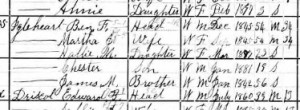
igleheart1900Today I had a little time to do some genealogy research, but I couldn’t decide what to work on. So I opened my family tree in my Reunion software, looking for inspiration. I noted the right sidebar had a listing of people on my tree, sorted alphabetically by last name.
I closed my eyes, scrolled up and down a few times on the sidebar and then clicked. The person I landed on was Martha Jane Ellis (1845-1919), my great great grandmother. I set to work looking at her record, looking for missing information. I pulled out the file folder for Martha and her husband, Benjamin Franklin Igelheart (1845-1913) and continuing the process of marrying my paper and electronic files. I also started adding information on siblings into Reunion, something I didn’t do in my first recording of data.

Randomizing my selection feels like a nice piece of serendipity. I sometimes prefer that to a systematic approach. It feels more fun to me and this is all about fun, right?

Filed Under: Challenges, General, My family Tagged With: ellis, getting started, Igleheart, overwhelm, record keeping, research

Now’s your chance to buy the Family Archivist Survival Kit

October 16, 2013 By Janine Adams Leave a Comment

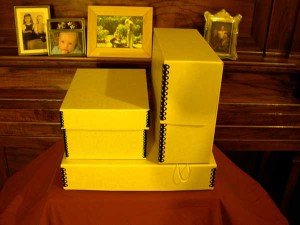
Family Archivist Survival KitProper preservation of treasured family photographs and other historical documents is really important, as I discussed here recently. Unfortunately, it can also be a little laborious to track down the proper supplies. And it can be challenging to understand the steps that are really necessary for proper preservation.
Fortunately, there’s the Family Archivist Survival Kit, from Sally Jacobs, The Practical Archivist. Here’s the thing: Sally makes this available only in the month of October. So if you don’t order by November 4, you’ll have to wait another year.

The 2013 Family Archivist Survival Kit is actually four kits in one:

  • Loose Photo Kit
  • Documents and Ephemera Kit
  • Oversize Kit
  • Photo Rescue Kit (for salvaging photos from those horrible old-school “magnetic” adhesive photo albums)

The first three kits include appropriately sized archival boxes and archival interior folders or envelopes. All these items have passed the Photographic Activity Test (PAT). The Photo Rescue Kit includes hand-held tools (white gloves, two types of pencils and a microspatula). In addition, you get ten hours of recorded instruction from Sally’s Joy of Organizing Photos workshop and other informational goodies.

I ordered Sally’s Declutter Your Photos Like An Archivist kit a couple of months ago and am now a bona fide fan girl. A professional archivist, Sally not only knows her stuff, she understands and sympathizes with the challenges family archivists face. So her information is accessible and relevant.

I first stumbled upon Sally’s information last January and wanted to buy the Family Archivist Survival Kit at that moment. Alas, I had to wait until October and, believe me, I bought it the minute I read the email telling me the kit was available. If you’re interested, don’t delay. November 4 is the last day to buy one.

Photo of the Family Archivist Survival Kit courtesy of Sally Jacobs, The Practical Archivist.


Filed Under: Challenges, Excitement, Preservation Tagged With: excitement, family photos, keepsakes, organizing aids, practical archivist, Sally Jacobs

Marrying my electronic and paper files

October 10, 2013 By Janine Adams 4 Comments

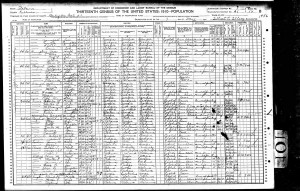
Store census documents by pressing Print, rather than SaveI used to be a paper gal. But when it comes to my genealogy records, I’ve stopped pressing the Print button. At the moment almost all my genealogy research is being done online, so I’m really understanding the utility of clicking Save rather than Print.

Part of the reason I’ve been able to make the shift is that I’ve set up a good electronic file system. That gives me confidence that I’ll find what I need on my hard drive.

Switching from paper to electronic has ramifications in at least a couple of areas. It means that it’s changing how I do things from this point forward. That’s no problem. But it also means I have a backlog to deal with. In the past, I’d print and file census documents and other resources I found online, rather than save them electronically. While all the information are recorded in my software (I use Reunion), the source documents themselves might be in a file or might be on my hard drive.

So this week, I’ve been working on marrying the two systems. It’s going to be a long process. What I’m doing is taking out a file folder for a couple and going through the documents, making sure they’re included in my software and seeing if they’re on my hard drive. If they’re not, I’m finding them online and saving them within my file structure.

I’m also taking the opportunity to do one other thing while I’m in there. As I look at census documents, I’m adding siblings of my ancestors to my family tree software, something I blogged about doing a few months ago.

This may sound really tedious to you, but I’m having a good time. It’s allowing me to reacquaint myself with various couples and really pay attention to all their kids, not just my direct ancestor. It’s also giving me the chance to clean up my hard drive and re-file errant files (and move some documents that accidentally ended up in my Genealogy folder). I’m not going through each line systematically. To keep it interesting, I’m jumping from family to family, choosing file folders as my whims take me.

Since I’m no longer printing newly found documents, I guess I’m slowly phasing out my paper files. And that’s okay with me. My hard drive is fast, spacious, orderly, and backed up both to an external hard drive via Time Machine and to a remote computer via Crash Plan Pro.

I’m looking forward to the comfort of having everything on my hard drive. Since I store my paper files in a closet a few steps from my desk, I also love that my data will be at my fingertips whenever I’m using my computer. It’ll be great when I travel, especially if I take research trips, to have all that information available to me. I believe this will be time well spent.

Filed Under: Challenges, Excitement, My family, Organizing Tagged With: electronic files, filing, paper files, record keeping, source documentation

  • « Go to Previous Page
  • Page 1
  • Interim pages omitted …
  • Page 99
  • Page 100
  • Page 101
  • Page 102
  • Page 103
  • Interim pages omitted …
  • Page 109
  • Go to Next Page »

about me

I'm Janine Adams, a professional organizer and a genealogy enthusiast. I love doing family history research, but I find it's very easy for me to get overwhelmed and not know where to turn next. So I'm working hard to stay organized and feel in control as I grow my family tree.

In this blog, I share my discoveries and explorations, along with my organizing challenges (and solutions). I hope by sharing what I learn along the way I'll be able to help you stay focused and have fun while you do your research, too.

tags

30 x 30 Adams amy johnson crow anniversary Brown cemetery census Civil War conferences connections dna electronic files Evernote excitement Family Curator family photos genealogy tools getting started goals How They Do It Igleheart Jeffries keepsakes learning opportunities maps newspapers NGS organizing aids overwhelm paper files planning quick tips rasco record keeping research research log research trip resources RootsTech social history source documentation Stacy Julian technology time management vital records

join the facebook community!

join the facebook community!

My organizing business

Learn more about my organizing business, Peace of Mind Organizing®.

Subscribe by RSS

  • RSS - Posts
  • RSS - Comments

© 2026 Janine Adams


Loading Comments...
