• BLOG
  • ABOUT
    • Privacy Policy

Organize Your Family History

Stay focused and happy while exploring your roots

Watch The Imperfect Genealogist on Zoom on May 14

April 29, 2022 By Janine Adams Leave a Comment

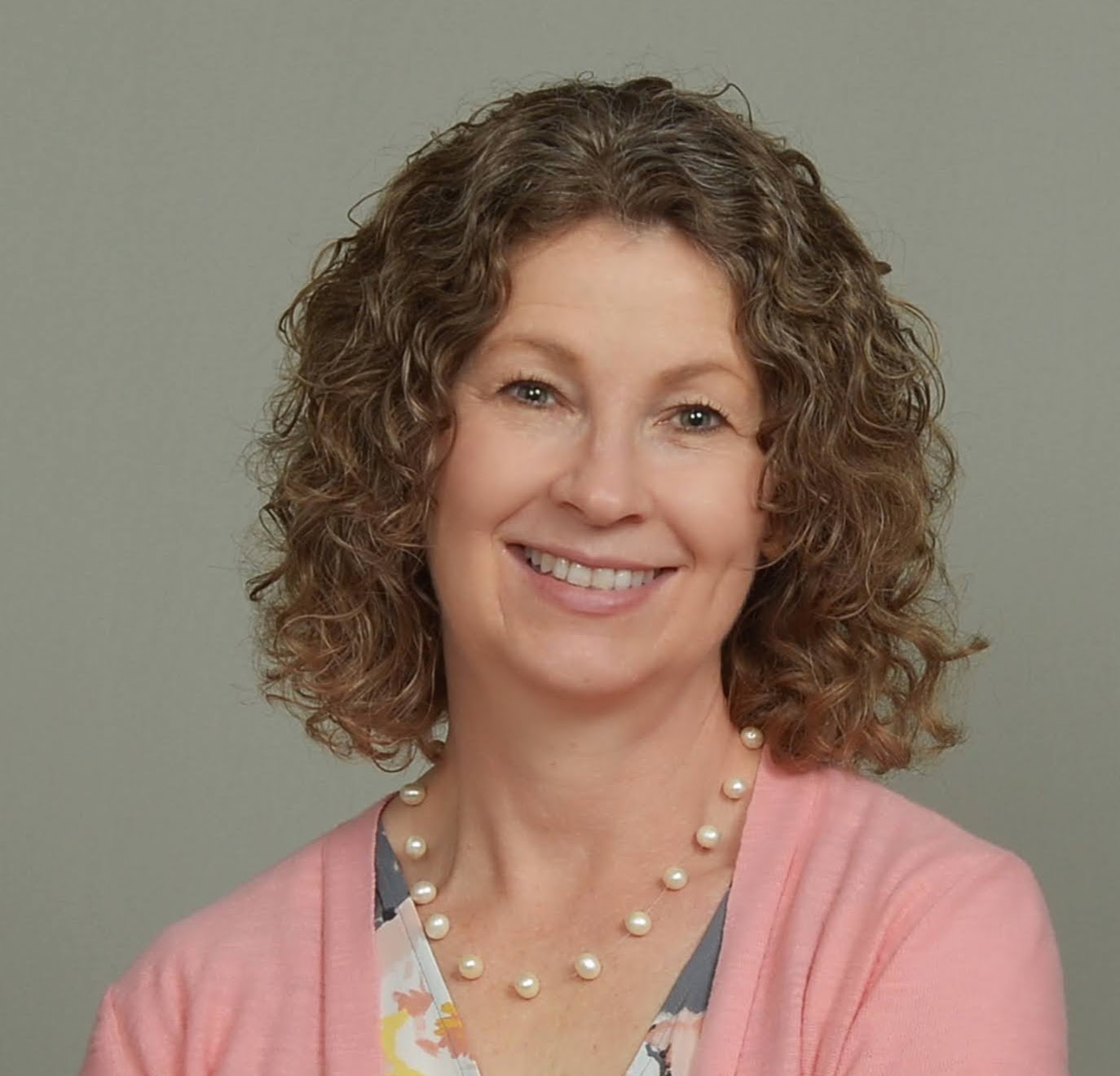
In what seems to be turning into an annual thing, I’ll be presenting my talk The Imperfect Genealogist again on Zoom. This time it’s for the Henderson County (Kentucky) Public Library. It’ll be at 9:30 to 10:30 am central time on Saturday, May 14. The talk is free and open to the public. You can register at the library’s website.

My talk kicks off a day of talks, the other three by eminent genealogist and speaker Mark Lowe, a specialist in Kentucky and Tennessee research. The latter two of Mark’s talks are Kentucky focused, but his first talk, Is Your Family Tree Broken? applies to all. It will be at 11 a.m. If you look at the library’s calendar, you’ll see links to each of his talks. It appears that separate registration is required for each.

I love talking about perfectionism. In this talk, I’ll be talking about ways perfectionism can get in the way of enjoyable and productive genealogy research, looking at some areas in genealogy where, in my opinion, good enough is (and isn’t) good enough. I’ll also be discussing some strategies for letting go of perfectionism. My co-host Shannon Wilkinson and I just published the 200th episode of our weekly podcast, Getting to Good Enough, which is all about letting go of perfectionism so you can do more of what you love. You can see that it’s a topic that we never have trouble finding new perspectives on!

I hope you’ll consider watching me on Zoom!

P.S. Don’t miss out! The special half-price offer from MyHeritage for Organize Your Family History readers expires tomorrow.
 

Filed Under: Excitement, Genealogy tips Tagged With: learning opportunities, perfectionism

How They Do It: Diana Elder

April 26, 2022 By Janine Adams 1 Comment

Today’s entry in my How They Do It series in an interview with Diana Elder of Family Locket. I’ve admired her talks and her contribuitions to the genealogy community through the years and I was delighted when she agree to do this interview. Diana Elder AGⓇ is a professional genealogist accredited in the Gulf South region of the United States. Diana authored Research Like a Pro: A Genealogist’s Guide and co-authored the companion volume, Research Like a Pro with DNA: A Genealogist’s Guide to Finding and Confirming Ancestors with DNA Evidence. Diana and her daughter, Nicole Dyer, are the hosts of the Research Like a Pro Genealogy Podcast and share research tips on their website, FamilyLocket.com.

How They Do It: Diana Elder

How long have you been doing genealogy research? 

I started researching my family in earnest in 2003 when my dad gave me all of his research in a suitcase. In 2015 I started doing client work and found I loved researching in a variety of locations.

What’s your favorite thing about being a genealogist?

I love making discoveries  – especially solving brick wall cases.

What’s your biggest challenge when it comes to organizing your genealogy?

Right now my biggest challenge involves the three large file boxes of documentary work I inherited from my father and added to once I took over the research in 2003. I’m slowly working through the files and making sure the research is digitized and organized in my digital files.

What is your favorite technology tool for genealogy?

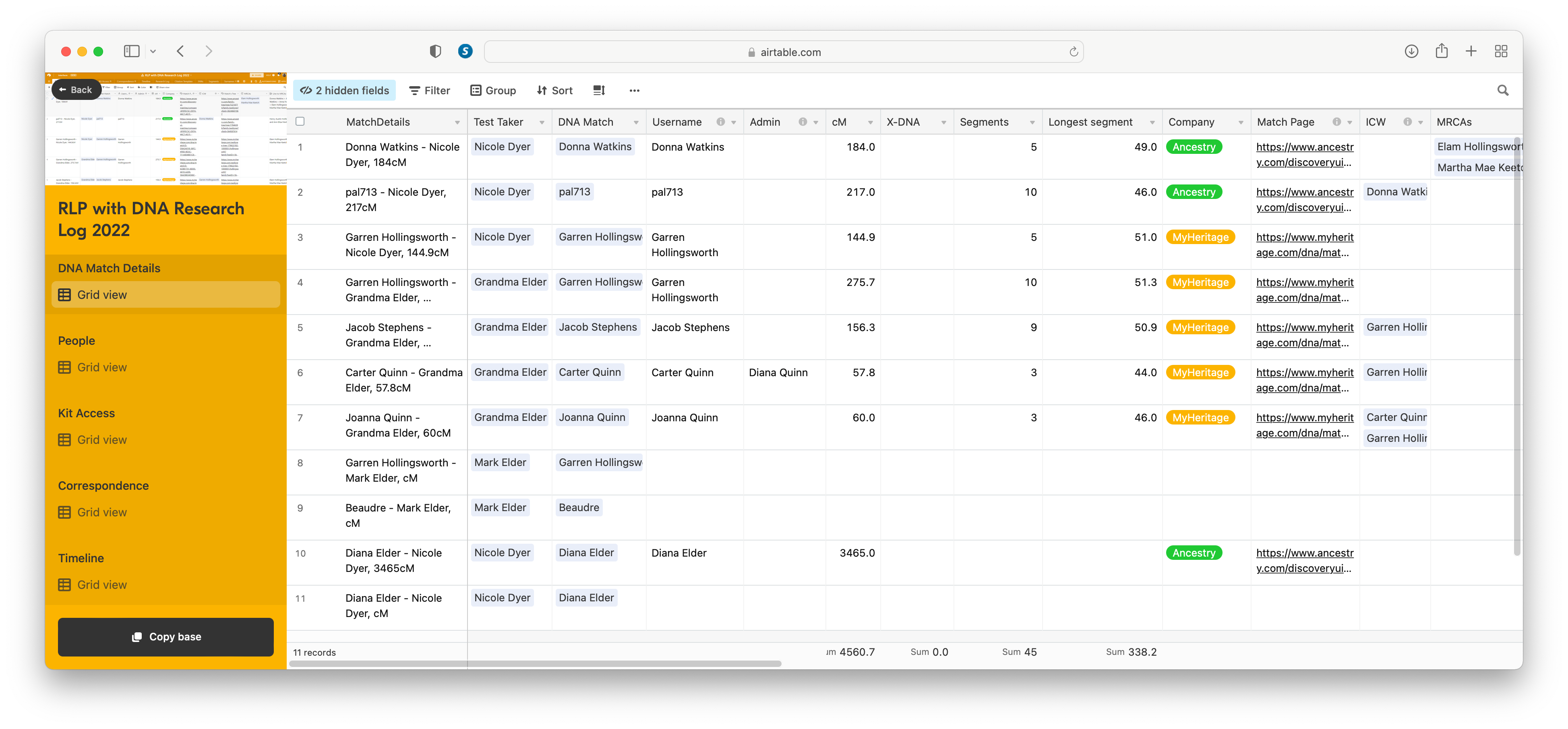
Hands down, my favorite tech tool is my Airtable research log. I use it for all my research whether it involves DNA or not.

If you were starting out new as a genealogist what would you do differently?

I would follow my Research Like a Pro process – doing a project for each ancestral line and ending up with a source-cited report for each ancestral couple.

Do you keep a research log? If so, what format?

Absolutely! I don’t feel that I’m doing real research unless I am working from my research plan and tracking the results in my Airtable research log.

How do you keep track of clues or ideas for further research?

The Airtable research log template has a column/field for comments or results. I add notes here or sometimes add another column for ideas for further research. My research report always includes a section titled “Future Research Suggestions.” I’ve found that no project is ever finished – there is always more that can be done. (That’s a screen shot of Diana’s Airtable DNA Research log at right. Click on it to see a larger image.)

How do you go about sharing your personal research with cousins or other interested parties?

I write up my research in a fully cited report that I upload to an ancestor’s profile on FamilySearch. I can also easily share the report with other researchers.

What’s the most important thing you do to prepare for a research trip?

I prepare a research plan based on my objective, the available sources, and what I hope to discover.

What’s your biggest piece of advice to genealogists in terms of organizing their research?

Research by objective. Focus on something specific that you’d like to discover such as death date and place, unknown father, etc.

Do you have a dedicated space in your home for doing genealogy research? What’s it like?

Yes, I have an office with my desktop computer, two monitors, shelves for my many books, and a filing cabinet.

Thank you, Diana! If you’d like to explore more of Diana’s advice on researching like a pro, be sure to check out the Family Locket website and blog. She and her daughter Nicole have such clear and complete advice on many genealogy topics. (If you favor videos, be sure to check out their YouTube channel.) Diana’s enthusiasm for Airtable has me wanting to check it out! If you’re intrigued as well, check out this Family Locket YouTube video on using Airtable for creating a research log for FAN Club genealogy research.

Filed Under: Excitement, Organizing Tagged With: Diana Elder, How They Do It, organizing aids

Who Do You Think You Are? returns to NBC this summer

April 22, 2022 By Janine Adams 7 Comments

I was very excited to learn that NBC is bringing back the docuseries Who Do You Think You Are. According to this article in the Hollywood Reporter, it will make its premiere on July 10. The subjects for the upcoming season season are Allison Janney, Zachary Levi, Nick Offerman, Billy Porter, Zachary Quinto and Bradley Whitford.

Co-produced by Lisa Kudrow and Dan Bucatinsky, the show aired on NBC from 2010 to 2012 before moving to the cable network TLC, where it aired from 2013 until 2018. I don’t have cable, so I wasn’t really able watch it on TLC. I’m delighted that it’s back and easy to find on NBC.

One thing I like about WDYTYA is that the celebrity subjects whose family histories are traced are more involved in the research process (as compared with, say, Finding Your Roots with Henry Louis Gates Jr.) I feel that approach makes doing genealogy on your own feel more possible. The very first episode I watched, in 2011, featured Ashley Judd. It was a thrill for me because she and I shared a Mayflower ancestor, William Brewster (at least I’d been told I was descended from him–I still need to verify that). I was just starting with genealogy back then and that episode opened my eyes to the fun possibilities of genealogy research.

I look forward to the return and I hope it sparks passion and curiosity in other beginner genealogists as it did in me!

Filed Under: Excitement, General, Reflections Tagged With: Who Do You Think You Are

Giving MyHeritage photo tools a spin

April 20, 2022 By Janine Adams Leave a Comment

There are so many amazing options for online research. Some, like FamilySearch and Chronicling America, are free. Others are fee-based. I’ve subscribed to Ancestry for a dozen years or more and always feel like it’s a worthwhile investment. More recently, I’ve started subscribing to Newspapers.com and just reupped. (I love newspaper research.)

But it was not until recently that I subscribed to MyHeritage. I was actually given a subscription to MyHeritage by the company gratis. They approached me about doing a Facebook Live presentation and about partnering with them for a week-long special promotion to my readers. (That promotion will be going out on Friday–if you’re not already on my mailing list, I encourage you to subscribe so you’ll get the offer in your inbox). When they asked me to partner with them, I requested free access so I could try it out before recommending it to my readers.

So I’ve been using MyHeritage a bit–not a ton because I haven’t had a lot of time for researching in the past couple of months. But I love that they have rich databases (16.9 billion records!) and also some pretty spectacular photo tools.

To test those out, I uploaded a couple of photos from my hard drive.

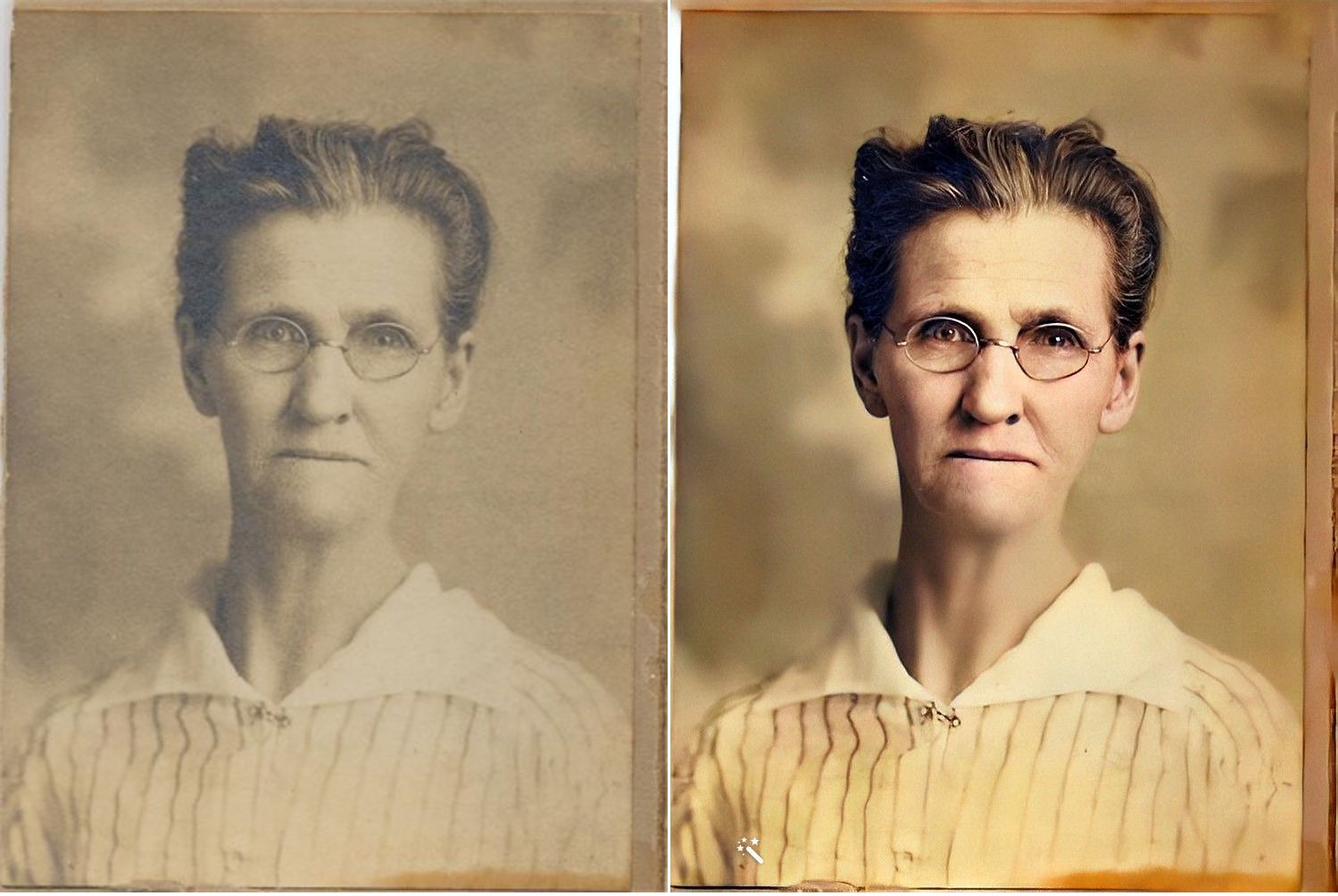
First, here’s a sepia-toned photo of my second great grandmother, Jennie Nebergall Wheeler (1857-1933) taken in 1917. I uploaded it to MyHeritage and used the Colorize, Repair and Enhance tools to improve the photo. The results are pretty remarkable, in my opinion.

I now feel like I can look into Jennie’s eyes and imagine a conversation with her, something that never felt possible with the old photo.

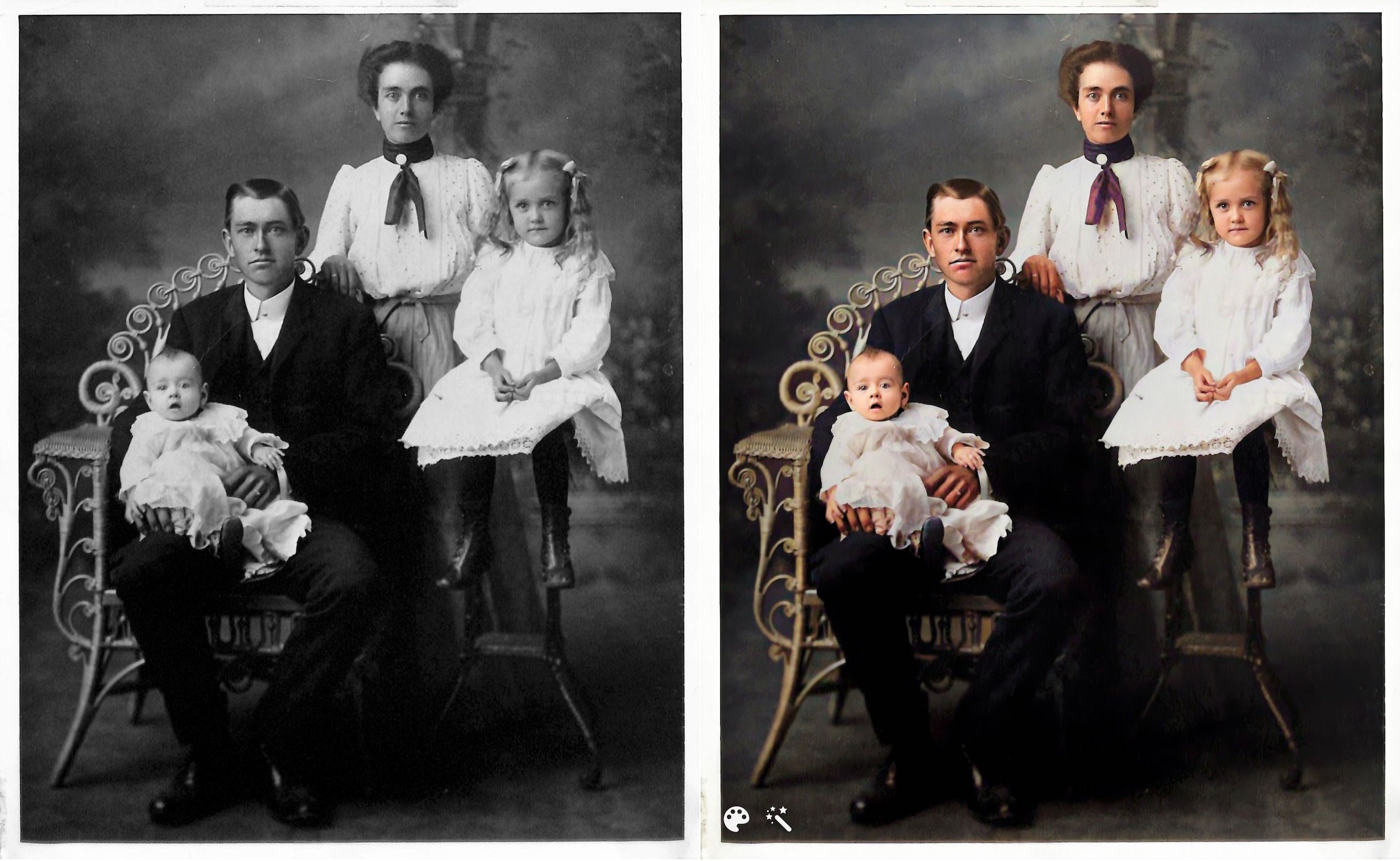
Here’s another example. This is the William Reese Rasco family in 1907. This photo graced the mantle at my aunt’s house for many years. My aunt recently moved and gave this photo to me. I consider it one of my treasured possessions. The baby in the photo is my maternal grandmother, Beatrix Rasco Adams (1907-1987).

This one feels a little different to me. It might be because I’m so familiar with the photo and the fact that the original photo is black and white (rather than sepia), but the improvement doesn’t feel quite as dramatic. It is fun to see what color my great great grandmother’s scarf might have been, though!

I downloaded the improved photos to on my hard drive and am storing them with the originals with the word Enhanced added to the end of the file name. I can’t wait to upload more photos. Since these two photos are portraits, improving them didn’t add a whole lot of information. But I know from watching Photo Detective Maureen Taylor’s Facebook Live for MyHeritage that these enhancements can bring out clues in photos that aren’t easily seen in the originals.

Another photo feature that MyHeritage has introduced is animation. You upload a still photo and they will animate the individual or individuals in the photo. Here’s an example, using the photo of my great grandmother Jennie.

https://organizeyourfamilyhistory.com/wp-content/uploads/2022/04/1917-photo-Jennie-Nebergall-Wheeler-location-unknown-Color-Restored-Enhanced-Repaired-0-Enhanced-Animated.mp4


And here’s my great aunt Lessie Rasco, from the portrait above.

https://organizeyourfamilyhistory.com/wp-content/uploads/2022/04/Rasco-2-Enhanced-Animated.mp4

I’m a bit on the fence about the utility of this one. But it is pretty fun and I imagine it might make sharing the photos a little more interesting for non-genealogy-focused relatives

Have you used these photo tools? What do you think?

Again, if you’re on my mailing list, you’ll receive an email from me on Friday with a special link for a really great discount on a MyHeritage subscription (for new MyHeritage subscribers only.) Full disclosure: they will share the revenue from your subscription with me. If you aren’t on the list, you can sign up here or in the form that pops up when you scroll to the bottom of this page. When you sign up for the mailing list, you’ll also get a short series of daily emails from me, along with a end-of-the-month email with links to the previous month’s blog posts. You can unsubscribe at any time.


Filed Under: Excitement, Genealogy tips, Preservation, Technology Tagged With: family photos, genealogy tools, myheritage, photos

  • « Go to Previous Page
  • Page 1
  • Interim pages omitted …
  • Page 7
  • Page 8
  • Page 9
  • Page 10
  • Page 11
  • Interim pages omitted …
  • Page 80
  • Go to Next Page »

about me

I'm Janine Adams, a professional organizer and a genealogy enthusiast. I love doing family history research, but I find it's very easy for me to get overwhelmed and not know where to turn next. So I'm working hard to stay organized and feel in control as I grow my family tree.

In this blog, I share my discoveries and explorations, along with my organizing challenges (and solutions). I hope by sharing what I learn along the way I'll be able to help you stay focused and have fun while you do your research, too.

tags

30 x 30 Adams amy johnson crow anniversary Brown cemetery census Civil War conferences connections dna electronic files Evernote excitement Family Curator family photos genealogy tools getting started goals How They Do It Igleheart Jeffries keepsakes learning opportunities maps newspapers NGS organizing aids overwhelm paper files planning quick tips rasco record keeping research research log research trip resources RootsTech social history source documentation Stacy Julian technology time management vital records

join the facebook community!

join the facebook community!

My organizing business

Learn more about my organizing business, Peace of Mind Organizing®.

Subscribe by RSS

  • RSS - Posts
  • RSS - Comments

© 2026 Janine Adams


Loading Comments...