• BLOG
  • ABOUT
    • Privacy Policy

Organize Your Family History

Stay focused and happy while exploring your roots

Quick Tip #10: Start with a research question

November 10, 2020 By Janine Adams Leave a Comment

Here’s the next in my occasional series of bite-size Quick Tips. Click on the Quick Tips tag for my other Quick Tips. Because I tend to write longer posts, I wanted to provide a quick-to-read (and quick-to-write) post every couple of weeks on a small topic that pops into my head. My research always goes better when follow the advice in this tip!

Start your research session with a question

It can be fun to click around on Ancestry and Family Search and just see what you can find. But if instead you start your session with a research question in mind, your precious research time will be better spent. Knowing what you’re looking for helps you stay focused and resist temptation. If you come across tempting information that doesn’t pertain to your research question, you can make note of it in your research log (or somewhere else) so you can come back to it at a later session.

Having a research question for each session is bound to make your sessions more productive and move your research along more quickly.

Photo by Sam Dan Truong on Unsplash
Filed Under: Genealogy tips, Organizing Tagged With: organizing aids, quick tips, research

Ancestry users: Don’t forget to check Family Search

November 6, 2020 By Janine Adams 20 Comments

My go-to genealogy resource is Ancestry.com. I find the search interface easy to use and I frequently find it helpful when I’m trying to answer a research question. I pretty much ignore the hints and I almost never consult public trees. I’m there for the vast number of documents in their collections.

But I had a couple of experiences while researching this week that reminded me not to overlook Family Search, even when I’ve found a pertinent document at Ancestry. Family Search (the LDS church’s genealogy website) sometimes has better scans or more accurate indexes of the same collections. And they may have expanded collections.

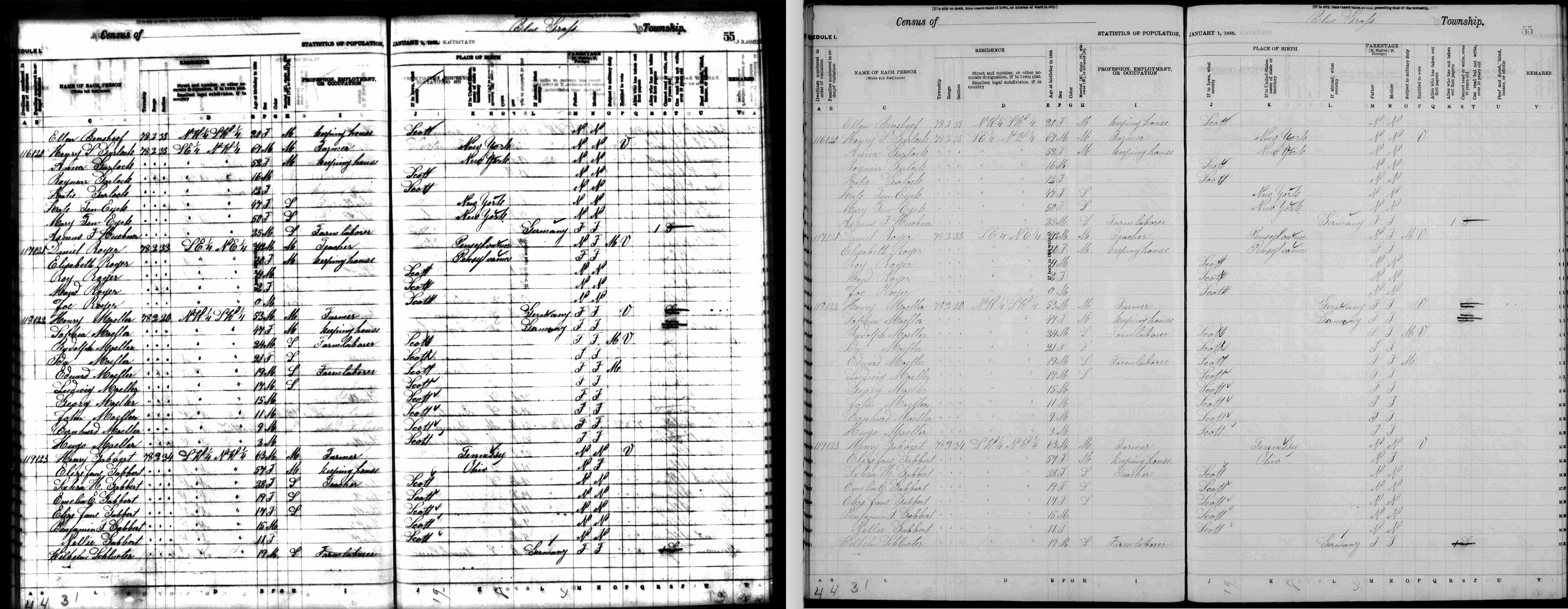
I blogged back in August 2018 in a post called No need to settle for bad scans about how I found a document on Family Search that was poorly scanned at Ancestry. It happened again this week when I was researching the family of my third great grandfather, Henry S. Garlock (1817-1909). The issue was that the main information in the 1885 Iowa census was legible, but the column headers were fuzzy. So I did a Google search looking for an explanation of the column headers. And that led me to a much more clear scan at Family Search.

Here they are side by side (click the photo to see them larger):

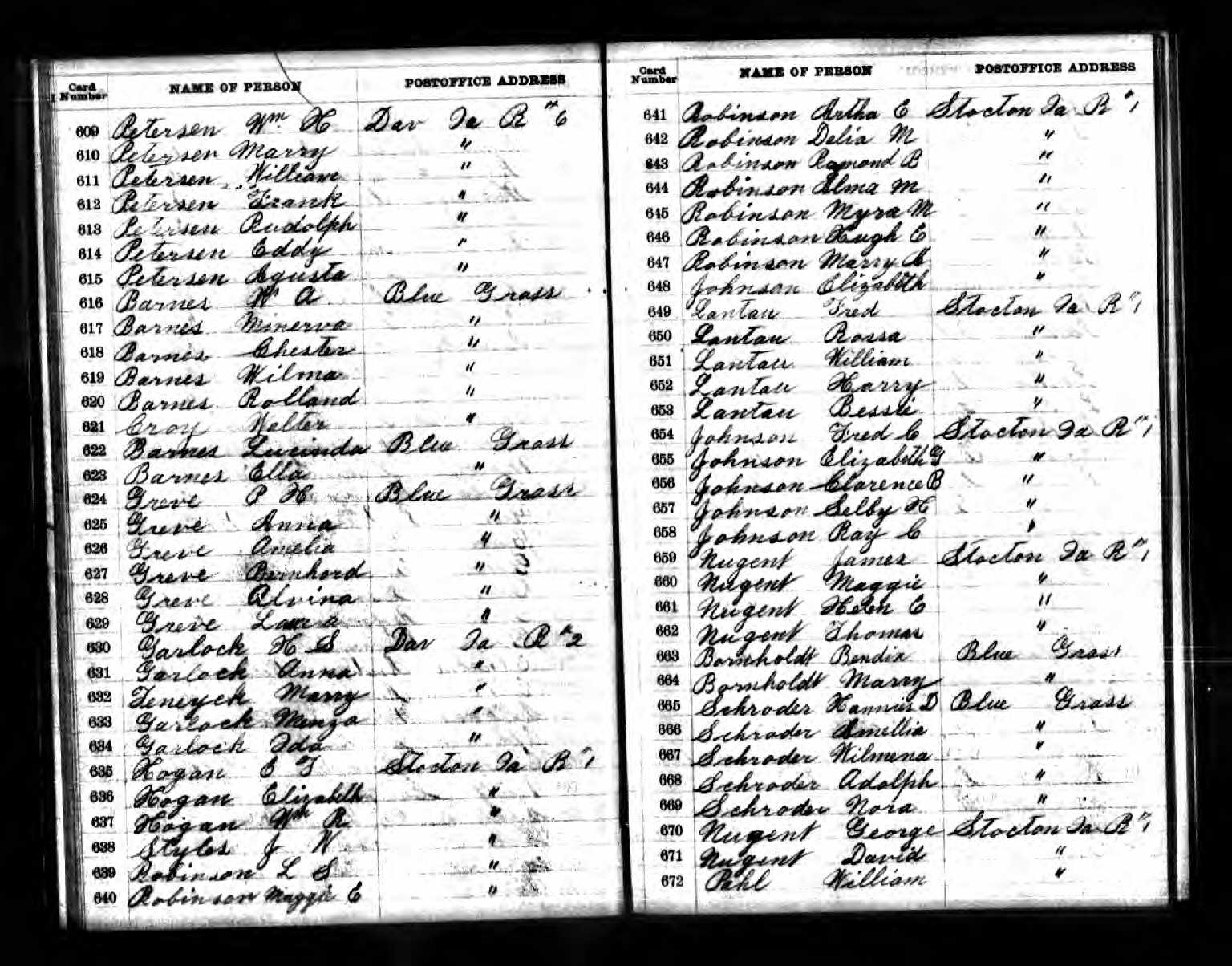
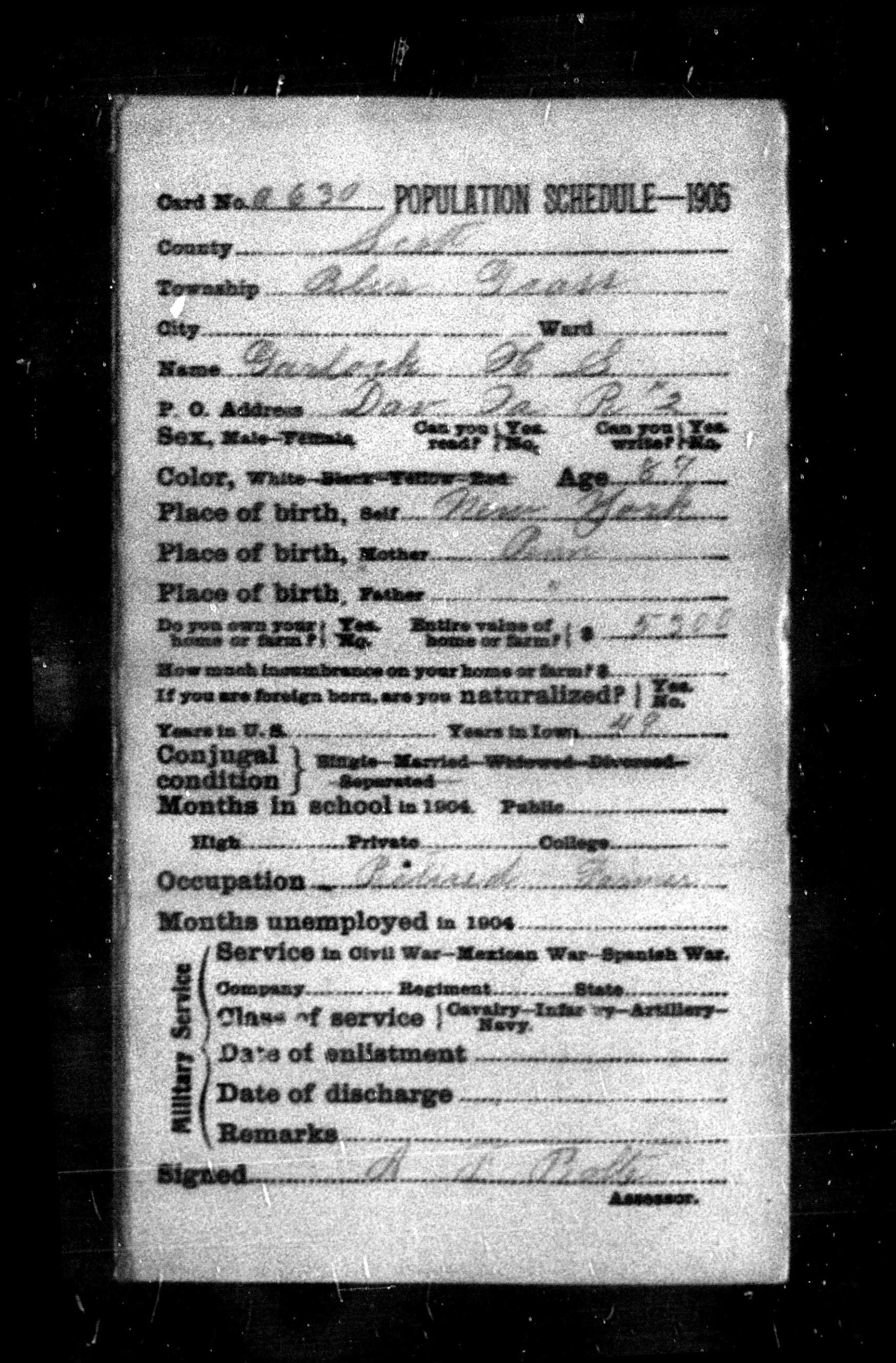
The next day, working on this same family, I was examining a document I’d downloaded from Ancestry that was for the 1905 Iowa census. It provided so little information I clicked onĀ  “About this collection” on Ancestry and all it said was, “This collection includes census records from Iowa in 1905. You can learn more about this collection at the FamilySearch website.” When I clicked on that link I discovered that the 1905 Iowa Census consisted of individual cards for each person and the page I’d downloaded from Ancestry was simply an index to those cards!

This is the census document I found on Ancestry:

And this is an example of one of the cards. So much more information!

It was nice to have this important reminder to check more than one repository for important information. I hope it helps you!

Filed Under: Challenges, Genealogy tips Tagged With: electronic files, Garlock, genealogy tools, research, technology

Major upgrade to Reunion released

November 3, 2020 By Janine Adams 19 Comments

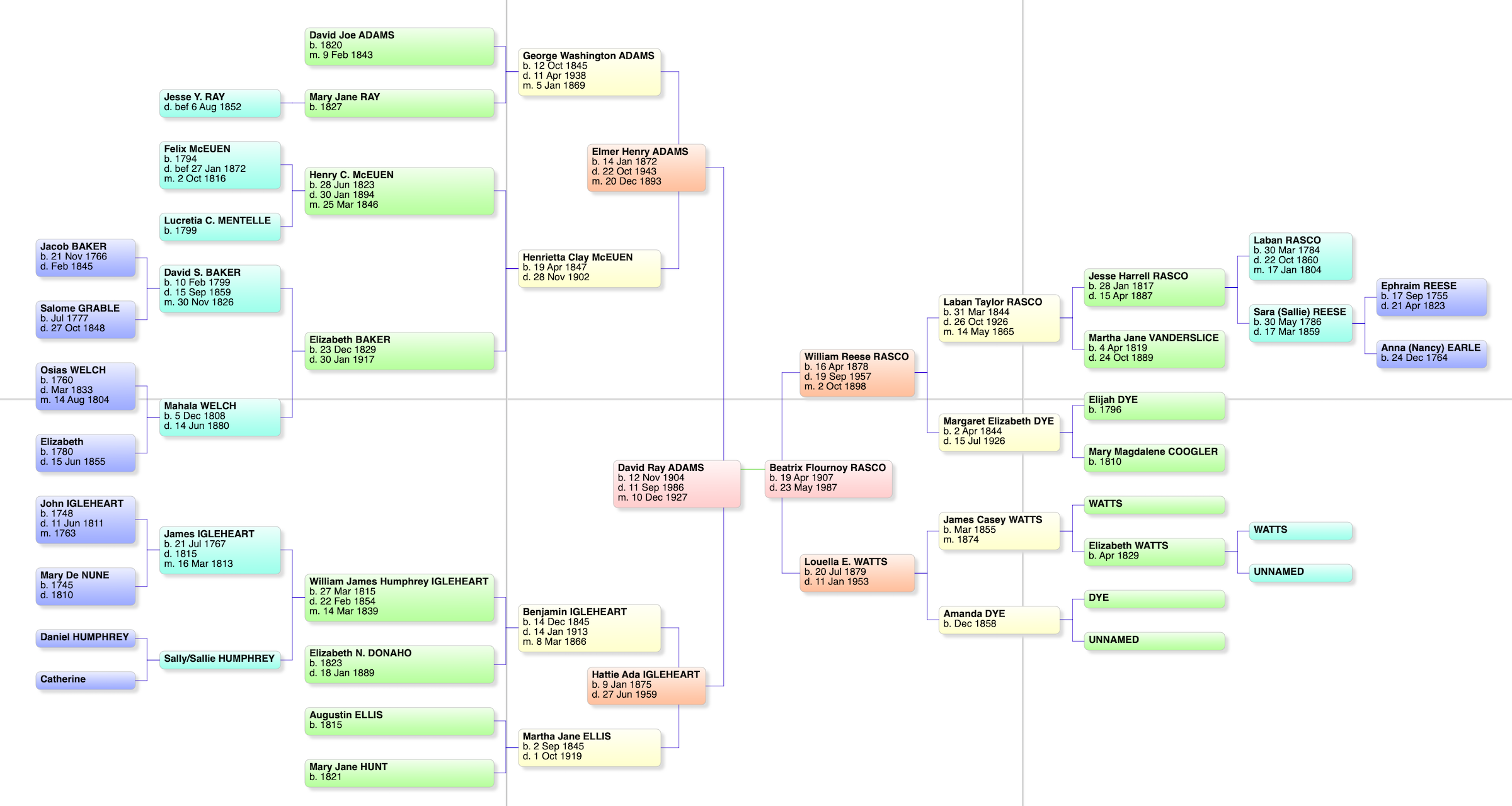
A bowtie chart for my paternal grandparents

I’ve been using Reunion, the genealogy software designed for the Mac, since I started getting serious about genealogy research, back in 2012. I love Reunion, though the truth is I’ve never used any other software so I don’t have anything to compare it with. It works well with the way I think and I’ve found it intuitive and easy to use. I’m definitely a glass-half-full kind of gal, but the only complaint I’ve ever had about Reunion is that media files do not export with a GEDCOM.

Over the years, I’ve upgraded Reunion when new versions became available every few years. (I started with Reunion 10.) Just last week when I opened the program, I saw that an upgrade to Reunion 13 was available. (It had been three years since I upgraded to Reunion 12.) I quickly checked out the new features and didn’t hesitate to spend $49.95 for the upgrade. The upgrade process was headache-free and I’m happily using and exploring the expanded capabilities.

Here’s a list of my favorite new features. I haven’t used them all but I’m glad to have them available:

  • Change Log. I can now look back and see what changes I made each research session. I used this the other day when I forgot to write in my research log. (I think the Change Log is a little hard to find, so I’ll mention that you find it by clicking on the File menu item at the top of the screen. If you don’t see Change Log, try clicking on a different screen in Reunion, if you have more than one open.)
  • Summary sidebar. Personal statistics for each member of a couple are now available in the sidebar. The summary sidebar contains information such as spouses, siblings, surnames of ancestors, surnames of descendants, number of descendants in how many generations and so forth. You can drill down on most statistics for more detail.
  • Connections allows me to add unrelated people (neighbor, godparent, witness, etc.) to my tree.
  • Find Relationship has been upgraded to instantly show a graphic relationship between to people in my tree. I can easily copy that graphic to share with someone.
  • Quickview windows pop up to provide further information about a person, couple, source record or surname without having to navigate to another record.
  • A Find feature that searches across all records and fields. You can search without having to leave the family view.
  • A new Bowtie chart that shows the ancestors of each member of a couple in one view (see photo above).

You can watch this video to see the top ten new features in action.

Eight years using Reunion and I haven’t been tempted to switch. This upgrade makes me feel more enthusiastic than ever!

Filed Under: Excitement, Genealogy tips, Technology Tagged With: genealogy tools, record keeping, technology

Quick Tip #9: Use a timer!

October 27, 2020 By Janine Adams 4 Comments

Here’s the next in my occasional series of bite-size Quick Tips. Click on the Quick Tips tag for my other Quick Tips. Because I tend to write longer posts, I wanted to provide a quick-to-read (and quick-to-write) post every couple of weeks on a small topic that pops into my head. This is one I use literally every day, in many aspects of my life.

Use a timer to stay focused

It’s so easy to fall down a rabbit hole when you’re researching and the next thing you know hours have passed and it’s past your bedtime (or you’ve missed a meal). Sometimes the likelihood of a long session is enough to stop you from starting a research session altogether.

Setting a timer can really help. It has two benefits: It reminds you to stop when the timer goes off. And knowing the timer will be going off soon is often enough to keep you from falling down that rabbit hole in the first place. When you’re tempted to stray, you can make a note to follow up on later and get back to to your research focus.

I almost always set a timer before a genealogy research session because I usually can’t afford to spend hours on a research session, no matter how enjoyable it is (or badly I want to solve a problem). I use the timer on my iPhone or Apple Watch, but you can ask Google (or Alexa) to set a timer you or use an old-fashioned kitchen timer.

Photo by Sam Dan Truong on Unsplash
Filed Under: Genealogy tips, Organizing Tagged With: organizing aids, quick tips, time management

  • « Go to Previous Page
  • Page 1
  • Interim pages omitted …
  • Page 28
  • Page 29
  • Page 30
  • Page 31
  • Page 32
  • Interim pages omitted …
  • Page 106
  • Go to Next Page »

about me

I'm Janine Adams, a professional organizer and a genealogy enthusiast. I love doing family history research, but I find it's very easy for me to get overwhelmed and not know where to turn next. So I'm working hard to stay organized and feel in control as I grow my family tree.

In this blog, I share my discoveries and explorations, along with my organizing challenges (and solutions). I hope by sharing what I learn along the way I'll be able to help you stay focused and have fun while you do your research, too.

tags

30 x 30 Adams amy johnson crow anniversary Brown cemetery census Civil War conferences connections dna electronic files Evernote excitement Family Curator family photos genealogy tools getting started goals How They Do It Igleheart Jeffries keepsakes learning opportunities maps newspapers NGS organizing aids overwhelm paper files planning quick tips rasco record keeping research research log research trip resources RootsTech social history source documentation Stacy Julian technology time management vital records

join the facebook community!

join the facebook community!

My organizing business

Learn more about my organizing business, Peace of Mind OrganizingĀ®.

Subscribe by RSS

  • RSS - Posts
  • RSS - Comments

© 2026 Janine Adams


Loading Comments...