• BLOG
  • ABOUT
    • Privacy Policy

Organize Your Family History

Stay focused and happy while exploring your roots

My (very informal) research log

April 4, 2017 By Janine Adams 21 Comments

A few commenters have asked me for samples of my research log. I hesitate to supply it because mine is so informal and not necessarily a good example for others to follow. But in the spirit of helping others, I offer it up.

I keep my log in Evernote. I have a notebook there called “2017 Research Log” and each time I do some research I try to create a log entry. I create a new note in the aforenamed notebook and head it with the date. Then I just type notes that I think might be useful in the future. I try to include what I was looking for, what I found and what next steps would be.

Here’s why it works for me:

  • First and foremost, it is easy for me to keep up. I just jot some notes to my future self and don’t get hung up on filling out a complicated spreadsheet or making sure I have every bit of information. For me, making it easy enough so I’ll actually do it trumps making it more complete.
  • It’s searchable, so I can easily search by person or surname. I could tag it by locality, family line or other category, though so far I haven’t done that.
  • Did I mention it’s easy?

Here’s a screenshot of a recent entry that’s fairly representative.
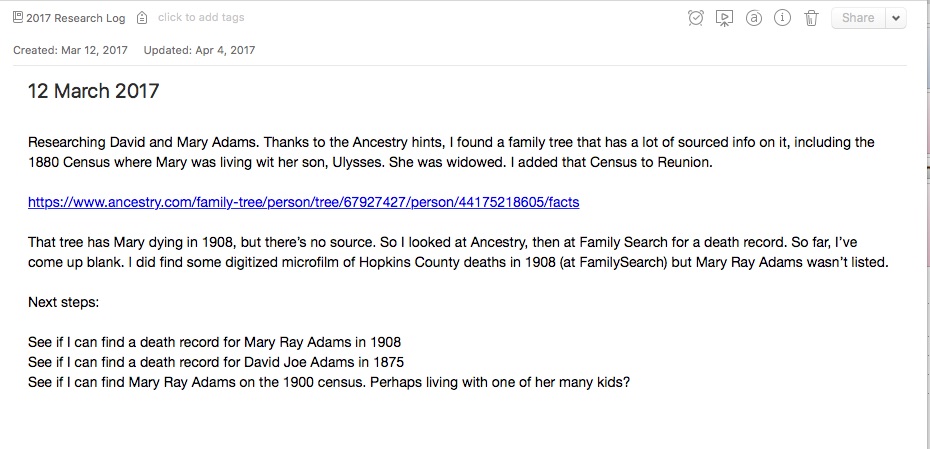
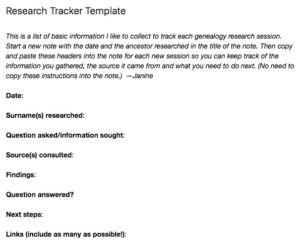
My genealogy research logI used to use a template in Evernote, one that I created when I was partnering with the dear departed Springpad. (I put that template at the top of this post; click on the image to make it bigger.) But I find I do better writing free form–I think it brings more information out of me.

Earlier this year I was experimenting with using the Log function in Reunion, also writing free-form notes, but I’ve discovered I prefer Evernote. I use Evernote on a daily basis for various aspects of my life and business, so I’m very comfortable with it.

I should mention that one downside to using Evernote as a research log is that it’s not sortable. It is searchable and taggable, but I can’t sort it like I could a spreadsheet. So far that hasn’t been an impediment to me.

I don’t think there’s any one right way to do a research log, but I’m pretty sure there are better ways than mine. But it’s working well for me at the moment.

If you are a spreadsheet person and aren’t intimidated by the opportunity to enter a lot of data, by all means check out Thomas MacEntee’s amazing research log spreadsheet.

Also, if you haven’t already feel free to join my Genealogy Research Loggers Facebook group for more conversations about research logs (as well as some samples from others).

For detailed information on how I organize my own genealogy research (including my research log), check out my Orderly Roots Guide, How I Do It: A Professional Organizer’s Genealogy Workflow, available for $19.99.
Filed Under: Challenges, Genealogy tips, Organizing, Technology Tagged With: Evernote, excitement, genealogy tools, organizing aids, research, research log, resources

My digital workflow

March 24, 2017 By Janine Adams 26 Comments

Digital workflow for genealogyWhen Brooks Duncan and I spoke at RootsTech last month about going digital with genealogy research, it became apparent to me from the questions that digital workflow is an individual thing. I’ve developed a work flow that works well for me, so I thought I’d share it here. I’m not suggesting I do things The Right Way (I don’t know if there is a right way, especially for hobbyists), but I wanted to show you what works for me. I know that I love seeing examples of how people handle their own workflow, so in the spirit of sharing, here’s mine.

When I find a digital document online–let’s say it’s a census document that I found at Ancestry–I take the following steps after ascertaining that it’s pertinent to my research:

  1. I click Save to download the document to my computer’s desktop.
  2. I rename the file immediately so that it reflects my simple file-naming protocol (year document type-ancestor name-location).
  3. I immediately file the document in my file structure (Genealogy/Surnames/[Ancestor’s surname]/[Ancestor’s name]
  4. I analyze the document and enter the first fact into my Reunion software.
  5. I create a source for that fact, using Reunion’s templates.
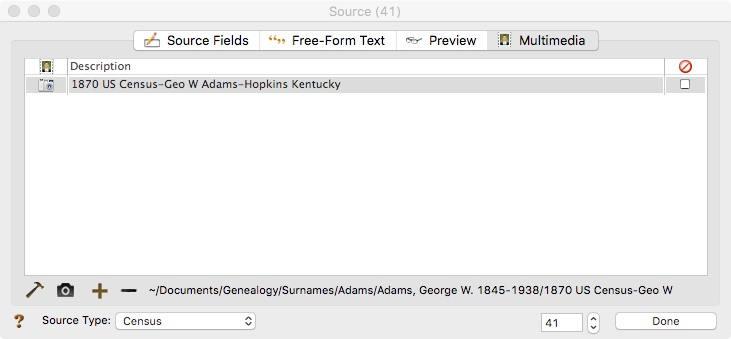
  6. I drag the image of the file into the Multimedia section of the Reunion source screen for that source. (That’s an example of the Reunion source screen at the top of this post.)
  7. I enter all other facts I find in the document into Reunion, using the same source number for each fact I find in that document.
  8. I click Preview in the Reunion source screen for that source and copy the citation and paste it into the metadata of the image file on my hard drive.

I added that last step after RootsTech, adapting a suggestion made by an audience member at our talk. I hadn’t thought about noting on the image what the source number and citation is. I think it’s a great idea and now I intend to go to back and do that for all my sources.

This eight-step work flow takes me from discovery through processing the document. It means that I don’t have stray documents on my hard drive with nonsensical file means. It also means I can easily a find a document when I want to. And it helps me see what documents are missing. Having the confidence that I can find a document I’ve saved allows me to feel good about not printing it, which cuts down on my paper clutter. (And, yes, I backup my hard drive daily, both to the cloud and to an external hard drive.) This workflow was about five years in the making, but I’m very satisfied with it!

For more in-depth information on how I organize my own genealogy, including a detailed look at my digital workflow, check out How I Do It: A Professional Organizer’s Genealogy Workflow, a 37-page downloadable available for $19.99.

Filed Under: Challenges, Organizing, Technology Tagged With: electronic files, organizing aids, record keeping, source documentation

Why keep a genealogy research log?

March 21, 2017 By Janine Adams 26 Comments

Why keep a genealogy research log?I’ve been writing about research logs quite a bit these days, particularly about my intention in 2017 to ingrain a habit of logging my research every time I do research. I created the Facebook group Genealogy Research Loggers (feel free to join us) and I really have been trying to be good about using a research log.
Recently, I received a comment on a blog post I wrote about genealogy research logs way back in 2012. Commenter Morag apparently stumbled on that post earlier this month and left this comment:

I don’t understand the value of a research log. Do you have any good posts about that, by you or someone else?

I don’t think I’ve ever written any great posts on the why of a research log. To me the value of keeping track of your research is intuitive and it’s always gone without saying. But then I realized it was a question worth addressing. So I told Morag I’d write about my reasons and then ask the smart readers of this blog to comment with their own perspectives.

For me, I think it’s valuable to write down what I’ve researched at the end of each session for the following reasons:

  • It allows me to take stock of what I’ve done
  • It prompts me to write down next steps (which helps eliminate the paralyzing question of what to work on)
  • It helps me avoid repeating searches I’ve already done
  • It keeps track of things I would otherwise inevitably forget

This thought process begs the question of what a research log actually is. I’m gathering that the term means different things to different people. For me, a research log has always been simply a record of the research I’ve done, coupled with notes about potential future exploration. I don’t store my genealogy data or source citations in a research log. Those I keep in my family-tree software, Reunion. I keep my research log in Evernote, using a very simple template I created or sometimes just a free-form note. It’s informal and not shared with anyone. I have also been experimenting with using the Log feature in Reunion for a particular research problem, but I think I’ll go back to Evernote for everything.

I’ve learned through the Genealogy Research Loggers Facebook group that different people are comfortable with different formats, and I think that’s great.  I think the best research log format is one that is simple enough that you’ll actually use it and complex enough to provide you with the information you need.

But getting back to the original question, why do you think it’s important to keep a research log? Please share!

Filed Under: Challenges, Organizing Tagged With: genealogy tools, research, research log

It’s Organize Your Home Office Day!

March 14, 2017 By Janine Adams 5 Comments

Thanks to an email from Thomas MacEntee, who is so organized he’s always on top of things like this, I learned that today has been named Organize Your Home Office Day.

In that email, Tom sent out a great list of resources for organizing your genealogy space. I am so grateful that Organize Your Family History is included on that list!

So, in honor of Organize Your Home Office Day, I challenge you today to look around your home office (genealogy or otherwise) and assess the following:

  • Are there stray papers that could be filed?
  • Do the items that are stored on your desk deserve to be there?
  • Do you have post-its or notes pinned to a bulletin board that have aged out?
  • How are you doing on office supplies? Are you about to run out of anything?
  • Do you have any shredding to do?
  • Can you put away items that belong in other rooms?

If you can say yes to any of those questions, I encourage you to pick three of them to address right now.

I’m convinced that most of these tidy-up type of projects take much less time than we expect them to. And they reap big benefits.

Two weeks ago, a TV reporter came to my home office to interview me for a story on paper clutter. (I’d post the link, except I haven’t found one yet.)

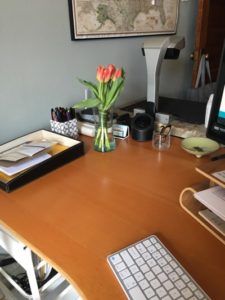
Looking at my office through his eyes, I saw all sorts of items that had made their way into the space that I’d barely even noticed. You can bet I put a little effort into tidying up my home office before he arrived. (I even bought some flowers!) That’s a picture of my desk that morning at the top of this post.

True confession: My desk looked great that day but as I look it this morning, two weeks later, it doesn’t look so great. As soon as I post this, I’m going to set a timer for 15 minutes and try to get it back into shape before the timer goes off. I think I’ll succeed. The place looked ship shape within ten minutes!

Even if you’re not reading this on March 14, I encourage you to do this assessment of your office and then take action for just a little while to address a few things on the list. Because really, every day can be Organize Your Home Office Day, can’t it?

Filed Under: Challenges, Organizing Tagged With: organizing aids, Thomas MacEntee

  • « Go to Previous Page
  • Page 1
  • Interim pages omitted …
  • Page 33
  • Page 34
  • Page 35
  • Page 36
  • Page 37
  • Interim pages omitted …
  • Page 69
  • Go to Next Page »

about me

I'm Janine Adams, a professional organizer and a genealogy enthusiast. I love doing family history research, but I find it's very easy for me to get overwhelmed and not know where to turn next. So I'm working hard to stay organized and feel in control as I grow my family tree.

In this blog, I share my discoveries and explorations, along with my organizing challenges (and solutions). I hope by sharing what I learn along the way I'll be able to help you stay focused and have fun while you do your research, too.

tags

30 x 30 Adams amy johnson crow anniversary Brown cemetery census Civil War conferences connections dna electronic files Evernote excitement Family Curator family photos genealogy tools getting started goals How They Do It Igleheart Jeffries keepsakes learning opportunities maps newspapers NGS organizing aids overwhelm paper files planning quick tips rasco record keeping research research log research trip resources RootsTech social history source documentation Stacy Julian technology time management vital records

join the facebook community!

join the facebook community!

My organizing business

Learn more about my organizing business, Peace of Mind Organizing®.

Subscribe by RSS

  • RSS - Posts
  • RSS - Comments

© 2026 Janine Adams


Loading Comments...
