• BLOG
  • ABOUT
    • Privacy Policy

Organize Your Family History

Stay focused and happy while exploring your roots

Creating a research log habit

December 27, 2016 By Janine Adams 11 Comments

Creating a research log habitI’ve been doing genealogy research long enough to know the value of keeping a research log. Yet I really resist it. I’m not sure why and it’s driving me a little crazy. I was thinking about it this morning as I was walking my dog and I vowed to amend my 2017 genealogy goals to add this important goal:

  • Create a habit of logging each research session

I think one of the reasons I’ve resisted using a log is that I find myself a little intimidated by complicated spreadsheets. The research log created and shared by Thomas MacEntee is a thing of beauty. Used regularly and properly it would elevate anyone’s research. Yet the idea of filling it out is just too much for me. And so I’ve been very hit or miss on writing down what I’m researching.

On my walk this morning, it hit me that a research log is like any organizing system: The very best one is the one you will use. It’s not a one-size-fits-all thing. There’s no right way to do it. The important thing is to just do something.

When I got home, I mindmapped what a simple research log I might create for myself would look like. Then I looked back at my previous attempts, all in Evernote, and I realize I actually have something in place that I can just pick up and start using again.

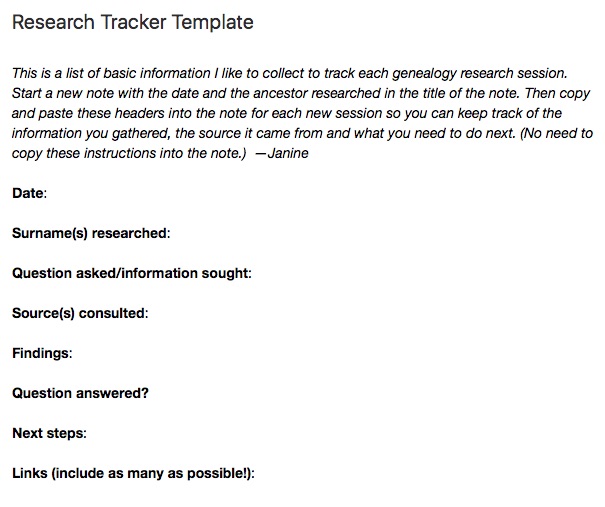
Back in late 2013, I partnered with the personal organizer app Springpad (RIP Springpad!) and created a Family History Organizer custom notebook. Part of it was research tracker template, a very simple form to track what you’ve done in each session. A Research Log Lite, if you will. I think I never felt my research tracker template was good enough to qualify as a research log and I didn’t fully commit to it. (I’ve blogged about my attempts.) But now I feel that if I use it regularly, I’ll actually have a nice body of knowledge. I’m going for it.

Today’s the first day of a new focus on keeping a research log. I created a 2017 Research Log notebook in Evernote, which is my preferred place to keep track of information (genealogy-wise and otherwise). I revised the original research tracker template a little and placed in my 2017 Research Log Notebook. (That’s the template, in its entirety, up in the top of this post. Click on the image to see it larger.)

I created my first note in the notebook, titling the note with today’s date and the names of the ancestors I researched. I copied the template into the note and filled it out. I tagged it with the ancestor’s surname (Adams) and created an “Adams RL tag”, so I can easily pull up all my research log notes about the Adamses.  I hope this is the beginning of a wonderful habit.

Bonus! I made the research tracker template, public, so you can add it to your own Evernote account if you want to give it a try.  Just click on the link and it should open up in Evernote for you. (I’m a novice at public Evernote notes, so if it doesn’t work for you, please let me know and I’ll figure it out.)

I’m always excited about creating new habits in the new year; I hope to be reporting here that it’s become ingrained!

I’m curious: Do you keep a research log? If so, in what format?
Filed Under: Challenges, Genealogy tips, Organizing, Technology Tagged With: Evernote, excitement, genealogy tools, organizing aids, research, research log, resources

Transpose shutting down December 9

November 8, 2016 By Janine Adams 4 Comments

I have posted here about Transpose, the app I have used to create custom forms, including some forms for my genealogy research.

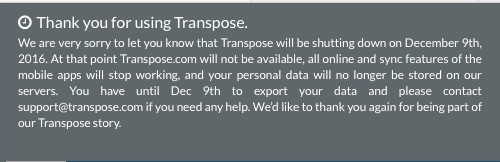
When I logged in this morning to access some information, I was really disappointed to see the following banner at the top of the site:

transposeclose

I wasted no time exporting my data into spreadsheets or pdfs, as appropriate, so I’ll lose nothing. But I will miss this very easy way to to gather information.

I am getting so tired of hopping on the bandwagon of great apps that then fold (see Springpad). I hope and trust that Evernote is here to stay because I have loads of information stored there. I am encouraged by its popularity and the fact it has a multi-tiered paid model.

But still. This strengthens my resolve to store as much data as possible on my hard drive, rather in the cloud. (Though my resolve was shaken a little a couple of weeks ago when I had to do a clean reinstall of my operating system. It all worked out, though.)

If you starting using Transpose on my recommendation, I’m sorry. Please don’t forget to export your data before December 9!

Filed Under: Genealogy tips, Organizing, Technology Tagged With: genealogy tools, organizing aids, record keeping, research, technology

Find help at National Archives’ new History Hub

October 28, 2016 By Janine Adams 2 Comments

historyhubimageI listened to a portion of the National Archives and Records Administration’s Virtual Genealogy Fair this week. It was terrific. For me, there were two big discoveries and a revelation.

First the discoveries:

  1. The talks, slides and handouts from this year’s Virtual Fair — as well as those from the last three Fairs–are freely available online. So if you missed a talk, or just want to revisit one, it’s there for you. (That took the pressure off to sit at my desk all day!) Click to access the 2015 Fair. Here’s 2014. And 2013.
  2. The National Archives has a new website, History Hub, in beta mode. I think it’s really promising. (More on that in a moment.)

I’ll share the revelation with you next week.

I don’t know about you, but I have always found the NARA website to be challenging to navigate. I know there’s info there (and am I’m so glad I figured out how to find my ancestors’ Civil War pension files), but tracking it down can take some effort.

The talk called Innovative Online Resources and Tools to Help with Your Genealogical Research provided some insight into how to navigate the NARA website. It’s worth checking out the talk if you find the NARA website challenging. In the first part of the talk, presenter Sarah Swanson, pointed out ways to navigate the site, and she revealed the many aspects of the site I had overlooked (including a link to the NARA YouTube channel and 16 NARA special-interest blogs!). I’m going to go through the session slides again and familiarize myself with how I can access the vast online holdings. It will also help me plan a research trip to NARA in Washington, DC, perhaps next year.

The second of the talk was about History Hub, which is described as “A support community managed by the National Archives for researchers, citizen historians, archival professionals, and open government advocates.”  The speaker, Kelly Osborn from NARA’s Innovation Office, likened History Hub to the Apple Support Community. If you’ve ever had a problem on an Apple product and googled it, you’ve probably ended up in the Apple Support Community where your question might be answered by an Apple employee or by a fellow Apple user. You might have asked the question yourself or got you needed by reading the answers to someone else’s question. That’s what the National Archives wants to do with History Hub–it’ll be a place where people can get their genealogy questions answered and learn from others’ questions. I think it’s an amazing idea.

Of course, History Hub is the kind of site that will only get better with age as more people use it and offer their expertise. The idea that I can tap into the knowledge of a subject matter expert from the National Archives–as well as other knowledgeable people–is really exciting. The site is searchable and has discussion boards, blogs and community pages. I think it has huge potential and I think it’s really great that the National Archives is embracing innovation this way.

By the way, if you’re getting an error message when you click on the History Hub link, try it in another browser. I found that the link works in Safari and Chrome, but not in Firefox, at least on my computer.

Filed Under: Excitement, Genealogy tips, Technology Tagged With: learning opportunities, resources, technology

Are there loose documents on your hard drive?

October 19, 2016 By Janine Adams 10 Comments

beachballI had to reinstall the operating system on my MacBook last week. (I paid someone to do it for me.) If you’re interested, you can read  some details about that in this blog post on my organizing blog. As a result, I spent some time focusing on the contents of the Documents folder of my hard drive before the big day.

I thought my genealogy documents were quite well organized on my hard drive. (I organize my documents in a Genealogy folder and Surname subfolder, by surname, then person.) Turns out, they weren’t quite as well organized as I thought. I was surprised to see that I had all sorts of loose files, some of them properly named, others with gibberish image names, floating around on my hard drive. Many were in my Downloads folder. Some were in the Genealogy folder. There are probably more elsewhere that I haven’t yet found.

It was actually quite a boon. Many of them I had not processed into my Reunion software. Some offered clues and insights. And it feels so much better to know things actually are well organized. (Or at least to have the illusion they are.)

If you download documents from Ancestry or elsewhere or if you scan documents into your computer, it might be worth 15 minutes to poke around your hard drive and see if there are any stray documents that didn’t make it into the proper folder!

Filed Under: Challenges, Genealogy tips, Technology Tagged With: electronic files, technology

  • « Go to Previous Page
  • Page 1
  • Interim pages omitted …
  • Page 14
  • Page 15
  • Page 16
  • Page 17
  • Page 18
  • Interim pages omitted …
  • Page 27
  • Go to Next Page »

about me

I'm Janine Adams, a professional organizer and a genealogy enthusiast. I love doing family history research, but I find it's very easy for me to get overwhelmed and not know where to turn next. So I'm working hard to stay organized and feel in control as I grow my family tree.

In this blog, I share my discoveries and explorations, along with my organizing challenges (and solutions). I hope by sharing what I learn along the way I'll be able to help you stay focused and have fun while you do your research, too.

tags

30 x 30 Adams amy johnson crow anniversary Brown cemetery census Civil War conferences connections dna electronic files Evernote excitement Family Curator family photos genealogy tools getting started goals How They Do It Igleheart Jeffries keepsakes learning opportunities maps newspapers NGS organizing aids overwhelm paper files planning quick tips rasco record keeping research research log research trip resources RootsTech social history source documentation Stacy Julian technology time management vital records

join the facebook community!

join the facebook community!

My organizing business

Learn more about my organizing business, Peace of Mind Organizing®.

Subscribe by RSS

  • RSS - Posts
  • RSS - Comments

© 2026 Janine Adams


Loading Comments...