• BLOG
  • ABOUT
    • Privacy Policy

Organize Your Family History

Stay focused and happy while exploring your roots

Registration open for RootsTech 2023 (in-person and virtual!)

October 25, 2022 By Janine Adams Leave a Comment

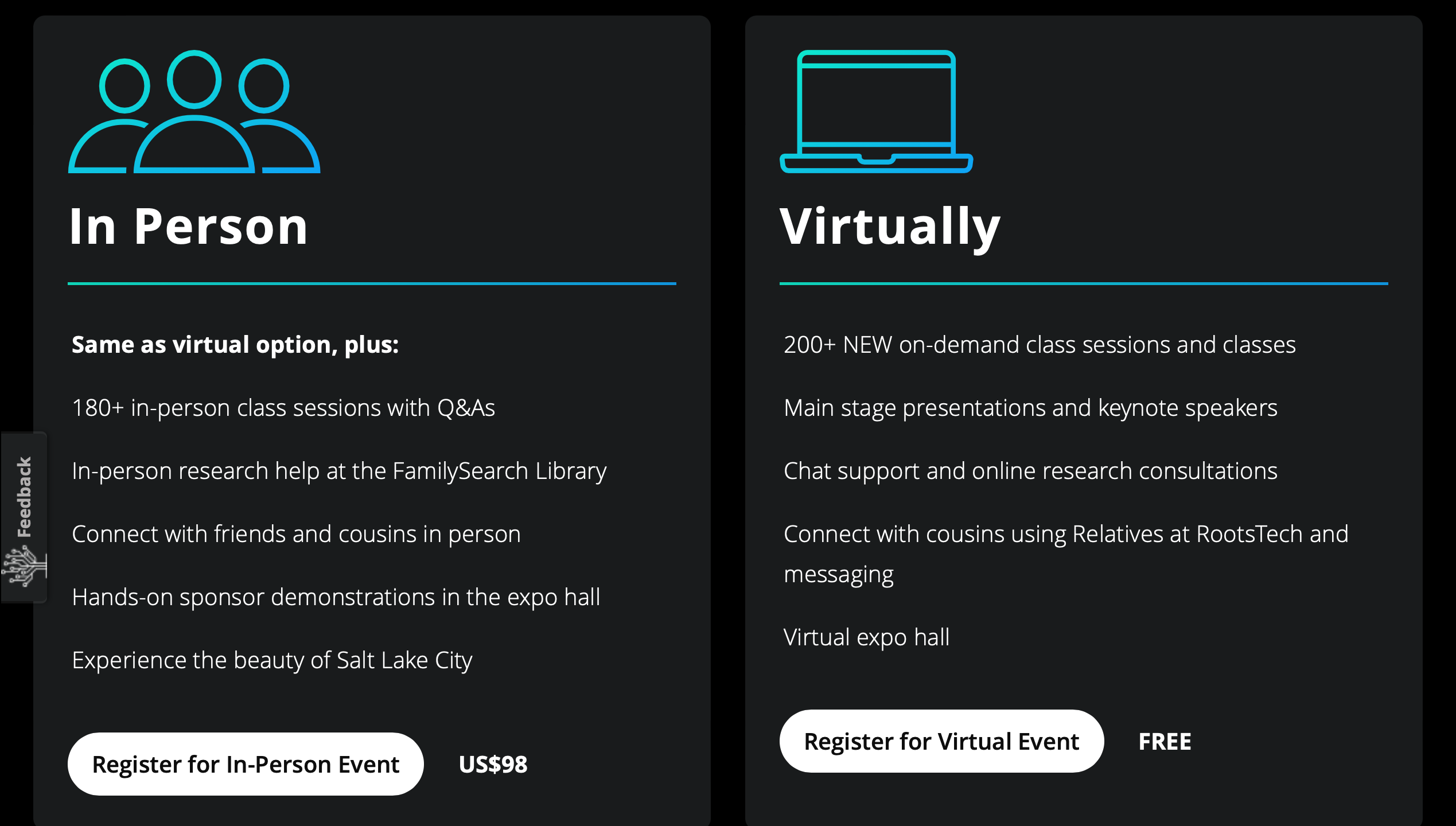
Interested in attending RootsTech 2023? You have a decision to make. After two years of a virtual conference, RootsTech will be back in 2023 as an in-person event. But the organizers have taken it to a new level: In addition to the traditional in-person conference they will also offer a full virtual experience, with over 200 on-demand classes.

The conference will be held March 2 to 4, 2023 in Salt Lake City, Utah. You can register (for either in person or virtual) on the registration page. The fee for the in-person conference is $98 and registration for the virtual conference is free.

I have to admit, I’m torn. I love RootsTech and all the energy that comes from being with thousands of fellow genealogy enthusiasts and attending classes live and in person. Despite my best intentions, I did not take full advantage of the offerings of the last two virtual RootsTech conferences. (The good news is that it’s not too late to see last year’s sessions!)

I attended (and spoke at) RootsTech 2020, which was held at the very end of February right before the world shut down. I didn’t get sick. I’ve had COVID once and am triple boosted. But I’m still a little wary of attending a large conference. And, of course, with travel expenses, attending the conference in person is a bigger financial commitment. So I may register for the virtual event today and give myself a deadline to decide about attending in person.

How about you? Are you planning to register for either option? If I decide to attend in person, I’ll post here and perhaps we can have a meet up.
Filed Under: Excitement, Technology Tagged With: conferences, learning opportunities, RootsTech

Giving MyHeritage photo tools a spin

April 20, 2022 By Janine Adams Leave a Comment

There are so many amazing options for online research. Some, like FamilySearch and Chronicling America, are free. Others are fee-based. I’ve subscribed to Ancestry for a dozen years or more and always feel like it’s a worthwhile investment. More recently, I’ve started subscribing to Newspapers.com and just reupped. (I love newspaper research.)

But it was not until recently that I subscribed to MyHeritage. I was actually given a subscription to MyHeritage by the company gratis. They approached me about doing a Facebook Live presentation and about partnering with them for a week-long special promotion to my readers. (That promotion will be going out on Friday–if you’re not already on my mailing list, I encourage you to subscribe so you’ll get the offer in your inbox). When they asked me to partner with them, I requested free access so I could try it out before recommending it to my readers.

So I’ve been using MyHeritage a bit–not a ton because I haven’t had a lot of time for researching in the past couple of months. But I love that they have rich databases (16.9 billion records!) and also some pretty spectacular photo tools.

To test those out, I uploaded a couple of photos from my hard drive.

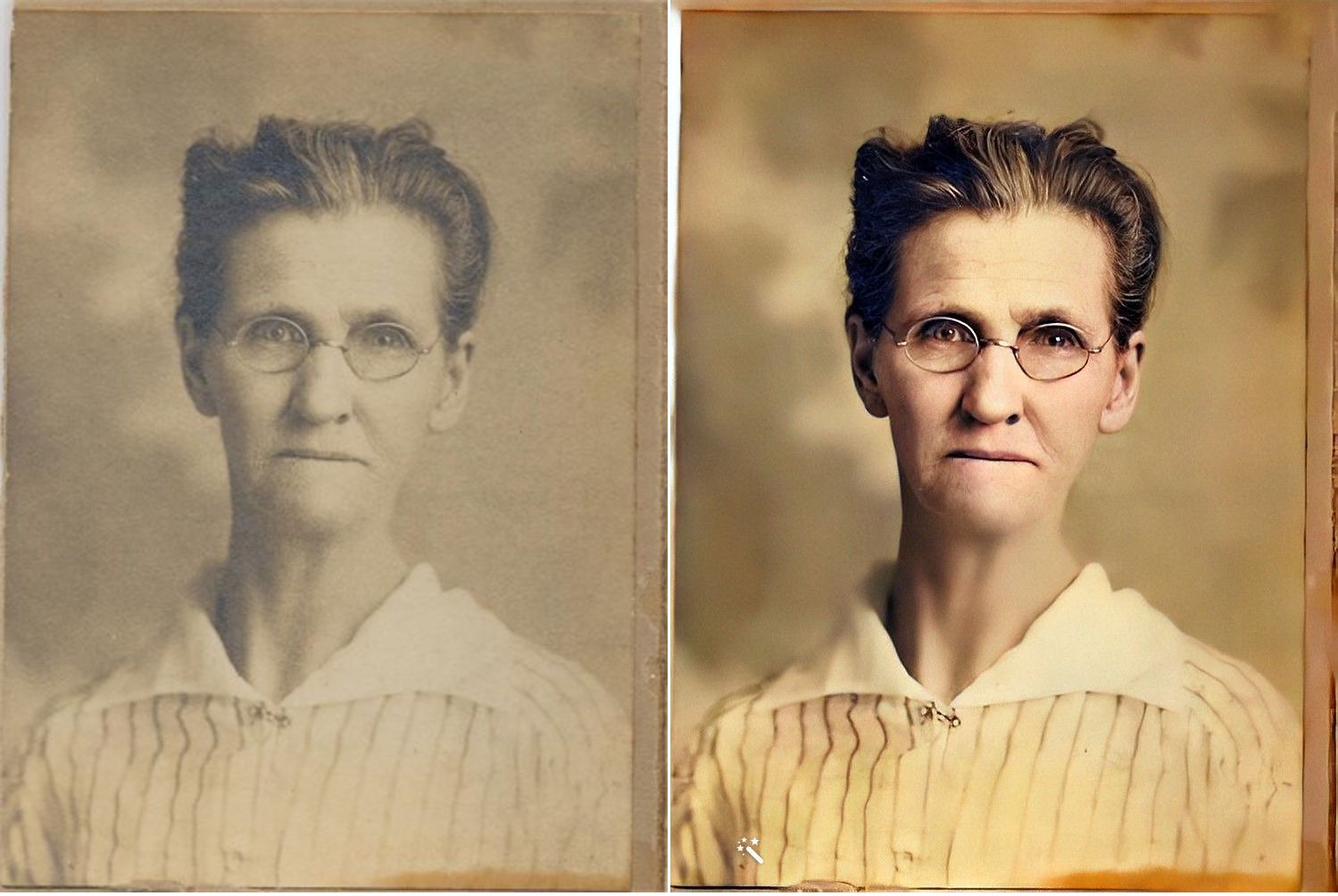
First, here’s a sepia-toned photo of my second great grandmother, Jennie Nebergall Wheeler (1857-1933) taken in 1917. I uploaded it to MyHeritage and used the Colorize, Repair and Enhance tools to improve the photo. The results are pretty remarkable, in my opinion.

I now feel like I can look into Jennie’s eyes and imagine a conversation with her, something that never felt possible with the old photo.

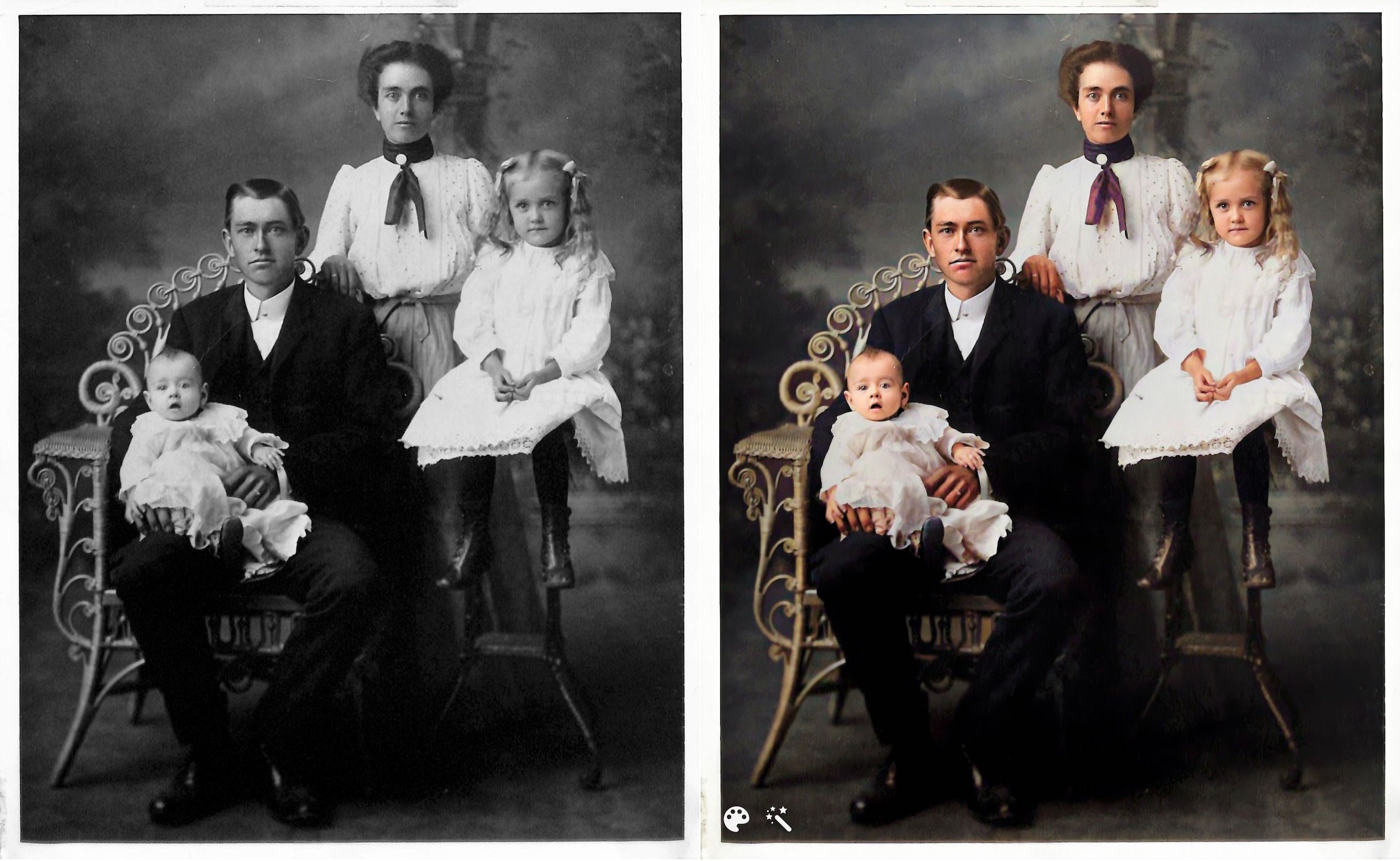
Here’s another example. This is the William Reese Rasco family in 1907. This photo graced the mantle at my aunt’s house for many years. My aunt recently moved and gave this photo to me. I consider it one of my treasured possessions. The baby in the photo is my maternal grandmother, Beatrix Rasco Adams (1907-1987).

This one feels a little different to me. It might be because I’m so familiar with the photo and the fact that the original photo is black and white (rather than sepia), but the improvement doesn’t feel quite as dramatic. It is fun to see what color my great great grandmother’s scarf might have been, though!

I downloaded the improved photos to on my hard drive and am storing them with the originals with the word Enhanced added to the end of the file name. I can’t wait to upload more photos. Since these two photos are portraits, improving them didn’t add a whole lot of information. But I know from watching Photo Detective Maureen Taylor’s Facebook Live for MyHeritage that these enhancements can bring out clues in photos that aren’t easily seen in the originals.

Another photo feature that MyHeritage has introduced is animation. You upload a still photo and they will animate the individual or individuals in the photo. Here’s an example, using the photo of my great grandmother Jennie.

https://organizeyourfamilyhistory.com/wp-content/uploads/2022/04/1917-photo-Jennie-Nebergall-Wheeler-location-unknown-Color-Restored-Enhanced-Repaired-0-Enhanced-Animated.mp4


And here’s my great aunt Lessie Rasco, from the portrait above.

https://organizeyourfamilyhistory.com/wp-content/uploads/2022/04/Rasco-2-Enhanced-Animated.mp4

I’m a bit on the fence about the utility of this one. But it is pretty fun and I imagine it might make sharing the photos a little more interesting for non-genealogy-focused relatives

Have you used these photo tools? What do you think?

Again, if you’re on my mailing list, you’ll receive an email from me on Friday with a special link for a really great discount on a MyHeritage subscription (for new MyHeritage subscribers only.) Full disclosure: they will share the revenue from your subscription with me. If you aren’t on the list, you can sign up here or in the form that pops up when you scroll to the bottom of this page. When you sign up for the mailing list, you’ll also get a short series of daily emails from me, along with a end-of-the-month email with links to the previous month’s blog posts. You can unsubscribe at any time.


Filed Under: Excitement, Genealogy tips, Preservation, Technology Tagged With: family photos, genealogy tools, myheritage, photos

How to watch RootsTech 2022

March 3, 2022 By Janine Adams Leave a Comment

RootsTech 2022 started today! Like last year’s conference, it is completely virtual and completely free. I’ve been traveling today, so I haven’t had a chance to experience a whole lot of the classes, but I’m impressed with what I see.

The great news is that most of the sessions will be available to watch until next year’s RootsTech conference (which may or may not be held in person but is promised to have a virtual component regardless). You can watch as many of the on-demand classes as you want now and save others for later. (I have every intention to watch as many as I can now before life takes over and I don’t make time to watch.) Live keynotes are available on a schedule. The keynotes should be available to watch after the conference.

But there are features that I think are going to be available only during the conference or perhaps the rest of the month. They include:

  • Chat, where you can interact with like-minded genealogists
  • Relatives at RootsTech, where you can see how many people who are registered for the conference are related to you through the Family Search tree. So far, I have 39,833 relatives registered for the conference! (Relatives at RootsTech goes away on March 25.)
  • Searching for your friends who are attending to see how you might be related.
  • The ability to chat with representatives of the exhibitors in Virtual Expo Hall

There are lots of ways to approach participating in RootsTech, but here’s what I suggest (and this is what I plan to do this weekend when I’ll have more time):

  1. Go to the RootsTech website.
  2. Login to your Family Search account. Or create one if you don’t already have one. It’s free.
  3. Click on Menu, then Relatives at RootsTech to find your relatives and see how you’re related. If you want, you can send relatives a message  by clicking on a peson’s name, then Send a Message under their name.
  4. If you’re feeling confused, watch the Website Tutorial by clicking the button near the top of the screen.
  5. Check out the schedule for the Live keynotes.
  6. Click on Sessions and search or browse for on-demand sessions.
  7. Add sessions to your Playlist, so you watch them at your leisure. You can get to your playlist by clicking on the little “play” triangle at the top of the screen, situated between Connection and Chat. (I just discovered that my 2021 playlist is still available! I bet yours is too.)
  8. Explore the Virtual Expo Hall. You can browse or search for particular vendors.
  9. Start a private chat, search for a chat room for a particular group or interest or ask the folks at FamilySearch anything you want through the Chat function. You can get there by clicking on the text bubble icon at the top menu on the main page.

When I’ve spoken at and attended  in-person RootsTech conferences I’ve always been amazed at well organized these conferences are. Last year’s virtual conference was an organizational achievement and they’ve even made improvements this year. These folks are unbelievable. Enjoy!

I want to be clear that I am not affiliated with RootsTech. I’ve been a speaker twice and I’m an enthusiastic  attendee, but otherwise I have nothing to do this amazing conference. I just want to make sure my readers are making the most of it!


Filed Under: Excitement, Technology Tagged With: conferences, learning opportunities, RootsTech

RootsTech starts in 6 days: Start planning now!

February 25, 2022 By Janine Adams 4 Comments

The RootsTech 2022 website is now live! That means you have just under a week to plan your RootsTech experience by creating a playlist of the classes you want to watch. You can also take note of the main stage speeches and mark them in your calendar if you want to watch them live.

While my 2021 playlist is gone, I was excited to discover that the 2021 talks are still available for viewing. You can find them by clicking on Sessions and scrolling down in the Filters area on the left side to “Year.” Select 2021 and you’ll see that there are 1767 talks available to view now.

You can also filter by topic, research location, speakers or other filters and then within those results filter by year. You can add both 2021 and 2022 classes to your playlist (or watch the 2021 classes now). I don’t know  whether the 2021 classes will be still be available when RootsTech 2022 starts next week. As I mentioned in my post last week, I tend to think they’ll be removed.

For sessions that will be presented live, the time is listed for the session on the search result. My understanding is that the pre-recorded 2022 sessions will be made available when RootsTech starts, which is Thursday, March 3, 2022 at 9 am Central Standard Time (GMT -6). That’s 11:00 AM in Rio, 6:00 PM in London; 12:00 PM in Tokyo and 2:00 am [Thursday] in Sydney.

Look for download links for class syllabi at the bottom of each class listing. Based on my poking around, it looks to me like  syllabi for 2022 classes won’t appear until the conference starts. But you can download syllabi for 2021 classes you’re interested in now.

The array of classes available is truly impressive. And I know it can feel overwhelming. Personally, I’ll get past that overwhelmed feeling by planning ahead and creating a playlist. While I know I can watch these classes for about a year, I’m going to try hard to take in RootsTech 2022 content while the conference is going on, so I can be part of the global experience and so I actually watch the classes. I found that I did not watch the 2021 content I intended to watch (though I did watch some last week!) and that disappoints me.

Once the conference starts, I’ll be eager to find my Relatives at Rootstech, visit the Virtual Expo Hall and check out the chatrooms for the classes I’m interested in.

If you have questions about RootsTech, the FAQ has lots of great information. You might find the post I wrote about the 2021 virtual conference helpful. I plan to write something similar once this year’s conference begins and I can check out the features.

If you haven’t registered yet, just go to www.rootstech.org and click on Register. It’s free and easy! Let me know in the conference whether you’re planning to attend. Who knows, we might find out we’re related!


Filed Under: Challenges, Excitement, Genealogy tips, Technology Tagged With: conferences, learning opportunities, RootsTech

  • « Go to Previous Page
  • Page 1
  • Page 2
  • Page 3
  • Page 4
  • Page 5
  • Page 6
  • Interim pages omitted …
  • Page 27
  • Go to Next Page »

about me

I'm Janine Adams, a professional organizer and a genealogy enthusiast. I love doing family history research, but I find it's very easy for me to get overwhelmed and not know where to turn next. So I'm working hard to stay organized and feel in control as I grow my family tree.

In this blog, I share my discoveries and explorations, along with my organizing challenges (and solutions). I hope by sharing what I learn along the way I'll be able to help you stay focused and have fun while you do your research, too.

tags

30 x 30 Adams amy johnson crow anniversary Brown cemetery census Civil War conferences connections dna electronic files Evernote excitement Family Curator family photos genealogy tools getting started goals How They Do It Igleheart Jeffries keepsakes learning opportunities maps newspapers NGS organizing aids overwhelm paper files planning quick tips rasco record keeping research research log research trip resources RootsTech social history source documentation Stacy Julian technology time management vital records

join the facebook community!

join the facebook community!

My organizing business

Learn more about my organizing business, Peace of Mind Organizing®.

Subscribe by RSS

  • RSS - Posts
  • RSS - Comments

© 2026 Janine Adams


Loading Comments...