• BLOG
  • ABOUT
    • Privacy Policy

Organize Your Family History

Stay focused and happy while exploring your roots

How I processed my Civil War pension files

April 14, 2025 By Janine Adams 4 Comments

I’m fortunate to have three ancestors who fought on the Union side in the Civil War and for whom I was able to obtain pension files from the National Archives. Ten years ago, I wrote a post about how I processed those files, starting with creating a robust source citation. I got good feedback on the post, so I thought I’d resurrect it in case newer readers would find it helpful. The pension files truly are treasure troves of information and the painstaking time I spent going through them paid off. If you want to request your ancestor’s pension file, you can do so on this page of the NARA website.
Processing civil war pension filesAs I mentioned a couple of weeks ago, I received my 3d great grandfather’s Civil War pension files from the National Archives in record time. I’d been prepared to wait 45 to 120 days and it arrived the week after I submitted the request online.

I dug right in and started processing the information. I was so grateful that I had attended the class Anatomy of a Military Pension, presented by Certified Genealogist Julie Miller at the National Genealogical Society’s annual conference that month. She provided step-by-step instructions of what to do with a military pension.

So the day after I received that 65-page pension file, I did what Julie suggested. I put the documents in chronological order and I assigned a number to each. Then I figured out a citation for the overall file and a  citation for each of the numbered documents.

Coming up with a proper citation was a bit of a challenge and I emailed Julie, who was kind enough to share the citation she uses for these files. (She had given us that info in the talk, but I hadn’t written it down.)

Here’s the citation I’m using for the overall pension file for my ggggrandfather, Richard Anderson Jeffries:

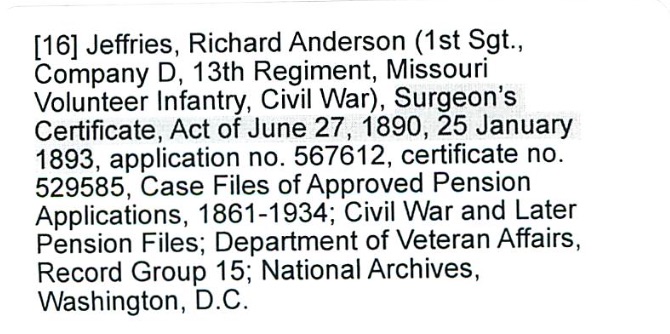
[278] Jeffries, Richard Anderson (1st Sgt., Company D, 13th Regiment, Missouri Volunteer Infantry, Civil War), application no. 567612, certificate no. 529585, Case Files of Approved Pension Applications, 1861-1934; Civil War and Later Pension Files; Department of Veteran Affairs, Record Group 15; National Archives, Washington, D.C.

278 was the next number in my source list in Reunion, my family tree software. Each of the individual documents is numbered, starting with 1, and has its own citation. My intention is that when I enter a fact into Reunion, I’ll use Source 278, but I’ll include in the detail field which of the 26 individual documents that particular fact came from.

I created citation labels for each of the documents and affixed them to the appropriate pages. (That’s the citation for document 16 above.) Then I scanned the whole document into a pdf. I elected to have one pdf, rather than 26 individual ones–time will tell whether that was a good choice. (Edited to add a year later: Yes! That was a great choice.)

The next step, according to Julie is to transcribe the documents. Yes, I’m going to type word for word exactly what is on the documents. Julie urged us not to skip that step because when we transcribe, we learn things we would not otherwise learn.

After I transcribe, I will abstract the documents, so I can tell at a glance what they are and what info is contained within each. And then I’ll enter the new-found facts into Reunion, my family-tree software.

That’s a lot of work, but I’m delighted to have learned how to be thorough with it. And I know I’ll learn so much about my ancestor.

I am so grateful to have this structure, because just a few days after receiving Richard Anderson Jeffries’s file, I received the pension file for my gggrandfather, George Washington Adams. That file is over 100 pages; I had to request and pay for the rest of the file (another 80 pages) to be copied–I’m still waiting for part two. That same week I received the third and final pension file, for another gggrandfather, Benjamin Franklin Igleheart. All three pension files, probably 250 pages, came within two weeks of my request.

If I did not have the structure Julie provided in that talk to thoroughly process the information, I know I would feel overwhelmed. I would probably skim the documents, pluck out a few easy-to-find facts, and put them away intending to get to them later. And I don’t know when later would be.

I have skimmed the most recently received pension files to get a preview what I’m going to learn. (G.W. Adams had a big dispute about the amount of his pension–an adversary in the Soldier’s Home turned him in for saying he was more disabled than he was!) But I’m not going to analyze them until I’m finished with Richard Anderson Jeffries. So that will be motivation to go through the process.

I think these pension files are going to be a great learning experience not just about my ancestors, but also about doing proper genealogical research. This feels great!
Filed Under: Challenges, Genealogy tips, Organizing Tagged With: Adams, Civil War, excitement, Jeffries, overwhelm, record keeping, research, source documentation

Contact that courthouse: It might pay off!

April 11, 2024 By Janine Adams 2 Comments

Not all genealogy documents are available on the internetIt can be challenging for me to pick up the phone or even send an email when I can’t find what I’m looking for online. But in 2017, when I originally wrote this post, I had a beneficial experience by doing just that. I thought you might appreciate this little nudge to step away from your online searching, so I’m running this post again.
Like many people, I rely primarily on documents I find by searching the internet. When do I library or cemetery research trip, I find information not available online, but when I’m in my office, I search online and if I don’t find what I’m looking for I typically move on.

I know it’s possible to contact courthouses or state archives for documents but over the years I’ve done little of that. In the last couple of weeks, however, I hit the jackpot when I took that extra step.

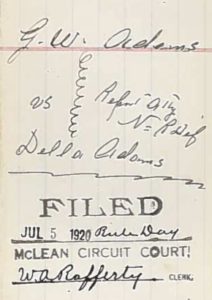
I’ve been working on transcribing the Civil War pension file of George Washington Adams, my 2nd great grandfather. In it was a divorce decree for his 1920 divorce from his second wife, Della. (I’m descended from his first wife, Henrietta.) That piqued my curiosity because it gave George custody of their “infant son” and the only son I knew about was 12 at the time of the divorce. I wondered if there was another son and also why the 75-year-old father was given custody over the 50-year-old mother. The decree referred to pleadings and depositions in the case and I wanted to get my hands on those. It was Christmas, so I couldn’t pick up the phone (and I don’t like picking up the phone), so I wrote a letter to the Circuit Court Clerk of McLean county, Kentucky.

To my delight, just a few days letter, she got back to me telling me that the documents I sought were in the State Archives and giving me a little extra information to make easier for the archivist to find them. She also gave me a phone number for the Archives. So I called and talked to a lovely young man and gave him a credit card number. That very same day he emailed me photos of the entire file. I think it cost me $8. If I’d wanted, he would have mailed a certified copy but I didn’t want to wait that long. (And get this: He added another divorce petition that I didn’t even know about! Six years into their 14-year marriage, Della filed for divorce from George, but she must have dropped it.)

The 30-page divorce file he sent had numerous depositions and probably sparked as many questions as it answered, but it’s another treasure trove. Turns out there was only one son from this marriage, Horace, who was indeed 12 at the time of the divorce. Apparently the word infant was used differently 100 years ago! But George went into the Old Soldier’s Home just two years later, so now I need to find out what happened to teenage Horace! [Note from 2024 Janine: I did find Horace on the 2020 census living with his older half brother.]

Neither the pension file nor this divorce file are available online, though I did order the pension file online. Both are outstanding sources of information about this ancestor. I’m processing the divorce file like I’m processing the pension file, by transcribing the documents and properly sourcing every fact I glean from them.

I encourage you to look beyond those documents available online, even if you’re not in a position to travel. There’s a whole world of documents that haven’t yet been digitized!

Filed Under: Challenges, Excitement, Genealogy tips, My family Tagged With: Adams, courthouse, research, vital records

Should you hang on to paper documents after scanning them?

December 7, 2023 By Janine Adams 4 Comments

Very little paper comes into my genealogy life since do almost all my research online. But in 2022 I cleaned out my parents’ home (they have both passed away) as well as my aunt’s (she’s in a nursing home) so I have some paper to think about. I wrote about this last year and in reviewing that post, I thought it valuable enough to run again. My feelings on the matter have not changed in the intervening year and a half!

I do most of my research online, so this hasn’t come up a lot. But this week I’m going through documents that had lived in my parents’ home and my aunt’s home and some of them are original vital records. I did my first group of ten a couple of days ago and scanned and processed them. And then I had to decide what to do with the originals.

This morning I went through the little stack one by one and followed my gut about those I wanted to file into the paper files I have left over from before I processed everything digitally and those I would feel comfortable discarding.

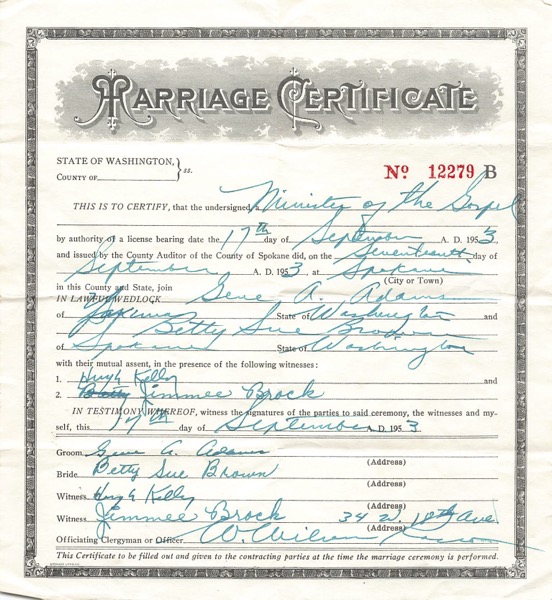
In truth, I could discard any of them, since I’ve captured the images. But my gut tells me to hang on to those documents that have original writing or signatures. An example is my parents’ marriage certificate, shown above. They were married by father’s uncle and I think he filled out the form. I don’t have a good, logical reason for this decision. It just feels right because these documents feel special. I have the space in my file cart and the files are already created, so it will be a simple matter to file them. If I have to create a new file folder label and put it on a folder to file something, I might feel like more trouble than it’s worth.

This is a matter of personal preference and I understand that my preferences might change. (And you may have a completely different preference.) If I end up with a lot more and it feels too laborious, I may revisit this criterion!

Filed Under: Challenges, Organizing, Reflections Tagged With: Adams, paper files, vital records

My process for downloaded documents

May 5, 2023 By Janine Adams 4 Comments

Life’s a little nuts right now, so rather than creating a new post, I’m re-running this post from October 20, 2017 in which I describe my workflow for a document I downloaded from the internet. Almost six years later, the process hasn’t really changed! For more detailed information on how I process digital documents, check out How I Do It: A Professional Organizer’s Genealogy Workflow, a 37-page downloadable pdf available for $19.99.

Last March, I wrote a post called My digital workflow that detailed what I do with a document I find on the Internet. (I never print it.) My digital workflow has not changed since then and it’s working out really well for me.

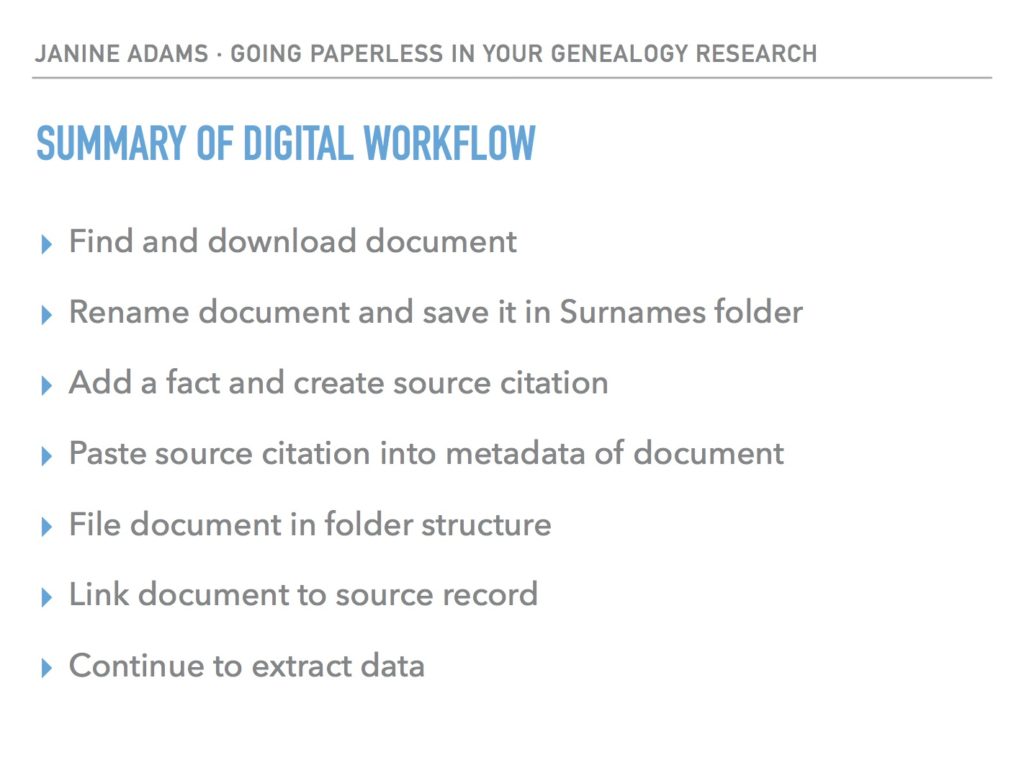
Last weekend, I did a talk at the St. Louis Genealogy Conference about going paperless and in my Powerpoint I included screenshots of the digital workflow and also a summary slide. The attendees asked for copies of the summary slide, so I decided to post it here.

The process is basically the same as my March post but I switched up the steps a little.

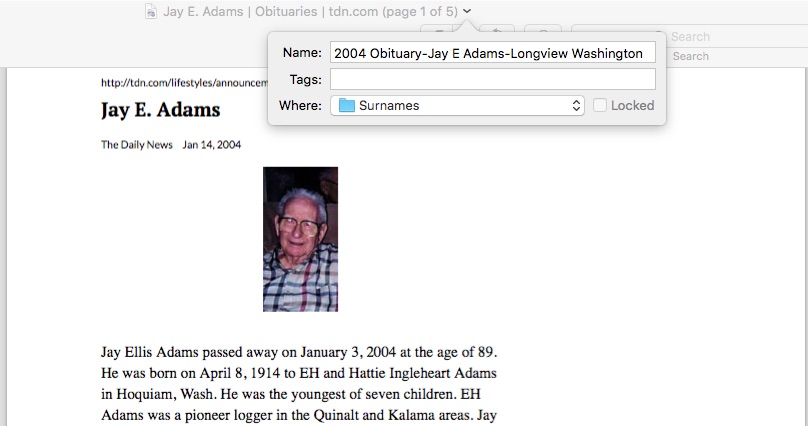
The example I used in my talk was my father’s uncle, Jay Ellis Adams (1914-2004). I had found his obituary online at the newspaper’s website. Here’s the workflow:

1. I click Print and, in the printer dialog box, Open in Preview (my Mac’s default pdf reader), which downloads the document to my computer. (If it had been a document at Ancestry, I would have clicked Save, then Save to My Computer.)

2. I immediately rename the file, using my file-naming protocol, which is Date Type of Document-Ancestor Name-Locality. I stick it into my Surnames folder, as a temporary holding place until I file it in step 6. I know that any unfiled documents in the Surnames folder require processing.


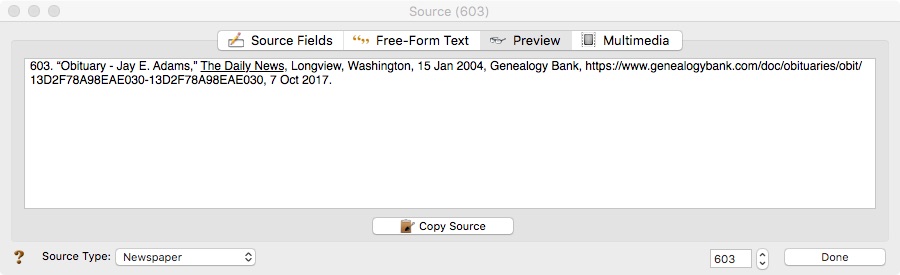
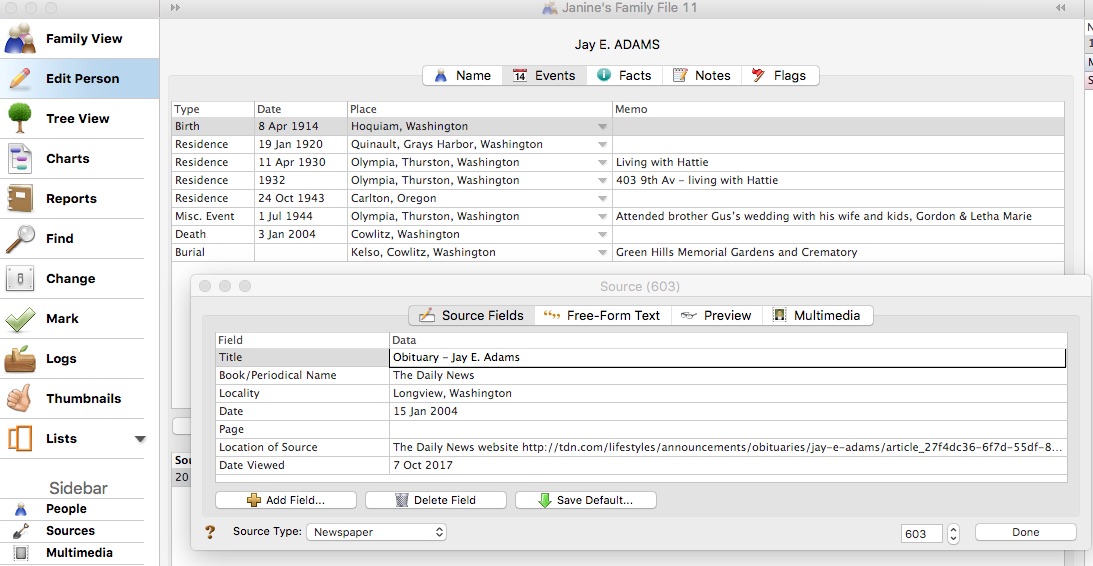
3. I select a fact from the document, add it to Reunion and create a source citation for it.


4. In Reunion, I click the Preview tab in the source record and then click Copy Source. (For the eagle-eyes among you, I originally found a transcript at Genealogy Bank and used that as the source citation. Then I decided to go to the newspaper’s website and download it from there, so I changed the source citation. But I was too lazy to take a new screenshot.)

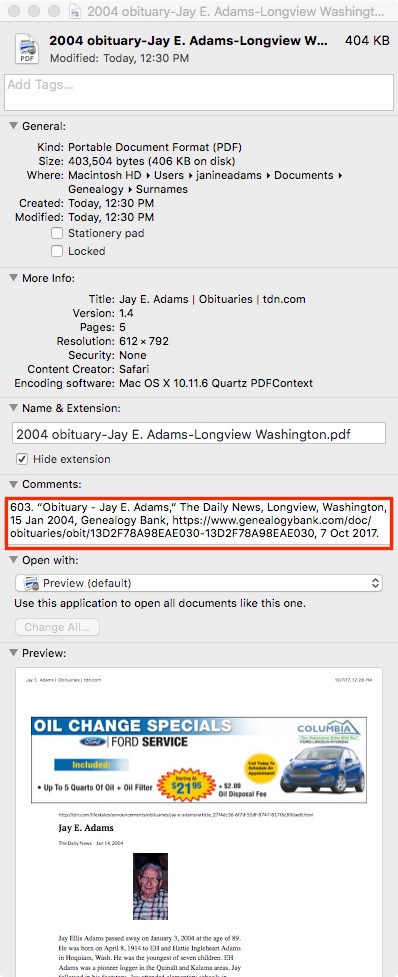
5. I paste the source citation into the metadata of the source document (the obituary) by Ctrl-clicking on the file and selecting Get Info from the menu that appears, then pasting into the Comments area.


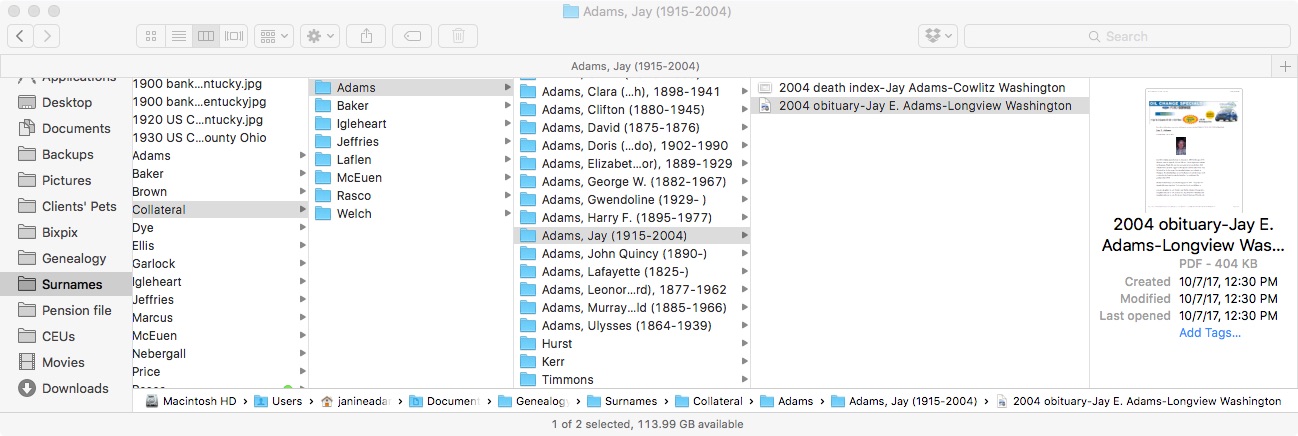
6. Then I file the document into my folder structure. My folder structure for collateral relatives is Genealogy/Surnames/Collateral/[Surname]/[Name of Ancestor (YOB-YOD)]. If the document  applies to multiple people, I duplicate it for each person and then drag it into the appropriate folder for each person. But I don’t take the trouble to rename it.

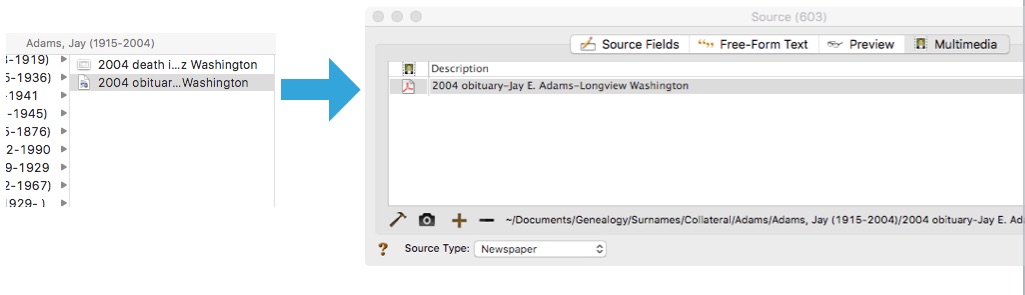
7. The final step is to drag the document into the Multimedia area of the source record in Reunion. This creates a link to the document so that I can open it up inside Reunion, which is very handy.


From there, I continue to extract information from the source document and add that it to Reunion. Every piece of information I glean from a single source document uses the same source number, no matter what person it applies to.

Here’s the summary slide:

This is the way I do and it works well for me. Of course, it’s not the only way to do it or perhaps the best way to do it. But I’m hoping you’ll find it useful to see my workflow. I’ve been processing documents this way for almost a year now and it’s working very well.

Again, for more in-depth information on how I organize my own genealogy, check out How I Do It: A Professional Organizer’s Genealogy Workflow, a 37-page downloadable pdf available for $19.99.

Filed Under: Challenges, My family, Organizing, Technology Tagged With: Adams, electronic files, organizing aids, record keeping, source documentation

  • Page 1
  • Page 2
  • Page 3
  • Interim pages omitted …
  • Page 16
  • Go to Next Page »

about me

I'm Janine Adams, a professional organizer and a genealogy enthusiast. I love doing family history research, but I find it's very easy for me to get overwhelmed and not know where to turn next. So I'm working hard to stay organized and feel in control as I grow my family tree.

In this blog, I share my discoveries and explorations, along with my organizing challenges (and solutions). I hope by sharing what I learn along the way I'll be able to help you stay focused and have fun while you do your research, too.

tags

30 x 30 Adams amy johnson crow anniversary Brown cemetery census Civil War conferences connections dna electronic files Evernote excitement Family Curator family photos genealogy tools getting started goals How They Do It Igleheart Jeffries keepsakes learning opportunities maps newspapers NGS organizing aids overwhelm paper files planning quick tips rasco record keeping research research log research trip resources RootsTech social history source documentation Stacy Julian technology time management vital records

join the facebook community!

join the facebook community!

My organizing business

Learn more about my organizing business, Peace of Mind Organizing®.

Subscribe by RSS

  • RSS - Posts
  • RSS - Comments

© 2026 Janine Adams


Loading Comments...