• BLOG
  • ABOUT
    • Privacy Policy

Organize Your Family History

Stay focused and happy while exploring your roots

Follow-up notebooks to the rescue!

May 27, 2022 By Janine Adams 6 Comments

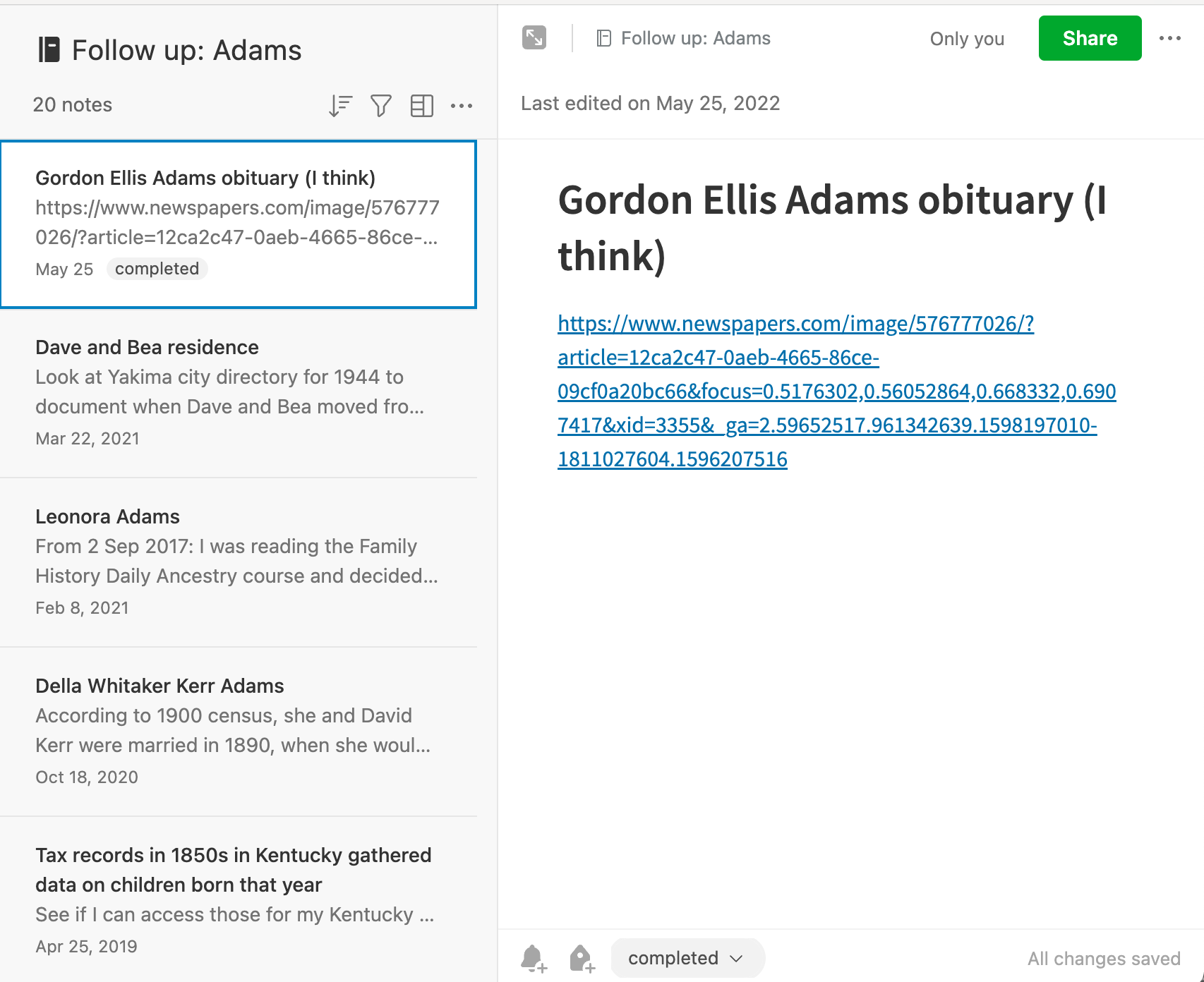
I’ve been using follow-up notebooks in Evernote for years to keep track of clues that I come across so that I don’t get distracted from my current research question. I have follow-up notebooks by Surname in my Evernote Genealogy stack. I also have a notebooks called Library Look Ups, where I paste links to FamilySearch documents that must be accessed from the Family History Library or one of its affiliates.

Two days ago, I met up with my genealogy buddy, Vickie, at the St. Louis County Library Headquarters’ Genealogy and History Library. The headquarters is closing tomorrow for more than year for renovation. While some of the genealogy collection is moving to another branch starting July 5, the resources won’t be as abundant.

Vickie and I thought it would be a good idea to pay one last visit while we could. We scheduled it a few weeks ago, before my trip to Walla Walla. Because of family and work obligations, I just haven’t had time to do genealogy research or even prepare as I normally would for this library trip.

So I just showed up with my computer at the library, with no plan or research question. But, thanks to my follow-up and library look-up notebooks in Evernote, I actually had a productive time! I first looked up everything in the library look-up notebook and then turned my attention to the follow-up notebooks by surname. That kept me busy the whole time I was there. And it got me away from the “what should I work on?” question that sometimes bedevils me.

I heartily recommend having a spot to record look-ups and follow-ups so you easily start researching when the opportunity arises.
Filed Under: Genealogy tips, Organizing Tagged With: Evernote, genealogy tools, organizing aids, overwhelm, research

Giving MyHeritage photo tools a spin

April 20, 2022 By Janine Adams Leave a Comment

There are so many amazing options for online research. Some, like FamilySearch and Chronicling America, are free. Others are fee-based. I’ve subscribed to Ancestry for a dozen years or more and always feel like it’s a worthwhile investment. More recently, I’ve started subscribing to Newspapers.com and just reupped. (I love newspaper research.)

But it was not until recently that I subscribed to MyHeritage. I was actually given a subscription to MyHeritage by the company gratis. They approached me about doing a Facebook Live presentation and about partnering with them for a week-long special promotion to my readers. (That promotion will be going out on Friday–if you’re not already on my mailing list, I encourage you to subscribe so you’ll get the offer in your inbox). When they asked me to partner with them, I requested free access so I could try it out before recommending it to my readers.

So I’ve been using MyHeritage a bit–not a ton because I haven’t had a lot of time for researching in the past couple of months. But I love that they have rich databases (16.9 billion records!) and also some pretty spectacular photo tools.

To test those out, I uploaded a couple of photos from my hard drive.

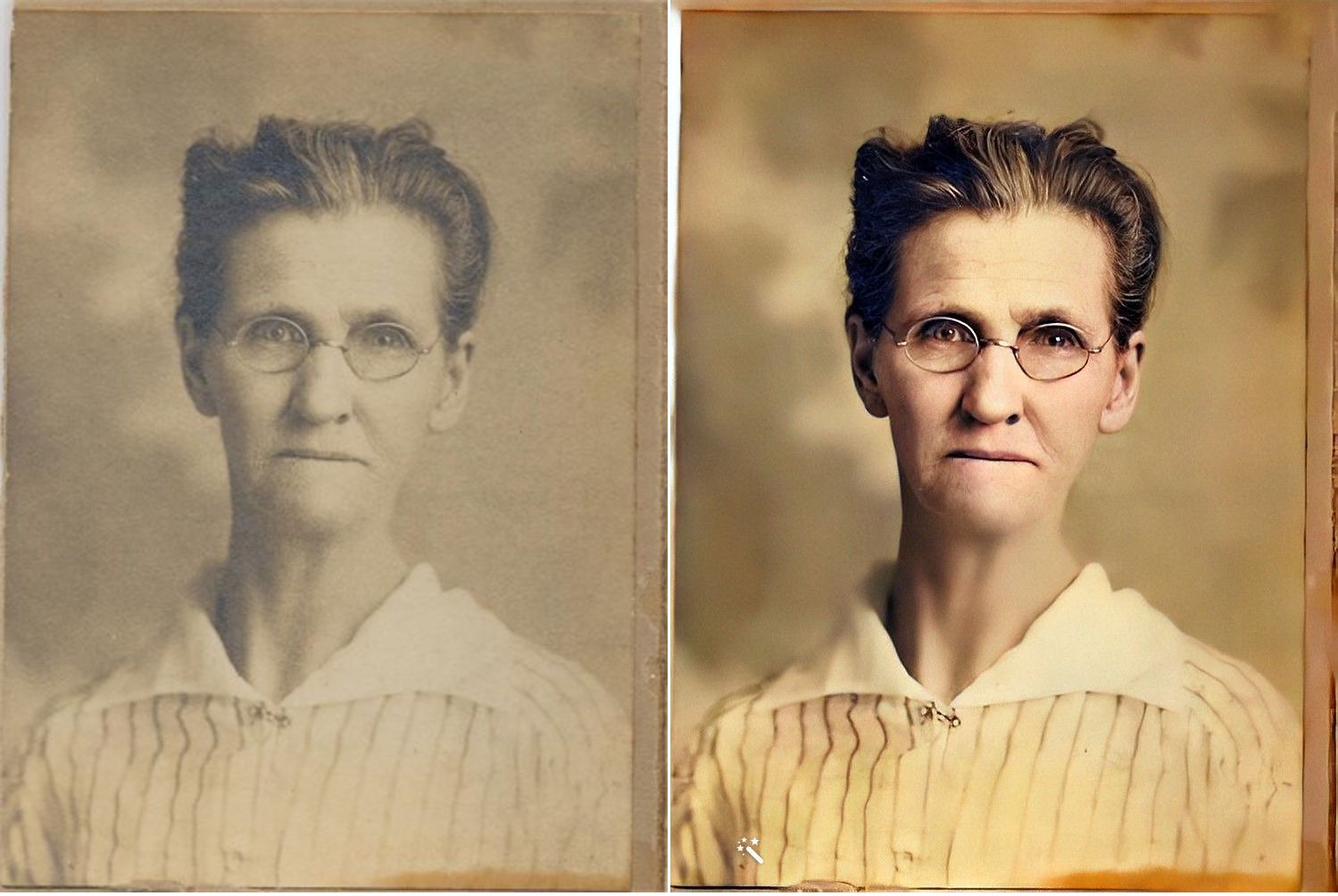
First, here’s a sepia-toned photo of my second great grandmother, Jennie Nebergall Wheeler (1857-1933) taken in 1917. I uploaded it to MyHeritage and used the Colorize, Repair and Enhance tools to improve the photo. The results are pretty remarkable, in my opinion.

I now feel like I can look into Jennie’s eyes and imagine a conversation with her, something that never felt possible with the old photo.

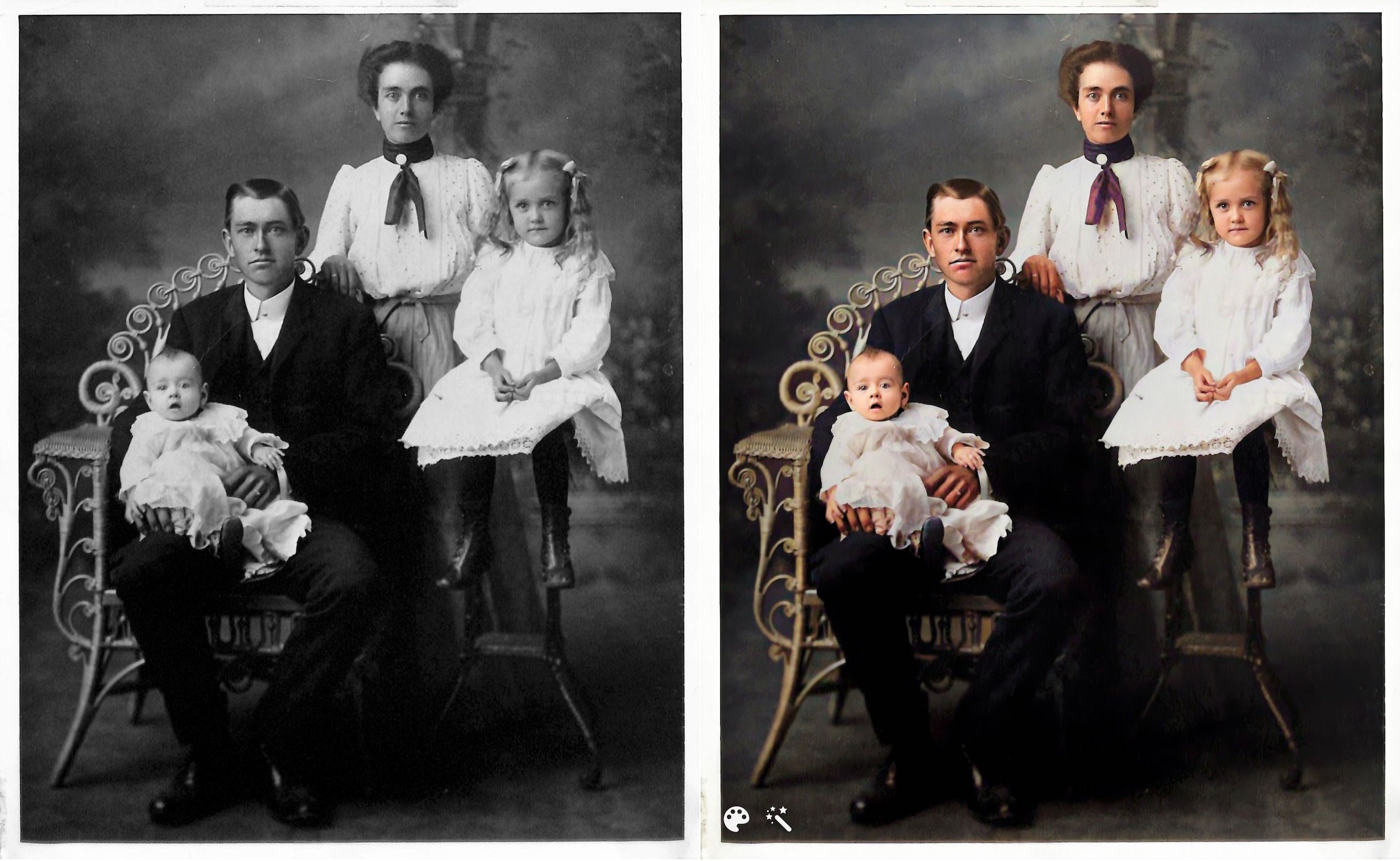
Here’s another example. This is the William Reese Rasco family in 1907. This photo graced the mantle at my aunt’s house for many years. My aunt recently moved and gave this photo to me. I consider it one of my treasured possessions. The baby in the photo is my maternal grandmother, Beatrix Rasco Adams (1907-1987).

This one feels a little different to me. It might be because I’m so familiar with the photo and the fact that the original photo is black and white (rather than sepia), but the improvement doesn’t feel quite as dramatic. It is fun to see what color my great great grandmother’s scarf might have been, though!

I downloaded the improved photos to on my hard drive and am storing them with the originals with the word Enhanced added to the end of the file name. I can’t wait to upload more photos. Since these two photos are portraits, improving them didn’t add a whole lot of information. But I know from watching Photo Detective Maureen Taylor’s Facebook Live for MyHeritage that these enhancements can bring out clues in photos that aren’t easily seen in the originals.

Another photo feature that MyHeritage has introduced is animation. You upload a still photo and they will animate the individual or individuals in the photo. Here’s an example, using the photo of my great grandmother Jennie.

https://organizeyourfamilyhistory.com/wp-content/uploads/2022/04/1917-photo-Jennie-Nebergall-Wheeler-location-unknown-Color-Restored-Enhanced-Repaired-0-Enhanced-Animated.mp4


And here’s my great aunt Lessie Rasco, from the portrait above.

https://organizeyourfamilyhistory.com/wp-content/uploads/2022/04/Rasco-2-Enhanced-Animated.mp4

I’m a bit on the fence about the utility of this one. But it is pretty fun and I imagine it might make sharing the photos a little more interesting for non-genealogy-focused relatives

Have you used these photo tools? What do you think?

Again, if you’re on my mailing list, you’ll receive an email from me on Friday with a special link for a really great discount on a MyHeritage subscription (for new MyHeritage subscribers only.) Full disclosure: they will share the revenue from your subscription with me. If you aren’t on the list, you can sign up here or in the form that pops up when you scroll to the bottom of this page. When you sign up for the mailing list, you’ll also get a short series of daily emails from me, along with a end-of-the-month email with links to the previous month’s blog posts. You can unsubscribe at any time.


Filed Under: Excitement, Genealogy tips, Preservation, Technology Tagged With: family photos, genealogy tools, myheritage, photos

Keeping track of my backlog busting

January 11, 2022 By Janine Adams Leave a Comment

One of my primary goals in this month’s 30 x 30 challenge is to get rid of the formidable backlog of documents to be processed that I had let pile up. I had a backlog of 88 files that I had not processed. I disappoint myself when I do that. But I’m bound and determined to get caught up this month.

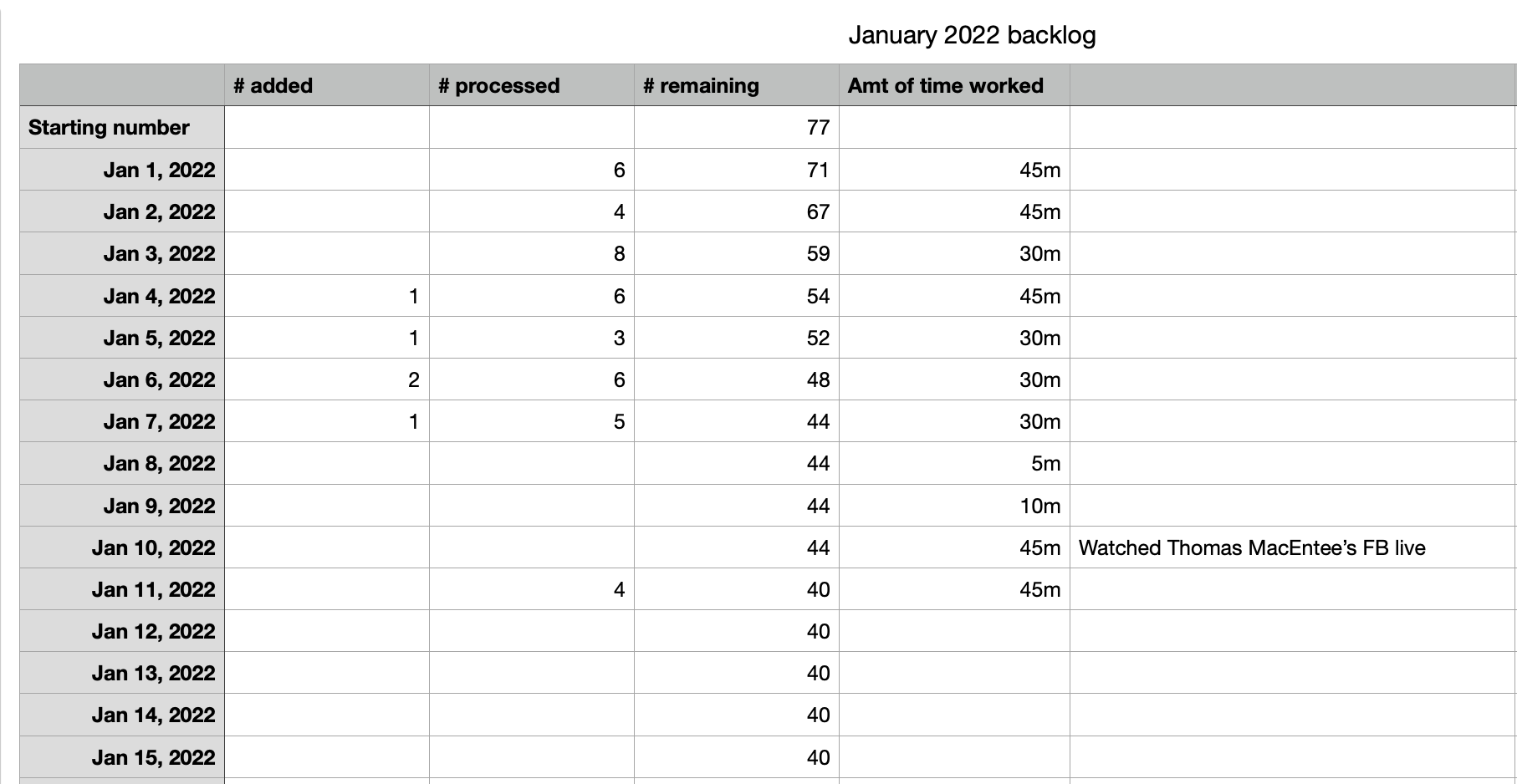
To help keep me motivated, I created a little spreadsheet as I’ve done in the past. Here’s what it looks like:

I started January with 77 backlogged files because I was able to reduce the number from 88 in late December. Here are a few things I like about this spreadsheet:

  • I can highlight the Amount of Time Worked column and see the total number of minutes for the month and average number of minutes worked per day. (Right now, I’m at 3 hours of work and an average of 32 minutes a day.)
  • Entering the numbers and watching the # remaining column go down is very motivating to me!
  • If I have to do a little research that results in my downloading documents in order to process a document, this spreadsheet takes that into account. I want to have a net reduction each session!

I do this in Numbers on my Mac, but it could easily be done in Excel or Google Sheets. I’ve also been keeping track of the types of documents I’m processing my informal Evernote research log.

I hope you find this a little bit helpful and that your 30 x 30 challenge is going as well as mine!


Filed Under: Challenges, Genealogy tips, Organizing Tagged With: 30 x 30, electronic files, genealogy tools, organizing aids

Creating a poster of your family tree

October 13, 2021 By Janine Adams 2 Comments

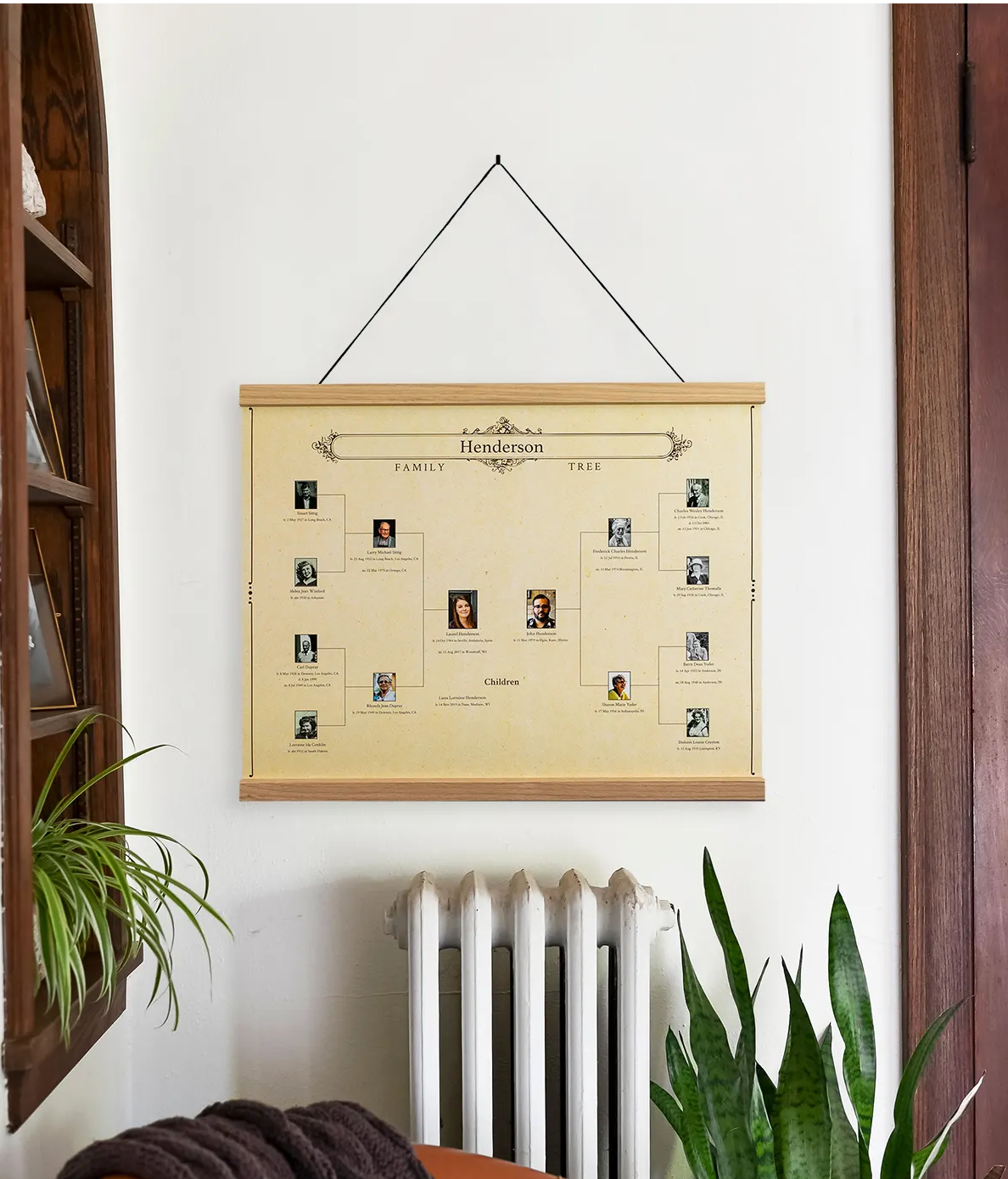
A tree from MyCanvas

I had an inquiry recently from someone who wanted to get her Ancestry tree printed so that she could see the whole tree. This isn’t the first time I’ve been asked this question and I did a little research. I haven’t had the desire to see a printed version of my tree, but I do get the attraction.

I found three companies that create large-scale printed versions of a tree (sometimes very large, suitable for family reunions!). I like limiting my options, so I stopped at three. This obviously isn’t an exhaustive list, but I hope you find it helpful. Feel free to add resources in the comments!

  • To have a decorative tree created from your Ancestry tree (rather than from software or a GEDCOM), it looks like the easiest option might be MyCanvas, which offers a 24 x 18 poster in three different types of trees, Standard Combination or Descendant (coming soon). Just connect your Ancestry tree to get started. Prices vary from $25 to $55, depending on the tree type and the number of generations. (Maximum is nine generations.) They also offer oak hanging rails.
  • Ancestry Printing will create a large-scale chart directly from a variety of genealogy software packages (including the one I use, Reunion). It also looks like they print from Ancestry, Geni, My Heritage and Tribal Pages. AncestryPrinting says it offers personalized customer service and lots of flexibility. They will do the designing for you! Their pricing is based on the linear foot of the chart.
  • Family ChartMasters offers custom decorative charts, as well as working charts and charts with blanks to be filled in. You can design your own or work with a designer. They offer charts in a variety of formats and you can get the ball rolling with a free consultation. Their prices vary depending on the type of chart.

If you’re looking for a decorative gift, a giant tree for a family reunion or a large-scale chart to help you with your research, it looks like these companies can help! If you have experience with any of these companies or you know of others, please let me know in the comments.


Filed Under: Challenges, Genealogy tips Tagged With: genealogy tools

  • « Go to Previous Page
  • Page 1
  • Page 2
  • Page 3
  • Page 4
  • Page 5
  • Page 6
  • Interim pages omitted …
  • Page 30
  • Go to Next Page »

about me

I'm Janine Adams, a professional organizer and a genealogy enthusiast. I love doing family history research, but I find it's very easy for me to get overwhelmed and not know where to turn next. So I'm working hard to stay organized and feel in control as I grow my family tree.

In this blog, I share my discoveries and explorations, along with my organizing challenges (and solutions). I hope by sharing what I learn along the way I'll be able to help you stay focused and have fun while you do your research, too.

tags

30 x 30 Adams amy johnson crow anniversary Brown cemetery census Civil War conferences connections dna electronic files Evernote excitement Family Curator family photos genealogy tools getting started goals How They Do It Igleheart Jeffries keepsakes learning opportunities maps newspapers NGS organizing aids overwhelm paper files planning quick tips rasco record keeping research research log research trip resources RootsTech social history source documentation Stacy Julian technology time management vital records

join the facebook community!

join the facebook community!

My organizing business

Learn more about my organizing business, Peace of Mind Organizing®.

Subscribe by RSS

  • RSS - Posts
  • RSS - Comments

© 2026 Janine Adams


Loading Comments...