• BLOG
  • ABOUT
    • Privacy Policy

Organize Your Family History

Stay focused and happy while exploring your roots

Using Ancestry clues to find images at Family Search (screencast)

August 11, 2023 By Janine Adams 7 Comments

Five years ago, I created a screencast of how I found my great aunt’s death certificate on family search after finding an FHL film number on Ancestry. While the user interfaces at Ancestry and Family Search may have changed a little in the last five years, I do think it’s useful information, so I decided to run that 2019 post again today.
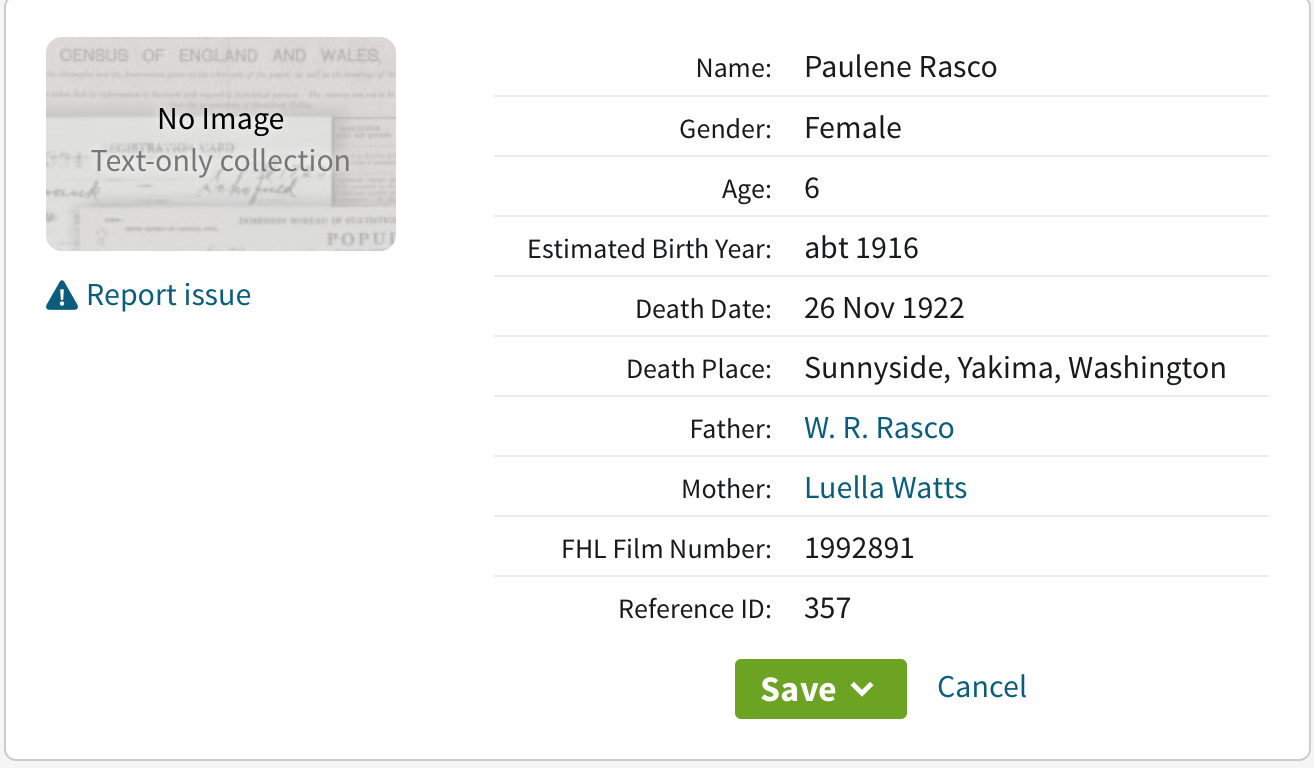
Today I was doing some research on Ancestry. (I’ve finished my backlog project and have lifted my ban on searching–more on that in a future post.) I was looking for a death certificate for my grandmother’s sister whom I had just learned through Find A Grave had died at the age of six, in 1922.

A simple Birth/Marriage/Death records search produced a collection called Washington, Select Death Certificates, 1907-1960, but when I clicked on it, it said “No Image Text-only collection.” (A picture of that screen is at the top of this post.) I saw that there was a FHL film number, so I went to Family Search to try to track down the document.

I was successful in finding an image of the death certificate, though I had to jump through a few hoops. After I successfully downloaded and processed it, I decided to do a screencast of the process, in case it helps someone here.

Here’s the screencast:

A quick summary is that I searched on the film number in the catalog at Family Search, then when I got another No Image Available message there, I drilled down further to the actual microfilm number mentioned on Ancestry and did another search. That brought up the image. If it hadn’t, I would have gone to the image number (listed in the initial search result at Family Search) in that digitized microfilm. Bottom line: don’t give up if you’re told an image isn’t available!

You can find more information on using Family Search’s card catalog in this post from a year ago: Using the card catalog to find elusive documents on Family Search. And if you’re interested in how I processed that death certificate after I downloaded it, check out the blog post How I process a downloaded document. (For a deeper dive, check out my Orderly Roots guide, How I Do It: A Professional Organizer’s Genealogy Workflow.)
Filed Under: Challenges, Genealogy tips, Technology Tagged With: family search, genealogy tools, research, resources, technology

My research-friendly computer setup

June 7, 2023 By Janine Adams 18 Comments

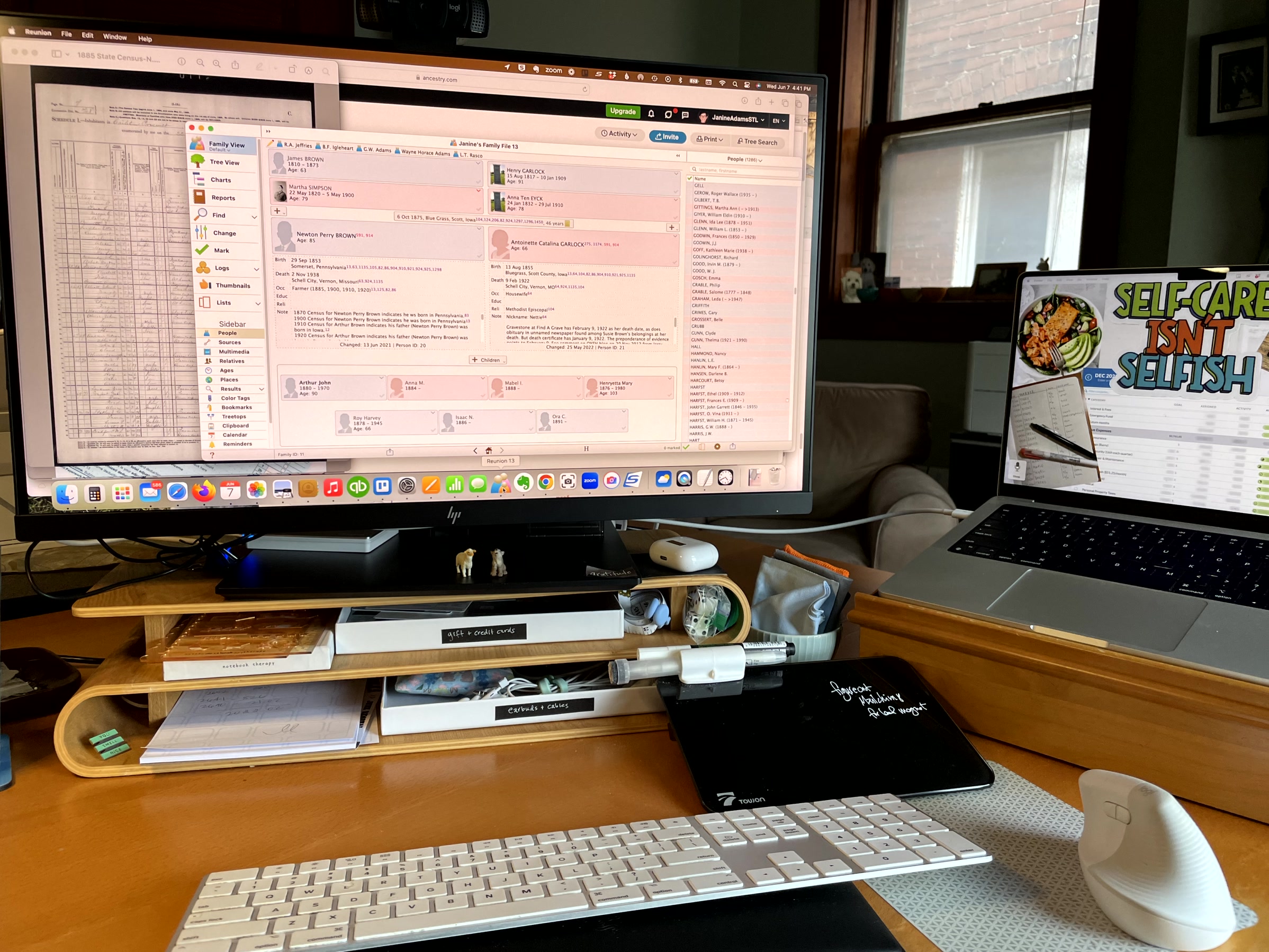
Computer monitor connected to laptop with one cord and wireless keyboard and mouseLike many people, I do most of my genealogy research online, from my desk. I have a laptop computer (a 14″ MacBook Pro). I love my laptop for its portability. I take it with me on research trips (or, really, any trip).

But I don’t love doing genealogy research on a 14″ screen and I don’t love using a trackpad instead of a mouse.

I bought my HP Business Z27 2TB68A8 27″ monitor way back in 2019 and it’s been great. (I should point out that there’s a more modern version of a similar monitor, the HP U28 4K HDR, that is less expensive and has more conveniently placed ports than mine. I’ve done no research on it, though.) What I love about this monitor is that it acts as a hub and a power source. I plug it into my computer with a USB-C cable and then I plug my external hard drive and webcam into the monitor. So I just have one cord going from my monitor to my computer. That makes it very easy to unplug and go. And it cuts down on cord clutter on my desk.

I also use a wireless keyboard and a wireless mouse. I recently developed tennis elbow from overuse of the keyboard and mouse, so I’m now using an ergonomic vertical mouse, which I think is helpful. I also prop the forward edge of my keyboard on a wrist rest so that it tilts downward, which helps my tennis elbow.

The joy of this setup is that I can have multiple documents open on my screen. I can also use my laptop screen, which I keep to the side and stash documents on. (In case you’re curious, my laptop wallpaper is the vision board I created for 2023.) If I were trying to do all my genealogy research and processing of downloaded documents on my laptop I am confident I would find it less enjoyable.

If you struggle with having as many documents visible as you’d like on your screen, you might consider a large monitor that you can use when you’re researching at home. Add a wireless keyboard and mouse and you get the best of both worlds of a desktop computer and laptop.

Filed Under: Challenges, Genealogy tips, Technology Tagged With: genealogy tools, technology

Making military research a little easier

May 26, 2023 By Janine Adams 2 Comments

Before Memorial Day in 2016, I wrote this post on figuring out which ancestors might have fought in which war. I’ve run it a couple more times and it seemed like a good time to run it again. Incidentally, MyHeritage is offering free access to its 83 million military records this weekend, May 25-30, 2023.

Whenever I read about a records collection for a certain conflict (which seems to happen around military-related holidays, like Memorial Day, Veteran’s Day or anniversaries of conflicts) I get excited about researching my ancestors in those collections, which can be such a treasure trove of information. But in the past sometimes I would have difficulty remembering which ancestor might have fought in which war and I’d become overwhelmed and abandon the effort.

So I created a document that shows me the prospective ancestors for each conflict, based on the dates they were born. At the time, I used a table from Family Tree Magazine but when I went looking for it to share in this post, I couldn’t find it. However, I did find an even-better table called Ages of Servicemen in Wars that lists 20 military conflicts, the years they were fought, the typical birth dates for soldiers and theĀ  typical ages of soldiers. Thank you, FamilySearch!

Armed with that information, I created a simple spreadsheet (pictured, in part, above) with the following column headers:

  • Conflict
  • Likely Birth Year of Soldiers
  • Prospective Ancestor
  • Confirmed Ancestor

For each conflict, I entered the names of the ancestors who were born during the birth-year window listed in column 2. After I ascertained that one had indeed fought in that war, I entered an X in the Confirmed Ancestor column. What I should have done and will from here forward, is place a dash or an N in the Confirmed Ancestor column to indicate that I’d ruled that ancestor out.

This is a simple way to see at a glance who I might research when I’m looking at military collections at the National Archives, Fold3 or elsewhere. It’s easy to create and I think it’s well worth the time spent.


Filed Under: Genealogy tips, Organizing Tagged With: genealogy tools, military, organizing aids

Two-part program on Zotero for genealogy starts tomorrow

February 3, 2023 By Janine Adams 2 Comments

Reader Donna Cox Baker is an enthusiastic advocate for using the tool Zotero to organize genealogy research. She wrote a guest post about it for this blog and also described it in her How I Do It interview from 2018.

So I was interested when I received an email yesterday from about a two-part program that Donna is teaching for the Bucks County (Pennsylvania) Genealogy Society (BCGS) called “Zotero for Genealogy: Harnessing the Power of Your Research.” The first part is tomorrow, February 4, from 10 am to 12 pm eastern. The second part will be on March 4. Donna says, “Part I will be about the essential core of Zotero and why genealogists need it. Part II will be about various creative ways I’ve expanded on the Zotero basics to make it a real powerhouse tool–such things as timelines, map legends, ticklers, research planning, thought mapping, and more.”

I still haven’t explored Zotero, so I’m interested in watching her programs. The fee is $10 per workshop for non-members of BCGS and $5 for members. The presentations are being recorded and will be available, to members only, for 30 days. I’m not able to attend live tomorrow, so I elected to join the Bucks County Genealogical Society for only $20 and then I’ll have $5 access to the two workshops (and any future workshops in 2023.) It’s worth it to me to pay an extra $10 for access to the recordings for 30 days.

If you’re interested too, go to this page on the BCGS website to learn about the program and this page to register as a non-member. If you’d rather join first, you can read about membership benefits or skip right to the online membership application form. It’s worth noting that when I joined this morning, I did not instantly gain access to registering for the program at the members’ rate. (I’m waiting for a welcome email with a login.) So if you’re planning to go this route, you might want to join today rather than waiting for tomorrow.

Filed Under: Genealogy tips, Organizing, Technology Tagged With: Donna Cox Baker, genealogy tools, learning opportunities, organizing aids, record keeping, research log, resources, source documentation, technology, Zotero

  • « Go to Previous Page
  • Page 1
  • Page 2
  • Page 3
  • Page 4
  • Page 5
  • Interim pages omitted …
  • Page 30
  • Go to Next Page »

about me

I'm Janine Adams, a professional organizer and a genealogy enthusiast. I love doing family history research, but I find it's very easy for me to get overwhelmed and not know where to turn next. So I'm working hard to stay organized and feel in control as I grow my family tree.

In this blog, I share my discoveries and explorations, along with my organizing challenges (and solutions). I hope by sharing what I learn along the way I'll be able to help you stay focused and have fun while you do your research, too.

tags

30 x 30 Adams amy johnson crow anniversary Brown cemetery census Civil War conferences connections dna electronic files Evernote excitement Family Curator family photos genealogy tools getting started goals How They Do It Igleheart Jeffries keepsakes learning opportunities maps newspapers NGS organizing aids overwhelm paper files planning quick tips rasco record keeping research research log research trip resources RootsTech social history source documentation Stacy Julian technology time management vital records

join the facebook community!

join the facebook community!

My organizing business

Learn more about my organizing business, Peace of Mind OrganizingĀ®.

Subscribe by RSS

  • RSS - Posts
  • RSS - Comments

© 2026 Janine Adams

Loading Comments...