• BLOG
  • ABOUT
    • Privacy Policy

Organize Your Family History

Stay focused and happy while exploring your roots

Loving my electronic file system

July 4, 2013 By Janine Adams 12 Comments

wheelerfilefolder

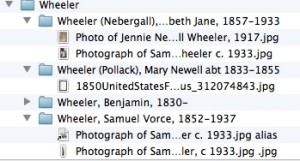
A snippet from my Finder window

Back in January, I blogged about reorganizing my electronic file system. I took inspiration from Ben Sayer of Genealogy Tools, creating a file structure format for each individual, organized into surname folders on my Mac. What I name individual documents within a folder is fairly loose, but the folder naming structure has been standardized.

I’m happy to report that it’s been a success! I can easily find a document I”m looking for and, even better, I’m now saving documents with confidence and alacrity. A nice side benefit of that confidence is that I’m printing fewer documents that I find online. (I blogged about the printing dilemma in January as well.)

I wanted to save money on paper and toner by printing less. What I didn’t take into account, though, is that I also save time by saving documents rather than printing them. It takes a bit more time to type the file name than to click Print, but once I’ve done that, the process is over. I don’t have to file the paper documents. And they’re also easier to retrieve. Since I store my genealogy file cart in a closet in my office, retrieving files took a little effort.

Another benefit is that when I’m feeling industrious, I can link images of source documents from my hard drive directly into the Reunion software I use. Once I get consistent about that, I’ll really be set and it will be so easy for me to see the research I’ve found.

I’m saving more documents and easily using this new naming protocol for folders. The next step will be to work on my backlog. My 2012 files are not consistently filed. But I know if I work on it a little at a time, I ca bring order to my hard drive!

My electronic file system has evolved a great deal since 2013 when I wrote this post. In 2021 I published an Orderly Roots Guide called How I Do It: A Professional Organizer’s Genealogy Workflow that provides detailed information on how I organize my own genealogy research, which is now 100 percent digital. It is available for $19.99.
Filed Under: Organizing Tagged With: excitement, genealogy tools, organizing aids, record keeping, source documentation

Improving my ancestor map

May 25, 2013 By Janine Adams 4 Comments

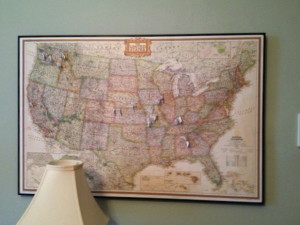
A map, cork board, foam core and frame make a great way for me to map my ancestors!I love the map I’ve put together to mark the birth and death places of my ancestors. Back in October, I blogged about the strategy I put into place on what to pin and how I make the pin flags. I pinned as far back as great grandparents before I hung the map, and that’s where I ran into a snag. I had been using a fabric-covered Homasote bulletin board that I had just pinned the map to. But when I rearranged my office and went to hang the map on the wall, I realized that the old bulletin board was so bowed it wasn’t going to hang well.
So I put a lot of energy (probably too much) into figuring out how to have an attractive, pinnable map hanging on my wall, and here’s what I came up with:

  • I purchased a sheet of 1/4″ thick cork board
  • I purchased a put-it-together-yourself metal frame kit
  • I purchased a piece of foam core
  • And of course, I already had a large map of the U.S.

My husband, Barry, who in a prior life worked in a frame shop, helped me assemble the frame (well, he did it for me). I took all the pins out of the map and took it off the old board. Barry layered the map on top of the cork board on top of the foam core and slid them into the frame. Naturally, there’s no glass covering the frame. I then had the pleasure of repinning all the pins!

The result (pictured above) is attractive, I think. And very functional. I haven’t taken the time to add more pins (though I want to!), but even just with my parents, grandparents and great grandparents pinned, it’s such a treat to glance up and see where my roots lie. (That would be in Alabama, Iowa, Kansas, Kentucky, Missouri, Nebraska, and Washington…and one outlier in California.)

I’m not a big DIYer, but this was one project that was not difficult for me. And I’m very pleased with the result!

Filed Under: My family, Organizing Tagged With: excitement, maps, organizing aids

Tracking progress

May 21, 2013 By Janine Adams 38 Comments

My memory is not what it used to be. And I’m finding the more family history research I do, the more I’m duplicating effort. In the process of researching one person, another person will pop into my mind. I’ll look for a record for that person, rejoice in finding it, then realize I’d already found it!

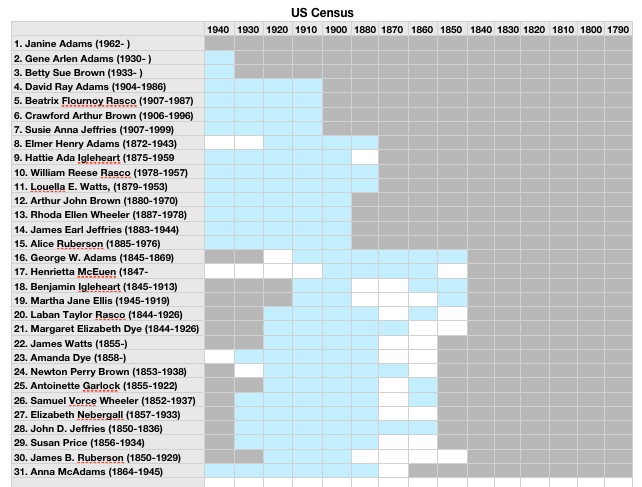
So in an effort to avoid that, as well help me in my never-ending quest to not feel overwhelmed about my genealogy research, this past weekend I created a series of progress-tracking spreadsheets. I was inspired by Miriam’s Census Spreadsheet, which is a Google Doc. I’m a Mac user and I used the Numbers program (similar to Excel) to create three spreadsheets (so far) that track progress, by ancestor, on finding the following records:

Sheet 1: BMD

  1. birth records
  2. marriage records
  3. death records
  4. burial records
  5. grave photos

Sheet 2: Censuses

On the first table (pictured above) I have a row for each ancestor (this is a work in progress…I’ve been adding info a generation at a time and up to my great-great grandparents), and a column for each U.S. Census. I fill in the square in blue if that record was found. A grey square indicates the ancestor wasn’t alive for that census. A blank (white) square indicates I still need to find this record. I also have a table of state censuses, so I can note those.

Sheet 3: Military

Here I track what military records I’ve found for each ancestor, by war or conflict. This one’s definitely a work in progress.

Going through this process helped me realize how much census work I’d done and how much more work I had to do to find birth, marriage and death records. I think these charts will help me feel a sense of accomplishment and also help me hone in on work that needs to be done. I’ll keep adding ancestors from Reunion, until I’m caught up, and then plan to keep up with the spreadsheet as I find more records.

Filed Under: My family, Organizing Tagged With: organizing aids, overwhelm, planning, progress log, research, research log, resources

Livescribe: A potentially great tool for genealogy researchers

April 30, 2013 By Janine Adams Leave a Comment

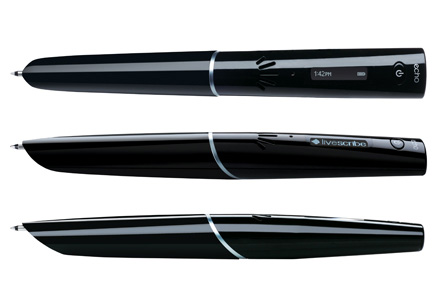
I recently purchased a Livescribe smartpen. (That’s a referral link; if you buy from it I get a small commission.) I bought the pen in anticipation of attending the national conference of the National Association of Professional Organizers, which I attended earlier this month in New Orleans. I’ve also used it in client appointments. Now that I have had it for a couple of weeks, I realize it could potentially be very helpful with my family history research.

What’s a smartpen? (Surely that’s a term coined by Livescribe.)  As you take notes on its special paper, it records the audio of what you’re listening to and links it with your notes. So, in replay mode, when you touch the paper with the pen, you hear what was being said when you made that note. You can also upload the recording and images of your notes to your computer (or the cloud, depending on which version of the pen you buy). When you click on your handwriting in the uploaded images, you hear what was being said as you were writing.

Think about that. It’s an audio recorder that’s linked to your written notes. So when you interview a family member, you can find what you want in the recording, based on your notes, instantly. If you attend a genealogy lecture (or conference), you don’t have to rely on your memory to understand your notes.

I feel like I have seen the future and it is the Livescribe smartpen.

There are a few versions of this pen. I bought the Livescribe Echo, which is the penultimate version. (The Pulse, which is no longer for sale, was the first and the Sky is the latest.) The Echo requires plugging in a cable to get the data off the pen and onto the computer. The newer version, the Sky, has wifi and uploads directly to Evernote. I chose the Echo because I wanted to make a smaller investment and don’t mind plugging in the cable.

On the advice of a Livescribe-loving friend, I also purchased the 3D recording headset, which produced really clear recordings, even in a noisy conference setting.

Here’s a video about how the Echo (the version I bought) works. My investment was only $100, including the headphones, thanks to a referral discount and special going on earlier this month. To me, it was well worth the investment!


Filed Under: Genealogy tips, Organizing Tagged With: excitement, genealogy tools, Livescribe smartpen, organizing aids, research, technology

  • « Go to Previous Page
  • Page 1
  • Interim pages omitted …
  • Page 39
  • Page 40
  • Page 41
  • Page 42
  • Page 43
  • Go to Next Page »

about me

I'm Janine Adams, a professional organizer and a genealogy enthusiast. I love doing family history research, but I find it's very easy for me to get overwhelmed and not know where to turn next. So I'm working hard to stay organized and feel in control as I grow my family tree.

In this blog, I share my discoveries and explorations, along with my organizing challenges (and solutions). I hope by sharing what I learn along the way I'll be able to help you stay focused and have fun while you do your research, too.

tags

30 x 30 Adams amy johnson crow anniversary Brown cemetery census Civil War conferences connections dna electronic files Evernote excitement Family Curator family photos genealogy tools getting started goals How They Do It Igleheart Jeffries keepsakes learning opportunities maps newspapers NGS organizing aids overwhelm paper files planning quick tips rasco record keeping research research log research trip resources RootsTech social history source documentation Stacy Julian technology time management vital records

join the facebook community!

join the facebook community!

My organizing business

Learn more about my organizing business, Peace of Mind Organizing®.

Subscribe by RSS

  • RSS - Posts
  • RSS - Comments

© 2026 Janine Adams


Loading Comments...