• BLOG
  • ABOUT
    • Privacy Policy

Organize Your Family History

Stay focused and happy while exploring your roots

How I store my genealogy data

October 24, 2025 By Janine Adams 17 Comments

I originally wrote this post in 2016 and nine years later I’m amazed how little has changed about how I handle my electronic genealogy data. The only differences are that I’m using a newer version of Reunion, I moved my research notes from Evernote to Apple’s Notes app, and I use Backblaze, rather than CrashPlan Pro. Otherwise this method has stood the test of time and I have no regrets!
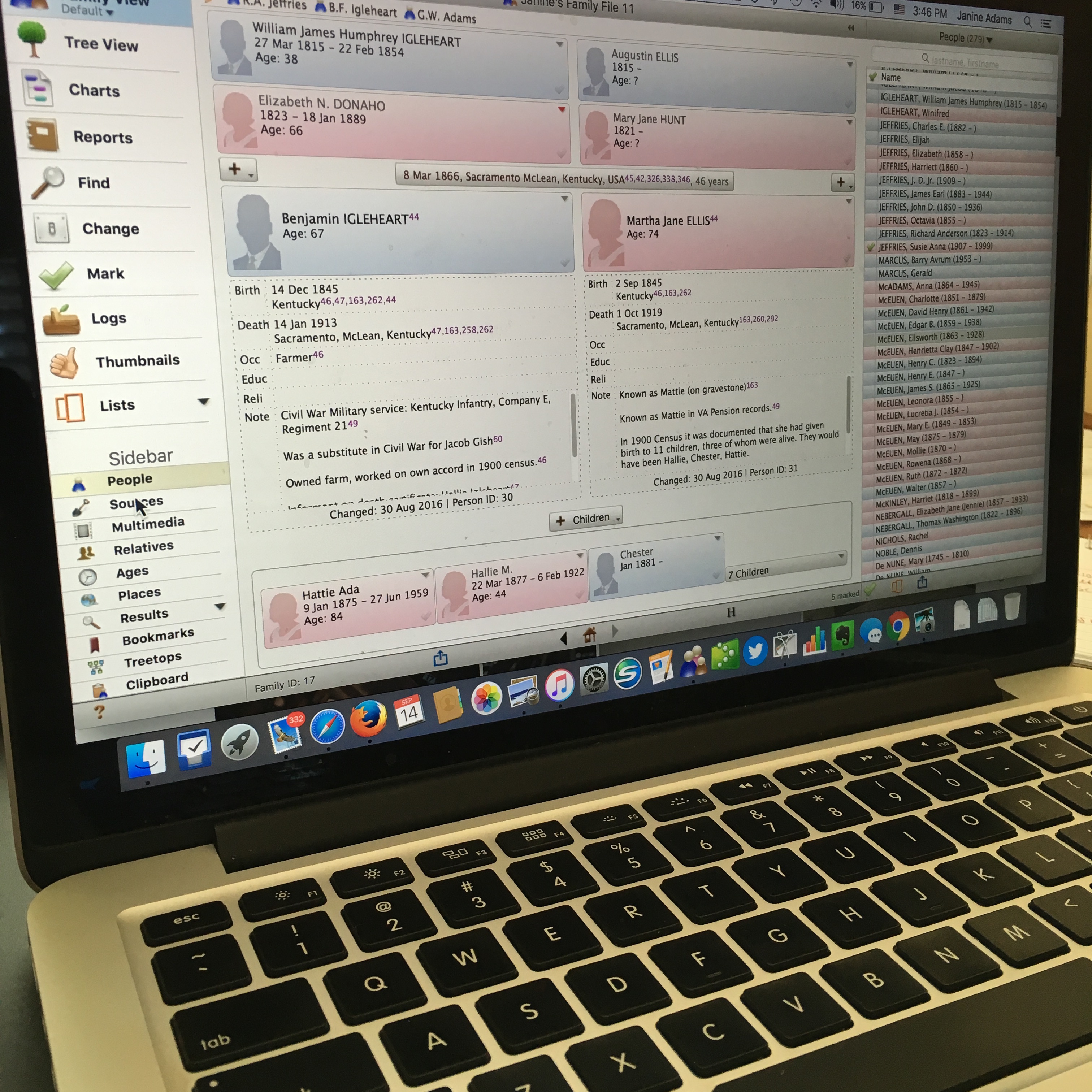
reuniononmac90I love organizing my family history research electronically. As I’ve mentioned here many times, I try not to print digital documents and instead store everything electronically where I can have easy access to it.

I don’t think I have been clear when I talk about storing my genealogy data electronically that I’m not talking about storing it as a family tree on Ancestry or Family Search. I’m talking about storing it on my hard drive.

To me, it would be folly to rely on an outside service to store my precious genealogy data. If the only copy of my information was at Ancestry, I would be required to renew my subscription to access my own data. Even storing all my information at a free site like Family Search feels risky to me. It’s conceivable that they could change their terms of service to something unacceptable to me. Or start charging for access. Or simply vanish. Another place that some people store their genealogy documents is Evernote. I think that can be a great way to have easy, searchable access to information. But I wouldn’t store genealogy documents on Evernote that I don’t also have on my hard drive. They could go belly up. (It happened with Springpad.)

I enter all of my data into family-tree software that resides on my laptop’s hard drive. I use Reunion 11, a Mac program. It can sync with the iPhone and iPad using the ReunionTouch app. I haven’t yet installed ReunionTouch because I take my Mac with me on research trips. I like that storing my data on my computer, rather than an online service, is that the information is accessible even when I don’t have an internet connection (if I have my computer with me).

Of course, I back up my hard drive, both on an external hard drive and with an online backup service (CrashPlan Pro). Backing up is critical.

I’m not saying that my way is the right way or the best way. But I’ll share with you my process for storing info, in case you find it helpful or interesting. So far, it’s working well for me.

When I find a sourced piece of information pertinent to my research this is what I do:

  1. Add the information to the appropriate person(s) in Reunion (or add a person if need be).
  2. Cite the source in Reunion.
  3. Download the information (or scan it if I found it in paper form).
  4. Attach an image of the source document to the source citation in Reunion.
  5. File the digital document in that ancestor’s electronic folder on my hard drive, copying it if it applies to more than one ancestor.
  6. Scour the source for further information.
  7. Make a note in Evernote if it sparks potential further research.

So far this feels good to me and I haven’t second guessed it.

How do you store your family tree information?
Filed Under: Challenges, Organizing, Technology Tagged With: electronic files, organizing aids, record keeping, technology

How I processed my Civil War pension files

April 14, 2025 By Janine Adams 4 Comments

I’m fortunate to have three ancestors who fought on the Union side in the Civil War and for whom I was able to obtain pension files from the National Archives. Ten years ago, I wrote a post about how I processed those files, starting with creating a robust source citation. I got good feedback on the post, so I thought I’d resurrect it in case newer readers would find it helpful. The pension files truly are treasure troves of information and the painstaking time I spent going through them paid off. If you want to request your ancestor’s pension file, you can do so on this page of the NARA website.

Processing civil war pension filesAs I mentioned a couple of weeks ago, I received my 3d great grandfather’s Civil War pension files from the National Archives in record time. I’d been prepared to wait 45 to 120 days and it arrived the week after I submitted the request online.

I dug right in and started processing the information. I was so grateful that I had attended the class Anatomy of a Military Pension, presented by Certified Genealogist Julie Miller at the National Genealogical Society’s annual conference that month. She provided step-by-step instructions of what to do with a military pension.

So the day after I received that 65-page pension file, I did what Julie suggested. I put the documents in chronological order and I assigned a number to each. Then I figured out a citation for the overall file and a  citation for each of the numbered documents.

Coming up with a proper citation was a bit of a challenge and I emailed Julie, who was kind enough to share the citation she uses for these files. (She had given us that info in the talk, but I hadn’t written it down.)

Here’s the citation I’m using for the overall pension file for my ggggrandfather, Richard Anderson Jeffries:

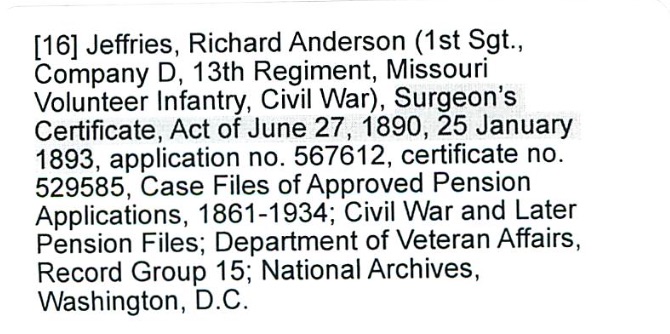
[278] Jeffries, Richard Anderson (1st Sgt., Company D, 13th Regiment, Missouri Volunteer Infantry, Civil War), application no. 567612, certificate no. 529585, Case Files of Approved Pension Applications, 1861-1934; Civil War and Later Pension Files; Department of Veteran Affairs, Record Group 15; National Archives, Washington, D.C.

278 was the next number in my source list in Reunion, my family tree software. Each of the individual documents is numbered, starting with 1, and has its own citation. My intention is that when I enter a fact into Reunion, I’ll use Source 278, but I’ll include in the detail field which of the 26 individual documents that particular fact came from.

I created citation labels for each of the documents and affixed them to the appropriate pages. (That’s the citation for document 16 above.) Then I scanned the whole document into a pdf. I elected to have one pdf, rather than 26 individual ones–time will tell whether that was a good choice. (Edited to add a year later: Yes! That was a great choice.)

The next step, according to Julie is to transcribe the documents. Yes, I’m going to type word for word exactly what is on the documents. Julie urged us not to skip that step because when we transcribe, we learn things we would not otherwise learn.

After I transcribe, I will abstract the documents, so I can tell at a glance what they are and what info is contained within each. And then I’ll enter the new-found facts into Reunion, my family-tree software.

That’s a lot of work, but I’m delighted to have learned how to be thorough with it. And I know I’ll learn so much about my ancestor.

I am so grateful to have this structure, because just a few days after receiving Richard Anderson Jeffries’s file, I received the pension file for my gggrandfather, George Washington Adams. That file is over 100 pages; I had to request and pay for the rest of the file (another 80 pages) to be copied–I’m still waiting for part two. That same week I received the third and final pension file, for another gggrandfather, Benjamin Franklin Igleheart. All three pension files, probably 250 pages, came within two weeks of my request.

If I did not have the structure Julie provided in that talk to thoroughly process the information, I know I would feel overwhelmed. I would probably skim the documents, pluck out a few easy-to-find facts, and put them away intending to get to them later. And I don’t know when later would be.

I have skimmed the most recently received pension files to get a preview what I’m going to learn. (G.W. Adams had a big dispute about the amount of his pension–an adversary in the Soldier’s Home turned him in for saying he was more disabled than he was!) But I’m not going to analyze them until I’m finished with Richard Anderson Jeffries. So that will be motivation to go through the process.

I think these pension files are going to be a great learning experience not just about my ancestors, but also about doing proper genealogical research. This feels great!

Filed Under: Challenges, Genealogy tips, Organizing Tagged With: Adams, Civil War, excitement, Jeffries, overwhelm, record keeping, research, source documentation

Creating a digital workflow

March 1, 2024 By Janine Adams Leave a Comment

Since it’s RootsTech time, I was thinking about the talk I co-presented at RootsTech 2017 with Brooks Duncan called Going Paperless in Genealogy. Shortly after I wrote a post about my digital workflow that presents it pretty concisely. I’m happy to report that the workflow has stood the test of time. I thought now would be a good time to repeat that post.

When Brooks Duncan and I spoke at RootsTech about going digital with genealogy research, it became apparent to me from the questions that digital workflow is an individual thing. I’ve developed a work flow that works well for me, so I thought I’d share it here. I’m not suggesting I do things The Right Way (I don’t know if there is a right way, especially for hobbyists), but I wanted to show you what works for me. I know that I love seeing examples of how people handle their own workflow, so in the spirit of sharing, here’s mine.

When I find a digital document online–let’s say it’s a census document that I found at Ancestry–I take the following steps after ascertaining that it’s pertinent to my research:

  1. I click Save to download the document to my computer’s desktop.
  2. I rename the file immediately so that it reflects my simple file-naming protocol (year document type-ancestor name-location).
  3. I immediately file the document in my file structure (Genealogy/Surnames/[Ancestor’s surname]/[Ancestor’s name]
  4. I analyze the document and enter the first fact into my Reunion software.
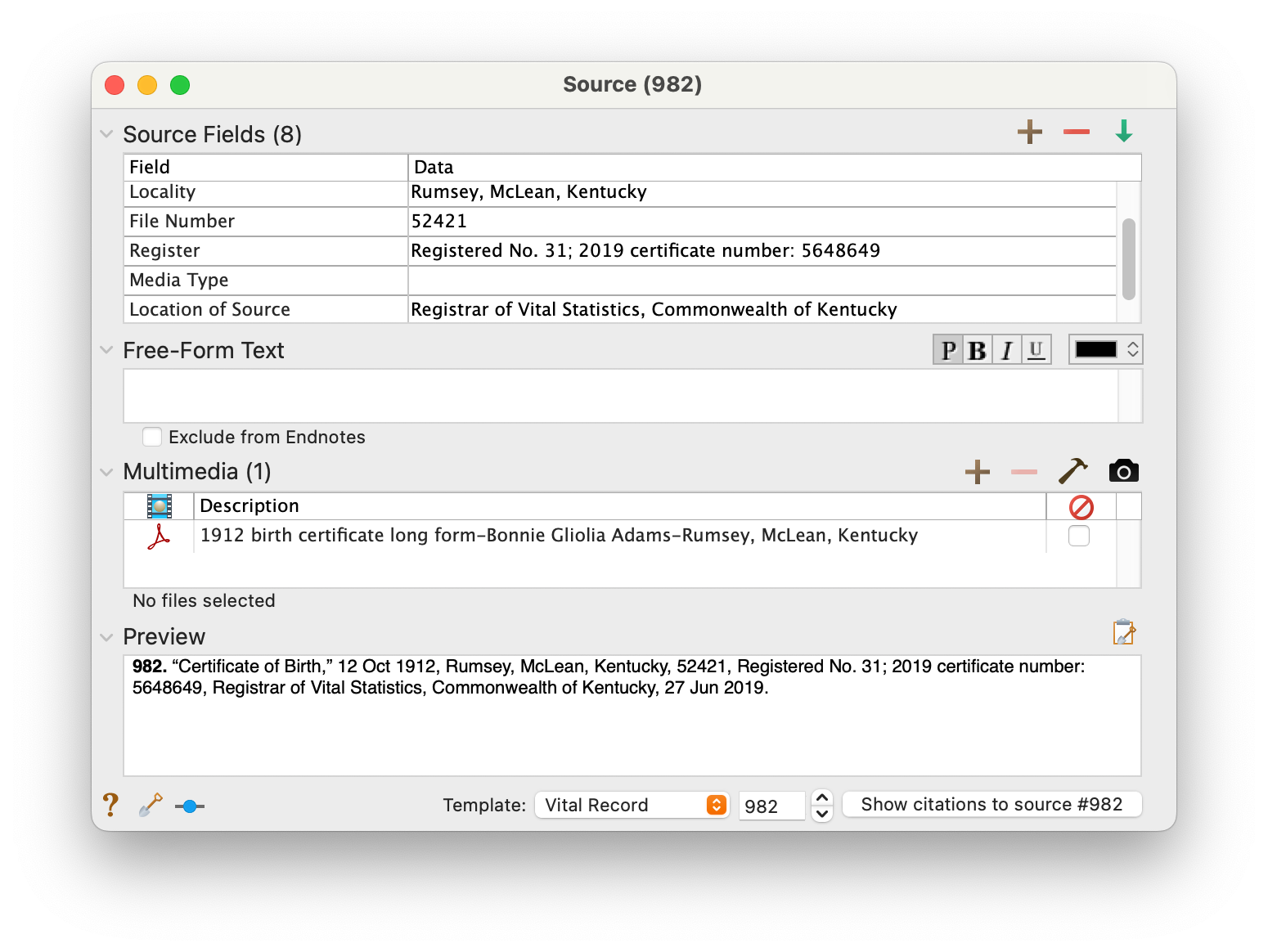
  5. I create a source for that fact, using Reunion’s templates.
  6. I drag the image of the file into the Multimedia section of the Reunion source screen for that source. (That’s an example of the Reunion source screen at the top of this post.)
  7. I enter all other facts I find in the document into Reunion, using the same source number for each fact I find in that document.
  8. I click Preview in the Reunion source screen for that source and copy the citation and paste it into the metadata of the image file on my hard drive.

I added that last step after RootsTech, adapting a suggestion made by an audience member at our talk. I hadn’t thought about noting on the image what the source number and citation is. I think it’s a great idea and now I intend to go to back and do that for all my sources.

This eight-step work flow takes me from discovery through processing the document. It means that I don’t have stray documents on my hard drive with nonsensical file means. It also means I can easily a find a document when I want to. And it helps me see what documents are missing. Having the confidence that I can find a document I’ve saved allows me to feel good about not printing it, which cuts down on my paper clutter. (And, yes, I backup my hard drive daily, both to the cloud and to an external hard drive.) This workflow was about five years in the making, and I’m very satisfied with it!

For more in-depth information on how I organize my own genealogy, including a detailed look at my digital workflow, check out How I Do It: A Professional Organizer’s Genealogy Workflow, a 37-page downloadable available for $19.99.


Filed Under: Organizing, Technology Tagged With: electronic files, organizing aids, record keeping, source documentation

Creating bio sketches about your ancestors

October 26, 2023 By Janine Adams 1 Comment

Professional genealogist Maria Tello wrote this blog post for me back in June 2018 and has graciously given me permission to run it again. Enjoy!

Reader (and professional genealogist) Maria Tello commented in my recent post on shifting my focus that she is in the process of creating biographical sketches for each of her ancestors, so that she can pass information on to her children and grandchildren, who are not genealogists.

I was intrigued by the idea and asked her to give me a little more information, along with an example.

Maria wanted to make her research more easily understood by her children and grandchildren, she is writing these short sketches of each ancestor. Her research on some of her lines goes back to the 15th century, so it’s a big task!

I’m thoroughly impressed that Maria’s goal is to write one of these each day. I think that’s a wonderful way to make an overwhelming project seem much more attainable.

Maria said that she used the Register Style Template from the New England Historic Genealogical Society as the basis for her sketches. I love that sources and footnotes are a prominent part of the template.

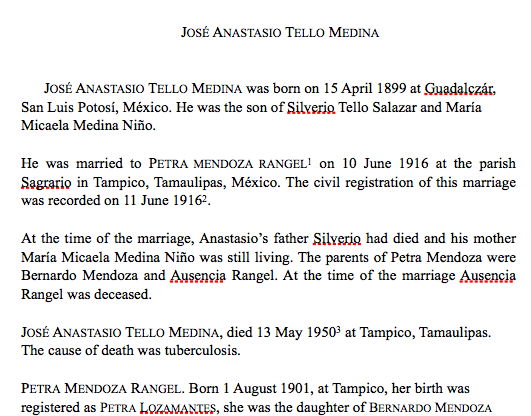
Here’s a sample sketch, of one of Maria’s ancestors on her father’s side. She explains, “My accreditation is in Mexico and the bulk of my research is done in Spanish language areas. I used tools that were developed for New England colonial area research, however, and that works splendidly.”

Click on this link to read Maria’s sketch of José Anastasio Tello.

Maria reports that her children not only have found the sketches easy to understand but they’re actually grateful for them!

In addition to the obvious benefit of having an easily understood way to present genealogical information to those who follow you, I can see how useful this exercise is to find holes in your research. I can also see its benefits for reacquainting yourself with your ancestors.

Reunion, the genealogy software I use, will create these reports automatically, I discovered. But Maria and I discussed the benefits to doing them by hand. There’s a big difference between creating something and reading something. (This is part of a larger post I’m contemplating on manual versus automatic in genealogy–keep an eye out.)

As I look toward shifting to a different family line in my own research, I think I’m going to take the time to write a bio sketch for the main ancestor I’ve been researching, George Washington Adams (1845-1938) before I say goodby to him for a little while. I think it should be a fun exercise.

Maria, thank you so much for sharing what you’re doing! And best of luck completing all the profiles!


Filed Under: Challenges, Genealogy tips, Preservation Tagged With: genealogy tools, Maria Tello, record keeping

  • Page 1
  • Page 2
  • Page 3
  • Interim pages omitted …
  • Page 15
  • Go to Next Page »

about me

I'm Janine Adams, a professional organizer and a genealogy enthusiast. I love doing family history research, but I find it's very easy for me to get overwhelmed and not know where to turn next. So I'm working hard to stay organized and feel in control as I grow my family tree.

In this blog, I share my discoveries and explorations, along with my organizing challenges (and solutions). I hope by sharing what I learn along the way I'll be able to help you stay focused and have fun while you do your research, too.

tags

30 x 30 Adams amy johnson crow anniversary Brown cemetery census Civil War conferences connections dna electronic files Evernote excitement Family Curator family photos genealogy tools getting started goals How They Do It Igleheart Jeffries keepsakes learning opportunities maps newspapers NGS organizing aids overwhelm paper files planning quick tips rasco record keeping research research log research trip resources RootsTech social history source documentation Stacy Julian technology time management vital records

join the facebook community!

join the facebook community!

My organizing business

Learn more about my organizing business, Peace of Mind Organizing®.

Subscribe by RSS

  • RSS - Posts
  • RSS - Comments

© 2026 Janine Adams


Loading Comments...