• BLOG
  • ABOUT
    • Privacy Policy

Organize Your Family History

Stay focused and happy while exploring your roots

8 reasons not to print

November 3, 2015 By Janine Adams 32 Comments

8 reasons not to print genealogy documentsWhen I started this blog in 2012, I printed everything. I did a lot of research online, but I would print out the documents I found online and read the printed version. Then I would  file them in my paper filing system after recording the information into my family tree software. Gradually, I’ve stopped that practice. I think the turning point was when I created an electronic filing system that I was confident in. Before that, I was afraid I wouldn’t find the document on my hard drive.

Now, the only paper that goes into file folders are documents that came to me in hard copy form. And even some of those are scanned and discarded.

In an effort to encourage others to consider giving up printing, I’ve come up with a list of eight advantages to going paperless:

  1. It’s less expensive. When you print, you’re using paper, toner (or ink) and electricity. And you’re creating wear and tear on your printer.
  2. It takes up less space. As your paper files (or binders) grow, they take up more space. (And certainly piles of unfiled paper take up a lot of space!)
  3. It’s easier to file. More effort goes into filing a piece of paper into a physical file folder or binder than into an electronic folder.
  4. Electronic documents are easier to find. If you misfile a paper file or leave it in a pile, it can take a lot of effort to find it.
  5. Electronic documents are searchable (usually). With a few keystrokes you can find all your electronic documents that share certain attributes (like a surname).
  6. Electronic files are easier to read. You can zoom, adjust contrast, brighten and do all sorts of things to electronic documents that make them easier to read. And that makes your research easier on your eyes. (I can’t remember the last time I used my lighted magnifier!)
  7. Electronic documents are easily backed up. I recommend using both an external hard drive and a cloud backup.
  8. Electronic files are easier to share. No photocopying or mailing necessary!

Do you have any reasons to add? I’m convinced, but I’d love to hear from anyone who would like to make a case for keeping paper copies of everything!

Photo of printer by Sir Adavis via Flickr. Used under Creative Commons License. (Red X added using PicMonkey.)

Filed Under: Genealogy tips, Organizing, Technology Tagged With: electronic files, organizing aids, record keeping, technology

Create (or download) genealogy forms with Transpose

September 15, 2015 By Janine Adams 9 Comments

I think many genealogists (including me) enjoy forms. We collect data and we like to have a place to put it. I have been playing with a website that allows me to create forms willy nilly and I’m having a great time.
That website is Transpose. It makes it ridiculously easy create forms that you can fill out yourself or share with others via weblink. (So you could create a form to send to cousins, for example, and the answers would form a database in your Transpose account.) You can also publish form templates for others to download and customize for their own use.

I learned about Transpose via Diahan Southard, Your DNA Guide, who mentioned that she used Transpose’s previous incarnation, KustomNote, for creating contact forms that help her organize the many DNA-related contacts she receives.

Since creating my (free) account on Transpose, I have created a bunch of forms, including several genealogy-related templates that I’ve been using regularly.

I’ve made three genealogy templates public:

  • Genealogy conference notes (which was really handy when I was taking notes at the Southern Illinois Genealogical Society’s conference)
  • Genealogy task list (which is wear I’m keeping track of current projects, as I blogged about last week)
  • Genealogy abstract form (which I’m using to capture data as I abstract my ancestors’ Civil War pension files)

Please feel free to download them and customize them for your use. I’m sure I’ll be adding more–they’ll all be tagged Genealogy, so they’ll be easy to find when you browse public templates at Transpose.  All my templates are quite simple, but I feel like I’ve just scratched the surface of the power of Transpose. I look forward to getting into it deeper!

Oh, and of course, Transpose has an iOS app, so I can use it on my iPhone and iPad. (An Android app is in development.)

If you use Transpose and have any public templates, please let me know in the comments!

Unfortunately, Transpose announced on November 8, 2016 that it is shutting down on December 9, 2016.

Filed Under: Genealogy tips, Organizing, Technology Tagged With: genealogy tools, organizing aids, record keeping, research, technology

SHOTBOX can help you digitize documents

July 22, 2015 By Janine Adams 7 Comments

One of the RootsTech vendors I was most excited about was SHOTBOX, a tabletop photo light studio. This portable lightbox makes it easy to use your phone to take good-looking, well-lit photos of three-dimensional objects, which is great for those of who blog. It would also be really useful for folks selling items on eBay, etsy or craigslist.

What’s great for the genealogist, though, is that it provides the ability to easily take photos from above, which can be very useful for digitizing documents or photos (or photo album pages). If you have delicate documents you wouldn’t want to put through a sheet-fed scanner, or if you don’t have a scanner at all, SHOTBOX might be the tool you need to use your phone to digitize documents without risk of damage and without shadows.

Right now, SHOTBOX is running a Kickstarter campaign while they work with the factory to finish the manufacturing and ship by October. I pledged and pre-ordered the SHOTBOX plus the SideShot Kit (a lighted attachment to hold the phone or tablet steady for photos taken from the front), for a total of $149. Once the product is in production, the anticipated retail price will be $149 for the SHOTBOX and $89 for the SideShot. [Note: The Kickstarter campaign is over, but you can now pre-order at a discount directly from the SHOTBOX website.]

Go to this page to see examples of photos taken with SHOTBOX.

I’m really excited to receive my SHOTBOX this autumn and put it to use!

Another note: The links above are affiliate links, which means that SHOTBOX gives me a small percentage of the sale, but that doesn’t affect the price at all.

Filed Under: Excitement, Genealogy tips, Preservation, Technology Tagged With: family photos, genealogy tools, shotbox, technology

Update on the Livescribe pen

June 19, 2015 By Janine Adams 2 Comments

In a comment on a recent blog post, reader Maria Tello mentioned that she would like to hear an update from me on how I use my Livescribe pen for genealogy.

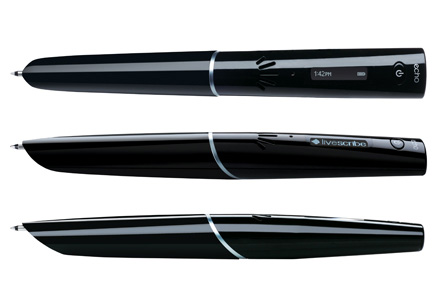
The Livescribe pen is a smart pen with a voice recorder in it that links the recording with the notes you are taking. So you can touch an area of your notes (taken in its special notebook) and hear what was being said when you took the note.

I bought my Livescribe Echo in 2013 and enthusiastically used it to take notes at conferences. In my blog post about it, I mentioned the ways I could see using it for genealogy.

True confession: The Livescribe pen is gathering dust in my desk drawer. It’s lost its luster for me. I realized that I never took the time to go back and listen to the recorded notes, which made the notes I did take less valuable (since I took fewer notes, assuming I’d listen to them).

I really do think it could be a very valuable for doing oral history interviews. I just haven’t used it that way.

It’s worth noting that since I bought my Livescribe Echo, the company has the Livescribe 3, which links with an iPhone/iPad app (as well as Android devices). It uses your device’s voice recorder, which makes the pen smaller. And the notes you take in your notebook are transmitted to the device. They can even be transcribed easily. I won’t be rushing out to buy it, since it turns out its utility for me wasn’t quite what I anticipated, but for those taking a lot of notes, I think it’s worth checking out.

Filed Under: Genealogy tips, Organizing Tagged With: excitement, genealogy tools, Livescribe smartpen, organizing aids, research, technology

  • « Go to Previous Page
  • Page 1
  • Interim pages omitted …
  • Page 13
  • Page 14
  • Page 15
  • Page 16
  • Page 17
  • Interim pages omitted …
  • Page 20
  • Go to Next Page »

about me

I'm Janine Adams, a professional organizer and a genealogy enthusiast. I love doing family history research, but I find it's very easy for me to get overwhelmed and not know where to turn next. So I'm working hard to stay organized and feel in control as I grow my family tree.

In this blog, I share my discoveries and explorations, along with my organizing challenges (and solutions). I hope by sharing what I learn along the way I'll be able to help you stay focused and have fun while you do your research, too.

tags

30 x 30 Adams amy johnson crow anniversary Brown cemetery census Civil War conferences connections dna electronic files Evernote excitement Family Curator family photos genealogy tools getting started goals How They Do It Igleheart Jeffries keepsakes learning opportunities maps newspapers NGS organizing aids overwhelm paper files planning quick tips rasco record keeping research research log research trip resources RootsTech social history source documentation Stacy Julian technology time management vital records

join the facebook community!

join the facebook community!

My organizing business

Learn more about my organizing business, Peace of Mind Organizing®.

Subscribe by RSS

  • RSS - Posts
  • RSS - Comments

© 2026 Janine Adams


Loading Comments...
