• BLOG
  • ABOUT
    • Privacy Policy

Organize Your Family History

Stay focused and happy while exploring your roots

2018 RootsTech livestream schedule

February 20, 2018 By Janine Adams 2 Comments

I’m excited that I’m attending RootsTech, but for those who can’t make it, RootsTech is livestreaming a small selection of the keynotes and breakout sessions at next week’s conference.

Here’s the schedule. The sessions will be streamed live on the RootsTech homepage and then afterward recordings will be posted on the website for a limited time.

Visit the Livestream page on the RootsTech website for descriptions of each of these sessions.

Wednesday, February 28

9:30 a.m.–10:30 a.m. | Family History in 5 Minutes a Day
Speaker: Deborah Gamble

11:00 a.m.–12:00 p.m. | DNA–One Family, One World
Speaker: David Nicholson

1:30 p.m.–2:30 p.m. | Organizing and Preserving Photograph Collections
Speaker: Ari Wilkins

3:00 p.m.–4:00 p.m. | Finding the Answers: The Basics of WWII Research
Speaker: Jennifer Holik

4:30 a.m.–5:30 a.m. | Wednesday General Session and Innovation Showcase
Speaker: Steve Rockwood, CEO of FamilySearch International

Thursday, March 1

8:30 a.m.-9:30 a.m. | Thursday General Session
Speaker: Brandon Stanton, Humans of New York

11:00 a.m.–12:00 p.m. | MyHeritage DNA 101: From Test to Results
Speaker: Yaniv Erlich

1:30 p.m.–2:30 p.m. | Google Photos: Collect, Organize, Preserve, and Share
Speaker: Michelle Goodrum

3:00 p.m.–4:00 p.m. | Unlocking Roman Catholic Records
Speaker: Brian Donovan

4:30 p.m.–5:30 p.m. | A Gift of Life: Who’s Writing Your Story?
Speaker: Deborah Abbott

Friday, March 2

8:30 a.m.–9:30 a.m. | Friday General Session
Speaker: Scott Hamilton

11:00 a.m.-12:00 p.m. | findmypast’s British and Irish Hidden Gems
Speaker: Myko Clelland

1:30 p.m.–2:30 p.m. | Finding the Right DNA Test for You
Speaker: Jim Brewster

3:00 p.m.–4:00 p.m. | How Not to Leave Your Genealogy Behind
Speakers: Amy Johnson Crow and Curt Witcher

4:30 p.m.–5:30 p.m. | Finding Elusive Records at FamilySearch
Speaker: Robert Kehrer

Saturday, March 3

8:30 a.m.–9:30 a.m. | Saturday General Session
Speakers: Henry Louis Gates, Jr., Natalia Lafourcade

11:00 a.m.–12:00 p.m. | Civil Registration Indexes of England and Wales
Speaker: Audrey Collins

1:30 p.m.–2:30 p.m. | Advancing Your Genealogy Research with DNA
Speaker: Anna Swayne

3:00 p.m.–4:00 p.m. | Pain in the Access: More Web for Your Genealogy
Speaker: Curt Witcher

That’s a lot of free information available to you! I heartily encourage to attend as many of these talks as you can, from the comfort of your computer, tablet or phone. In my experience, RootsTech presentations are top notch.

 

Filed Under: Excitement, Genealogy tips, General Tagged With: conferences, excitement, learning opportunities, RootsTech, technology

Raise your hand if you’re going to RootsTech!

February 6, 2018 By Janine Adams 3 Comments

RootsTech 2018 is a little later than usual (February 28 to March 2) and I’ve just today started to focus on it. I deleted last year’s app on my so that I could download this year’s version. Turns out, if I’d read this blog post, titled 7 Ways the Mobile App Will Enhance Your RootsTech Experience I would have realized that all had to do was open the 2017 app, tap Exit to Show List, and select RootsTech 2018.

The app really is robust, allowing you to access information about conference sessions, exhibitors, schedules and more in a variety of ways. I’m going to make sure I budget some time in advance of the conference to go through it and put sessions on the app’s schedule so I’m not feeling stressed while at the conference.

Apparently 15,000 attendees are expected at this year’s conference to learn from their choice of 300 sessions and 200 exhibitors. I can’t believe I can attend a conference of that scope and not feel completely overwhelmed. It really is very well organized. One thing I’ve learned is to schedule down time and give myself permission to skip a conference session if I’m feeling exhausted. (I find that being around so many people can be draining.) If you’re attending for the first time you might want to check out this RootsTech blog post, A Survival Guide to RootsTech.

In years past I’ve had a great time meeting readers of this blog at RootsTech. If you’re going and you’d like to say hi in person, just leave a note in the comments and we’ll figure that out. I hope to meet some of you in person this year!

Filed Under: Excitement, General, Technology Tagged With: conferences, excitement, learning opportunities, resources, technology

A simple tip for accessing Family Search documents

January 26, 2018 By Janine Adams 14 Comments

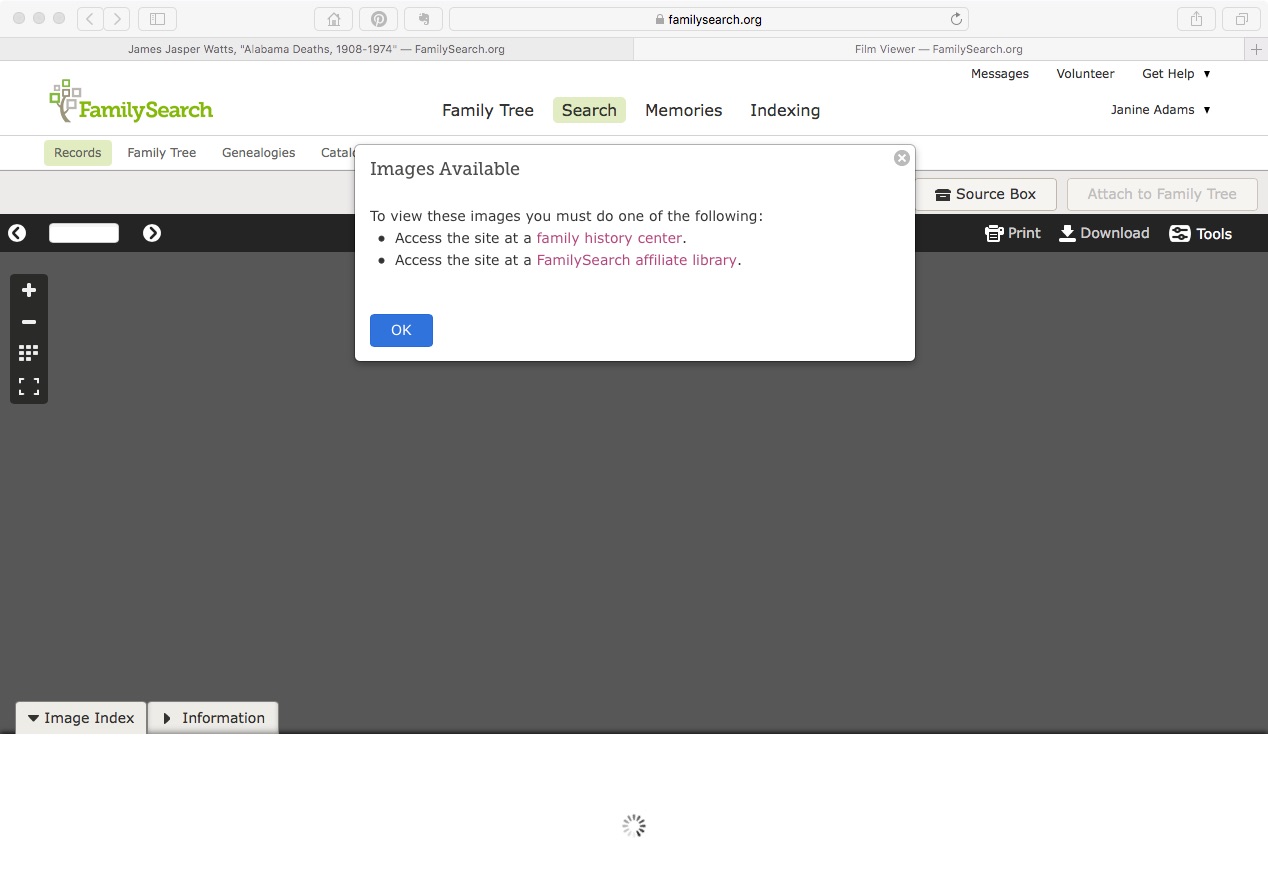
Last weekend I went to the St. Louis County Library’s genealogy room to access some documents I’d found on Family Search that were only available for viewing from the Family History Library or an affiliate library. I had stored links to these documents in Evernote until I had a few lookups to do.

When I got there and logged on to the library’s wifi, I was disappointed to get the same message I’d received at home (pictured above). I consulted with the librarian, who was able to access the first document on her computer. She didn’t know why I couldn’t access it on mine, but suggested I use the library’s computers. I did that, but I would have much preferred being on my own laptop, since the documents I was trying to access were hyperlinked on my computer. (I didn’t think of accessing my Evernote account on the library’s computer.) I also would have much preferred to download the documents directly to my computer, rather than onto a flash drive. And I didn’t enjoy fumbling around with Windows when I’m used to a Mac.

When I got home, I realized I’d not properly captured the source information. So back I went to the library three days later.

I had the same problem accessing the documents and I asked a different librarian for help. He made a brilliant suggestion:

Try another browser.

I don’t know why I hadn’t thought of it. I like to use Safari on my Mac, but Safari sometimes doesn’t play well with others. When I tried to access the document on Chrome, there it was.

So if you’re in a library where you should be able to access a Family Search document and can’t, just try another browser.

Edited to add: According to some comments I received on Facebook, this browsing-switching phenomenon as it relates to Family Search might be specific to the St. Louis County Library. So your mileage may vary.

Filed Under: Challenges, Genealogy tips, Technology Tagged With: research, technology, vital records

Backing up Evernote on a Mac (updated)

November 28, 2017 By Janine Adams 4 Comments

I like storing important files on my hard drive, not in the cloud. Call it unreasonable, but I have a distrust of the cloud. Yet I love Evernote, the cloud-based note-taking and information storing app. In fact I depend on it for many facets of my personal, business, and genealogy lives. So I was thrilled when reader Corbin Dodge, J.D., was kind enough to spell out instructions for backing up Evernote to your hard drive, after I expressed my fear of what would happen if Evernote vanished, in a comment on my blog post How I store my genealogy information. I went through all the steps of Corbin’s clear and detailed instructions and now have such peace of mind knowing that my notes are safe and easily accessible outside of the Evernote app. (I back up my hard drive to an external hard drive and to the cloud.) I didn’t want this valuable information to remain buried in the comments, so Corbin has graciously agreed to let me reprint them here. [Note: Evernote issued an update which changed the way the backup is created. This post has been updated to include the new instructions.]

I share your concerns re: what if an app goes belly up (what nightmares are made of!).

One thing I admire about Evernote is that it is easy to backup your notes so they’re accessible even if the app goes away. To do this on Mac:

(1) select the “Notes” heading in the sidebar

(2) On mac, hold down the command key and the “A” key at the same time, which will select all notes (on PC, hold down the control key and the “A” key at the same time)
(3) On the main menu bar, click “File”, then select “Export notes…”
(4) A window will pop up. There is a drop-down box labeled “Format”. It gives you 2 options. Choose “HTML”
(5) Save*

To access the backups, click on any note in the folder. It will open in your default browser. You can backspace out the note name in the url to get the full table of contents of every note that was backed up. Not as smooth to browse as the app, but reassuring to know your notes are accessible even if Evernote goes away! It also saves the images, albeit as a separate image file

*I’ve found this folder structure works well to organize backups for my various apps:
Dropbox / Backups / Evernote / 2017-09-27 Evernote Backup

Selecting the HTML format is a safeguard in case Evernote ceases to exist. The alternate option is to save them as “Evernote XML Format (.enex)”, which is an Evernote-specific file format which saves more metadata about each note (e.g., notebooks, tags, author), so this choice could be useful if you ever need to restore lost notes into Evernote (i.e., if their sync ever messes up). The downside to .enex is that it’s not a universally-friendly file format, so it wouldn’t do you much good if Evernote ever goes kaput.

p.s., an added benefit of backing your notebooks up in HTML format is that you can easily go back and retrieve a previous version of any single note without affecting all of your Evernote notebooks (which would be the case if you didn’t select “HTML” in step 3.

You can learn about Corbin’s digital marketing business at corbin-dodge.com and read about his adventures renovating his 100+ year home at eastwoodbungalow.com. Thank you, Corbin!


Filed Under: Genealogy tips, Technology Tagged With: Evernote, genealogy tools, organizing aids, technology

  • « Go to Previous Page
  • Page 1
  • Interim pages omitted …
  • Page 7
  • Page 8
  • Page 9
  • Page 10
  • Page 11
  • Interim pages omitted …
  • Page 20
  • Go to Next Page »

about me

I'm Janine Adams, a professional organizer and a genealogy enthusiast. I love doing family history research, but I find it's very easy for me to get overwhelmed and not know where to turn next. So I'm working hard to stay organized and feel in control as I grow my family tree.

In this blog, I share my discoveries and explorations, along with my organizing challenges (and solutions). I hope by sharing what I learn along the way I'll be able to help you stay focused and have fun while you do your research, too.

tags

30 x 30 Adams amy johnson crow anniversary Brown cemetery census Civil War conferences connections dna electronic files Evernote excitement Family Curator family photos genealogy tools getting started goals How They Do It Igleheart Jeffries keepsakes learning opportunities maps newspapers NGS organizing aids overwhelm paper files planning quick tips rasco record keeping research research log research trip resources RootsTech social history source documentation Stacy Julian technology time management vital records

join the facebook community!

join the facebook community!

My organizing business

Learn more about my organizing business, Peace of Mind Organizing®.

Subscribe by RSS

  • RSS - Posts
  • RSS - Comments

© 2026 Janine Adams


Loading Comments...