• BLOG
  • ABOUT
    • Privacy Policy

Organize Your Family History

Stay focused and happy while exploring your roots

Exploring ICD codes on death certificates

May 1, 2020 By Janine Adams 9 Comments

Death certificates can provide such great information, which is why I always try to track them down. Often my eye makes a bee-line for the names of the parents of the deceased, but of course there’s much more information to be found. One area, cause of death, is always of interest. Unfortunately, that information seems to often be the most illegible. In the past, if I could make out the words I would add them to my database. But if I couldn’t, I’d just move along.

But I’ve learned that with a little more effort you can decipher the cause of death and learn more about your ancestor. Often, in addition to the written-out words describing cause of death, there’s a ICD (International Classification of Diseases) code as well. If you can’t read the words, you can look up the ICD code to get more information. Just visit the International Classification of Diseases page at Wolfbane.com to track down the meaning of the code.

Let’s use a death certificate from my great grandfather’s brother, Jesse Wiley Rasco (1978-1957), to illustrate this.

Here’s his 1945 death certificate. I’ve put a red border around the ICD codes.
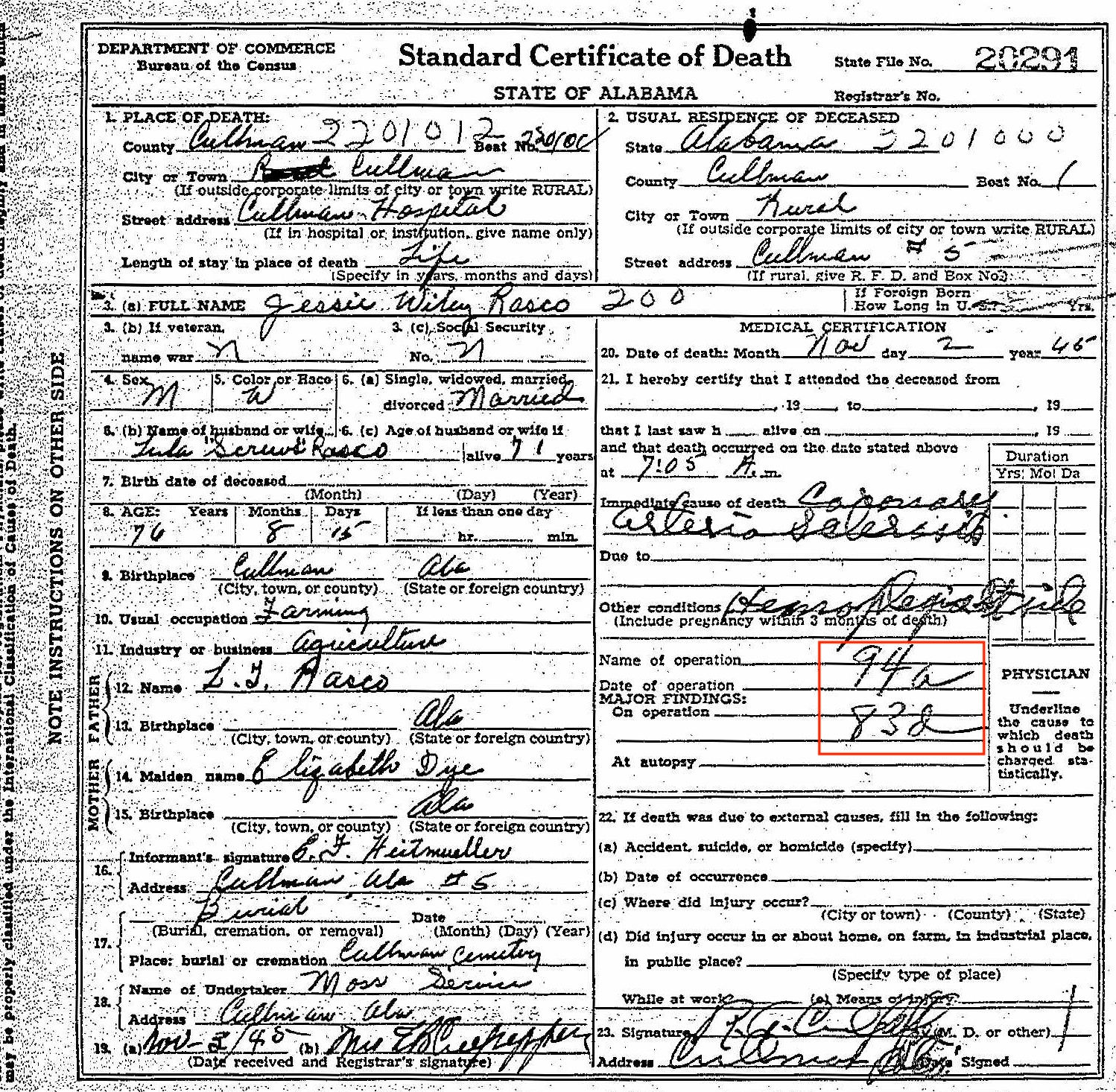
Death certificate for Jesse Wiley Rasco


As you can see, the ICD code for the primary cause of death is 94a. And the ICD code for the secondary cause of death is 83d. I could read the words for the primary cause of death. To me, it looks like Coronary Arteriosclerosis. Ordinarily, I would have stopped there. But the secondary cause of death was hard to decipher and I was curious.

I went to the International Classification of Disease page at Wolfbane.com and clicked on ILCD Revision 5 (1938), which would have been the version in use in 1945, since the next revision came out in 1948. The codes are listed in numerical order, so it was easy for me to find 94a, “diseases of the coronary arteries.” The secondary cause of death, 83d, is “hemiplegia and other paralyses of unstated origin.” Once I read that, I could see the word hemiplegia in the handwriting. It’s hard to make out the word after, but it looks to me like it could be “stroke.” I looked up the word hemiplegia and learned that it means “Paralysis on one side of the body.” [Edited to add: I received a note from reader Dennis Young suggesting that the handwriting says “Rt. side.” That makes complete sense and now seems obvious! The plot thickened a little when I received a note from reader Brad Pierce suggesting that the words say Lt. side, not Rt. side. Brad’s a physician himself so is probably good at deciphering doctor’s handwriting! I can’t tell whether it’s left or right, but I’m so glad to accept the “side” part. Thank you Dennis and Brad!]

Knowing that this 76-year-old farmer was living with paralysis on one side of his body at the time of his death gives me a bigger picture of what his life experience (or least the end of his life) was like.

As you can see, taking time to look up ICD codes when you see them might provide you with more information about your ancestor or might even solve a mystery. Just be sure you’re looking at the pertinent Revision!
Filed Under: Challenges, Genealogy tips Tagged With: genealogy tools, rasco, research, vital records

A simple tip for accessing Family Search documents

January 26, 2018 By Janine Adams 14 Comments

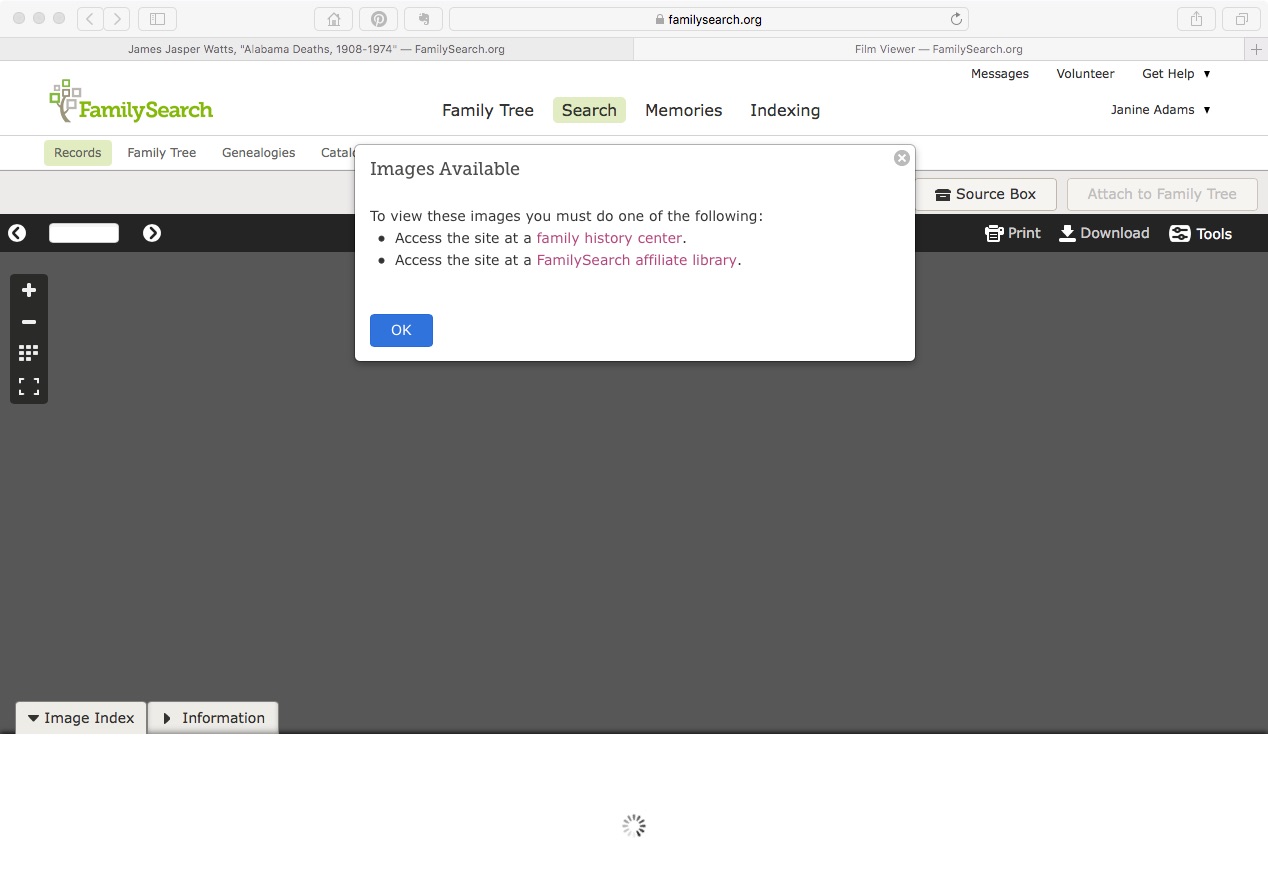
Last weekend I went to the St. Louis County Library’s genealogy room to access some documents I’d found on Family Search that were only available for viewing from the Family History Library or an affiliate library. I had stored links to these documents in Evernote until I had a few lookups to do.

When I got there and logged on to the library’s wifi, I was disappointed to get the same message I’d received at home (pictured above). I consulted with the librarian, who was able to access the first document on her computer. She didn’t know why I couldn’t access it on mine, but suggested I use the library’s computers. I did that, but I would have much preferred being on my own laptop, since the documents I was trying to access were hyperlinked on my computer. (I didn’t think of accessing my Evernote account on the library’s computer.) I also would have much preferred to download the documents directly to my computer, rather than onto a flash drive. And I didn’t enjoy fumbling around with Windows when I’m used to a Mac.

When I got home, I realized I’d not properly captured the source information. So back I went to the library three days later.

I had the same problem accessing the documents and I asked a different librarian for help. He made a brilliant suggestion:

Try another browser.

I don’t know why I hadn’t thought of it. I like to use Safari on my Mac, but Safari sometimes doesn’t play well with others. When I tried to access the document on Chrome, there it was.

So if you’re in a library where you should be able to access a Family Search document and can’t, just try another browser.

Edited to add: According to some comments I received on Facebook, this browsing-switching phenomenon as it relates to Family Search might be specific to the St. Louis County Library. So your mileage may vary.

Filed Under: Challenges, Genealogy tips, Technology Tagged With: research, technology, vital records

Reclaim the Records is fighting for genealogists

May 17, 2017 By Janine Adams 3 Comments

I was really pleased to learn about Reclaim the Records, a non -profit group of genealogists, researchers, historians and open-government advocates who are using Freedom of Information requests to get state governments to make genealogical and archival records freely available to the public.

The group was founded in 2015 by Brooke Schreier Ganz and has already successfully petitioned for a collection of marriage records to be released. Their pilot project was an index to the 1908-1929 New York City marriage license, applications and affidavits that was only available on microfilm on site in lower Manhattan. Thanks to Reclaim the Records’ efforts–which took the NYC Department of Records and Information Services all the way to the Supreme Court of the state of New York–that data set is now scanned and available on the Internet Archive for free and open access. You can read the complete sage on their website.

Reclaim the Records has seven other pilot projects, the second of which opened up the index to all 1930-1995 New York City marriages. Two of those projects (#6 and #7) have special interest to me because they involve Missouri birth and death indexes. My fair state has proven difficult at best and Reclaim the Records has filed litigation in both cases.

I find their efforts extremely interesting and I’m grateful to them for working so hard to make genealogical and archival information available to all. I encourage you to check out their website, including their To-Do List, to see what’s on the horizon. You can also take their Records Survey to inform them about data sets you think are wrongly withheld from the public.

Thanks so much to Organize Your Family History reader Diane Unger for telling me about Reclaim the Records!

Filed Under: Genealogy tips Tagged With: reclaim the records, research, vital records

Go ahead, contact that courthouse!

January 11, 2017 By Janine Adams 15 Comments

Not all genealogy documents are available on the internetLike many people, I rely primarily on documents I find by searching the internet. When do I library or cemetery research trip, I find information not available online, but when I’m in my office, I search online and if I don’t find what I’m looking for I typically move on.

I know it’s possible to contact courthouses or state archives for documents but over the years I’ve done little of that. In the last couple of weeks, however, I hit the jackpot when I took that extra step.

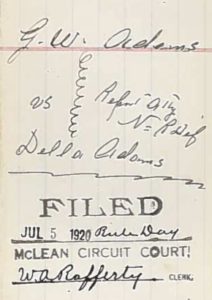
I’ve been working on transcribing the Civil War pension file of George Washington Adams, my 2nd great grandfather. In it was a divorce decree for his 1920 divorce from his second wife, Della. (I’m descended from his first wife, Henrietta.) That piqued my curiosity because it gave George custody of their “infant son” and the only son I knew about was 12 at the time of the divorce. I wondered if there was another son and also why the 75-year-old father was given custody over the 50-year-old mother. The decree referred to pleadings and depositions in the case and I wanted to get my hands on those. It was Christmas, so I couldn’t pick up the phone (and I don’t like picking up the phone), so I wrote a letter to the Circuit Court Clerk of McLean county, Kentucky.

To my delight, just a few days later, she got back to me telling me that the documents I sought were in the State Archives and giving me a little extra information to make easier for the archivist to find them. She also gave me a phone number for the Archives. So I called and talked to a lovely young man and gave him a credit card number. That very same day he emailed me photos of the entire file. I think it cost me $8. If I’d wanted, he would have mailed a certified copy but I didn’t want to wait that long. (And get this: He added another divorce petition that I didn’t even know about! Six years into their 14-year marriage, Della filed for divorce from George, but she must have dropped it.)

The 30-page divorce file he sent had numerous depositions and probably sparked as many questions as it answered, but it’s another treasure trove. Turns out there was only one son from this marriage, Horace, who was indeed 12 at the time of the divorce. I don’t know why he was called an infant in the decree. But George went into the Old Soldier’s Home just two years later, so now I need to find out what happened to teenage Horace!

Neither the pension file nor this divorce file are available online, though I did order the pension file online. Both are outstanding sources of information about this ancestor. I’m processing the divorce file like I’m processing the pension file, by transcribing the documents and properly sourcing every fact I glean from them.

I encourage you to look beyond those documents available online, even if you’re not in a position to travel. There’s a whole world of documents that haven’t yet been digitized!

Filed Under: Challenges, Excitement, Genealogy tips, My family Tagged With: Adams, courthouse, research, vital records

  • « Go to Previous Page
  • Page 1
  • Page 2
  • Page 3
  • Page 4
  • Go to Next Page »

about me

I'm Janine Adams, a professional organizer and a genealogy enthusiast. I love doing family history research, but I find it's very easy for me to get overwhelmed and not know where to turn next. So I'm working hard to stay organized and feel in control as I grow my family tree.

In this blog, I share my discoveries and explorations, along with my organizing challenges (and solutions). I hope by sharing what I learn along the way I'll be able to help you stay focused and have fun while you do your research, too.

tags

30 x 30 Adams amy johnson crow anniversary Brown cemetery census Civil War conferences connections dna electronic files Evernote excitement Family Curator family photos genealogy tools getting started goals How They Do It Igleheart Jeffries keepsakes learning opportunities maps newspapers NGS organizing aids overwhelm paper files planning quick tips rasco record keeping research research log research trip resources RootsTech social history source documentation Stacy Julian technology time management vital records

join the facebook community!

join the facebook community!

My organizing business

Learn more about my organizing business, Peace of Mind Organizing®.

Subscribe by RSS

  • RSS - Posts
  • RSS - Comments

© 2026 Janine Adams


Loading Comments...