• BLOG
  • ABOUT
    • Privacy Policy

Organize Your Family History

Stay focused and happy while exploring your roots

BCGS presentation on Presentism

April 26, 2024 By Janine Adams 4 Comments

I have to admit that “Presentism” isn’t a term I had been familiar with when I received an email from Donna Cox Baker about her upcoming virtual presentation on presentism in genealogy for the Bucks County Genealogical Society. (The title of the talk is Our Founding Fathers Would What? Presentism in Genealogical and Historical Research.) When I clicked for more details I learned that “Presentism is a type of historical bias in which our understanding of the present influences or clouds how we evaluate and interpret the past. Historians take great pains to avoid presentism—and genealogists should be on guard for it also.”

This topic is so intriguing to me when seen through the lens of genealogist. I think this presentation from Donna, who is a history scholar and professor (and friend of this blog!) will be fascinating. It will be held on May 4 from 10 to noon eastern time. Registration opens on April 29.

I’m participating in a neighborhood yard sale on May 4 so won’t be able to attend live but the topic sounds so interesting that I’m tempted to sign up so I can watch the recording. The fee for the program is $5 for members and $10 for non-members. Membership is $20 a year and only members have access to a recording of the program, which is available for 30 days.

To learn a little more about Donna Cox Baker, you can read her How They Do It interview on this blog as well as her guest post on organizing genealogy research with Zotero.
Filed Under: Genealogy tips Tagged With: Donna Cox Baker, learning opportunities, research

Contact that courthouse: It might pay off!

April 11, 2024 By Janine Adams 2 Comments

Not all genealogy documents are available on the internetIt can be challenging for me to pick up the phone or even send an email when I can’t find what I’m looking for online. But in 2017, when I originally wrote this post, I had a beneficial experience by doing just that. I thought you might appreciate this little nudge to step away from your online searching, so I’m running this post again.


Like many people, I rely primarily on documents I find by searching the internet. When do I library or cemetery research trip, I find information not available online, but when I’m in my office, I search online and if I don’t find what I’m looking for I typically move on.

I know it’s possible to contact courthouses or state archives for documents but over the years I’ve done little of that. In the last couple of weeks, however, I hit the jackpot when I took that extra step.

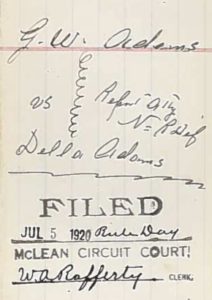
I’ve been working on transcribing the Civil War pension file of George Washington Adams, my 2nd great grandfather. In it was a divorce decree for his 1920 divorce from his second wife, Della. (I’m descended from his first wife, Henrietta.) That piqued my curiosity because it gave George custody of their “infant son” and the only son I knew about was 12 at the time of the divorce. I wondered if there was another son and also why the 75-year-old father was given custody over the 50-year-old mother. The decree referred to pleadings and depositions in the case and I wanted to get my hands on those. It was Christmas, so I couldn’t pick up the phone (and I don’t like picking up the phone), so I wrote a letter to the Circuit Court Clerk of McLean county, Kentucky.

To my delight, just a few days letter, she got back to me telling me that the documents I sought were in the State Archives and giving me a little extra information to make easier for the archivist to find them. She also gave me a phone number for the Archives. So I called and talked to a lovely young man and gave him a credit card number. That very same day he emailed me photos of the entire file. I think it cost me $8. If I’d wanted, he would have mailed a certified copy but I didn’t want to wait that long. (And get this: He added another divorce petition that I didn’t even know about! Six years into their 14-year marriage, Della filed for divorce from George, but she must have dropped it.)

The 30-page divorce file he sent had numerous depositions and probably sparked as many questions as it answered, but it’s another treasure trove. Turns out there was only one son from this marriage, Horace, who was indeed 12 at the time of the divorce. Apparently the word infant was used differently 100 years ago! But George went into the Old Soldier’s Home just two years later, so now I need to find out what happened to teenage Horace! [Note from 2024 Janine: I did find Horace on the 2020 census living with his older half brother.]

Neither the pension file nor this divorce file are available online, though I did order the pension file online. Both are outstanding sources of information about this ancestor. I’m processing the divorce file like I’m processing the pension file, by transcribing the documents and properly sourcing every fact I glean from them.

I encourage you to look beyond those documents available online, even if you’re not in a position to travel. There’s a whole world of documents that haven’t yet been digitized!

Filed Under: Challenges, Excitement, Genealogy tips, My family Tagged With: Adams, courthouse, research, vital records

Do you use Reunion?

March 29, 2024 By Janine Adams 2 Comments

If you’re like me and use Reunion for Macintosh as your genealogy software, you’ll probably be interested in learning that there is a virtual Reunion Users Group organized by the San Diego Genealogy Society that meets on Zoom. It’s free and open to the public and the next meeting is on Tuesday, 2 April 2024 at 12 pm Pacific time. The topic will be on the new version of the software, Reunion 14, and the speaker will be Anne Alves. Here’s the page with a link to register.

I am so grateful to reader Marian Kowalski who frequently shares great tips and resources. I appreciate her taking the time to email me about this users group. If you have ideas for blog posts or want me to share resources of interest, please don’t hesitate to reach out to me at janine@organizeyourfamilyhistory.com.

Other great learning resources for Reunion include Leister’s ReunionTalk forum and the Reunion Software Users Group on Facebook. My How I Do It: A Professional Organizer’s Genealogy Workflow is a 37-page pdf download explaining how I organize my genealogy research. Since I use Reunion, all the examples are shown in Reunion 13.

If you recommend other Reunion resources, please share them in the comments!

Filed Under: Genealogy tips, Technology Tagged With: genealogy tools, learning opportunities, Reunion, technology

Switching from Evernote to Apple Notes

March 15, 2024 By Janine Adams 38 Comments

I was a happy Evernote user for ten years. (Click on the Evernote tag below or search for the word Evernote above to read the articles I wrote about that.) It took me a little while to embrace Evernote. I think part of my problem was that I didn’t like the way it looked. But I got used to it and created a lot of notebooks for both my genealogy and my organizing business (and my life!). I kept my genealogy research log in Evernote.

I started with a free version, then moved to a $50 Premium version that allowed me access to my Evernote notebooks even when I was offline. The price was raised to $70 and I paid that for seven years. But then, after Evernote was sold, they raised the price to $130 a year. And they made the Free version all but useless.

I found that price hike egregious, so I decided to jump ship. I did a little research and opted to use Apple Notes, which came with my Mac and iPhone and is available at no additional cost. (I’m already paying extra to Apple for 2TB of iCloud storage space.)

It turns out that the process of transferring my data to Apple Notes isn’t difficult, but it has to be done a notebook at a time. I have 200 notebooks. So I’m working on it a few notebooks at a time. The process is easy. Here’s what I do on my laptop, using the Evernote app (not the website):

  1. Select a notebook to transfer
  2. Highlight all the notes in that notebook
  3. Click File, Export
  4. Select ENEX format and click Export
  5. Create a filename that matches the notebook name and click Save.
  6. Go to Apple Notes
  7. Click File, Import to Notes
  8. Select the file you just created, then click Import
  9. Rename the notebook from the default name Imported Notes

Then go to the next notebook.

I created a little screen share video for those who prefer to see these instructions in action.

https://organizeyourfamilyhistory.com/wp-content/uploads/2024/03/video2278013066.mp4

It’s worth noting that I’m not transferring everything…there are notebooks that I really don’t need again. I’m making that evaluation as I go along. Little by little the transfer will get done. In the interim, I’m making sure to add all new notes in Apple Notes, not Evernote. Once the Evernote transition is complete, Apple Notes will be my comprehensive go-to repository of notes.

My understanding is that I can use my existing notebooks without paying. The free version limits me to one new notebook with 50 notes but I wouldn’t lose my current notes and I can export, delete and merge existing notes. However, I haven’t tested that because when I went to cancel I was repeatedly offered a lower price to stay on. So I accepted an offer of $65 (less than the $70 I was prepared to pay) for one last year. I figure it will give me some time to make this transfer without feeling any pressure or feeling like I’m shackled. The key, of course, is to keep chipping away at it and not wait until the end of the year to work on it.

It feels great not to have to budget money for what turned out to be a redundant app for me.

Filed Under: Organizing, Technology Tagged With: Apple Notes, Evernote, research log

  • « Go to Previous Page
  • Page 1
  • Interim pages omitted …
  • Page 8
  • Page 9
  • Page 10
  • Page 11
  • Page 12
  • Interim pages omitted …
  • Page 219
  • Go to Next Page »

about me

I'm Janine Adams, a professional organizer and a genealogy enthusiast. I love doing family history research, but I find it's very easy for me to get overwhelmed and not know where to turn next. So I'm working hard to stay organized and feel in control as I grow my family tree.

In this blog, I share my discoveries and explorations, along with my organizing challenges (and solutions). I hope by sharing what I learn along the way I'll be able to help you stay focused and have fun while you do your research, too.

tags

30 x 30 Adams amy johnson crow anniversary Brown cemetery census Civil War conferences connections dna electronic files Evernote excitement Family Curator family photos genealogy tools getting started goals How They Do It Igleheart Jeffries keepsakes learning opportunities maps newspapers NGS organizing aids overwhelm paper files planning quick tips rasco record keeping research research log research trip resources RootsTech social history source documentation Stacy Julian technology time management vital records

join the facebook community!

join the facebook community!

My organizing business

Learn more about my organizing business, Peace of Mind Organizing®.

Subscribe by RSS

  • RSS - Posts
  • RSS - Comments

© 2026 Janine Adams


Loading Comments...