• BLOG
  • ABOUT
    • Privacy Policy

Organize Your Family History

Stay focused and happy while exploring your roots

Quick Tip #24: Keep your folder structure simple

August 10, 2021 By Janine Adams 2 Comments

Here’s the next in my occasional series of bite-size Quick Tips. Click on the Quick Tips tag for my other Quick Tips. Because I tend to write longer posts, I wanted to provide a quick-to-read (and quick-to-write) post every couple of weeks on a small topic that pops into my head. This one has saved me a lot of time in filing and retrieving documents from my hard drive.

Keep your folder structure simple

There’s a tendency to think a complicated organizational system is a good one. I think the opposite is true. The simpler we can make a system, the easier it is to maintain.

This is true for your folder structure for your genealogy source documents. There’s no best way to organize your folders. You could file documents by surname, location, type of document…whatever works for you. But I urge you to keep it simple. I file my documents by surname and have created a folder structure with individual folders for each ancestor within a single surname (with an additional layer for collateral relatives). I describe my folder structure briefly in Step 6 of this post and in more depth in my Orderly Roots Guide, How I Do It: A Professional Organizer’s Genealogy Workflow.)

I could have chosen to nest the folders by generation, which would have had me click my way through a family tree to find a document. But that is unnecessarily complex in my view. My simple folder structure allows me to file easily and find documents easily. (And that means I actually file!) And it allows me to see all the documents I have for a single ancestor in one place.

My goal for all organizing systems is to make them as simple and streamlined as possible. I think this definitely applies to the folder structure on our hard drives!

Photo by Sam Dan Truong on Unsplash
Filed Under: Challenges, Genealogy tips Tagged With: electronic files, quick tips

Revisit: Exploring ICD codes on death certificates

August 3, 2021 By Janine Adams 7 Comments

Today, I was processing a death certificate for a collateral relative (thank you, 30 x 30 challenge!) and as I squinted at the cause of death I thought it said pneumonia. But I wasn’t sure. I didn’t know if I should risk a wrong assumption and decided to check the ICD code. I did a quick google search to see if I could find what that ICD code 92 would have represented in 1929 and didn’t come up with an easy answer. And then I remembered I’d blogged about it. So I looked on my blog and found the post, from May 1, 2020, which contains a link to the International Classifications of Diseases page at Wolfbane. That got me thinking that re-running my 2020 post about ICD codes might help my readers. So here it is again, in its entirety. P.S. 92 did indicate pneumonia in 1929!

Death certificates can provide such great information, which is why I always try to track them down. Often my eye makes a bee-line for the names of the parents of the deceased, but of course there’s much more information to be found. One area, cause of death, is always of interest. Unfortunately, that information seems to often be the most illegible. In the past, if I could make out the words I would add them to my database. But if I couldn’t, I’d just move along.

But I’ve learned that with a little more effort you can decipher the cause of death and learn more about your ancestor. Often, in addition to the written-out words describing cause of death, there’s a ICD (International Classification of Diseases) code as well. If you can’t read the words, you can look up the ICD code to get more information. Just visit the International Classification of Diseases page at Wolfbane.com to track down the meaning of the code.

Let’s use a death certificate from my great grandfather’s brother, Jesse Wiley Rasco (1978-1957), to illustrate this.

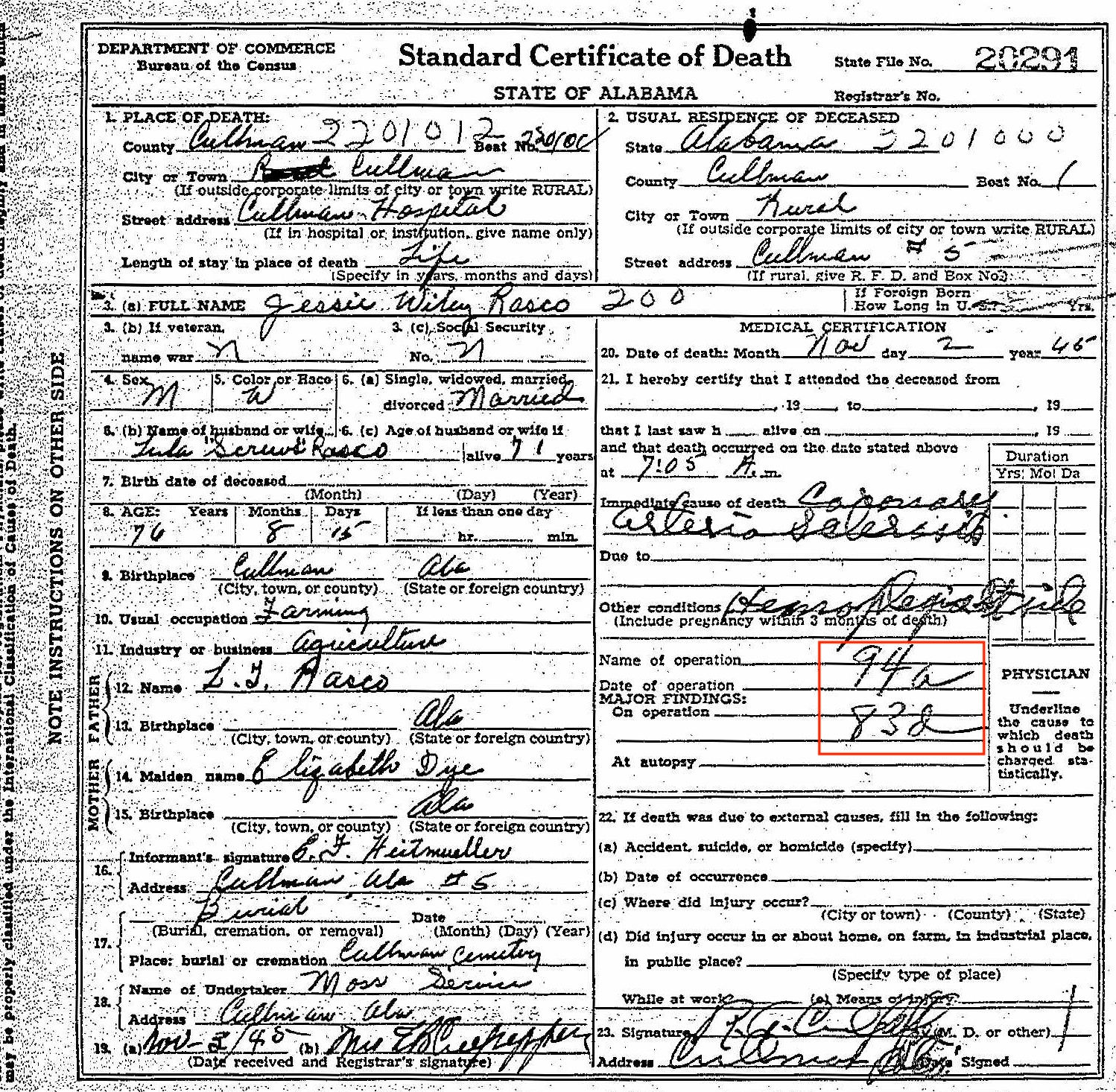
Here’s his 1945 death certificate. I’ve put a red border around the ICD codes.

Death certificate for Jesse Wiley Rasco


As you can see, the ICD code for the primary cause of death is 94a. And the ICD code for the secondary cause of death is 83d. I could read the words for the primary cause of death. To me, it looks like Coronary Arteriosclerosis. Ordinarily, I would have stopped there. But the secondary cause of death was hard to decipher and I was curious.

I went to the International Classification of Disease page at Wolfbane.com and clicked on ILCD Revision 5 (1938), which would have been the version in use in 1945, since the next revision came out in 1948. The codes are listed in numerical order, so it was easy for me to find 94a, “diseases of the coronary arteries.” The secondary cause of death, 83d, is “hemiplegia and other paralyses of unstated origin.” Once I read that, I could see the word hemiplegia in the handwriting. It’s hard to make out the word after, but it looks to me like it could be “stroke.” I looked up the word hemiplegia and learned that it means “Paralysis on one side of the body.” [Edited to add: I received a note from reader Dennis Young suggesting that the handwriting says “Rt. side.” That makes complete sense and now seems obvious! The plot thickened a little when I received a note from reader Brad Pierce suggesting that the words say Lt. side, not Rt. side. Brad’s a physician himself so is probably good at deciphering doctor’s handwriting! I can’t tell whether it’s left or right, but I’m so glad to accept the “side” part. Thank you Dennis and Brad!]

Knowing that this 76-year-old farmer was living with paralysis on one side of his body at the time of his death gives me a bigger picture of what his life experience (or least the end of his life) was like.

As you can see, taking time to look up ICD codes when you see them might provide you with more information about your ancestor or might even solve a mystery. Just be sure you’re looking at the pertinent Revision!

Filed Under: Challenges, Genealogy tips Tagged With: genealogy tips, genealogy tools, research, revisit, vital records

Join me for August 2021 30 x 30 challenge?

July 30, 2021 By Janine Adams 45 Comments

Oh my goodness, do I need a 30 x 30 challenge. After a dismal June challenge, my research did not pick up pace in July. So I’m declaring a 30 x 30 challenge for August 2021. During this coming month my goal is to spend 30 minutes a day for 30 days in a row doing genealogy research. If I average 30 minutes, that will be good enough. (I keep a spreadsheet that calculates my average.)

I find that daily research is so beneficial–it keeps my ancestors top of mind and makes it so much easier to dive right in. When I don’t have a challenge going, unfortunately, sometimes genealogy plummets on my priority list. So I’m thrilled to rev up again.

Would you care to join me? If so, please say so in the comments. Feel free to share what you intend to work on (genealogy research, genealogy organizing, a specific project or goal). About halfway through the month, I’ll do an update post and invite you to let everyone know how it’s going for you.

This is the boost I need!

Filed Under: Challenges, Excitement Tagged With: 30 x 30, time management

How do you back up your data?

July 23, 2021 By Janine Adams 12 Comments

If you embrace digital organization of your genealogy documents, like I do, you know that backing up your data is absolutely essential.

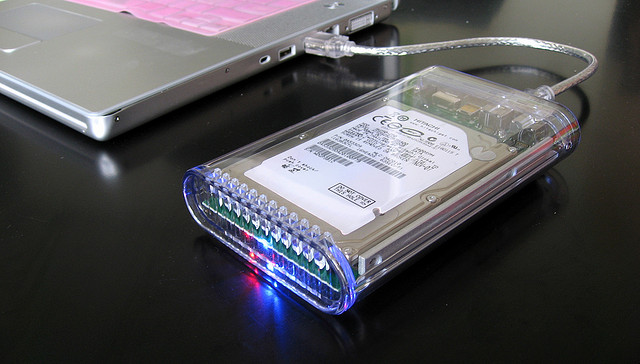
I like to store my genealogy files on my MacBook Pro’s hard drive, rather than in the cloud. I back up my hard drive to an external hard drive using Time Machine. When my laptop is at my desk (where I use a 27-inch external monitor and wireless keyboard and mouse), the external drive is automatically connected when I attach my monitor. (My monitor, an HP Business Z27 , acts as a hub.) So as long as my laptop is not away from my desk, I’m backing up to the external hard drive hourly.

In addition, I subscribe to Backblaze for $60 a year. (That’s an affiliate link that I think gives us each a free month if you click on it and subscribe.) It’s set to back up over the internet continuously. So far, I haven’t experienced a hard drive crash, but I did experience a battery situation that meant that I couldn’t access my computer for a couple of weeks. I was able to identify an important file on Backblaze and download it to my phone, which saved the day. (It was my father’s 90th-birthday video!)

I also attach my genealogy documents as multimedia files to source records in Reunion, my family tree software. My Reunion files are stored in Dropbox so that they are also available on my phone. So I think that’s a third way my genealogy files are protected.

I’m curious: How do you back up your data? Please let me know in the comments. Seven years ago, I wrote a similar post to this one (and I even used the same photo). My back-up system hasn’t changed since then (beyond switching to Backblaze from CrashPlan Pro and getting a new external hard drive). I’ll be curious to see if your answers have changed! I feel good about what I’m doing, though I’m sure there is room for improvement.

Photo by Karen via Flickr. Used under Creative Commons License.

Filed Under: Challenges, Technology

  • « Go to Previous Page
  • Page 1
  • Interim pages omitted …
  • Page 46
  • Page 47
  • Page 48
  • Page 49
  • Page 50
  • Interim pages omitted …
  • Page 219
  • Go to Next Page »

about me

I'm Janine Adams, a professional organizer and a genealogy enthusiast. I love doing family history research, but I find it's very easy for me to get overwhelmed and not know where to turn next. So I'm working hard to stay organized and feel in control as I grow my family tree.

In this blog, I share my discoveries and explorations, along with my organizing challenges (and solutions). I hope by sharing what I learn along the way I'll be able to help you stay focused and have fun while you do your research, too.

tags

30 x 30 Adams amy johnson crow anniversary Brown cemetery census Civil War conferences connections dna electronic files Evernote excitement Family Curator family photos genealogy tools getting started goals How They Do It Igleheart Jeffries keepsakes learning opportunities maps newspapers NGS organizing aids overwhelm paper files planning quick tips rasco record keeping research research log research trip resources RootsTech social history source documentation Stacy Julian technology time management vital records

join the facebook community!

join the facebook community!

My organizing business

Learn more about my organizing business, Peace of Mind Organizing®.

Subscribe by RSS

  • RSS - Posts
  • RSS - Comments

© 2026 Janine Adams


Loading Comments...