• BLOG
  • ABOUT
    • Privacy Policy

Organize Your Family History

Stay focused and happy while exploring your roots

Revisit: How I process Newspapers.com articles

April 21, 2025 By Janine Adams 10 Comments

I’ve been looking through my published blog posts for some that might be worthy of repeating. This article from 2020 is one that I thought folks might find helpful. The screenshots may not exactly match how things look currently on Newspapers.com and to be honest I haven’t had a subscription in awhile so I wasn’t able to verify that all the steps are exactly right. But I’m going on faith that it’s up-to-date enough to be helpful to those looking for ideas on including newspaper articles in their genealogy database. When I published it originally, it garnered some valuable comments, so you might want to check the comments on the original version.

I’ve been doing a lot of research on Newspapers.com recently. I downloaded a number of articles about my maternal grandparents, Crawford and Susie (Jeffries) Brown, who lived in Spokane, Washington, from 1936 until their deaths in the 1990s. My mother, Betty Sue Brown Adams, was born in Missouri in 1933, but the family to Spokane when she was three and lived there until she left for college.

The Spokesman-Review, Spokane’s daily paper, is part of Newspapers.com Publisher Extra collection. I did a seven-day free trial with them and when it was over I still I had research I wanted to do, so I signed up for a 30-day subscription for $19.99. (I didn’t want to spend $60 for a six-month subscription.) With the clock ticking, I’ve been downloading articles and also working through my backlog of downloaded articles. In doing so much research on Newspapers.com, I’ve developed a method of downloading and processing the articles that I thought I’d share with you here with some screenshots in case it’s helpful.

As always, I’m sharing what works for me…that doesn’t make it the right way or the best way. And it doesn’t mean I won’t change it up later. But this is what I’m doing now. (Several years ago, I did a screencast of how I process newspaper articles from Genealogy Bank, which was slightly different. If you’re interested, you can check it out here.)

When you find an article on Newspapers.com, you have the option to clip the article so that you find it later on Newspapers.com and others can see it (you can also download, share or save on Ancestry.com by clipping an article), or you can print or save the article. Because I don’t plan to keep my Publisher’s Extra subscription and because I prefer to download everything to my hard drive, I choose to the download the article and also to download the entire page it is on, for context. Here’s what I do:

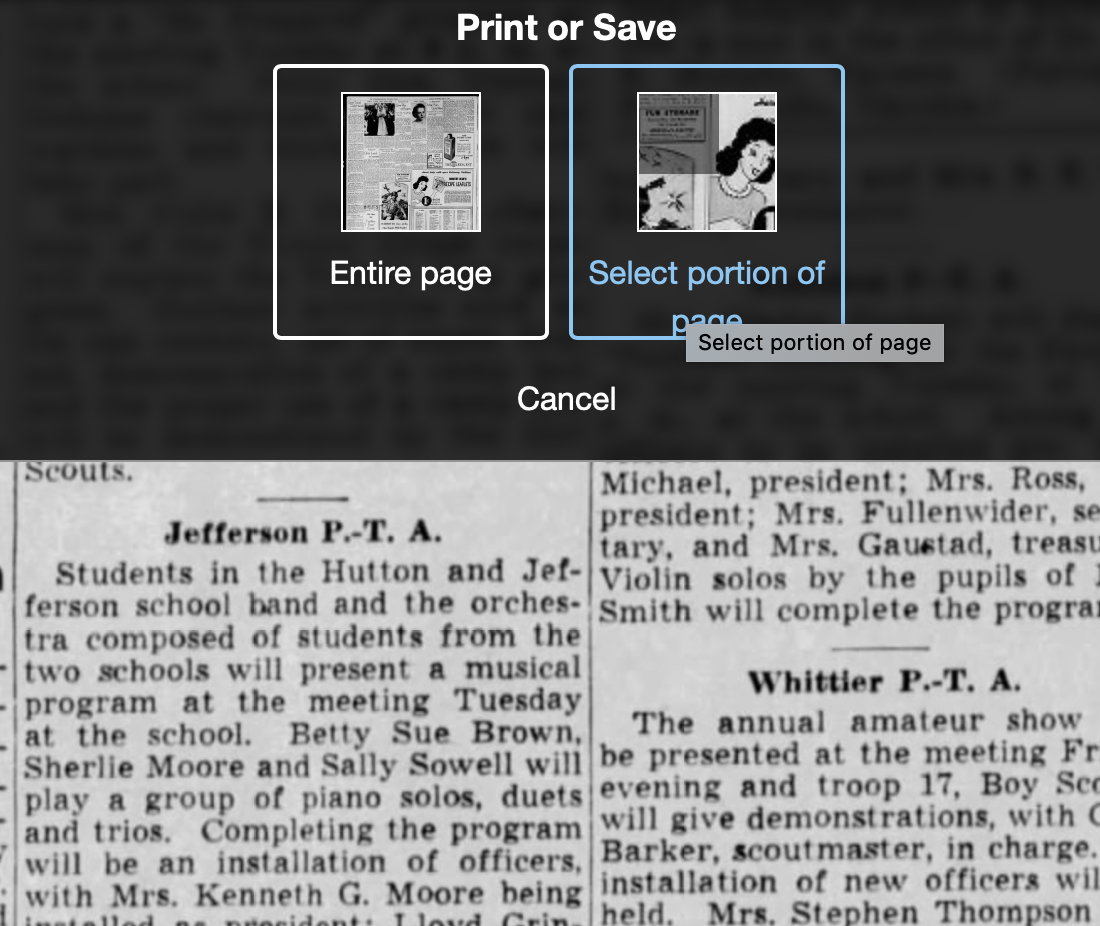
Once I’ve found an article that I want to save (in this example, it’s a 1943 article about my ten-year-old mother performing in a musical program at a PTA meeting), I click on Print/Save.

Then I click on Select portion of page. (Click on any of these images to make them larger.)
Processing an article from Newspapers.com Step OneThen I outline the article using Newspaper.com’s grab tool and click Save.
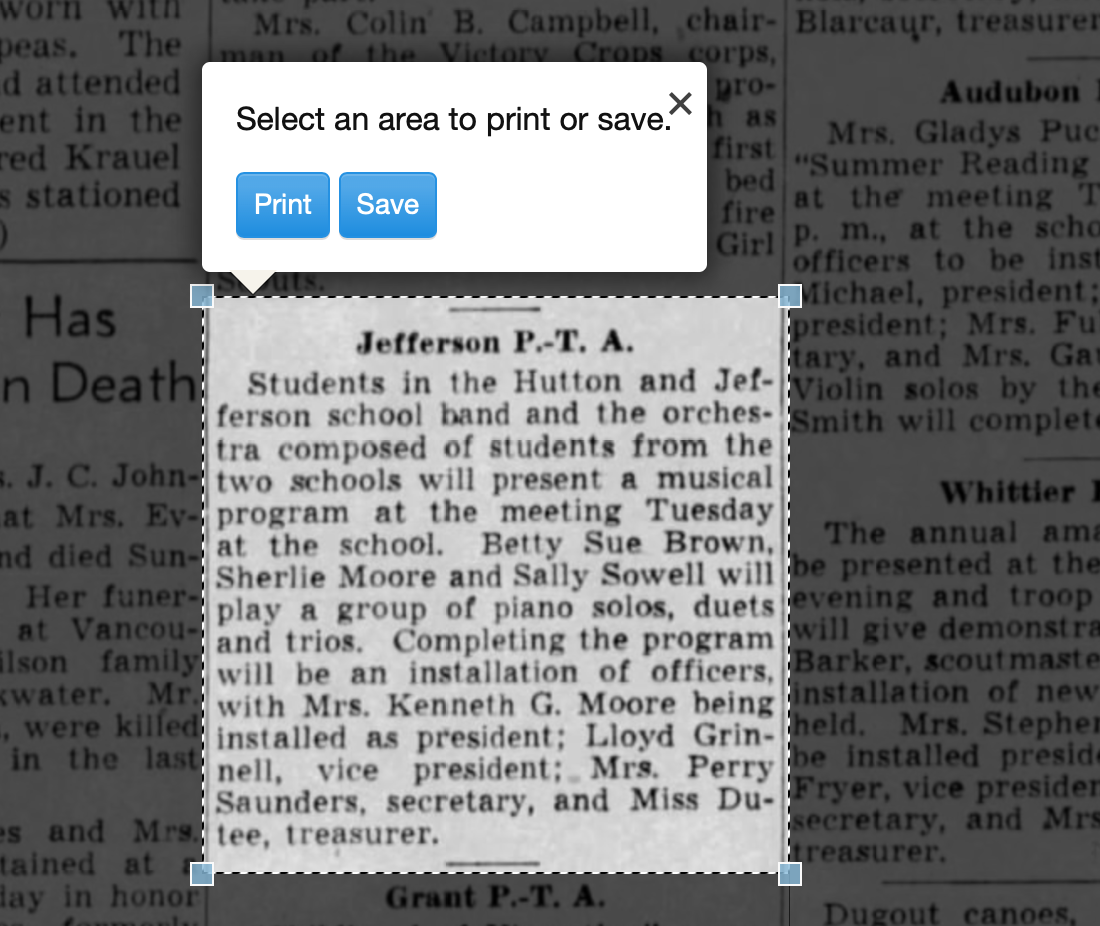
Processing an article from Newspapers.com Step One

Once I click Save, I’m given an option of saving it as a jpg or a pdf. When you save as a pdf, the source information is included. I always save a clip as a pdf.
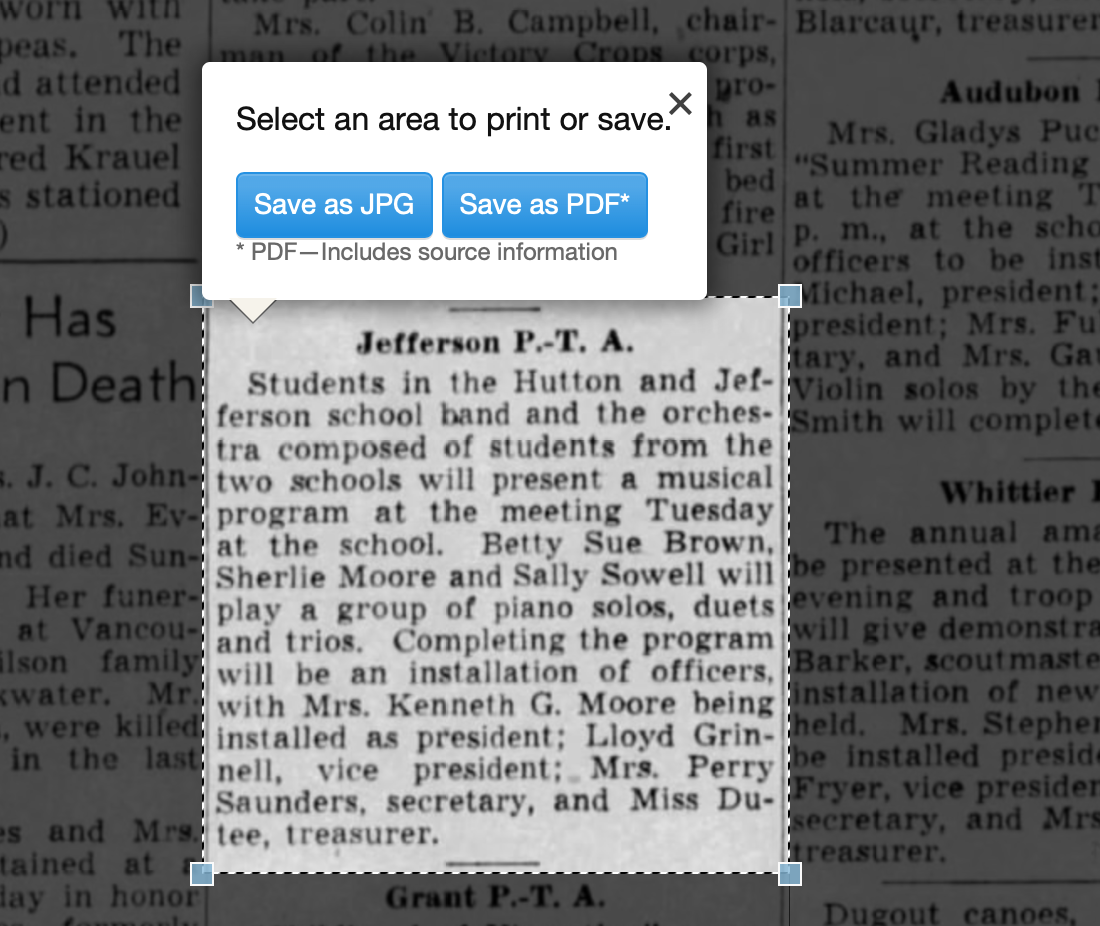
Processing an article from Newspapers.com Step Three

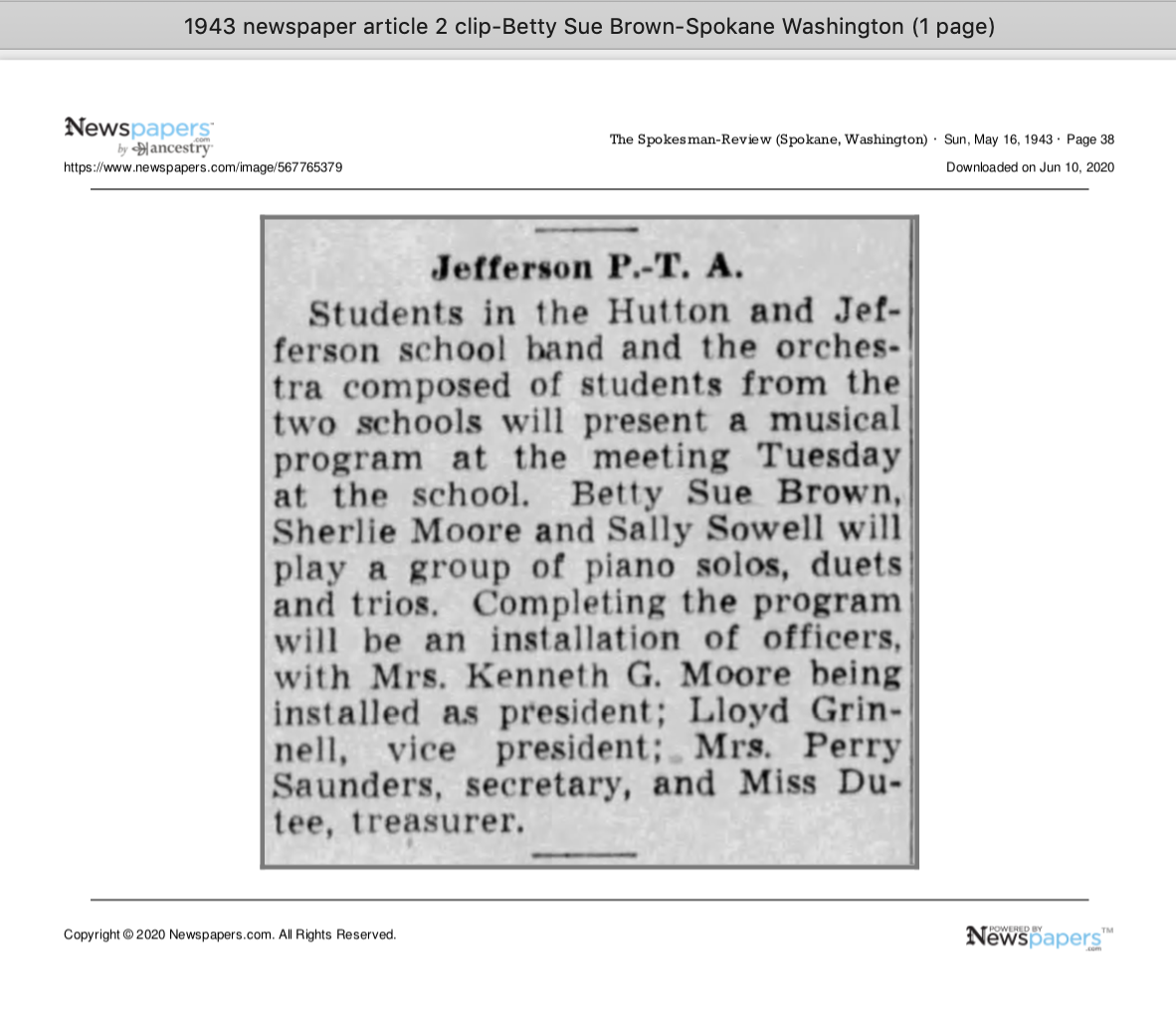
Once I click Save as PDF, the article is downloaded to my hard drive. When I open it, it looks like this:
Processing an article from Newspapers.com Step Four

You can see that Newspapers.com has included the newspaper title, date, and page number of the article, as well as the date it was downloaded and the URL for the image. This is really helpful when I create the source citation in Reunion, the genealogy software I use on my Mac. Notice that I have changed the filename of the article per my file-naming protocol. I always put “clip” in the filename for the clipped articles, since I will also download the entire page using the same filename (minus “clip”). I save the article in my Surnames folder.

Next, I go back to newspapers.com, click on Print/Save again, and this time select Entire Page. Then I’m asked if I want to save it as a jpg or pdf. I always save the whole page, as a jpg. That’s just my personal preference.

Processing an article from Newspapers.com Step FourOnce I click Save as JPG, the page is downloaded and I change the filename to match the clip’s filename (omitting the word “clip.”)

Now it’s time to glean information from the article and add it to Reunion.

I take a fact from the article, enter it into Reunion and create a source citation. In Reunion, I use the template for Newspapers to create my source citations. So here’s what the source record for this article looks like (again, click any image for a larger view):
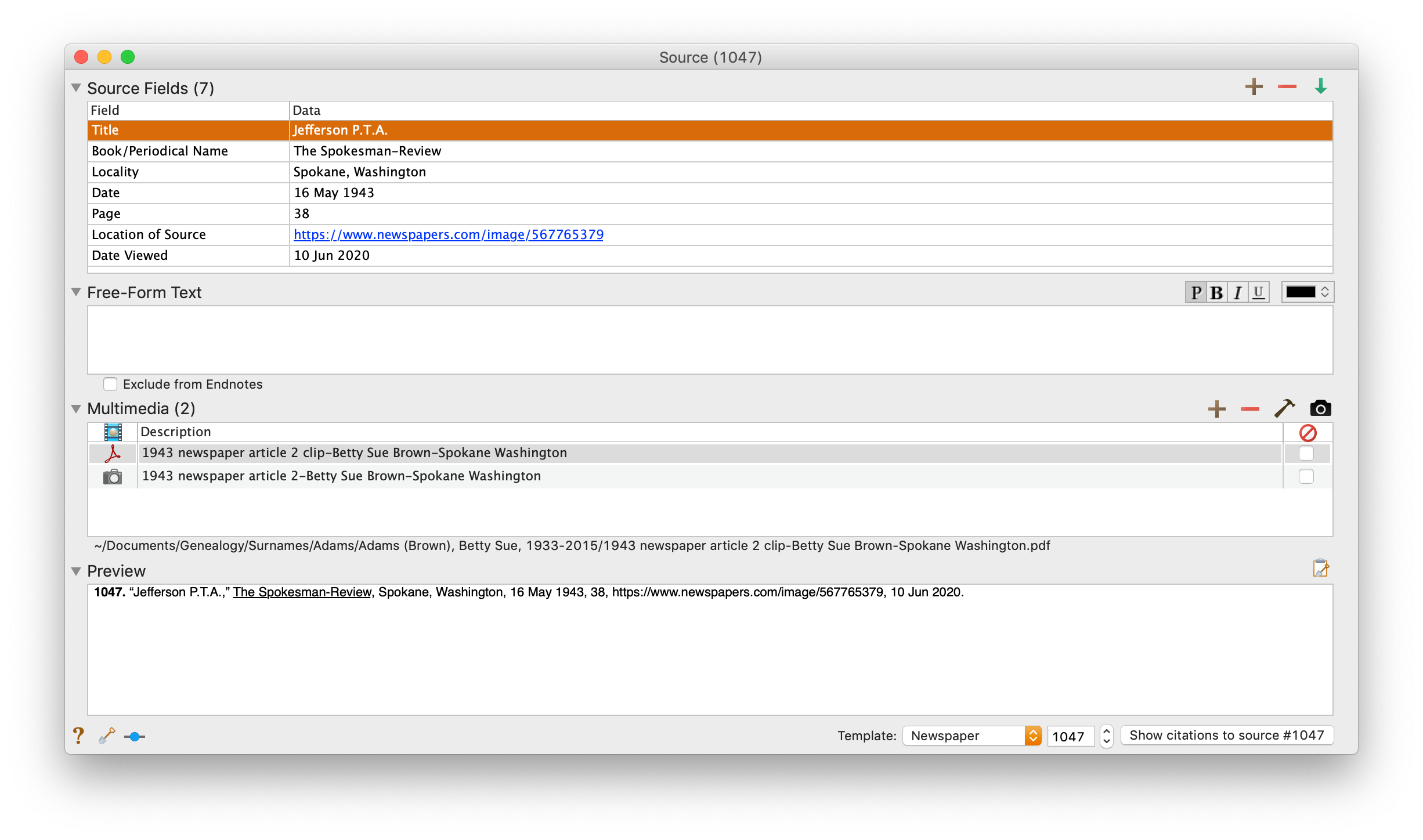
Processing an article from Newspapers.com Step FiveNote that I have attached both files, the clip and the whole page, as multimedia files in the source citation, by simply dragging them from the Finder. But before I do that, I do one other thing. I click on the little clipboard icon in the Preview pane and I paste the citation into the metadata of the file. Here’s how I do that.

I highlight the two files (article and whole page) in Finder, right (or control) click on them and then select Get Info. That brings up the metadata for those files. I paste the source citation in the Comments field. This is really helpful later on if I want to see which source a particular file is attached to.
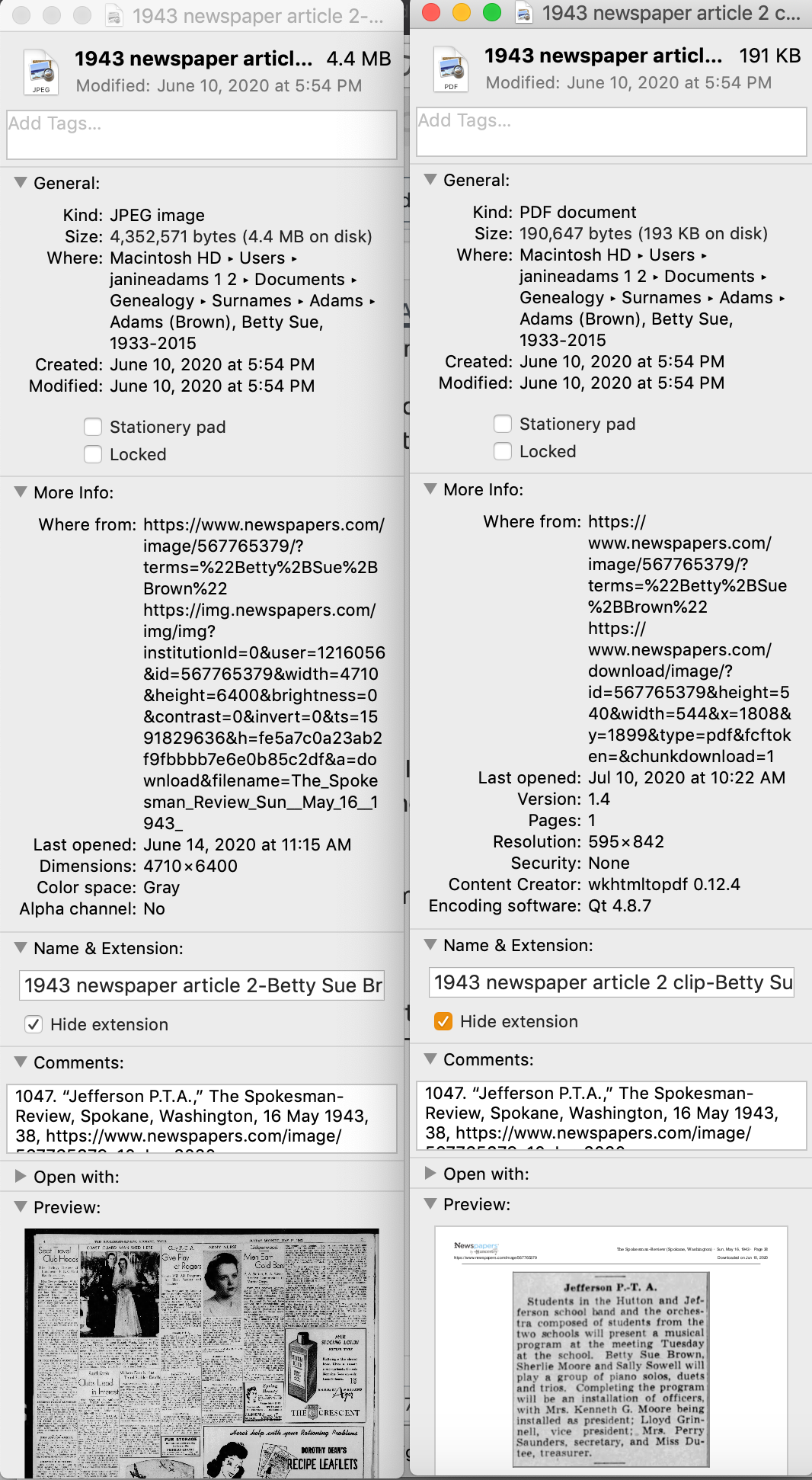
Processing an article from Newspapers.com Step Six

Then I drag the files into the source record. After I’ve gleaned all the information from the articles, I file them in my folder structure.

A final note: In this particular example, you might be curious how I entered this tidbit about a musical program in Reunion. Under Residence in the Events tab, I added the date of the newspaper article and Spokane, recording that my mother lived in Spokane on 16 May 1943.  But I took it a little further. This was one of six Spokesman-Review articles I found about my mother performing as a girl. So in the Notes tab I also created a little listing of those performances. Here’s a screenshot:
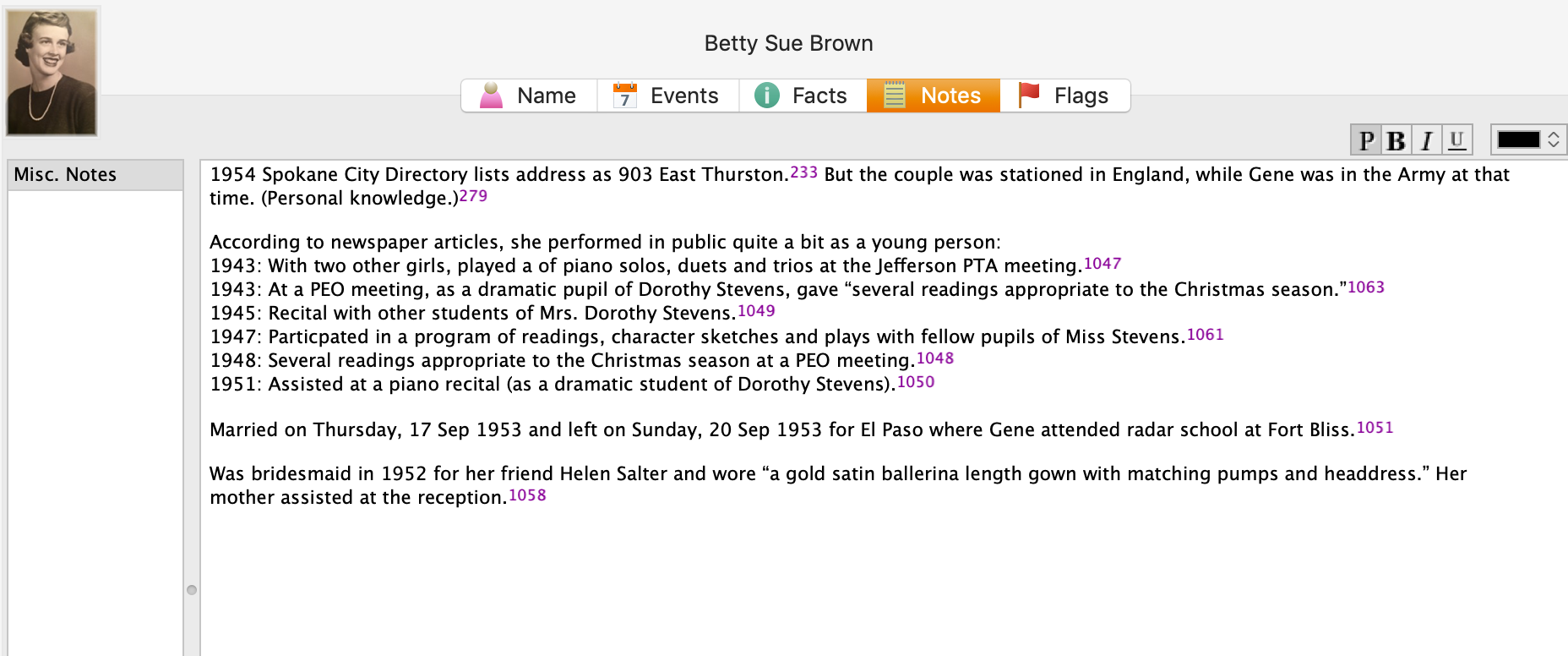
Processing an article from Newspapers.comI don’t know if it looks complicated laid out like this, but it really isn’t. I pretty easily got into the rhythm of it. The process can get a little tedious, but I think it’s worth the effort to have both the clip and the whole page downloaded. The little nuggets you get from newspaper research can really paint a great picture!
 

Filed Under: Challenges, Genealogy tips, Organizing, Technology Tagged With: Brown, electronic files, genealogy tools, newspaper clippings, newspapers, organizing aids, research, source documentation

How I processed my Civil War pension files

April 14, 2025 By Janine Adams 4 Comments

I’m fortunate to have three ancestors who fought on the Union side in the Civil War and for whom I was able to obtain pension files from the National Archives. Ten years ago, I wrote a post about how I processed those files, starting with creating a robust source citation. I got good feedback on the post, so I thought I’d resurrect it in case newer readers would find it helpful. The pension files truly are treasure troves of information and the painstaking time I spent going through them paid off. If you want to request your ancestor’s pension file, you can do so on this page of the NARA website.

Processing civil war pension filesAs I mentioned a couple of weeks ago, I received my 3d great grandfather’s Civil War pension files from the National Archives in record time. I’d been prepared to wait 45 to 120 days and it arrived the week after I submitted the request online.

I dug right in and started processing the information. I was so grateful that I had attended the class Anatomy of a Military Pension, presented by Certified Genealogist Julie Miller at the National Genealogical Society’s annual conference that month. She provided step-by-step instructions of what to do with a military pension.

So the day after I received that 65-page pension file, I did what Julie suggested. I put the documents in chronological order and I assigned a number to each. Then I figured out a citation for the overall file and a  citation for each of the numbered documents.

Coming up with a proper citation was a bit of a challenge and I emailed Julie, who was kind enough to share the citation she uses for these files. (She had given us that info in the talk, but I hadn’t written it down.)

Here’s the citation I’m using for the overall pension file for my ggggrandfather, Richard Anderson Jeffries:

[278] Jeffries, Richard Anderson (1st Sgt., Company D, 13th Regiment, Missouri Volunteer Infantry, Civil War), application no. 567612, certificate no. 529585, Case Files of Approved Pension Applications, 1861-1934; Civil War and Later Pension Files; Department of Veteran Affairs, Record Group 15; National Archives, Washington, D.C.

278 was the next number in my source list in Reunion, my family tree software. Each of the individual documents is numbered, starting with 1, and has its own citation. My intention is that when I enter a fact into Reunion, I’ll use Source 278, but I’ll include in the detail field which of the 26 individual documents that particular fact came from.

I created citation labels for each of the documents and affixed them to the appropriate pages. (That’s the citation for document 16 above.) Then I scanned the whole document into a pdf. I elected to have one pdf, rather than 26 individual ones–time will tell whether that was a good choice. (Edited to add a year later: Yes! That was a great choice.)

The next step, according to Julie is to transcribe the documents. Yes, I’m going to type word for word exactly what is on the documents. Julie urged us not to skip that step because when we transcribe, we learn things we would not otherwise learn.

After I transcribe, I will abstract the documents, so I can tell at a glance what they are and what info is contained within each. And then I’ll enter the new-found facts into Reunion, my family-tree software.

That’s a lot of work, but I’m delighted to have learned how to be thorough with it. And I know I’ll learn so much about my ancestor.

I am so grateful to have this structure, because just a few days after receiving Richard Anderson Jeffries’s file, I received the pension file for my gggrandfather, George Washington Adams. That file is over 100 pages; I had to request and pay for the rest of the file (another 80 pages) to be copied–I’m still waiting for part two. That same week I received the third and final pension file, for another gggrandfather, Benjamin Franklin Igleheart. All three pension files, probably 250 pages, came within two weeks of my request.

If I did not have the structure Julie provided in that talk to thoroughly process the information, I know I would feel overwhelmed. I would probably skim the documents, pluck out a few easy-to-find facts, and put them away intending to get to them later. And I don’t know when later would be.

I have skimmed the most recently received pension files to get a preview what I’m going to learn. (G.W. Adams had a big dispute about the amount of his pension–an adversary in the Soldier’s Home turned him in for saying he was more disabled than he was!) But I’m not going to analyze them until I’m finished with Richard Anderson Jeffries. So that will be motivation to go through the process.

I think these pension files are going to be a great learning experience not just about my ancestors, but also about doing proper genealogical research. This feels great!

Filed Under: Challenges, Genealogy tips, Organizing Tagged With: Adams, Civil War, excitement, Jeffries, overwhelm, record keeping, research, source documentation

January 30 x 30 challenge wrap up – how did it go?

January 31, 2025 By Janine Adams 11 Comments

We had a nice turnout for this month’s 30 x 30 challenge, based on the number people who commented that they were interested in joining. Now’s the time to report in: How did it go? Were you able to spend 30 minutes a day for 30 days on your genealogy? (Or did you meet a different goal that you set?)

I have to admit I didn’t make progress in digitizing my paper genealogy files. My extra time this month was focused on managing my iPhone’s photos, which is no small project. But my box of genealogy papers is really getting on my nerves and I hope to get to it soon.

Please let us know in the comments how your month was. I’d love to hear whether the challenge was helpful, even if you didn’t manage to get in 15 hours!

Filed Under: Challenges Tagged With: 30 x 30, time management

30 x 30 challenge: mid-month check-in

January 15, 2025 By Janine Adams 14 Comments

It’s the 15th of the month! How’s your 30 x 30 challenge going? I was so pleased with the challenge’s participation this month and hope that it’s going well for you. Please let us know in the comments whether you’ve been able to get some time in and whether the challenge has been beneficial.

I haven’t actually been putting much time in on my genealogy organizing but I have been getting some small organizing tasks done around my apartment, which feels very good. (I blogged about them on my organizing blog…you can check those posts out here, if you’d like.)

I look forward to reading about your progress!

Filed Under: Challenges Tagged With: 30 x 30, time management

  • « Go to Previous Page
  • Page 1
  • Page 2
  • Page 3
  • Page 4
  • Page 5
  • Interim pages omitted …
  • Page 109
  • Go to Next Page »

about me

I'm Janine Adams, a professional organizer and a genealogy enthusiast. I love doing family history research, but I find it's very easy for me to get overwhelmed and not know where to turn next. So I'm working hard to stay organized and feel in control as I grow my family tree.

In this blog, I share my discoveries and explorations, along with my organizing challenges (and solutions). I hope by sharing what I learn along the way I'll be able to help you stay focused and have fun while you do your research, too.

tags

30 x 30 Adams amy johnson crow anniversary Brown cemetery census Civil War conferences connections dna electronic files Evernote excitement Family Curator family photos genealogy tools getting started goals How They Do It Igleheart Jeffries keepsakes learning opportunities maps newspapers NGS organizing aids overwhelm paper files planning quick tips rasco record keeping research research log research trip resources RootsTech social history source documentation Stacy Julian technology time management vital records

join the facebook community!

join the facebook community!

My organizing business

Learn more about my organizing business, Peace of Mind Organizing®.

Subscribe by RSS

  • RSS - Posts
  • RSS - Comments

© 2026 Janine Adams


Loading Comments...
