• BLOG
  • ABOUT
    • Privacy Policy
  • CONTACT

Organize Your Family History

Stay focused and happy while exploring your roots

How I handle married women in my files

March 29, 2022 By Janine Adams 8 Comments

Today I had what I thought was a great idea to write about how I handle married women in my digital files in my own research. But I searched my blog and discovered I’d written about just over a year ago! I still think it’s an interesting topic, so I’m re-running the original post, slightly edited. One thing I discovered with the comments to the original post is that the way I do it may not be the standard way! Most, if not all, of the commenters last year said that they organize the women in their family trees by their birth surname. (I object to the term “maiden name” so will stick to my preferred term, “birth name.”)

I’m by no means saying my way is the right way, but it’s worked well for me for years. I encourage you to read the comments to the original post (linked above), to see how the dozen or so commenters are handling their female ancestors and relatives.

Handling the females in your family tree

Most of the women in our family trees changed their name at some point or another. That can present an organizational conundrum in the files we keep for them. I thought I’d let you know how I handle it in my digital filing system. As always, I’m not telling you the right way to do anything. I just want to share how I do it, because it’s worked well for me.

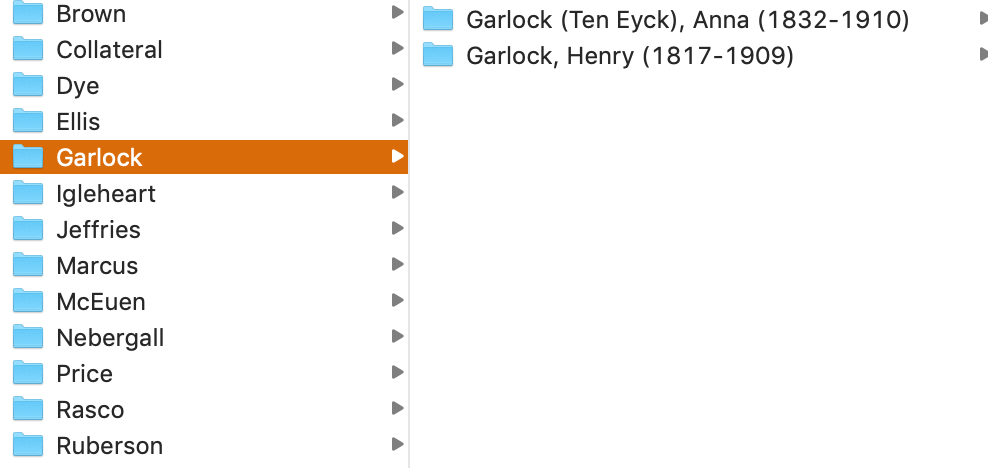
In a nutshell, I file women under their married surname. (By contrast, in my genealogy software, Reunion, all the women are listed by their birth names and if I don’t know their birth name, I leave the surname blank.) As I describe in the post How I Process a Downloaded Document, I have surname folders on my hard drive for each of the surnames I have researched and within each folder I have folders for individual people. The folders for individuals contain the source documents pertaining to that person. (I have a separate Collateral folder within which the surname folders for collateral relatives are filed using the same folder structure.)

Here’s how I name women’s folders:

Last Name (Birth Name), First Name (YOB-YOD). So the folder for one of my second great grandmother’s folder is called Garlock (Ten Eyck), Anna (1832-1910). It resides in the Garlock Surname folder, as shown in the screenshot above.

If I find a relative before she’s married, I’ll use her birth surname for filing purposes. But once I’ve found marriage documents, I’ll rename and move her folder to her married surname.

It seems pretty straight forward, but of course, things like multiple marriages can make it more complicated. For my direct-line ancestors, it’s easy. I use the surname associated with the spouse who is my direct line. (If it’s a second or later marriage, I don’t typically use the first married name in the folder name, I just use the birth name.)

But for collateral relatives, where there isn’t necessarily a married name that is more relevant to me than the other married names, I typically just use the first married surname that I find and leave it like that.  Sometimes I make exceptions, especially for women who were married multiple times and for whom I have trouble keeping track of their various married names. For example, Leonora Adams, the daughter of my much-researched second great grandfather George Washington Adams, was married four times. I file her within the Adams Collateral folder using the folder name “Adams, Leonora (Lochry Stevens Good Ward), 1877-1962.”

Again, I’m not suggesting this is the best way to do it, but it works for me. I pretty much developed my system as I went along. And, as in almost all things, I allow myself to be imperfect about it. That means that  there may be inconsistencies in my folder structure. But I have enough of a solid infrastructure that the inconsistencies don’t bother me.

Writing this makes me want to go through my folders–particularly for the collateral relatives–and perhaps correct any inconsistencies. But I’m comfortable leaving them as is until I get around to doing that.

I’d love to hear in the comments how you handle the name changes of women in your files. And are there any situations I didn’t cover here that you’re curious about? Feel free to ask in the comments.

For more in-depth information on how I organize my own genealogy, check out How I Do It: A Professional Organizer’s Genealogy Workflow, a 37-page downloadable available for $19.99.
Filed Under: Challenges, My family, Organizing Tagged With: electronic files, organizing aids

My top five reasons to organize digitally

February 15, 2022 By Janine Adams Leave a Comment

Regular readers of this blog know that I prefer organizing my genealogy files digitally. I almost never print anything I find online and things that come to me on paper get scanned and organized on my hard drive.

Today, I wanted to simply share the top reasons for my preference for digital organizing of genealogy records:

  1. It’s more portable. I love that my research is with me wherever I go. I use Reunion genealogy software on my Mac and attach my source documents to each source record. The data is stored in Dropbox and easily accessible on my phone through the ReunionTouch app.
  2. It’s easier on my eyes. Early on, I would print census records on 8.5″ x 11″ paper and have to use a magnifying glass to read them. My eyes aren’t getting any younger and I really appreciate that I can just zoom in on documents in Preview, the app I use to read pdfs and jpgs.
  3. It takes less effort to file digitally. It is so much easier to rename a file, then drag it file to a folder on my computer than it it so open a file cabinet drawer and locate and open a folder and file (or open a binder to the right place and insert a piece of paper).
  4. It creates less clutter. I don’t have a pile of genealogy papers waiting to be filed. I don’t have unruly paper files or binders. I just have a nice neat hard drive. (True confession: I do, sometimes, I have a tidy digital backlog of files waiting to be processed into my software.)
  5. It’s less expensive. Since I’m not printing documents I find online, I save money on paper and toner. And I may save a tree or two while I’m at it.

I could go on; there are more than five reasons I love digital organization for my genealogy research! An important note: since I know that hard drives can fail, I backup my genealogy files in three places (Dropbox, an external hard drive and in the cloud via Backblaze.) A good back-up routine is critical.

If you’re interested in making the switch, check out my blog post Getting started going digital. And if you’d like a deep dive into exactly how I organize my research digitally, you can my purchase my Orderly Roots guide, How I Do It: A Professional Organizer’s Genealogy Workflow.

Filed Under: Challenges, Genealogy tips, Organizing, Technology Tagged With: electronic files, organizing aids, paper files, record keeping, technology

Legacy Family Tree offering free one-day genealogy conference on Saturday

January 25, 2022 By Janine Adams 5 Comments

I was pleased to see that Legacy Family Tree, which offers such a wide range of affordable genealogy webinars, is offering a free series of webinars this Saturday and they’re all about genealogy organizing!

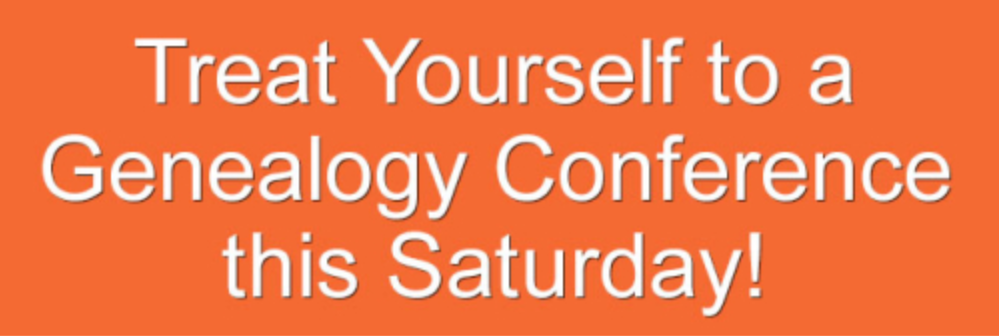
You can read all about it here: Treat Yourself to a Genealogy Conference this Saturday.

This is the first in a series of monthly genealogy conferences that Legacy Family Tree intends to offer this year. Presenters at this Saturday’s conference (30 Jan 2022) are:

  • Teri E. Flack
  • Mary Hill
  • Cyndi Ingle (of Cyndi’s List fame)
  • Lisa Louise Cooke
  • Thomas MacEntee

Click on the link above to see the topics of the presentations. According to the notice linked above, “Each conference will include 5 pre-recorded classes (1 class is brand new, 4 classes are hand-selected and unlocked from the members-only webinar library).”

No registration is necessary. Just visit www.FamilyTreeWebinars.com/Conference that day. The conference includes a free syllabus!

Filed Under: Excitement, Organizing Tagged With: learning opportunities

How They Do It: Marian Burk Wood

January 21, 2022 By Janine Adams 1 Comment

I’m so happy to present a new How They Do It interview! This one is with speaker, blogger and author Marian Burk Wood. Marian is the author of the best-selling genealogy book, Planning a Future for Your Family’s Past and the blog, Climbing My Family Tree. A Bronx native transplanted to New England, she holds an MBA from Long Island University in New York and a BA from the City University of New York. Marian’s special interest is helping people to preserve, share, and perpetuate family history. In this interview, Marian shines a light on how she organizes her family photos, which date back more than a century!

How They Do It: Marian Burk Wood

How long have you been doing genealogy?

My family history journey began in 1998, when the genealogist on my mother’s side asked about my father’s parents. I knew almost nothing about those ancestors. Little by little, I learned how to do research, and soon I was hooked, especially when my search led me to long-lost cousins.

What’s your favorite thing about being a genealogist?

Cousin connections! Although both of my parents had many first and second cousins, I met only a few when I was young, and never even knew the names of others. That’s why I jump for joy when I connect with a cousin and we have the opportunity to get acquainted, reminisce, and share family stories.

What’s your biggest challenge when it comes to organizing your genealogy/family photos?

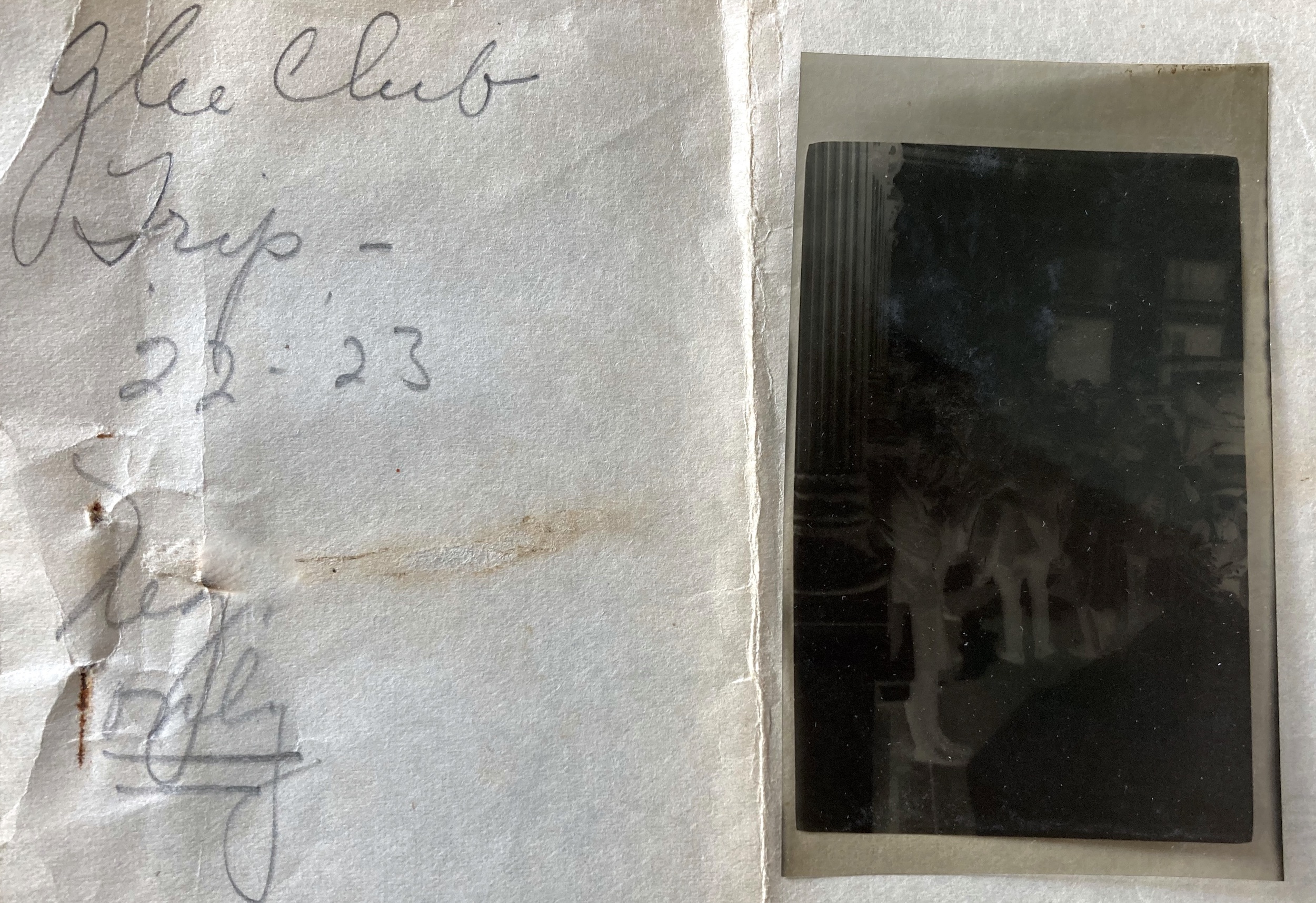
My late father-in-law was a photo buff from an early age, snapping and developing his own photos from 1917 on. It’s a challenge to organize and safely store these photos because they vary in size and shape, and a number are already deteriorated. Some negatives were stored in envelopes or paper wrappers, interleaved with prints, while others were in paper wrappers marked “not printed.” I’ve scanned and inverted most of the negatives to try and identify the people and places. It’s important to my family’s history to safeguard these century-old photos and negatives, plus the original handwritten notes.

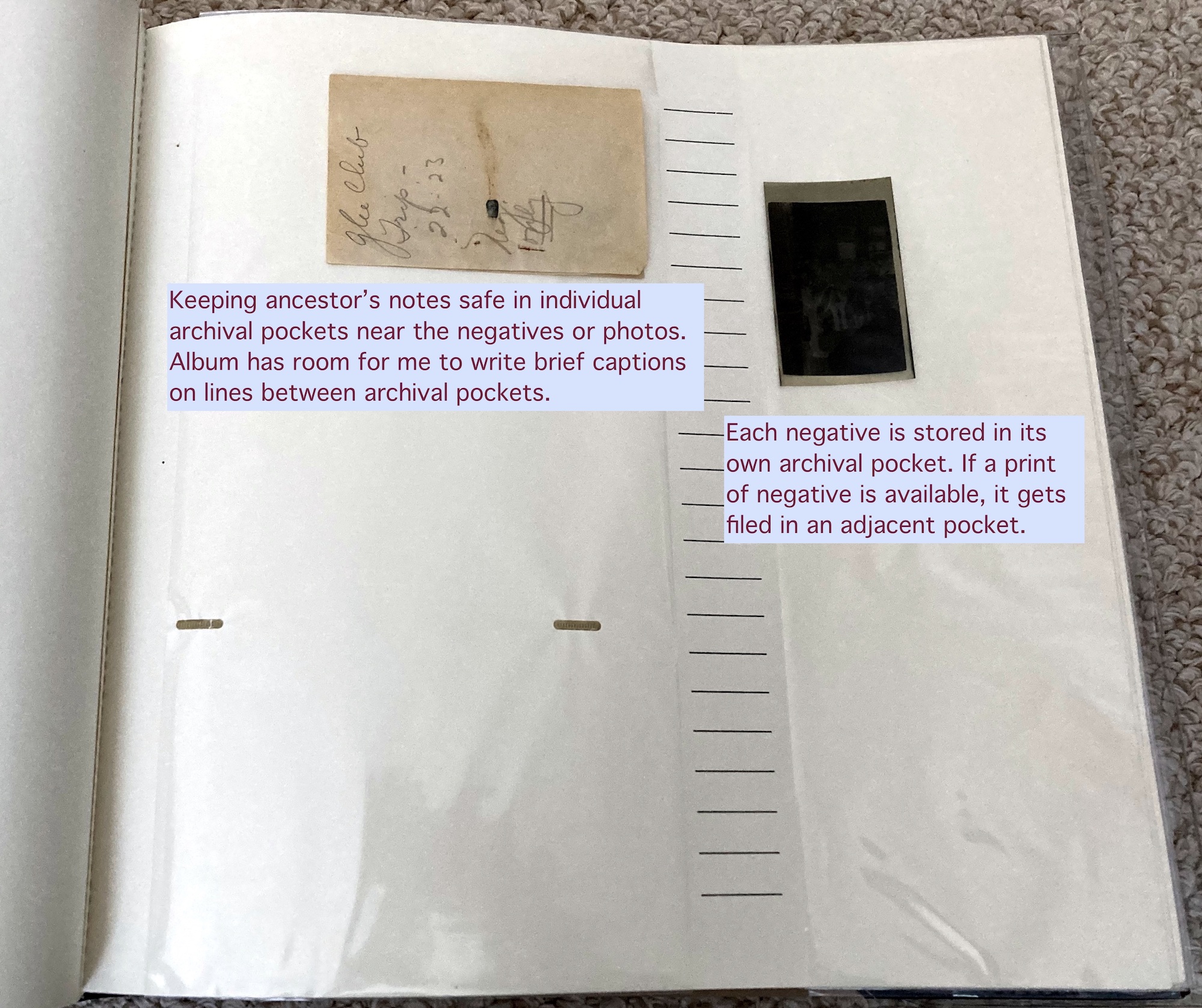
I’m experimenting with putting photos, negatives, and notes in an archival photo album, rather than the archival sleeves and boxes I currently use. Here you see one of the handwritten notes with one unprinted negative from 1922-1923:

After scanning, the negative(s) and the note go into the archival album, with space for written captions. For the next batch, I’m going to use archival photo pages in binders so I can easily rearrange the pages:

What is your favorite technology tool for genealogy/family photos?

My trusty Canon CanoScan 8400F does a dandy job of scanning photos and slides that I import into different photo applications for fine-tuning. In particular, I like Vivid-Pix for restoring faded, cracked, and torn digital images.

If you were starting out new as a genealogist what would you do differently?

If I could go back in time, I would carefully cite my sources and write down the provenance of old photos and captions, if not obvious. Back in the day, I was so excited about each discovery that I barely stopped to note my sources. I didn’t have the experience to know that in the future, I would want to retrace my steps and mine those sources for more details and insights.

How do you go about sharing your personal research/photos with cousins or other interested parties?

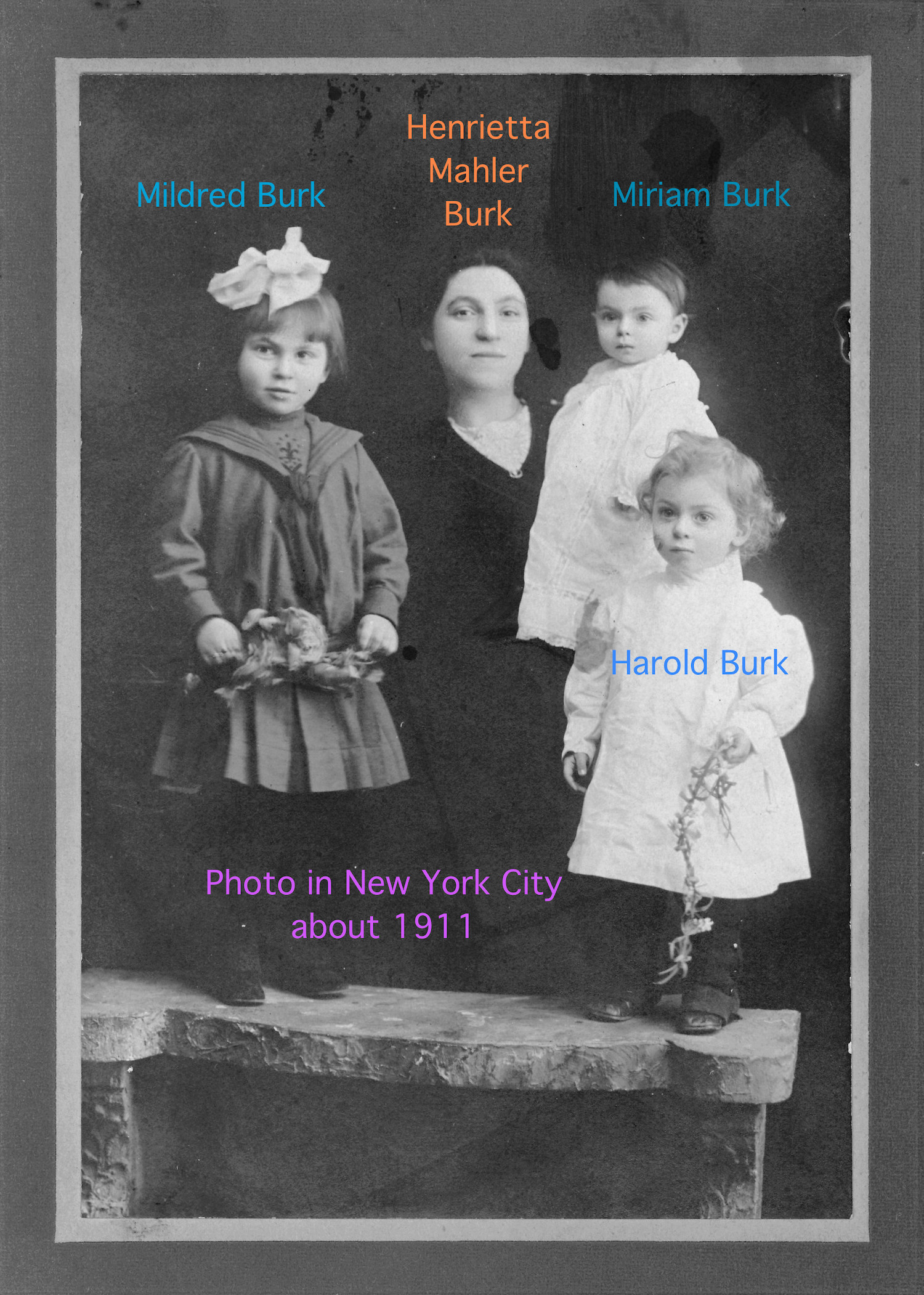
Cousins are invited to view my public family tree, posted on a variety of genealogy websites. I digitize and share old photos privately with individual cousins, asking for help identifying people. Then I digitally label each person on the photo before sharing an uncaptioned and a captioned version with cousins. For one group wedding photo, I color-coded the names I digitally put on the photo to indicate which branch of the family each person belonged to, my way of clarifying the relationships. That was a big hit with the cousins whose ancestors were in the photo. Here’s an example of a digitally captioned family photo (I use Preview on my Mac to add the captions):

For the wider world, and for cousin bait, I share finds from family history and selected photos of ancestors on my genealogy blog. The “ancestor landing pages” along the top summarize what I know about each ancestor or family and include links to individual blog posts. I also blog about research methodology and planning ahead so genealogical materials wind up in safe hands (family or non-family) later on.

Do you have a dedicated space in your home for doing genealogy research? What’s it like?

In my home office, a couple of steps from my desk and computer, I have a file cabinet just for genealogy, plus shelf space for my multitude of archival boxes and reference books. When working on a project, I temporarily store documents and photos in an archival box (or for really short term, a storage tub) so the materials are in one place. This is my alternative to piling things on my desk, where they tend to get in the way.

What’s your biggest piece of advice to genealogists in terms of organizing their research/family photos?

Think long term. We’re not just organizing for ourselves but for the sake of future generations. I love archival boxes for original documents and old photos–I have nearly 40, with surname labels–but I also recognize that archival photo albums would be easier to browse, which I want to encourage. The best organizational methods and materials are those that work for today and for tomorrow, keeping documents and photos accessible and safe. I consider my approach to organizing genealogy a work in progress. I’m always looking for fresh ideas to make my research more accessible for me and for those who come after me.

Thank you so much, Marian! I love these ideas for organizing family photos! Photo organizing can be so overwhelming for so many people (including me), so these very practical examples are much appreciated. I also appreciate your comments about our genealogical legacy. I can’t wait to read your book!

Filed Under: Excitement, Organizing Tagged With: family photos, How They Do It, Marian Burk Wood, organizing aids

  • « Go to Previous Page
  • Page 1
  • Interim pages omitted …
  • Page 7
  • Page 8
  • Page 9
  • Page 10
  • Page 11
  • Interim pages omitted …
  • Page 69
  • Go to Next Page »

about me

I'm Janine Adams, a professional organizer and a genealogy enthusiast. I love doing family history research, but I find it's very easy for me to get overwhelmed and not know where to turn next. So I'm working hard to stay organized and feel in control as I grow my family tree.

In this blog, I share my discoveries and explorations, along with my organizing challenges (and solutions). I hope by sharing what I learn along the way I'll be able to help you stay focused and have fun while you do your research, too.

tags

30 x 30 Adams amy johnson crow anniversary Brown cemetery census Civil War conferences connections dna electronic files Evernote excitement Family Curator family photos genealogy tools getting started goals How They Do It Igleheart Jeffries keepsakes learning opportunities maps newspapers NGS organizing aids overwhelm paper files planning quick tips rasco record keeping research research log research trip resources RootsTech social history source documentation Stacy Julian technology time management vital records

join the facebook community!

join the facebook community!

My organizing business

Learn more about my organizing business, Peace of Mind Organizing®.

Subscribe by RSS

  • RSS - Posts
  • RSS - Comments

© 2026 Janine Adams


Loading Comments...