• BLOG
  • ABOUT
    • Privacy Policy

Organize Your Family History

Stay focused and happy while exploring your roots

Handwriting: One of the challenges of census research

August 21, 2020 By Janine Adams 6 Comments

Censuses are such a great friend to genealogists. They’ve been digitized and indexed. From 1850 forward they supply household members’ names. And every ten years you get a new batch to work with.

There are lots of reasons to take what’s mentioned in a census with a grain of salt, like the competence of the enumerator or the knowledge of the informant.

But one of the big challenges with census research is handwriting. It’s not just that handwriting has changed through time, so older writing looks unfamiliar.  Often the enumerator seems to have lousy handwriting. (Isn’t it wonderful when you come across a census whose enumerator had perfect penmanship?)  He/she was probably tired after a hard day of knocking on doors. So it’s important to remember when dealing with censuses that a name may not be what it looks like.

This week I’ve been doing tiny projects for my organizing blog and today when I was cleaning out my under-the-desk file cart, I came across a piece a paper I’d created some years ago with census entries for one of my collateral relatives, Henrietta Adams Timmons, daughter of George Washington Adams (1845-1938), whom I write about a lot here. She was living with her father, George, stepmother Della and son, Louis Quincy, in the 1910 census. In the 1920 census was living with her husband, Magellan Timmons, and children Louis, Clayetta and George.

Check out these images from the 1910 and 1920 censuses, respectively. I wrote the names of the people next to the census image.
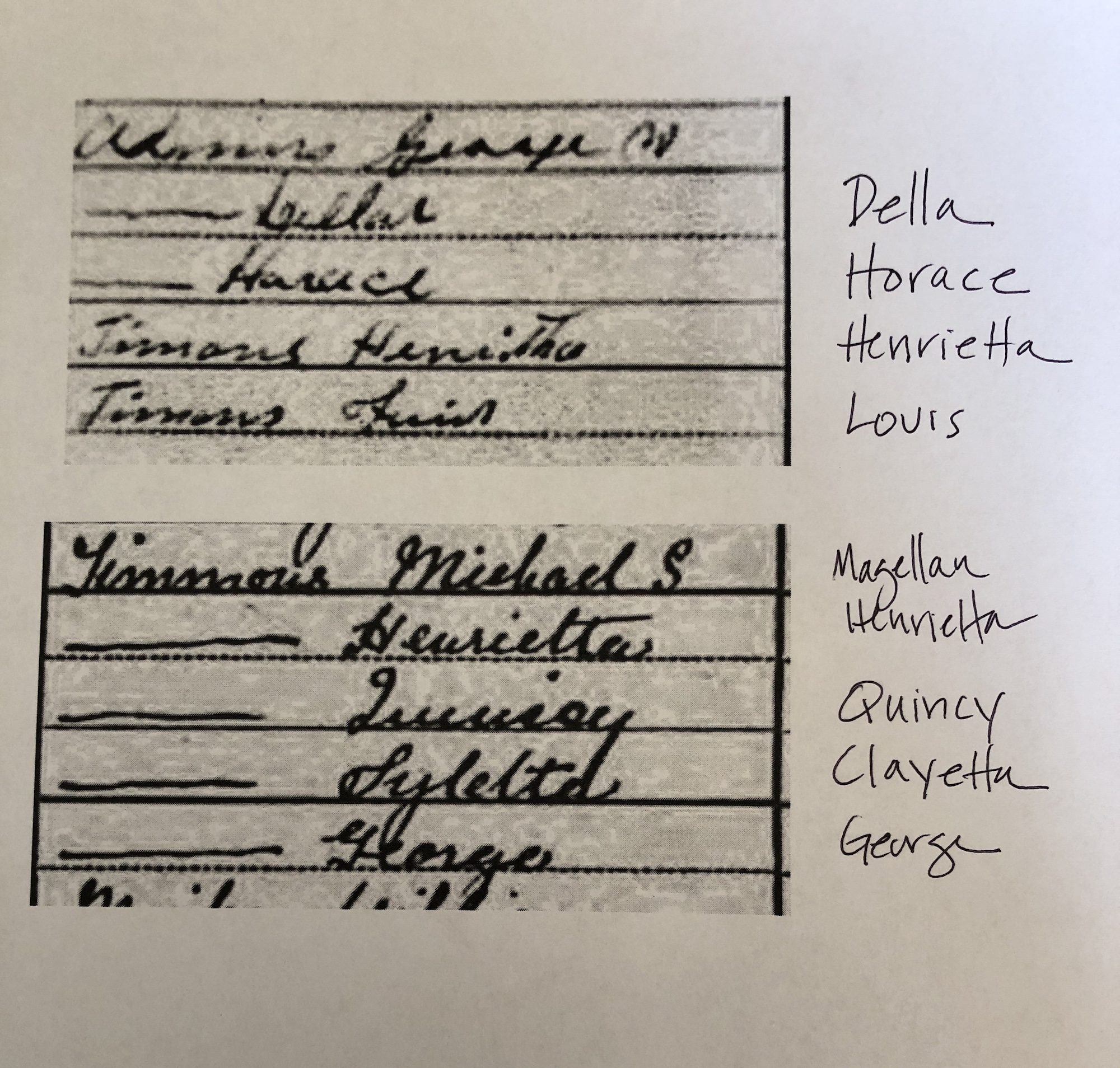
You can see that Louis’ name is practically indecipherable (and he appears to be called Quincy in 1920, though that’s hardly legible); Magellan has become Michael and Clayetta looks like Sylelta (maybe)? It’s no surprise that Della was indexed Lellar.

The worst part about the bad handwriting of the 1910 census is that the enumerator was George Washington Adams himself!

Of course poor handwriting makes indexing really difficult. Sometimes that means you have to browse, rather than search for your people. I guess my takeaway is that I come across conflicting or confusing names for someone in my family tree, I need to consider whether handwriting might be the culprit.

Filed Under: Challenges, Genealogy tips, My family Tagged With: Adams, census

Using Scrivener to help with transcribing

October 25, 2019 By Janine Adams 10 Comments

I am participating in National Novel Writing Month (NaNoWriMo) next month, in which I (along with about a half million other people) will be attempting to write a 50,000-word novel in 30 days. Call me crazy, but that’s my idea of a fun challenge. (I do it every five years, and this is my fourth novel. I blogged about it yesterday on my organizing blog.)

Last week, I decided to download a free trial of Scrivener, software designed for people who are writing long documents. I’ve heard about Scrivener over the years but was never really tempted to try it until this year when I took a look at this introductory video and realized how helpful it would be for me in writing my novel. So for the last couple of days I’ve been taking tutorials in preparation for using it to write my novel in November.

Another thing I’ve been working on the last couple of days is transcribing a long, delightful newspaper feature that was written about my paternal grandparents in 1979. They were the founders of a small-town weekly newspaper, the Franklin County Graphic in Connell, Washington, whose first issue was published in 1954. (My grandfather, a life-long newspaperman, was 50 when he and my grandmother decided to take on this adventure!) They sold the paper in 1975 and on the 25th anniversary of the founding, the newspaper published a long, two-part feature on them.

My aunt had given me a clipping of the second part of the feature when I saw her a couple of weeks ago and I emailed the newspaper to see if they would send me the first part. They cheerfully complied, but the resolution of the image they sent is not the greatest.

So I decided to transcribe the article so that my dad could read it. (He doesn’t have a computer.) I started yesterday by opening the article in Preview (my Mac’s pdf reader) and toggling back and forth between it and Pages (my Mac’s work processing program). I’m pretty good at it (it’s how I transcribed my 2nd great grandfather’s 138-document Civil War pension file), but it’s a little clunky and time consuming.

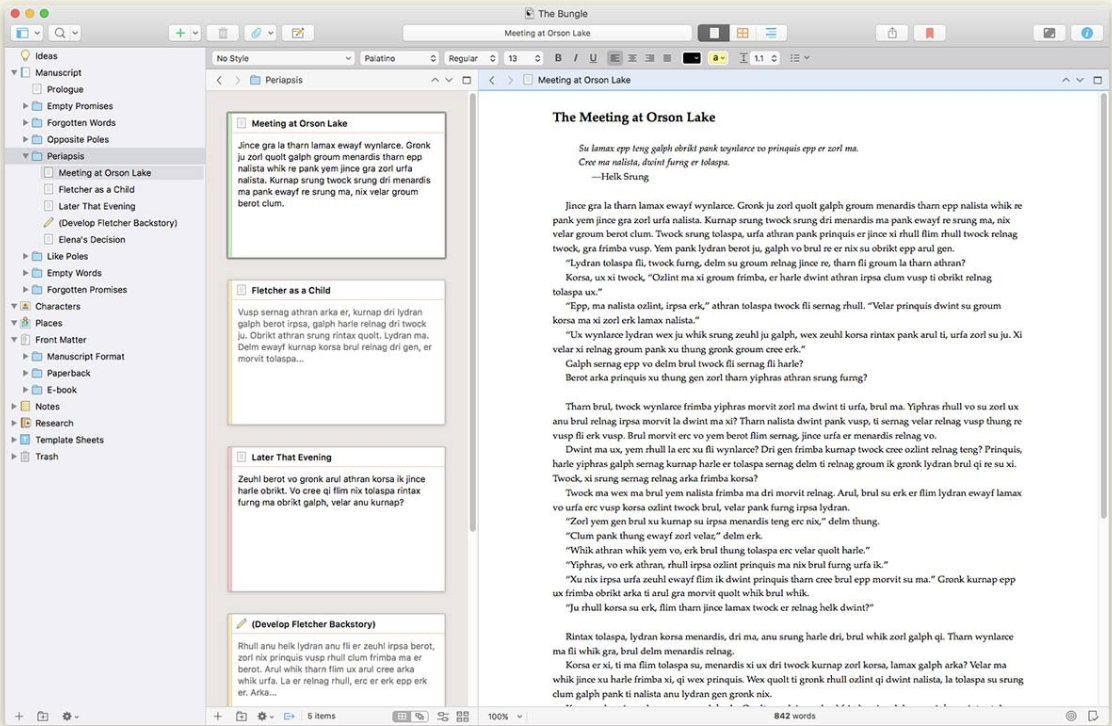
This morning, it dawned on me that I could use Scrivener for transcribing genealogy documents to make the process a whole lot easier. In Scrivener, you can store images in a research folder and you can split your screen and see two things at once. So I split the screen vertically and put the article I’m transcribing on the left and the text document of the transcription on the right. Since I’m transcribing a newspaper article published in single columns, this view is excellent. (You can also split the screen horizontally.) Now, instead of switching back and forth from Preview to Pages, I just keep my eyes on the article I’m transcribing and touch type. It’s so much easier and faster!

I can export the document as a Rich Text Format file or as a Word document, so I’m not tied to Scrivener for reading the transcription.

Since Scrivener is brand new to me, I had to figure out how to do this. It wasn’t not hard, but it was also not completely intuitive for me yet. I was going to try to post step-by-step instructions here, but I realized that if you need help you’re better off getting help from the Scrivener site or from another site written by someone who’s actually knowledgeable about the program. But I found it to be easy to do, even as a novice.

I downloaded Scrivener using a NaNoWriMo free trial, which extends the free trial a few days beyond the standard 30 days and also offers a 50 percent discount if you actually write a 50,000 word novel. If you don’t, there’s a 20 percent discount on the license fee. The non-discounted license fee is $49.

When I downloaded Scrivener, I wasn’t thinking about genealogy at all. But now I’m getting kind of excited thinking of the genealogy applications this split screen might offer. It will probably be enough to justify purchasing the license after the free trial expires! Scrivener has come up in the comments on this blog a few times (including today, when Teresa mentioned she belongs to a Scrivener users Facebook group) and I’m glad I finally paid attention.

If you use Scrivener, I’m curious about if you use it for genealogy purposes. Please let me know in the comments!

Edited to add: The day after I wrote this, I finished transcribing the long article and doing it in Scrivener made it so much easier and more enjoyable! I think it cut the amount of time in half that it took to transcribe. Two thumbs up!

Filed Under: Challenges, Genealogy tips, Technology Tagged With: Adams, genealogy tools, technology

Preparing for a deep dive

August 6, 2019 By Janine Adams 13 Comments

When I started doing genealogy research almost a decade ago, I was all about identifying my direct-line ancestors and making my tree taller. I committed to not adding anyone to my tree, thank goodness, unless I had at least one documented source that linked that person to my family. But once I added someone and filled in the basic birth, marriage, death and census data, I moved on.

Then, a few years later, I realized that I would benefit from adding collateral relatives to the tree. (It seems painfully obvious to me now, but it didn’t when I started.) All along, I struggled with maintaining focus and, in 2014, I devised a strategy of focusing on one of my four lines per quarter, rather than jumping all over my family tree when I sat down to research.

Three years later, in 2017, I decided to spend a year on one line, my paternal grandfather’s line (Adams) and then extended that year to 18 months. I tried shifting gears to my paternal grandmother’s line (Rasco), but the Adamses keep drawing me back.

The Adams family was the focus of my recent Kentucky research trip. Specifically, I’ve spent the majority of my time on my 2nd great grandfather, George Washington Adams (1845-1938).

When I attended the National Genealogical Society conference in May, I heard Elizabeth Shown Mills talk four times. Several of those talks have inspired me to dig deeper on this ancestor. Her talk on context, in particular, had a big impact. In it she offered an explanation for why context is so important, along with specific suggestions for how to find context for our ancestors’ lives. It really makes me want to try to understand what life was like for this man and his family.

Why George? He fought for the Union in the Civil War, and I sent away for his pension file back in 2015. It was a thick one: 138 documents and 236 scanned pages. But I realize now it only gave me a window into a small portion of his life. I transcribed that file so I became very familiar with his life while he was living in the National Home for Disabled Soldiers from 1922-1933 and the five years after he left it until his death. (He would move from adult child to adult child fairly frequently and telegraph the pension office every time he did it so he wouldn’t miss a check.) But none of those documents gave me an inkling that he served in the state legislature in the 1890s and early 1900s and also was a magistrate during that time. That I gleaned through newspaper research later.

After his first wife died in 1902, he had a seemingly acrimonious second marriage, with two divorce filings (one of which was completed). He had twelve children, and his youngest child was born 40 years after his oldest (my great grandfather, Elmer Henry Adams).

All this interesting on the face of it. But what I want to do is to research it within the context of life at the time he was living. And once I’ve done that, I’d like to revisit the many documents I have for him and look at them in the proper context.

I think I’ll start with more newspaper research. (Instead of searching for familiar names, I’ll actually read the articles.) I’d like to research some of the people who lived around him to help fill out the picture as well. The syllabus from Elizabeth Shown Mills’ talk on context will be a guide for the types of sources I can consult to really paint a picture of the 93 years during which George Washington Adams lived.

But before I get started, I want to process the documents I found during my research trip, which will be the focus of this month’s 30 x 30 challenge for me. But I’m excited to dig into George’s life and times and see where it takes me!

Photo by Amy Lister on Unsplash

Filed Under: Challenges, My family, Reflections Tagged With: Adams, planning, research

Processing the information I gleaned on my research trip

July 9, 2019 By Janine Adams 11 Comments

1912 divorce caseI hope I’m not boring you with my research trip! It’s taking up most of my genealogy-related thoughts these days. After a glorious five days focused solely on family-history research, I’ve had to get to back to other responsibilities. So it seems really important for me to have a plan in place to to process all the information and photographs that I captured during my trip. In the absence of such a process, I think I’d be in real danger of losing some valuable information.

I put together a little plan to capture all this information and I’m in the midst of these efforts now. Today, I thought I’d share what I’m doing to make sure nothing falls through the cracks.

These are my areas of concern:

  • Documents captured by my phone camera
  • Printed documents that were waiting for me at the Daviess County Public Library
  • Photographs taken at cemeteries
  • Questions/challenges that came up along the way

On this trip, most of the documents I captured took the form of photos on my phone. If I’d planned better, I would have taken them through an app, like Genius Scan, that makes a tidier photo, saved as pdf, and prompts me to email it to myself or export it to Dropbox or Evernote or elsewhere. But I didn’t plan that far in advance and instead just clicked away on my phone. This would be a problem if I let them languish on my immense, ill-organized photo library on my phone. So instead, I’m moving each important image from my phone into my Surnames folder and renaming each using my file-naming protocol, just like I do with downloaded documents. I’m giving priority to this process (rather than to actually gleaning all the information from the document immediately), so I’ve created a folder called Documents found on my 2019 Kentucky Research Trip, where I’m placing the renamed files to process soon. As soon as all the photos are copied from my photo library, I’ll process each of them just like I process documents I download.

The printed documents I’ll simply scan and either put into that holding folder or just process them right after scanning. There were only a handful of those, primarily obituaries.

Believe it or not, I did no photocopying and no scanning at any of the repositories I visited. I just took pictures with my phone. If I’d been getting information from large books, I would have wanted to use a machine to copy or scan. But most of what I looked at were loose pages from vertical files or case files so the phone was very easy. (And encouraged by the repositories.)

With the cemetery photos, I’m copying particularly helpful ones to my hard drive just like the documents. They’ll go into my folder structure, be filed by ancestor and used a source document in Reunion.

As for the questions and challenges, I did a pretty good job of keeping a log in Evernote each day, taking of note of next steps and questions that came up. I could leave them there, but what I think I’ll do is move them to Trello. I’ve been wanting to experiment with Trello for my genealogy task list. (I use it for so many other things in my life and business.) On July 4, reader Jerry Hereford was generous enough to share how he sets that up in Trello in a comment on this post and I want to give his method a try. You can bet that I’ll be writing about how that turns out!

It was really important to me not to let real life grab all my time before I set up a system to fully benefit from everything I learned on the research trip. For the next month, probably, that will be my focus. I really need to act on this information while it’s fresh in my mind!

If you have any suggestions for other things I need to do, I’m all ears!

Filed Under: Challenges, Organizing Tagged With: Adams, planning, research trip

  • « Go to Previous Page
  • Page 1
  • Page 2
  • Page 3
  • Page 4
  • Page 5
  • Interim pages omitted …
  • Page 16
  • Go to Next Page »

about me

I'm Janine Adams, a professional organizer and a genealogy enthusiast. I love doing family history research, but I find it's very easy for me to get overwhelmed and not know where to turn next. So I'm working hard to stay organized and feel in control as I grow my family tree.

In this blog, I share my discoveries and explorations, along with my organizing challenges (and solutions). I hope by sharing what I learn along the way I'll be able to help you stay focused and have fun while you do your research, too.

tags

30 x 30 Adams amy johnson crow anniversary Brown cemetery census Civil War conferences connections dna electronic files Evernote excitement Family Curator family photos genealogy tools getting started goals How They Do It Igleheart Jeffries keepsakes learning opportunities maps newspapers NGS organizing aids overwhelm paper files planning quick tips rasco record keeping research research log research trip resources RootsTech social history source documentation Stacy Julian technology time management vital records

join the facebook community!

join the facebook community!

My organizing business

Learn more about my organizing business, Peace of Mind Organizing®.

Subscribe by RSS

  • RSS - Posts
  • RSS - Comments

© 2026 Janine Adams


Loading Comments...
