• BLOG
  • ABOUT
    • Privacy Policy

Organize Your Family History

Stay focused and happy while exploring your roots

My digital workflow

March 24, 2017 By Janine Adams 26 Comments

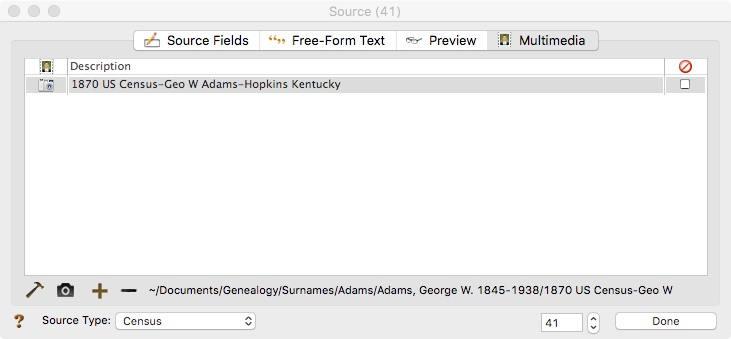
Digital workflow for genealogyWhen Brooks Duncan and I spoke at RootsTech last month about going digital with genealogy research, it became apparent to me from the questions that digital workflow is an individual thing. I’ve developed a work flow that works well for me, so I thought I’d share it here. I’m not suggesting I do things The Right Way (I don’t know if there is a right way, especially for hobbyists), but I wanted to show you what works for me. I know that I love seeing examples of how people handle their own workflow, so in the spirit of sharing, here’s mine.

When I find a digital document online–let’s say it’s a census document that I found at Ancestry–I take the following steps after ascertaining that it’s pertinent to my research:

  1. I click Save to download the document to my computer’s desktop.
  2. I rename the file immediately so that it reflects my simple file-naming protocol (year document type-ancestor name-location).
  3. I immediately file the document in my file structure (Genealogy/Surnames/[Ancestor’s surname]/[Ancestor’s name]
  4. I analyze the document and enter the first fact into my Reunion software.
  5. I create a source for that fact, using Reunion’s templates.
  6. I drag the image of the file into the Multimedia section of the Reunion source screen for that source. (That’s an example of the Reunion source screen at the top of this post.)
  7. I enter all other facts I find in the document into Reunion, using the same source number for each fact I find in that document.
  8. I click Preview in the Reunion source screen for that source and copy the citation and paste it into the metadata of the image file on my hard drive.

I added that last step after RootsTech, adapting a suggestion made by an audience member at our talk. I hadn’t thought about noting on the image what the source number and citation is. I think it’s a great idea and now I intend to go to back and do that for all my sources.

This eight-step work flow takes me from discovery through processing the document. It means that I don’t have stray documents on my hard drive with nonsensical file means. It also means I can easily a find a document when I want to. And it helps me see what documents are missing. Having the confidence that I can find a document I’ve saved allows me to feel good about not printing it, which cuts down on my paper clutter. (And, yes, I backup my hard drive daily, both to the cloud and to an external hard drive.) This workflow was about five years in the making, but I’m very satisfied with it!

For more in-depth information on how I organize my own genealogy, including a detailed look at my digital workflow, check out How I Do It: A Professional Organizer’s Genealogy Workflow, a 37-page downloadable available for $19.99.
Filed Under: Challenges, Organizing, Technology Tagged With: electronic files, organizing aids, record keeping, source documentation

Introducing the Paperless Genealogy Guide

February 10, 2017 By Janine Adams 2 Comments

Paperless Genealogy GuideI’ve partnered with “Mr. Paperless,” Brooks Duncan of DocumentSnap, to create a guide to going paperless in your genealogy research. I think it will be really helpful for those who would like to go paperless but feel overwhelmed by the prospect.

Brooks and I are presenting a session at RootsTech today (Go Paperless: Streamline and Digitize Your Genealogy) and we worked on the presentation and the guide at the same time.

You can read all the details about the Paperless Genealogy Guide over at DocumentSnap and download it for $9 there.  The guide covers how to name and find your digital documents, along with different types of scanners, and strategies for protecting your precious documents. And it ends with a checklist to walk you through the actions you need to get going.

My genealogy life is much easier now that almost all of my documents are in digital form. I can carry all my research with me, find it easily, read it easily (no more magnifying glass!) and determine very easily what I have and don’t have for a particular ancestor.

If that sounds good to you, hop on over and check out the Paperless Genealogy Guide! It can be yours instantly for $9.

Filed Under: Excitement, Genealogy tips, Organizing, Technology Tagged With: Brooks Duncan, electronic files, genealogy tools, paperless, record keeping, technology

Are there loose documents on your hard drive?

October 19, 2016 By Janine Adams 10 Comments

beachballI had to reinstall the operating system on my MacBook last week. (I paid someone to do it for me.) If you’re interested, you can read  some details about that in this blog post on my organizing blog. As a result, I spent some time focusing on the contents of the Documents folder of my hard drive before the big day.
I thought my genealogy documents were quite well organized on my hard drive. (I organize my documents in a Genealogy folder and Surname subfolder, by surname, then person.) Turns out, they weren’t quite as well organized as I thought. I was surprised to see that I had all sorts of loose files, some of them properly named, others with gibberish image names, floating around on my hard drive. Many were in my Downloads folder. Some were in the Genealogy folder. There are probably more elsewhere that I haven’t yet found.

It was actually quite a boon. Many of them I had not processed into my Reunion software. Some offered clues and insights. And it feels so much better to know things actually are well organized. (Or at least to have the illusion they are.)

If you download documents from Ancestry or elsewhere or if you scan documents into your computer, it might be worth 15 minutes to poke around your hard drive and see if there are any stray documents that didn’t make it into the proper folder!

Filed Under: Challenges, Genealogy tips, Technology Tagged With: electronic files, technology

How I store my genealogy information

September 16, 2016 By Janine Adams 36 Comments

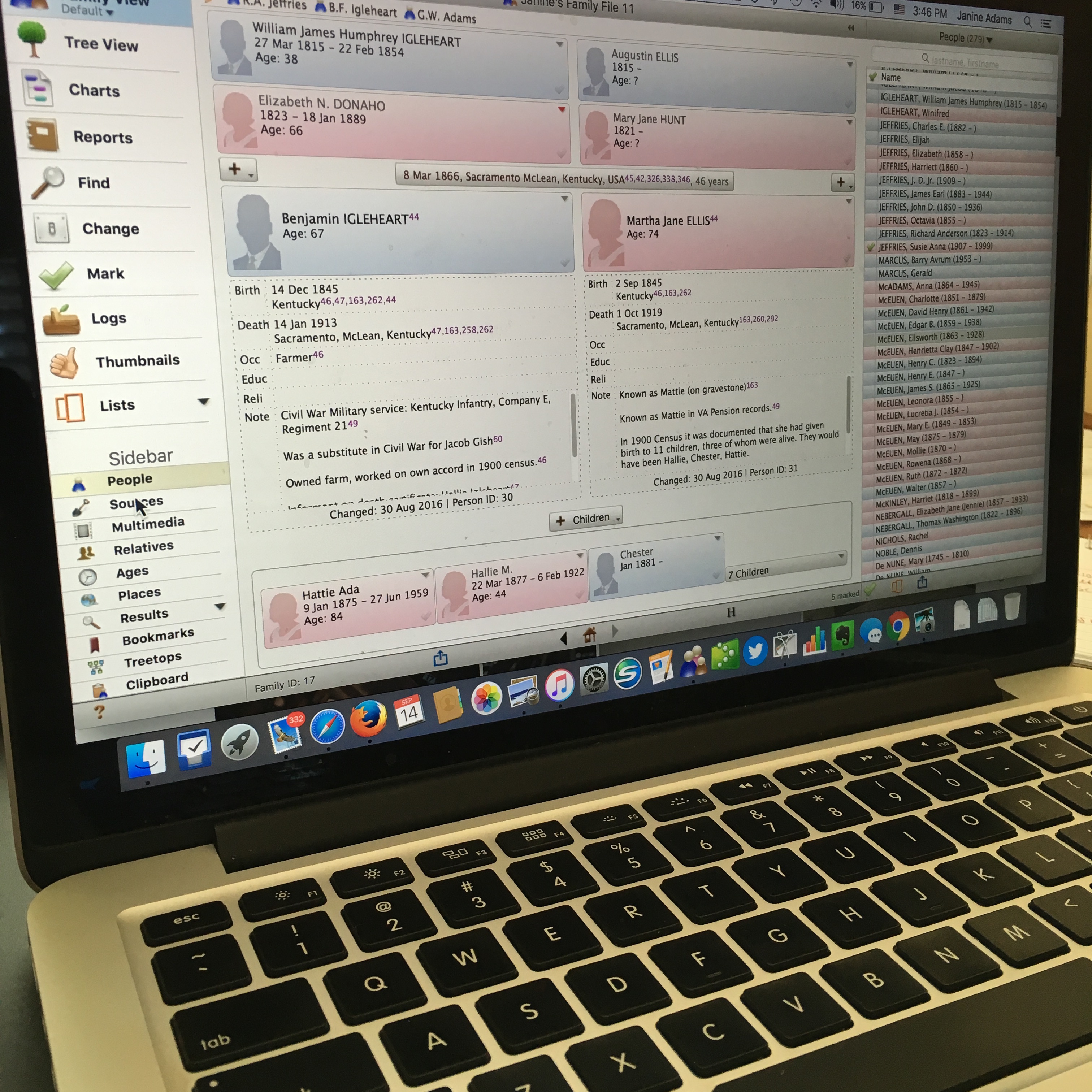
reuniononmac90I love organizing my family history research electronically. As I’ve mentioned here many times, I try not to print digital documents and instead store everything electronically where I can have easy access to it.

I don’t think I have been clear when I talk about storing my genealogy data electronically that I’m not talking about storing it as a family tree on Ancestry or Family Search. I’m talking about storing it on my hard drive.

To me, it would be folly to rely on an outside service to store my precious genealogy data. If the only copy of my information was at Ancestry, I would be required to renew my subscription to access my own data. Even storing all my information at a free site like Family Search feels risky to me. It’s conceivable that they could change their terms of service to something unacceptable to me. Or start charging for access. Or simply vanish. Another place that some people store their genealogy documents is Evernote. I think that can be a great way to have easy, searchable access to information. But I wouldn’t store genealogy documents on Evernote that I don’t also have on my hard drive. They could go belly up. (It happened with Springpad.)

I enter all of my data into family-tree software that resides on my laptop’s hard drive. I use Reunion 11, a Mac program. It can sync with the iPhone and iPad using the ReunionTouch app. I haven’t yet installed ReunionTouch because I take my Mac with me on research trips. I like that storing my data on my computer, rather than an online service, is that the information is accessible even when I don’t have an internet connection (if I have my computer with me).

Of course, I back up my hard drive, both on an external hard drive and with an online backup service (CrashPlan Pro). Backing up is critical.

I’m not saying that my way is the right way or the best way. But I’ll share with you my process for storing info, in case you find it helpful or interesting. So far, it’s working well for me.

When I find a sourced piece of information pertinent to my research this is what I do:

  1. Add the information to the appropriate person(s) in Reunion (or add a person if need be).
  2. Cite the source in Reunion.
  3. Download the information (or scan it if I found it in paper form).
  4. Attach an image of the source document to the source citation in Reunion.
  5. File the digital document in that ancestor’s electronic folder on my hard drive, copying it if it applies to more than one ancestor.
  6. Scour the source for further information.
  7. Make a note in Evernote if it sparks potential further research.

So far this feels good to me and I haven’t second guessed it.

How do you store your family tree information?

Filed Under: Challenges, Organizing, Technology Tagged With: electronic files, organizing aids, record keeping, technology

  • « Go to Previous Page
  • Page 1
  • Interim pages omitted …
  • Page 10
  • Page 11
  • Page 12
  • Page 13
  • Page 14
  • Page 15
  • Go to Next Page »

about me

I'm Janine Adams, a professional organizer and a genealogy enthusiast. I love doing family history research, but I find it's very easy for me to get overwhelmed and not know where to turn next. So I'm working hard to stay organized and feel in control as I grow my family tree.

In this blog, I share my discoveries and explorations, along with my organizing challenges (and solutions). I hope by sharing what I learn along the way I'll be able to help you stay focused and have fun while you do your research, too.

tags

30 x 30 Adams amy johnson crow anniversary Brown cemetery census Civil War conferences connections dna electronic files Evernote excitement Family Curator family photos genealogy tools getting started goals How They Do It Igleheart Jeffries keepsakes learning opportunities maps newspapers NGS organizing aids overwhelm paper files planning quick tips rasco record keeping research research log research trip resources RootsTech social history source documentation Stacy Julian technology time management vital records

join the facebook community!

join the facebook community!

My organizing business

Learn more about my organizing business, Peace of Mind Organizing®.

Subscribe by RSS

  • RSS - Posts
  • RSS - Comments

© 2026 Janine Adams


Loading Comments...
