• BLOG
  • ABOUT
    • Privacy Policy

Organize Your Family History

Stay focused and happy while exploring your roots

My (very informal) research log

April 4, 2017 By Janine Adams 21 Comments

A few commenters have asked me for samples of my research log. I hesitate to supply it because mine is so informal and not necessarily a good example for others to follow. But in the spirit of helping others, I offer it up.

I keep my log in Evernote. I have a notebook there called “2017 Research Log” and each time I do some research I try to create a log entry. I create a new note in the aforenamed notebook and head it with the date. Then I just type notes that I think might be useful in the future. I try to include what I was looking for, what I found and what next steps would be.

Here’s why it works for me:

  • First and foremost, it is easy for me to keep up. I just jot some notes to my future self and don’t get hung up on filling out a complicated spreadsheet or making sure I have every bit of information. For me, making it easy enough so I’ll actually do it trumps making it more complete.
  • It’s searchable, so I can easily search by person or surname. I could tag it by locality, family line or other category, though so far I haven’t done that.
  • Did I mention it’s easy?

Here’s a screenshot of a recent entry that’s fairly representative.
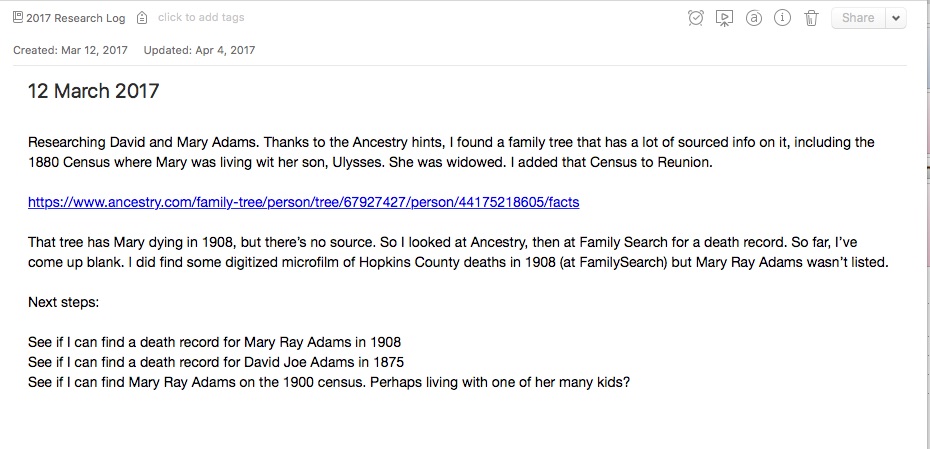
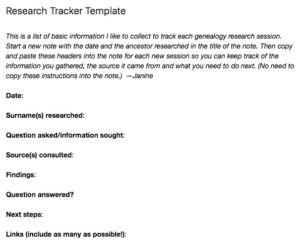
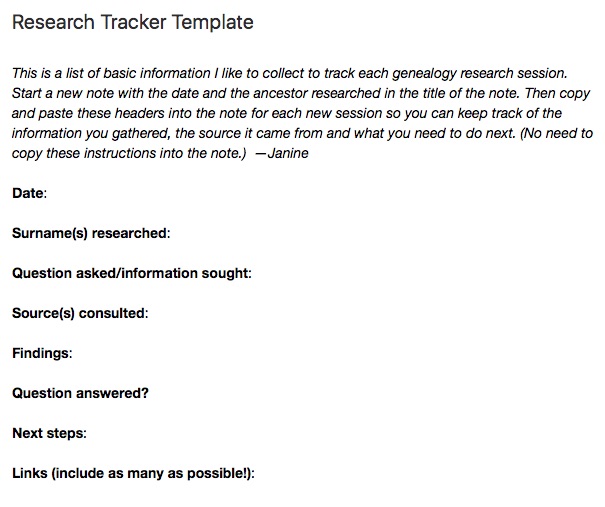
My genealogy research logI used to use a template in Evernote, one that I created when I was partnering with the dear departed Springpad. (I put that template at the top of this post; click on the image to make it bigger.) But I find I do better writing free form–I think it brings more information out of me.

Earlier this year I was experimenting with using the Log function in Reunion, also writing free-form notes, but I’ve discovered I prefer Evernote. I use Evernote on a daily basis for various aspects of my life and business, so I’m very comfortable with it.

I should mention that one downside to using Evernote as a research log is that it’s not sortable. It is searchable and taggable, but I can’t sort it like I could a spreadsheet. So far that hasn’t been an impediment to me.

I don’t think there’s any one right way to do a research log, but I’m pretty sure there are better ways than mine. But it’s working well for me at the moment.

If you are a spreadsheet person and aren’t intimidated by the opportunity to enter a lot of data, by all means check out Thomas MacEntee’s amazing research log spreadsheet.

Also, if you haven’t already feel free to join my Genealogy Research Loggers Facebook group for more conversations about research logs (as well as some samples from others).

For detailed information on how I organize my own genealogy research (including my research log), check out my Orderly Roots Guide, How I Do It: A Professional Organizer’s Genealogy Workflow, available for $19.99.

Filed Under: Challenges, Genealogy tips, Organizing, Technology Tagged With: Evernote, excitement, genealogy tools, organizing aids, research, research log, resources

Creating a research log habit

December 27, 2016 By Janine Adams 11 Comments

Creating a research log habitI’ve been doing genealogy research long enough to know the value of keeping a research log. Yet I really resist it. I’m not sure why and it’s driving me a little crazy. I was thinking about it this morning as I was walking my dog and I vowed to amend my 2017 genealogy goals to add this important goal:

  • Create a habit of logging each research session

I think one of the reasons I’ve resisted using a log is that I find myself a little intimidated by complicated spreadsheets. The research log created and shared by Thomas MacEntee is a thing of beauty. Used regularly and properly it would elevate anyone’s research. Yet the idea of filling it out is just too much for me. And so I’ve been very hit or miss on writing down what I’m researching.

On my walk this morning, it hit me that a research log is like any organizing system: The very best one is the one you will use. It’s not a one-size-fits-all thing. There’s no right way to do it. The important thing is to just do something.

When I got home, I mindmapped what a simple research log I might create for myself would look like. Then I looked back at my previous attempts, all in Evernote, and I realize I actually have something in place that I can just pick up and start using again.

Back in late 2013, I partnered with the personal organizer app Springpad (RIP Springpad!) and created a Family History Organizer custom notebook. Part of it was research tracker template, a very simple form to track what you’ve done in each session. A Research Log Lite, if you will. I think I never felt my research tracker template was good enough to qualify as a research log and I didn’t fully commit to it. (I’ve blogged about my attempts.) But now I feel that if I use it regularly, I’ll actually have a nice body of knowledge. I’m going for it.

Today’s the first day of a new focus on keeping a research log. I created a 2017 Research Log notebook in Evernote, which is my preferred place to keep track of information (genealogy-wise and otherwise). I revised the original research tracker template a little and placed in my 2017 Research Log Notebook. (That’s the template, in its entirety, up in the top of this post. Click on the image to see it larger.)

I created my first note in the notebook, titling the note with today’s date and the names of the ancestors I researched. I copied the template into the note and filled it out. I tagged it with the ancestor’s surname (Adams) and created an “Adams RL tag”, so I can easily pull up all my research log notes about the Adamses.  I hope this is the beginning of a wonderful habit.

Bonus! I made the research tracker template, public, so you can add it to your own Evernote account if you want to give it a try.  Just click on the link and it should open up in Evernote for you. (I’m a novice at public Evernote notes, so if it doesn’t work for you, please let me know and I’ll figure it out.)

I’m always excited about creating new habits in the new year; I hope to be reporting here that it’s become ingrained!

I’m curious: Do you keep a research log? If so, in what format?

Filed Under: Challenges, Genealogy tips, Organizing, Technology Tagged With: Evernote, excitement, genealogy tools, organizing aids, research, research log, resources

How I’m using Evernote for genealogy

August 5, 2016 By Janine Adams 7 Comments

Evernote logoI have to admit I have been a slow adopter of Evernote. In 2013 and 2014 I posted here about how I wanted to give Evernote a(nother) try to help me organize certain aspects of my genealogy research. Well, it’s two years later and I’m happy to report that I am actually using Evernote to help organize a bunch of things in my life, including certain aspects of my genealogy research. I’ve become a big fan, though no one would describe me as a power user.
I thought it might be helpful to some people for me to describe how I’m using it for genealogy. Before I do, though, I want to emphasize that this isn’t the best way or the only way to use Evernote. It’s just the way I’m using it. And it will no doubt evolve.

So here’s a source list of ways I use Evernote in my genealogy life:

  1. Research log. I have a very simple template in Evernote in which I jot down what I’ve researched that session. Full disclosure: I don’t do it each and every session; I just do it when it feels right. Evernote makes it very easy.
  2. Genealogy task list. I have a notebook (in my Genealogy stack) called Genealogy clues/puzzles to check out. That’s where I make note of the things that come up that I don’t want to explore at the moment. I helps me stay focused on the task at hand.
  3. Source documentation project. As I described last month, I’m systematically reexamining all my sources in Reunion, verifying them, checking citations, ensuring that I’ve gleaned all the information I can out of them and adding images of each source to the citation. I keep the list in Evernote and check it off as I go.
  4. Keeping track of resources. I have a notebook called Genealogy resources where I clip interesting websites. Do I go back and look at it a lot? Not so much. But when I do there are usually some treasures in there. And clipping it means I don’t have to try to remember it, which frees up my mind.
  5. Genealogy travel. When I’m planning a research or cemetery trip, I keep notes about hotels, logistics, things to remember to pack, etc.
  6. Blog post ideas. I jot down ideas for this blog and my organizing blog when they occur to me. I consult it when I don’t know what to write. Which is quite often.

I don’t store my genealogy research in Evernote. After the 2015 National Genealogical Society meeting where I heard a detailed talk on using Evernote for genealogy, I briefly tried storing images of the genealogy documents I’d downloaded (census records, vital records, etc) in Evernote. I abandoned that as too labor intensive (though I can see the sense in it because it makes those documents exquisitely accessible). Instead, I attach those documents to the source citation in Reunion on my Mac.

In short, Evernote has become indispensable to me. It’s my go-to place to store and retrieve all manner of things (and I use it a whole lot for non-genealogy purposes as well). I pay for the premium version, so that I can access it when I’m not online. The price for the premium version just went up from $50 to $70 a year. I like it enough that I didn’t even consider not renewing because of the price hike.

Evernote is such a robust platform that I know I could be taking better advantage of it. And in a year I might be using it entirely differently. But right now it’s meeting my needs quite nicely.

How do you use Evernote for your genealogy research?

Filed Under: Challenges, General, Organizing, Reflections Tagged With: Evernote, organizing aids, research, research log, resources, technology

Digging out after a conference

March 4, 2015 By Janine Adams 2 Comments

Diggin out after a conferenceI love going to conferences. Between organizing and genealogy conferences, I attend at least three a year.

Conferences are wonderful learning and networking opportunities, but they can present an organizing challenge. When I return home from a conference, I’m usually behind in my work and it’s so easy to leave everything I learned on a back burner. The biggest challenge is probably dealing with the literature I bring home from conferences. I’m a bit ashamed to admit that, in the past, items I picked up at trade shows have stayed in the bag untouched until they’re thrown away months or even years later.

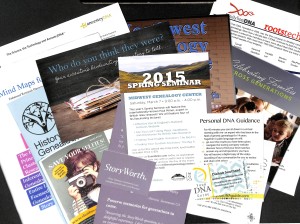
Last month, I attended RootsTech. It had a gigantic trade show and I learned about so many new resources I wanted to explore. I was bound and determined that the information I bought home with me would not languish. Here’s how I handled it this year. (Spoiler alert: I’m feeling pretty good about it!)

  • I minimized what I brought home by carefully going through all the paper before packing my bag at the hotel room in Salt Lake City.
  • Once I got home to St. Louis, I put all the literature together until I could process it.
  • I spread it out and scanned it for the photo to go with this post (something non-bloggers wouldn’t have to consider!).
  • Then I gathered it into a pile and went through it piece by piece. I looked up the websites for each of the flyers I brought home. If the product or service still interested me, I added it to a note I created in Evernote called “Interesting resources from RootsTech 2015” that I placed in my Evernote “Genealogy Resources” notebook.
  • For a couple of the resources, I created a follow up task in Things, the task management application I use.  I can assign a due date, so these tasks will pop up on my Today page next year  (helpful for reminders about conferences I might want to attend in 2016).
  • I jotted down some blog post ideas sparked by the literature and put them in my Blog Post Ideas notebook in Evernote.
  • I recycled all the paper, except two items I decided to file

The whole process took me about 30 minutes. It feels great! There were some resources I’d forgotten about already, but now they’re safe inside Evernote. I took action on a couple of items, signing up for newsletters and other services and making one inquiry about working with someone. And, perhaps best of all, I got rid of a pile of paper.

Taking 30 to 60 minutes to process this information really adds value to what I brought home from RootsTech. It’s an amazing return on the investment of time spent! I’m grateful for Evernote and Things which help me free up my memory so I can find this information when I need it.

I can’t wait to do it again after next month’s National Association of Professional Organizers conference.

Do you have a better (or different) way of digging out after a conference?

Filed Under: Challenges, Genealogy tips, Organizing, Technology Tagged With: conferences, Evernote, genealogy tools, organizing aids, resources, technology

  • « Go to Previous Page
  • Page 1
  • Page 2
  • Page 3
  • Page 4
  • Page 5
  • Go to Next Page »

about me

I'm Janine Adams, a professional organizer and a genealogy enthusiast. I love doing family history research, but I find it's very easy for me to get overwhelmed and not know where to turn next. So I'm working hard to stay organized and feel in control as I grow my family tree.

In this blog, I share my discoveries and explorations, along with my organizing challenges (and solutions). I hope by sharing what I learn along the way I'll be able to help you stay focused and have fun while you do your research, too.

tags

30 x 30 Adams amy johnson crow anniversary Brown cemetery census Civil War conferences connections dna electronic files Evernote excitement Family Curator family photos genealogy tools getting started goals How They Do It Igleheart Jeffries keepsakes learning opportunities maps newspapers NGS organizing aids overwhelm paper files planning quick tips rasco record keeping research research log research trip resources RootsTech social history source documentation Stacy Julian technology time management vital records

join the facebook community!

join the facebook community!

My organizing business

Learn more about my organizing business, Peace of Mind Organizing®.

Subscribe by RSS

  • RSS - Posts
  • RSS - Comments

© 2026 Janine Adams


Loading Comments...