• BLOG
  • ABOUT
    • Privacy Policy

Organize Your Family History

Stay focused and happy while exploring your roots

Taking notes at genealogy conferences

January 29, 2016 By Janine Adams 6 Comments

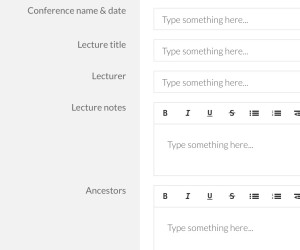
Template for taking notes at a genealogy conferenceIf you’re going to RootsTech next week (or any other genealogy conference this year) I encourage you to check out the free template I created in Transpose.

Transpose is a business platform/website that I wrote about last year. It allows you to create templates (which they now call “solutions”) to create customized forms. You can also download solutions that others have created and uploaded into the Transpose Public Library.

I’ve created a bunch of solutions for my own use and uploaded seven solutions to the Transpose Public Library. One of these is a solution called Genealogy Conference Notes. It’s designed to make it easy to take notes at a genealogy conference.

I’ve only been to one genealogy conference since I created this solution (the Genealogy Society of Southern Illinois conference last August). Using the template, I created a new record for each lecture. The template allowed me to capture general notes from the lecture and also jot down which ancestors the information might apply to, along with action ideas. It worked out really well for me–I love having a structured place to take notes. When I got home, I had a list of concrete action steps.

I chose to take notes on my laptop, because I prefer a full keyboard. Transpose has an app you can use on a tablet or smartphone, but I haven’t yet tried out taking notes with my solution on a mobile platform.

If you’re interested in trying it, you’ll need a free account at Transpose. Go to the Genealogy Conference Notes solution in the library and just copy it into your account. There it will be among any other solutions you copy or download. Just click on the solution and create a new record for each lecture you attend. All the information you capture will be saved for you in Transpose, in a searchable and filterable database.

You can also use it as a basis creating your own solution that works better for your needs. The folks at Transpose work hard to make it easy for you to use the platform. Here’s a great getting started tutorial.

I can’t wait to use it for the next genealogy conference I attend!

Unfortunately, Transpose announced on November 8, 2016 that it is shutting down on December 9, 2016.

Filed Under: Genealogy tips, Organizing, Technology Tagged With: conferences, genealogy tools, organizing aids, record keeping, research, technology

Using Twitter for genealogy

November 18, 2015 By Janine Adams 3 Comments

Using Twitter for genealogyI love Twitter and have been on it since 2008. I primarily use it for marketing my organizing business and reading interesting things posted by the people I follow. But recently, I’ve been searching on the #genealogy hashtag and it’s been a revelation!

I find keeping up with genealogy blogs a bit overwhelming. (I tried using Feedly, but found I just wasn’t reading blogs with regularity.) What’s great about the #genealogy hashtag is that I see tweets about individual posts, resources, news bites or lectures in progress–all of them genealogy related–and I can click on the link and go directly to the post or resource. Tweets are only 140 characters long, so I can get a teeny bite-sized synopsis of the link. I can dip in when I’m looking for inspiration. It’s a really interesting way to go about finding current genealogy-related things to read about.

If you’re not on Twitter, you could join today (at no cost) and immediately start searching the #genealogy hashtag. You could also start tweeting and build relationships with people and grow your followers.  I hear from a lot of people that they just don’t “get” Twitter, which is fine. For the genealogist, using it as a gateway to genealogy information is reason enough to join Twitter, in my opinion. Follow a few a few genealogy luminaries and you’ll have a timeline full of interesting stuff. (But again, if you search on #genealogy you don’t even need to worry about following anyone or reading your timeline.)

Here’s a brief primer on joining Twitter and using it for genealogy:

  • Go to www.twitter.com and create an account. You’ll need to choose a username, which will be your handle. It’s smart to keep it as short as possible, because of the 140-character limit in Twitter. (For example, I’m @janinea.)
  • Upload a picture of yourself into your profile (otherwise, Twitter will use an egg for your picture, which tells the world you’re a newbie)
  • Enter #genealogy in the Search Twitter box and see what’s going on at that moment in the world of genealogy
  • If you want, follow some genealogy folks. To get you started, here are some that I follow:
    • @geneabloggers (Thomas MacEntee)
    • @legalgen (Judy Russell)
    • @genealogyisfun (Jana Last)
    • @ancestry (Ancestry.com)
    • @amyjohnsoncrow (Amy Johnson Crow)
    • @megansmolenyak (Megan Smolenyak Smolenyak)
    • @familytreemagazine (Family Tree Magazine)
    • @vhughesauthor (Valerie Hughes)
    • @familysearch (Family Search)
    • @crestleaf (Crestleaf)
  • Feel free to create a Tweet, but don’t feel like you have to.
  • If you have your own genealogy blog, tweet your posts. If you don’t have your own blog, feel free to tweet links to great genealogy posts you read. (Most blogs have a Share on Twitter icon.)

If you’re already on Twitter, how do you use it for genealogy?

Filed Under: Genealogy tips, Technology Tagged With: genealogy tools, technology

Getting my own handwriting analyzed

September 23, 2015 By Janine Adams 15 Comments

Getting my handwriting analyzedAs I’ve written here, I hired Nancy Douglas of WriteMeaning to analyze the handwriting of my paternal grandfather, after I saw her at her booth at RootsTech. My grandfather had written a long letter to my grandmother before they were married and I was intrigued by what I might learn about him through having his handwriting analyzed, since I had this robust sample.

I showed the analysis to my father and his sister and they were both surprised by some of the character traits that the Nancy gleaned from the handwriting. Of course, they didn’t know their father during that period of his life, since they weren’t yet born, but the report didn’t completely jibe with their memory of him. That made me curious about whether the discrepancy was in my father and aunt’s recollection or in the analysis itself.

So I decided to have my own handwriting analyzed in what Nancy calls a Personality Profile. I figured that would put me in a position of knowing whether my grandfather’s handwriting analysis was accurate. Plus I’ve always been fascinated by graphology and it sounded just plain fun.

I filled out Nancy’s forms (by hand, of course) and paid the $50 fee.

My verdict? The analysis was spot on! I loved reading the report. She correctly identified me as efficient and productive, but “not following through on some projects you would like to” (so true!). The analysis says that I am honest, broadminded and an active listener (such important traits for a professional organizer), but that sometimes efficiency and getting things done can trump active listening for me.

The report goes on to identify that I like to talk, am extroverted, open, frank and loyal. It also said I’m analytical thinker and that I prefer quality over quantity (that’s definitely the case). Nancy (correctly) identified some areas where I might be feeling unfulfilled.

The great thing about the report is Nancy details (with snippets from my handwriting to illustrate) what it is about the handwriting that tells her these things. Reading it was truly a learning experience!

If you’re curious and have $50 to spare, I heartily recommend filling out the form and seeing what Nancy has to tell you. Not only did I find it fun, but having my handwriting analyzed helped my genealogy because it lends credence to the historical family documents analysis of my grandfather’s handwriting.

Thank you, Nancy!

Edited to add: Nancy has stopped offering this service, so I’ve taken out the links. But it was an interesting experience and if you have the opportunity to do a handwriting analysis of an ancestor through a different service, I encourage you to try it!

Filed Under: Excitement, Genealogy tips, Reflections Tagged With: Adams, excitement, genealogy tools, handwriting

Create (or download) genealogy forms with Transpose

September 15, 2015 By Janine Adams 9 Comments

I think many genealogists (including me) enjoy forms. We collect data and we like to have a place to put it. I have been playing with a website that allows me to create forms willy nilly and I’m having a great time.

That website is Transpose. It makes it ridiculously easy create forms that you can fill out yourself or share with others via weblink. (So you could create a form to send to cousins, for example, and the answers would form a database in your Transpose account.) You can also publish form templates for others to download and customize for their own use.

I learned about Transpose via Diahan Southard, Your DNA Guide, who mentioned that she used Transpose’s previous incarnation, KustomNote, for creating contact forms that help her organize the many DNA-related contacts she receives.

Since creating my (free) account on Transpose, I have created a bunch of forms, including several genealogy-related templates that I’ve been using regularly.

I’ve made three genealogy templates public:

  • Genealogy conference notes (which was really handy when I was taking notes at the Southern Illinois Genealogical Society’s conference)
  • Genealogy task list (which is wear I’m keeping track of current projects, as I blogged about last week)
  • Genealogy abstract form (which I’m using to capture data as I abstract my ancestors’ Civil War pension files)

Please feel free to download them and customize them for your use. I’m sure I’ll be adding more–they’ll all be tagged Genealogy, so they’ll be easy to find when you browse public templates at Transpose.  All my templates are quite simple, but I feel like I’ve just scratched the surface of the power of Transpose. I look forward to getting into it deeper!

Oh, and of course, Transpose has an iOS app, so I can use it on my iPhone and iPad. (An Android app is in development.)

If you use Transpose and have any public templates, please let me know in the comments!

Unfortunately, Transpose announced on November 8, 2016 that it is shutting down on December 9, 2016.

Filed Under: Genealogy tips, Organizing, Technology Tagged With: genealogy tools, organizing aids, record keeping, research, technology

  • « Go to Previous Page
  • Page 1
  • Interim pages omitted …
  • Page 17
  • Page 18
  • Page 19
  • Page 20
  • Page 21
  • Interim pages omitted …
  • Page 30
  • Go to Next Page »

about me

I'm Janine Adams, a professional organizer and a genealogy enthusiast. I love doing family history research, but I find it's very easy for me to get overwhelmed and not know where to turn next. So I'm working hard to stay organized and feel in control as I grow my family tree.

In this blog, I share my discoveries and explorations, along with my organizing challenges (and solutions). I hope by sharing what I learn along the way I'll be able to help you stay focused and have fun while you do your research, too.

tags

30 x 30 Adams amy johnson crow anniversary Brown cemetery census Civil War conferences connections dna electronic files Evernote excitement Family Curator family photos genealogy tools getting started goals How They Do It Igleheart Jeffries keepsakes learning opportunities maps newspapers NGS organizing aids overwhelm paper files planning quick tips rasco record keeping research research log research trip resources RootsTech social history source documentation Stacy Julian technology time management vital records

join the facebook community!

join the facebook community!

My organizing business

Learn more about my organizing business, Peace of Mind Organizing®.

Subscribe by RSS

  • RSS - Posts
  • RSS - Comments

© 2026 Janine Adams


Loading Comments...