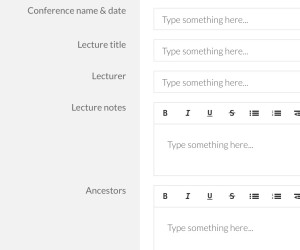
 If you’re going to RootsTech next week (or any other genealogy conference this year) I encourage you to check out the free template I created in Transpose.
Transpose is a business platform/website that I wrote about last year. It allows you to create templates (which they now call “solutions”) to create customized forms. You can also download solutions that others have created and uploaded into the Transpose Public Library.
I’ve created a bunch of solutions for my own use and uploaded seven solutions to the Transpose Public Library. One of these is a solution called Genealogy Conference Notes. It’s designed to make it easy to take notes at a genealogy conference.
I’ve only been to one genealogy conference since I created this solution (the Genealogy Society of Southern Illinois conference last August). Using the template, I created a new record for each lecture. The template allowed me to capture general notes from the lecture and also jot down which ancestors the information might apply to, along with action ideas. It worked out really well for me–I love having a structured place to take notes. When I got home, I had a list of concrete action steps.
I chose to take notes on my laptop, because I prefer a full keyboard. Transpose has an app you can use on a tablet or smartphone, but I haven’t yet tried out taking notes with my solution on a mobile platform.
If you’re interested in trying it, you’ll need a free account at Transpose. Go to the Genealogy Conference Notes solution in the library and just copy it into your account. There it will be among any other solutions you copy or download. Just click on the solution and create a new record for each lecture you attend. All the information you capture will be saved for you in Transpose, in a searchable and filterable database.
You can also use it as a basis creating your own solution that works better for your needs. The folks at Transpose work hard to make it easy for you to use the platform. Here’s a great getting started tutorial.
I can’t wait to use it for the next genealogy conference I attend!
Unfortunately, Transpose announced on November 8, 2016 that it is shutting down on December 9, 2016.

Thanks for this! I’m going to an all-day conference tomorrow and I plan to give it a try. The tutorial is geared to the desktop application, so I had a little trouble figuring it out on my iPad. I went to Transpose on my desktop and found your Solution right away. As soon as I copied it, I went to my iPad and found it. I have a keyboard for my iPad and that’s what I always use to take notes at conferences.
Fantastic, Dede. Please let me know how you like it! I hope you don’t have any trouble using it on the iPad and that you have a terrific conference. Thanks for commenting.
Thank you so much for sharing this with us Janine!
I want to let you know that your blog post is listed in today’s Fab Finds post at http://janasgenealogyandfamilyhistory.blogspot.com/2016/01/follow-friday-fab-finds-for-january-29.html
Have a great weekend!
Thanks, Jana! I hope you have a great weekend too.
I picked up your bit and used it to create my own for keeping track of sources and information. I had tried a number of things (I am a technology person and not afraid to experiment). Transpose is just what I needed for all sorts of things. Thanks!!!d
That’s fantastic, Delia! I love Transpose. I’d love to see your solution for keeping track of sources and info, if you make it public. Please do let me know if you do!