• BLOG
  • ABOUT
    • Privacy Policy

Organize Your Family History

Stay focused and happy while exploring your roots

Find genealogy files on your computer with metadata

March 18, 2014 By Janine Adams Leave a Comment

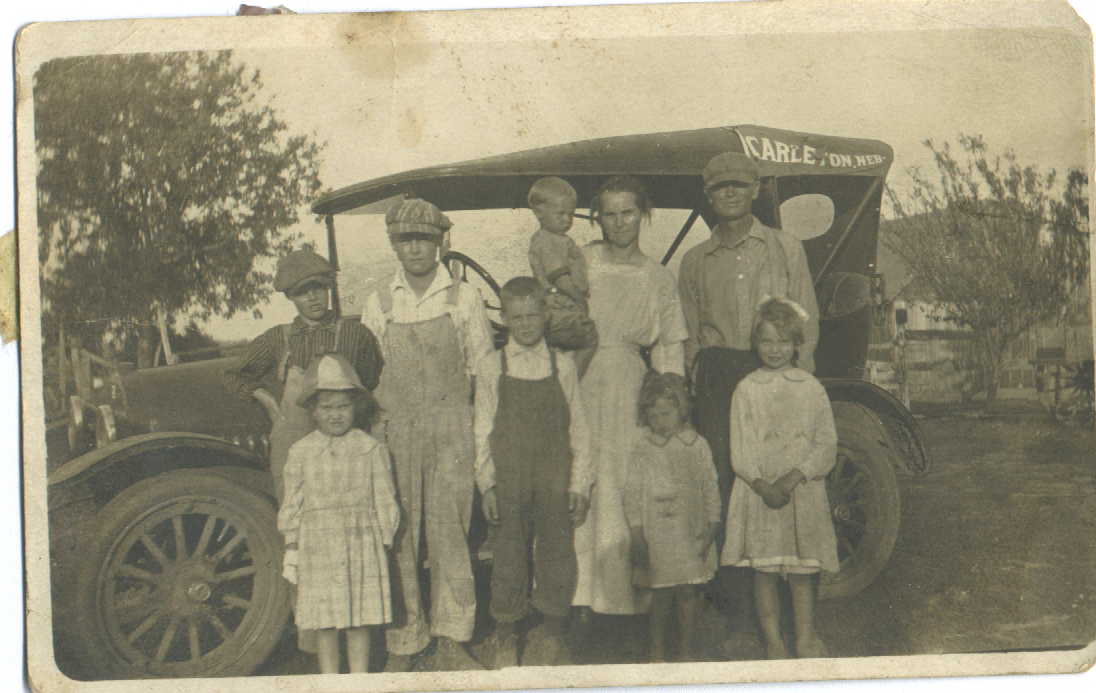
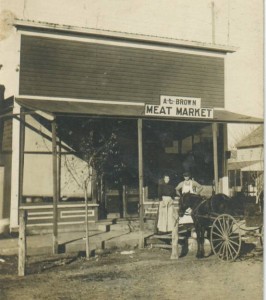
Brown family, before trip to Nebraska, 1922Brown family, before trip to Nebraska, 1922AJ Brown meat marketAs I mentioned in my last blog post, being able to easily access my genealogy research findings is critical to me. I’m creating a reasonable file structure on my hard drive, but I can’t put a ton of information about a document in the file name. Happily, there’s a way I can find all the documents or photographs pertaining to one thing (like a location or a surname) and that’s by tagging my files with metadata.

When I went to RootsTech last month, I heard a couple of talks on metadata (one Mac focused, one PC focused). So I know more than I did  before the conference, but I’m certainly no expert. Here’s a brief primer on metadata, with links to more in-depth information.

What is metadata?

The word metadata literally means “data about data.” So it’s information about what’s in a file or a photo. Think about a caption with info scribbled beneath is or on the back, saying who is in the picture, where it was taken, and when. That’s metadata. You can attach the same sort of information to your digital photos and scans, embedded in the file, without marring the photo.

If you’re familiar with tagging a document with keywords in Evernote or Springpad, you’ll understand the concept. Think also how you tag people in photographs in Facebook. Just use terms you can imagine searching on.

How do you add metadata?

Very generally, you add metadata by right-clicking on a file within the Windows Explorer or Mac Finder, then clicking on Properties (Windows) or Get Info (Mac). On a Windows machine, you’d then click on Properties, then on the third tab, Details. You’ll see a form you can fill in with varying types of data. On a Mac, it’s a little more free form. After clicking Get Info, you fill in the tags you want in the Spotlight Comments section at the top of the info window. Use a semicolon to separate tags.

You can also download software specifically for adding metadata. I need to research that more for my own files. I do know that I want to keep this as simple as possible.

Why bother using metadata?

Even in the most organized file structure, you can only fit so many characters in a file name. And long file names can become unwieldy. Embedding metadata allows you to easily find the files you’re looking for, even if the search terms aren’t those you’d put in a filename. Also, the information stays with the file when you share it. The photo above, of my great grandfather’s meat market in Nebraska, has no metadata attached to it, except that the name of the cousin who sent it to me. I have many photos like that and I hope to make them more meaningful by embedding metadata.

How can you learn more about metadata?

I know I’m not giving you a whole lot of information here, partly because I use a Mac and don’t have a Windows machine at my fingertips to test things on.  Here are some online resources to help you get started.

  • Metadata for Digital Images, presentation by Flip-Pal Scanner at 2013 RootsTech (handout)
  • Understanding Metadata and Genealogy, Lisa Louis Cooke’s Genealogy Gems podcast (video interview with Randy Whited)
  • Labeling Digital Photos, on All About Digital Photos (more in-depth information on metadata and software)
  • Labeling Photos with IPTC, Kimberly Powell, About.com Genealogy (info on the IPTC metadata standard)

My goal with this post was to make you aware of the concept and the utility of metadata and urge you to consider tagging your documents. Don’t worry about being perfect. Any data you add will be helpful.


Filed Under: Genealogy tips, Preservation, Technology Tagged With: Brown, family photos, genealogy tools, keepsakes, metadata, RootsTech

City directories: a great resource, used carefully

January 30, 2014 By Janine Adams 6 Comments

City directories can provide clues--and sometimes red herringsThis quarter, I’m exploring the Adams family–those ancestors from my paternal grandfather’s line. I’ve been fortunate recently to find my great grandparents heavily represented in city directories in the 1910s and 1920s. I’ve also found my grandparents and even my parents in city directories via Ancestry.com.

An individual’s entry in a city directory can provide some great information (depending on the year), including:

  • Address
  • Spouse
  • Occupation
  • Value of personal property

Tracking an ancestor’s address from year to year can be really revealing.

I was thrilled to see in the 1912 Chehalis County Directory paragraphs about each of the towns in the county. About Quiniault (now spelled Quinault), which is the town that my grandfather and his parents were living in that year, I learned this:

Population: 125. A village on Lake Quiniault, settled in 1890, 150 miles west of Seattle, 60 by rail and mail route, northwest of Montessano, the county seat. 40 north of Hoquiam, the banking point, 28 northwest of Moclips, the shipping point. Mail stage tri-weekly to Hoquiam ($4.00), to Humptulips ($2.00). A.V. Higley, postmaster.

That paints a picture of a very remote place, doesn’t it? Quinault is located on the Olympic Peninsula in Washington state. The occupation of my great grandfather, Elmer, was listed as farmer. I can’t really imagine what life was like there in that small town, so far from everything, with four small children.

One thing I’ve come to realize about city directories, however, is that offer a snapshot that may look very different than reality. For example, I know from my grandfather’s letter to my grandmother that his parents did not live together in Olympia.  You would not know it from the Olympia city directory, where both Elmer and Hattie are listed at one address year after year. Similarly, my parents are listed in the Spokane city directory in 1954. I know that in fact they were stationed in London at the time. (My father was in the Army.) So as much as I love finding an entry in a city directory for one of my people, I’m learning to not take the information as gospel.

Filed Under: Genealogy tips, My family Tagged With: Adams, city directories, genealogy tools, research, resources

Find historical maps on MapofUS.org

January 28, 2014 By Janine Adams 2 Comments

mapofusI’m not sure how I happened across the website MapofUS.org, but it seems like quite a find for history and map lovers, and, of course, family history researchers.
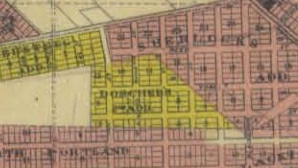
The site consists of links to many, many high-resolution historical maps of the U.S. (and a few other countries), as well as a small selection of battle maps for the Revolutionary War, and Civil War maps promised to come soon.In addition, there is a Historical  Atlases section, which provides some city maps as well. I was able to see 1852 and 1880 maps of St. Louis, where I live. They were fascinating.

It also offers an interactive U.S. map where you can watch the territories and states as they’re established throughout time. Each state also has an interactive county map.

The maps are available free of charge (at this point anyway). This seems like a really easy way to check county (and other) boundaries on various dates while you’re doing your genealogy research.


Filed Under: Genealogy tips, General Tagged With: genealogy tools, maps, resources

Looking for my grandfather’s birth home

January 17, 2014 By Janine Adams 2 Comments

Looking for my grandfather's birth homeI’m in Portland, Oregon, doing some business planning my friend and colleague, Shannon Wilkinson. (This is something I try to do annually, and it really pays off.)

As I discovered earlier this year, my paternal grandfather, Dave Adams, was born in Portland. The birth announcement I found for him listed a street address for his parents, 749 Roosevelt Street. So I thought while I was here I might see if I could find the home his parents were living in when he was born on November 12, 1904.

Last night, after dark and in the fog, Shannon and I found ourselves near Roosevelt Street. (I had told her about it on the phone when I first found the birth announcement, and she remembered.) As it happens, due to the addition of freeways and an industrial plant in that area, only one residential block of Roosevelt street remains. So it was easy to narrow down our search.

However, some time in the 1930s, Portland changed its numbering scheme for its addresses. The block we were in was the 2200 block. My quest today was to find out whether the last existing residential block of Roosevelt happened to be the same block my great grandparents lived in.

Thankfully, Shannon is savvy about online resources available in Portland and she pointed me to Portland Maps, a city-run website that provides loads of information on each property in Portland. I had written down the address of one of the houses, so I looked it up.  I was able to click on historical permits on that house and the houses around it until I found a permit old enough to reveal the original address. I learned that 2354 Roosevelt was 780 Roosevelt back in the day. I clicked on the next house west and saw that it had been 782 Roosevelt, so I knew I was going in the wrong direction. Unfortunately, there were only a couple of houses east of 2354 Roosevelt, so it became apparent that my great grandparents’ house was one that was destroyed in order to make room for the freeway.

A look at the plat map of Portland in 1906 showed that the whole area had been residential. Shannon and I agree that the turn-of-the-century houses we saw in the last remaining block of Roosevelt probably are a good representation of where the Adams family had lived.

While I was ultimately disappointed in the outcome of this fun little research project, I’m thrilled to have a feel for the kind of housing my ancestors lived in 110 years ago. I’m so grateful to have this information available to me at my fingertips but also glad that I saw those houses in person.

Incidentally, I used the Research Tracker in my Family History Organizer notebook in Springpad (available to you by clicking here) to track this project. I’m finding it a really easy way to keep track of my research without feeling overwhelmed by a big spreadsheet.

Filed Under: Challenges, My family Tagged With: Adams, genealogy tools, research log

  • « Go to Previous Page
  • Page 1
  • Interim pages omitted …
  • Page 26
  • Page 27
  • Page 28
  • Page 29
  • Page 30
  • Go to Next Page »

about me

I'm Janine Adams, a professional organizer and a genealogy enthusiast. I love doing family history research, but I find it's very easy for me to get overwhelmed and not know where to turn next. So I'm working hard to stay organized and feel in control as I grow my family tree.

In this blog, I share my discoveries and explorations, along with my organizing challenges (and solutions). I hope by sharing what I learn along the way I'll be able to help you stay focused and have fun while you do your research, too.

tags

30 x 30 Adams amy johnson crow anniversary Brown cemetery census Civil War conferences connections dna electronic files Evernote excitement Family Curator family photos genealogy tools getting started goals How They Do It Igleheart Jeffries keepsakes learning opportunities maps newspapers NGS organizing aids overwhelm paper files planning quick tips rasco record keeping research research log research trip resources RootsTech social history source documentation Stacy Julian technology time management vital records

join the facebook community!

join the facebook community!

My organizing business

Learn more about my organizing business, Peace of Mind Organizing®.

Subscribe by RSS

  • RSS - Posts
  • RSS - Comments

© 2026 Janine Adams


Loading Comments...