• BLOG
  • ABOUT
    • Privacy Policy

Organize Your Family History

Stay focused and happy while exploring your roots

Creating a digital workflow

March 1, 2024 By Janine Adams Leave a Comment

Since it’s RootsTech time, I was thinking about the talk I co-presented at RootsTech 2017 with Brooks Duncan called Going Paperless in Genealogy. Shortly after I wrote a post about my digital workflow that presents it pretty concisely. I’m happy to report that the workflow has stood the test of time. I thought now would be a good time to repeat that post.

When Brooks Duncan and I spoke at RootsTech about going digital with genealogy research, it became apparent to me from the questions that digital workflow is an individual thing. I’ve developed a work flow that works well for me, so I thought I’d share it here. I’m not suggesting I do things The Right Way (I don’t know if there is a right way, especially for hobbyists), but I wanted to show you what works for me. I know that I love seeing examples of how people handle their own workflow, so in the spirit of sharing, here’s mine.

When I find a digital document online–let’s say it’s a census document that I found at Ancestry–I take the following steps after ascertaining that it’s pertinent to my research:

  1. I click Save to download the document to my computer’s desktop.
  2. I rename the file immediately so that it reflects my simple file-naming protocol (year document type-ancestor name-location).
  3. I immediately file the document in my file structure (Genealogy/Surnames/[Ancestor’s surname]/[Ancestor’s name]
  4. I analyze the document and enter the first fact into my Reunion software.
  5. I create a source for that fact, using Reunion’s templates.
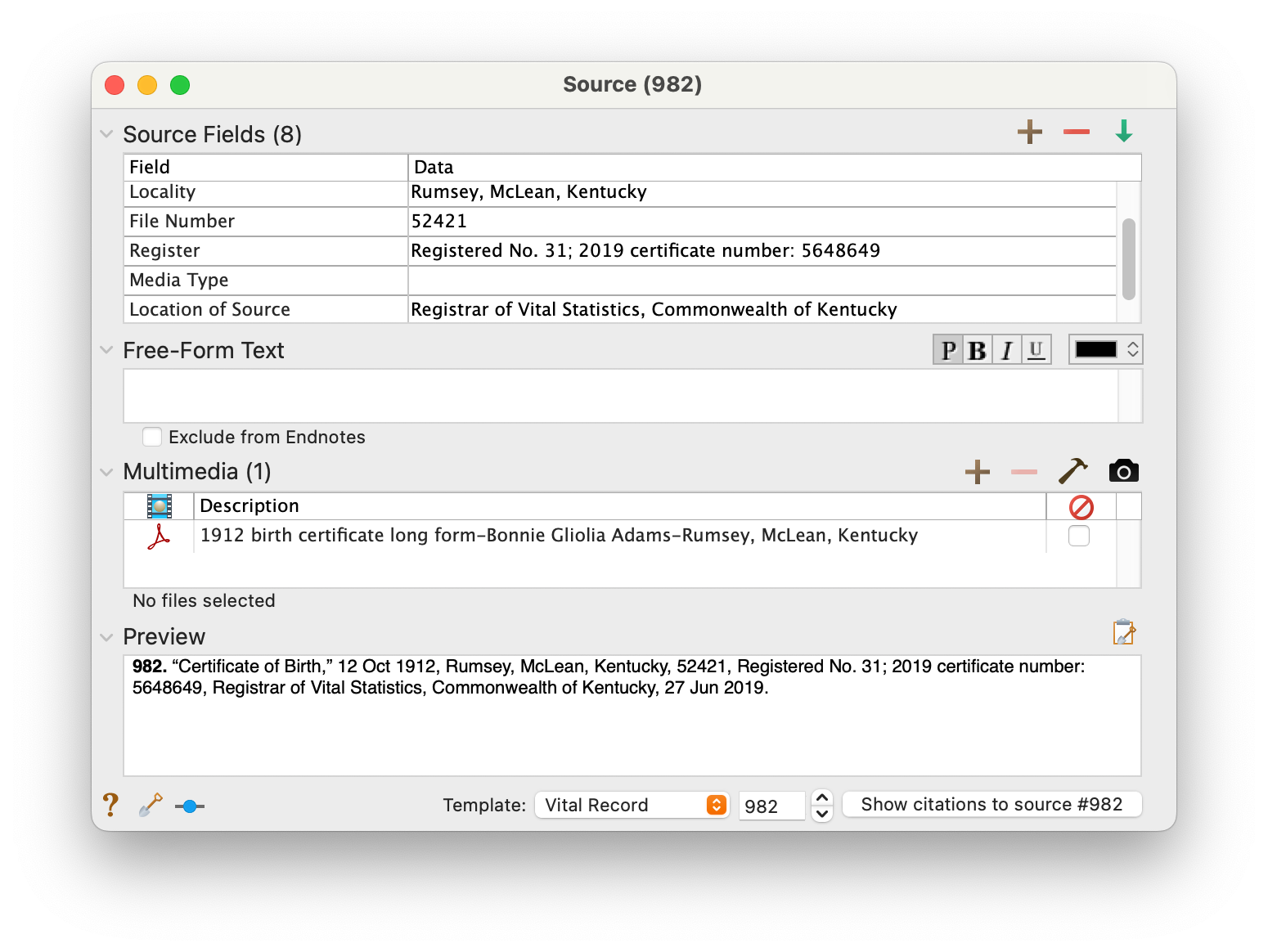
  6. I drag the image of the file into the Multimedia section of the Reunion source screen for that source. (That’s an example of the Reunion source screen at the top of this post.)
  7. I enter all other facts I find in the document into Reunion, using the same source number for each fact I find in that document.
  8. I click Preview in the Reunion source screen for that source and copy the citation and paste it into the metadata of the image file on my hard drive.

I added that last step after RootsTech, adapting a suggestion made by an audience member at our talk. I hadn’t thought about noting on the image what the source number and citation is. I think it’s a great idea and now I intend to go to back and do that for all my sources.

This eight-step work flow takes me from discovery through processing the document. It means that I don’t have stray documents on my hard drive with nonsensical file means. It also means I can easily a find a document when I want to. And it helps me see what documents are missing. Having the confidence that I can find a document I’ve saved allows me to feel good about not printing it, which cuts down on my paper clutter. (And, yes, I backup my hard drive daily, both to the cloud and to an external hard drive.) This workflow was about five years in the making, and I’m very satisfied with it!

For more in-depth information on how I organize my own genealogy, including a detailed look at my digital workflow, check out How I Do It: A Professional Organizer’s Genealogy Workflow, a 37-page downloadable available for $19.99.


Filed Under: Organizing, Technology Tagged With: electronic files, organizing aids, record keeping, source documentation

Four habits to make your research easier

February 16, 2024 By Janine Adams Leave a Comment

I stumbled on this post I wrote a year ago and I liked it so much I thought I would share it again. Creating great habits in any aspect of your life tends to make your life easier. The more we can do habitually, the less we have to think about doing it. I encourage you to consider incorporating these four habits into your genealogy life!

I’m a huge fan of creating beneficial habits. When you have a habit going, it becomes automatic–at least for awhile! And when that happens, life gets easier. (You might enjoy listening to Episode 22 of the podcast I co-hosted, Getting to Good Enough, called Creating Helpful Habits.)

I got to thinking about the genealogy habits that benefit me and four jumped to mind. Your future self will thank you if you do these four things every time you research:

  1. Rename the files you download. Having a consistent file-naming protocol will help make sure you don’t lose valuable documents on your hard drive. (See this blog post if you’re interested in my file-naming protocol and folder structure.)
  2. Process each document right after you download it. By process, I mean extract all the data from it and enter it in your genealogy software. Be sure to create a source citation (see #3 below). If you do this, you won’t have an ever-present backlog of unprocessed documents nagging at you. And you get to further your research!
  3. Create a source citation for every document and assign a source to every fact. In my genealogy life no fact goes into my database (I use Reunion) without a source citation. That’s how I know I can trust my research. (And so can other people.)
  4. Log your research during each session or, at the very least, write out your next steps. It is so useful to be able to pull up your research log and see where you left off. It eliminates that overwhelming question, “What should I research today?” (Here’s a post on my very informal research log.)

The good news is that while these habits are important, they’re not hard. I encourage you to work on creating great genealogy habits. It can take some of the frustration out of the research process. You want your genealogy research to be as frustration-free as possible!

For detailed information on how I organize my own genealogy research, check out my Orderly Roots Guide, How I Do It: A Professional Organizer’s Genealogy Workflow, available for $19.99.

Filed Under: Genealogy tips, Organizing Tagged With: habits, organizing aids, research

In praise of the family fan chart

September 27, 2023 By Janine Adams 3 Comments

Ancestry has added a fan chart as a way to view your pedigree and navigate to direct-line ancestors in your tree. It’s in Beta now and when I checked it out, I really liked what I saw.

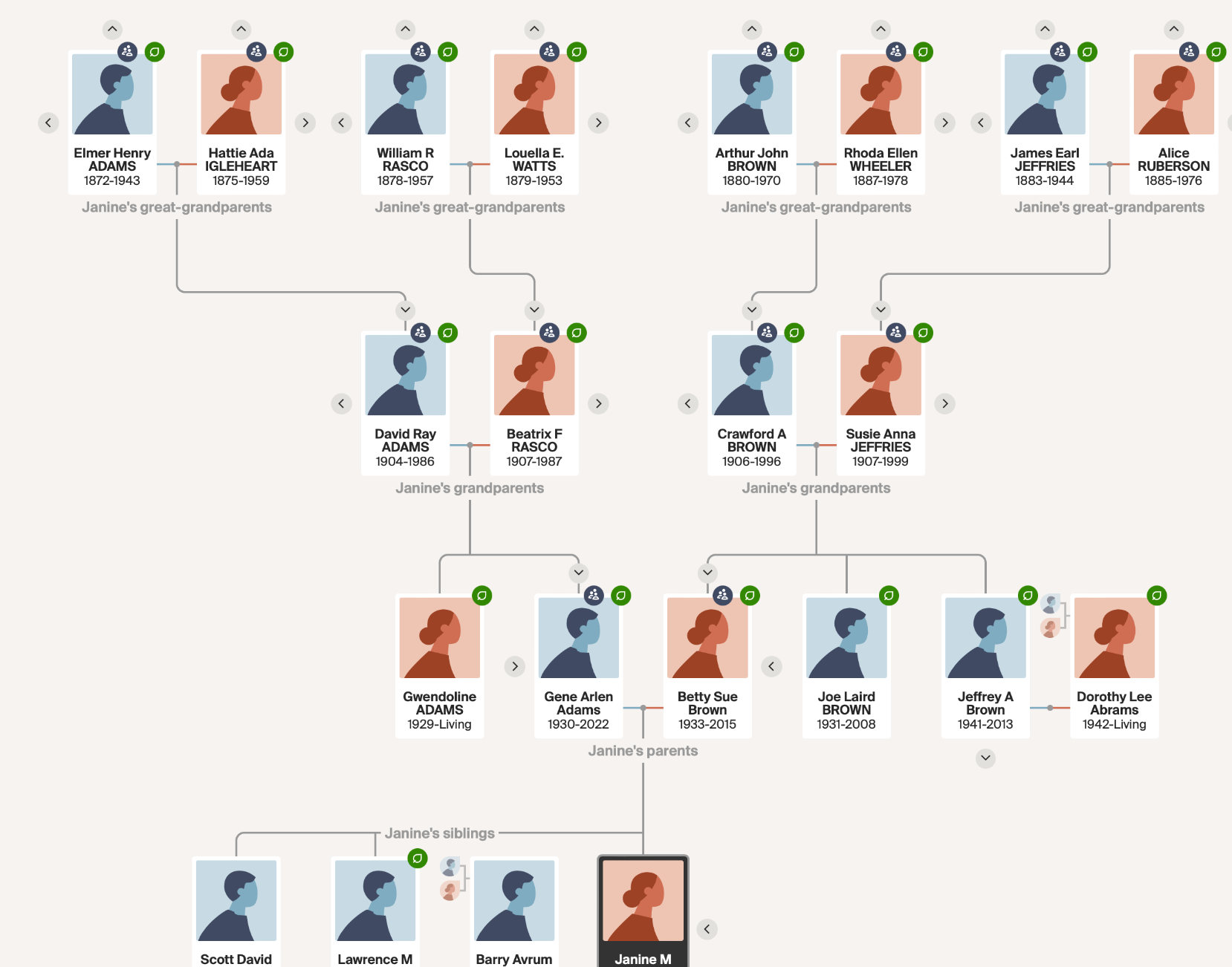
In my opinion, the fan chart is so much cleaner and less cluttered than the pedigree charts (horizontal or vertical) offered by Ancestry. (It doesn’t offer green leaves or Thrulines alerts however.) I can click on any ancestor in the chart and be taken to that ancestor’s Ancestry profile.

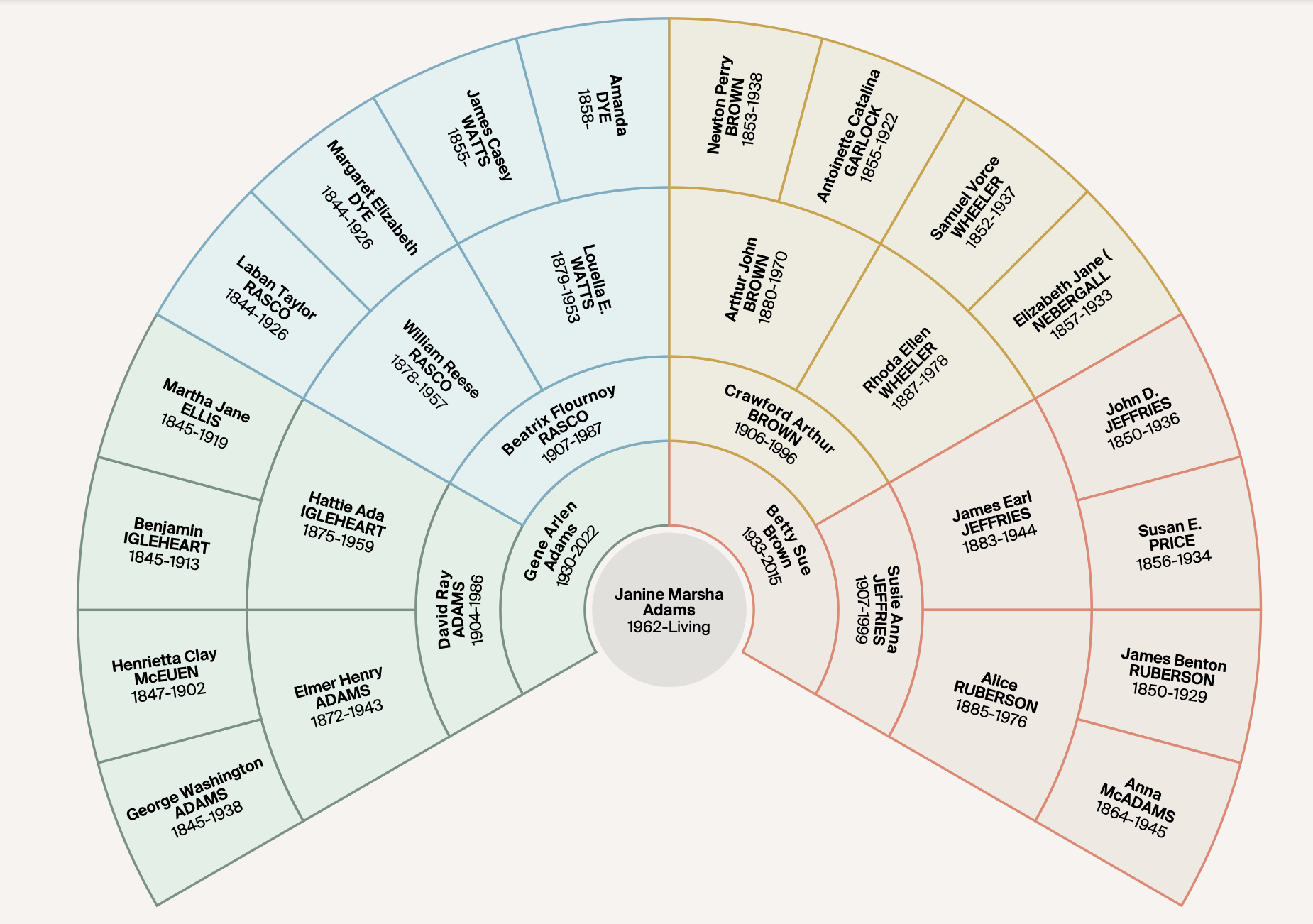
As an illustration, I’ll share my family chart on Ancestry, from me through my second great grandparents.

Here’s the fan chart:

And here’s the vertical pedigree chart, which had been my preference.

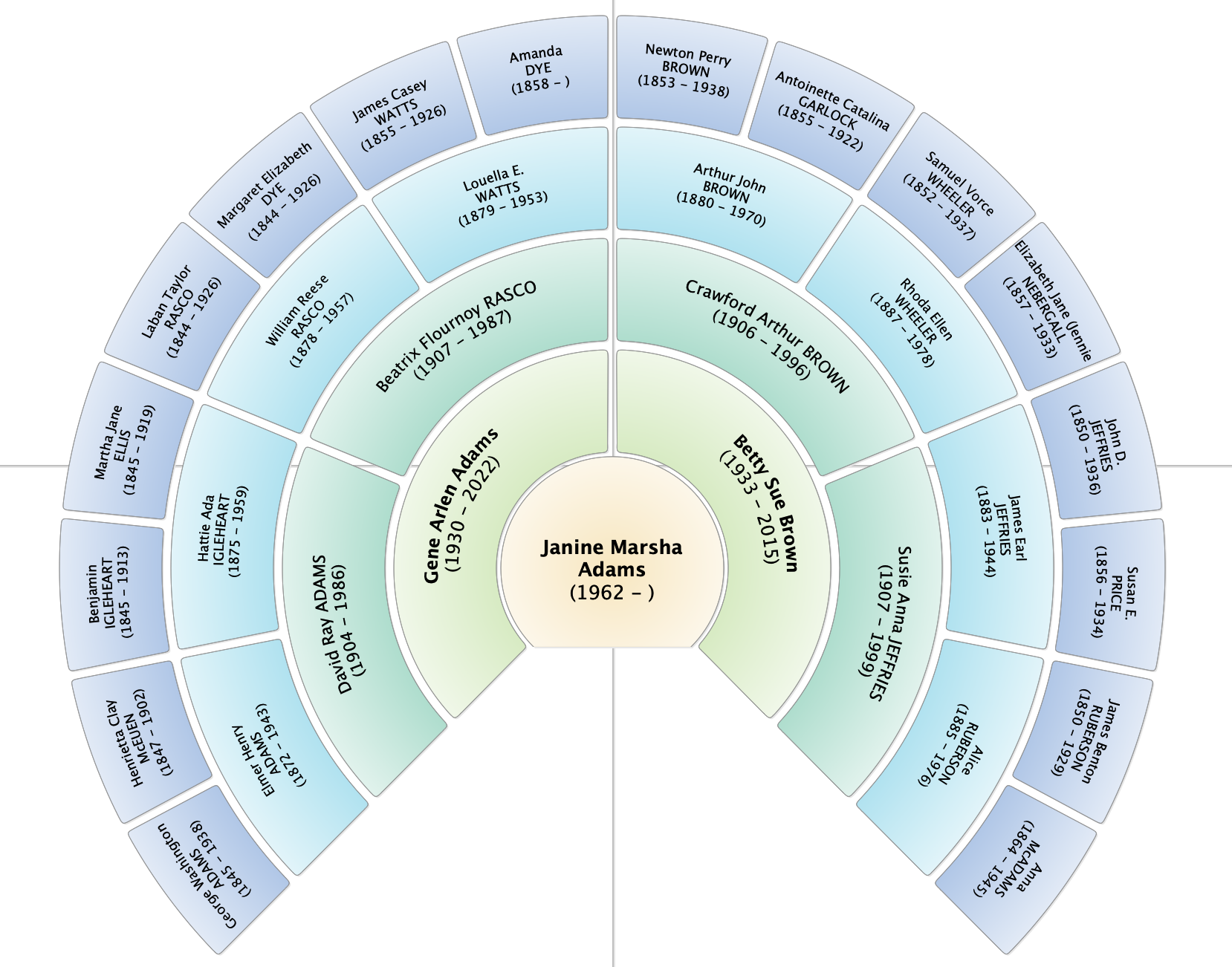
I love how fan charts provide an attractive and easy-to-understand progress of generations. The family-tree software I use on my Mac, Reunion, offers a fan chart too, but it’s not clickable like the Ancestry chart. Here’s what my Reunion fan chart looks like:

I’d be willing to bet that your family-tree software offers a fan chart. In my opinion, it’s worth looking for!

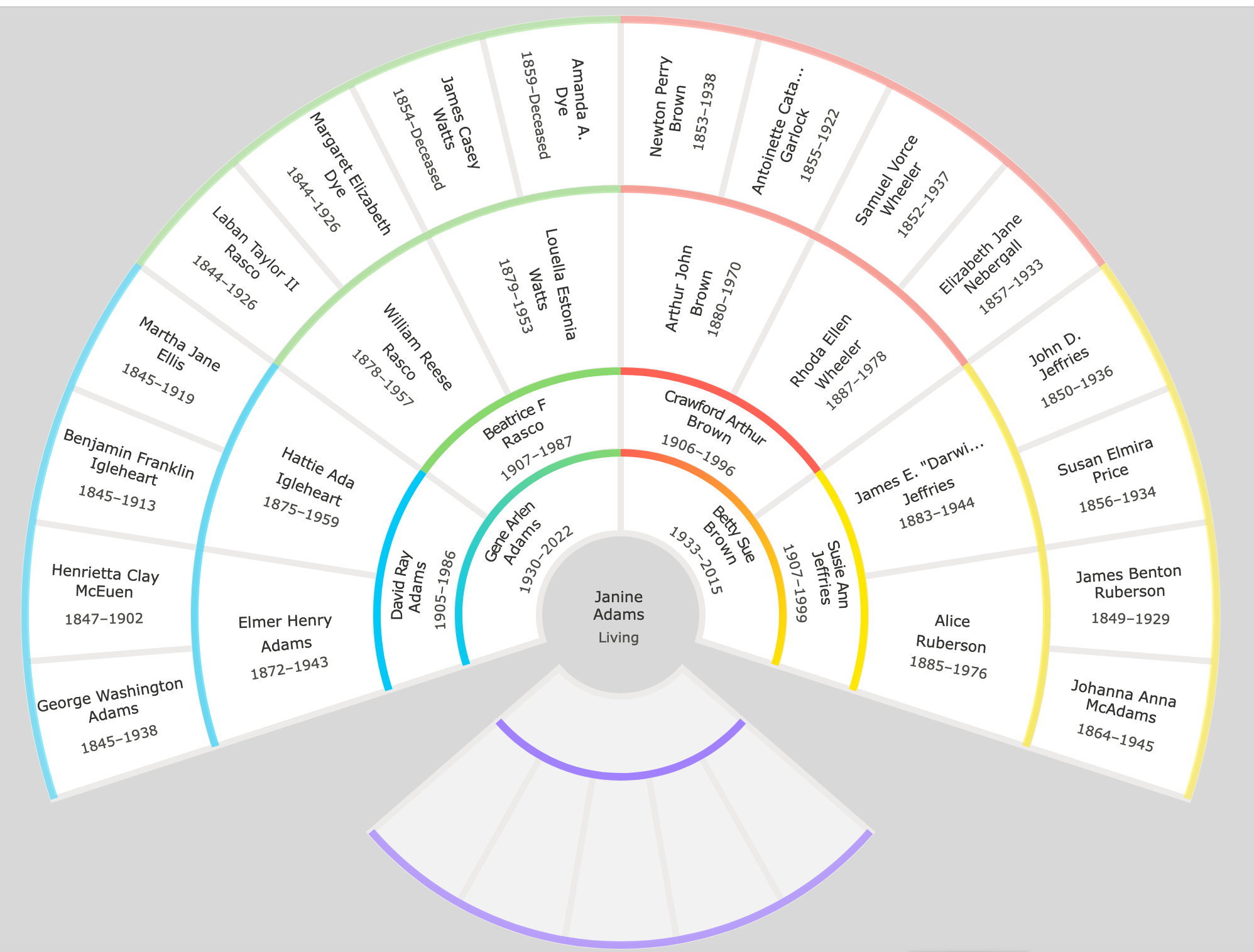
It just occurred to me to see whether Family Search has a fan-chart view and it does! I simply logged in and clicked Tree and there it was. Each ancestor is clickable and you can put a person in the middle of the fan chart by hovering over their section and clicking the fan icon. (I have not connected my husband on the Family Search family tree and rather than ignore that, it looks like Family Search included a blank grid for my husband and our non-existent children.)

Here’s what my Family Search fan chart looks like.

This is getting repetitive, so I’ll stop. I just wanted to take a moment to express my appreciation for fan charts!

Filed Under: Excitement, Genealogy tips, Organizing Tagged With: genealogy tools, organizing aids

A little help for reading censuses

September 7, 2023 By Janine Adams Leave a Comment

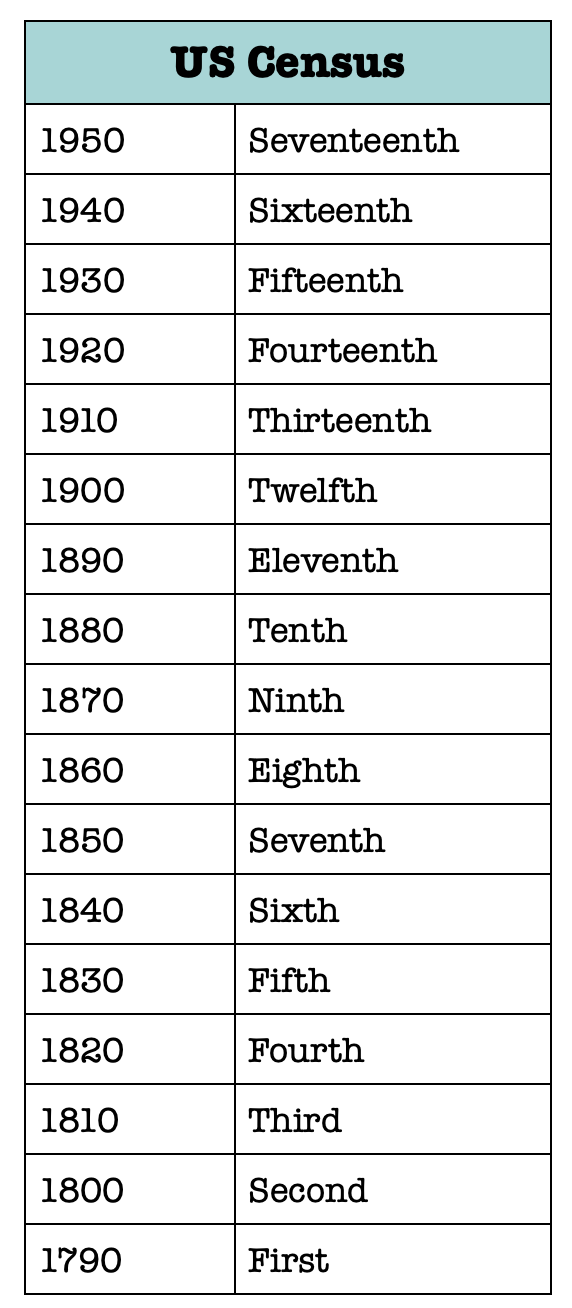
Recently, I’ve been republishing popular blog posts from the past to expose them to new people. Today, I wanted to share this post from June 2013 which provides a little table to make it easier to tell one US Census from another. I’ve updated it to include the 1950 census!

If you’re accustomed to looking at census documents for genealogy research, you know that the the number of the census (Thirteenth, for example) is clearly visible, while the actual year takes a little squinting to see. I created a simple table so that I can tell at a glance which census I’m looking at. I hope you find it as handy as I do. If you’d like to print a version, just click on the image and it will open in a new browser tab. Then you can right- or control-click it to save it to your computer (or email the image to yourself).


Filed Under: Genealogy tips Tagged With: census, organizing aids, resources

  • « Go to Previous Page
  • Page 1
  • Page 2
  • Page 3
  • Page 4
  • Interim pages omitted …
  • Page 43
  • Go to Next Page »

about me

I'm Janine Adams, a professional organizer and a genealogy enthusiast. I love doing family history research, but I find it's very easy for me to get overwhelmed and not know where to turn next. So I'm working hard to stay organized and feel in control as I grow my family tree.

In this blog, I share my discoveries and explorations, along with my organizing challenges (and solutions). I hope by sharing what I learn along the way I'll be able to help you stay focused and have fun while you do your research, too.

tags

30 x 30 Adams amy johnson crow anniversary Brown cemetery census Civil War conferences connections dna electronic files Evernote excitement Family Curator family photos genealogy tools getting started goals How They Do It Igleheart Jeffries keepsakes learning opportunities maps newspapers NGS organizing aids overwhelm paper files planning quick tips rasco record keeping research research log research trip resources RootsTech social history source documentation Stacy Julian technology time management vital records

join the facebook community!

join the facebook community!

My organizing business

Learn more about my organizing business, Peace of Mind Organizing®.

Subscribe by RSS

  • RSS - Posts
  • RSS - Comments

© 2026 Janine Adams


Loading Comments...