• BLOG
  • ABOUT
    • Privacy Policy

Organize Your Family History

Stay focused and happy while exploring your roots

The Research Tracker in Springpad

January 24, 2014 By Janine Adams Leave a Comment

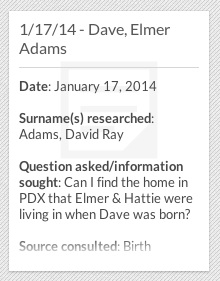
researchtrackersampleOne of the features of the Family History Organizer custom notebook I created for Springpad is the Research Tracker tab. Since I started getting serious about family history research about 18  months ago, I knew I needed to do a better job of keeping a research log. I tried a spreadsheet, but failed to keep up with it. I think the problem was that I had so many columns to fill out, it felt overwhelming.

So when Springpad asked me to create this notebook, I requested a place to easily record research sessions. It includes headers that can be copied and pasted into a fresh note for each research session. (I made up the headers that make sense to me, but you can easily edit them so that you’re copying and pasting headers that work better for you.)

I’ve been using the Research Tracker for a couple of weeks and have found that it’s really helpful. I start creating a new note at the beginning of each session, which helps me identify the information I’m looking for in the session. I like that when I finish filling it out at the end of the session, I identify next steps in the research.

I think what I like most about it is that it’s simple and non-intimidating. It may not be as thorough as a formal research log, but it’s way better than what I was recording before (which was nothing). Since I’m trying to do research five days a week (or at least work on organizing my research), I have plenty to enter and am feeling optimistic that this will keep me on track.

If you’re interested in trying it out, simply download the Family History Organizer notebook into your free Springpad account. (Or learn more about the notebook before downloading.)
Filed Under: Genealogy tips, Organizing, Technology Tagged With: organizing aids, record keeping, research log, Springpad

Pin the tail on the family tree

October 31, 2013 By Janine Adams Leave a Comment

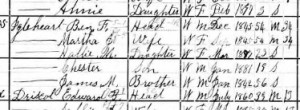
igleheart1900Today I had a little time to do some genealogy research, but I couldn’t decide what to work on. So I opened my family tree in my Reunion software, looking for inspiration. I noted the right sidebar had a listing of people on my tree, sorted alphabetically by last name.
I closed my eyes, scrolled up and down a few times on the sidebar and then clicked. The person I landed on was Martha Jane Ellis (1845-1919), my great great grandmother. I set to work looking at her record, looking for missing information. I pulled out the file folder for Martha and her husband, Benjamin Franklin Igelheart (1845-1913) and continuing the process of marrying my paper and electronic files. I also started adding information on siblings into Reunion, something I didn’t do in my first recording of data.

Randomizing my selection feels like a nice piece of serendipity. I sometimes prefer that to a systematic approach. It feels more fun to me and this is all about fun, right?

Filed Under: Challenges, General, My family Tagged With: ellis, getting started, Igleheart, overwhelm, record keeping, research

Marrying my electronic and paper files

October 10, 2013 By Janine Adams 4 Comments

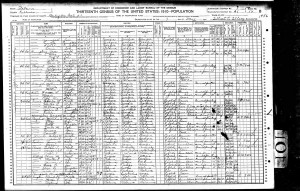
Store census documents by pressing Print, rather than SaveI used to be a paper gal. But when it comes to my genealogy records, I’ve stopped pressing the Print button. At the moment almost all my genealogy research is being done online, so I’m really understanding the utility of clicking Save rather than Print.

Part of the reason I’ve been able to make the shift is that I’ve set up a good electronic file system. That gives me confidence that I’ll find what I need on my hard drive.

Switching from paper to electronic has ramifications in at least a couple of areas. It means that it’s changing how I do things from this point forward. That’s no problem. But it also means I have a backlog to deal with. In the past, I’d print and file census documents and other resources I found online, rather than save them electronically. While all the information are recorded in my software (I use Reunion), the source documents themselves might be in a file or might be on my hard drive.

So this week, I’ve been working on marrying the two systems. It’s going to be a long process. What I’m doing is taking out a file folder for a couple and going through the documents, making sure they’re included in my software and seeing if they’re on my hard drive. If they’re not, I’m finding them online and saving them within my file structure.

I’m also taking the opportunity to do one other thing while I’m in there. As I look at census documents, I’m adding siblings of my ancestors to my family tree software, something I blogged about doing a few months ago.

This may sound really tedious to you, but I’m having a good time. It’s allowing me to reacquaint myself with various couples and really pay attention to all their kids, not just my direct ancestor. It’s also giving me the chance to clean up my hard drive and re-file errant files (and move some documents that accidentally ended up in my Genealogy folder). I’m not going through each line systematically. To keep it interesting, I’m jumping from family to family, choosing file folders as my whims take me.

Since I’m no longer printing newly found documents, I guess I’m slowly phasing out my paper files. And that’s okay with me. My hard drive is fast, spacious, orderly, and backed up both to an external hard drive via Time Machine and to a remote computer via Crash Plan Pro.

I’m looking forward to the comfort of having everything on my hard drive. Since I store my paper files in a closet a few steps from my desk, I also love that my data will be at my fingertips whenever I’m using my computer. It’ll be great when I travel, especially if I take research trips, to have all that information available to me. I believe this will be time well spent.

Filed Under: Challenges, Excitement, My family, Organizing Tagged With: electronic files, filing, paper files, record keeping, source documentation

Are you organized enough?

August 16, 2013 By Janine Adams Leave a Comment

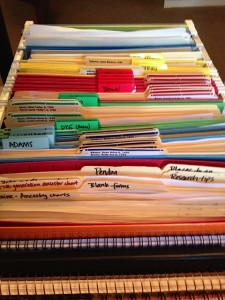
My genealogy file cartA lot of people (including me) strive to be organized, especially when it comes to their genealogy. You need look no further than the incredibly popular and busy new Facebook group, The Organized Genealogist (3,604 members, as of today) to see that. It’s obvious that many people are looking for ways to get their genealogy research organized.

That begs the question, What does being organized really mean?

I think the answer varies by the individual, but generally speaking, as a professional organizer, I believe that being organized means that you’re able to put your hands on what you want, when you want it (well, within a minute or two). I always discourage people from striving to be “perfectly organized” (because that’s not really possible) and instead go for “organized enough.”

So how do you become organized enough? When it comes to family history research, the path to being organized starts with picking out a system that will work for you. There’s no one right way to organize your genealogy records. Pick what you think will work for you and try to keep it simple.

The next step is to deal with your backlog. That is, implement your system using the papers or files you already have.

The final, very important, step is to maintain your system regularly. You don’t want to wait for a backlog to build back up before filing again. Instead, file as you go along. When you acquire a new document  (be it paper or electronic) file it right away. And here’s a tip: Don’t wait until you get through your backlog to start filing your incoming documents. Start immediately.

For me, the big difference in how I organize my genealogy files between now and when I first started getting interested in the hobby about a dozen years ago is that I’m relying less on paper and more on electronic files. I’ve set up a file naming protocol and I’m using it consistently for new files while chipping away at the backlog. Since I know I can find my electronic files, I’m printing fewer documents. I’m still using the paper file system that I started at the beginning for the papers that do come my way. And today, unlike a dozen years ago, I’m using software to keep track of my family tree and my sources. (I use Reunion on my Mac.) That gives me great peace of mind. (And, yes, I back it up both on an external hard drive and in the cloud.)

The best part? Thanks to neat paper and electronic files, my genealogy research doesn’t impinge on my physical space. (My paper files are in a rolling file cart that I tuck into a closet in my office.)

I’m not perfectly organized, not by a long shot. But I can find virtually everything I’m looking for quickly, so that makes me organized enough. And that makes me happy.

Filed Under: Organizing, Reflections Tagged With: electronic files, organized enough, paper files, record keeping

  • « Go to Previous Page
  • Page 1
  • Interim pages omitted …
  • Page 12
  • Page 13
  • Page 14
  • Page 15
  • Go to Next Page »

about me

I'm Janine Adams, a professional organizer and a genealogy enthusiast. I love doing family history research, but I find it's very easy for me to get overwhelmed and not know where to turn next. So I'm working hard to stay organized and feel in control as I grow my family tree.

In this blog, I share my discoveries and explorations, along with my organizing challenges (and solutions). I hope by sharing what I learn along the way I'll be able to help you stay focused and have fun while you do your research, too.

tags

30 x 30 Adams amy johnson crow anniversary Brown cemetery census Civil War conferences connections dna electronic files Evernote excitement Family Curator family photos genealogy tools getting started goals How They Do It Igleheart Jeffries keepsakes learning opportunities maps newspapers NGS organizing aids overwhelm paper files planning quick tips rasco record keeping research research log research trip resources RootsTech social history source documentation Stacy Julian technology time management vital records

join the facebook community!

join the facebook community!

My organizing business

Learn more about my organizing business, Peace of Mind Organizing®.

Subscribe by RSS

  • RSS - Posts
  • RSS - Comments

© 2026 Janine Adams


Loading Comments...