• BLOG
  • ABOUT
    • Privacy Policy

Organize Your Family History

Stay focused and happy while exploring your roots

Quick Tip #26: Search for an ancestor without using his name

October 8, 2021 By Janine Adams Leave a Comment

Here’s the next in my occasional series of bite-size Quick Tips. Click on the Quick Tips tag for my other Quick Tips. Because I tend to write longer posts, I wanted to provide a quick-to-read (and quick-to-write) post every couple of weeks on a small topic that pops into my head. I learned this trip from Amy Johnson Crow’s excellent, Getting Savvy with FamilySearch workshop.

Search for an ancestor without using his name

When you fill out a search form on FamilySearch on Ancestry, you typically enter the name into the search box of the ancestor whose records your searching for. That seems like a no-brainer, doesn’t it? But if you’re having trouble finding records on a research subject whose parents’, spouses’s or siblings’ names you know, try the leaving the person’s name blank an instead entering the name of one or more of those relatives. Sometimes you’ll find documents that did not come up with a search on the ancestor’s name.

Why does it work? There are lots of possibilities. Perhaps there was an indexing error on the research subject’s name. Or maybe you were searching on a full name when the document in question uses a nickname or initials. It’s an easy thing to try and you might be pleasantly surprised by the results!

Photo by Sam Dan Truong on Unsplash
Filed Under: Challenges, Genealogy tips Tagged With: quick tips, research

FamilySearch has finished digitizing its microfilm holdings!

September 21, 2021 By Janine Adams 4 Comments


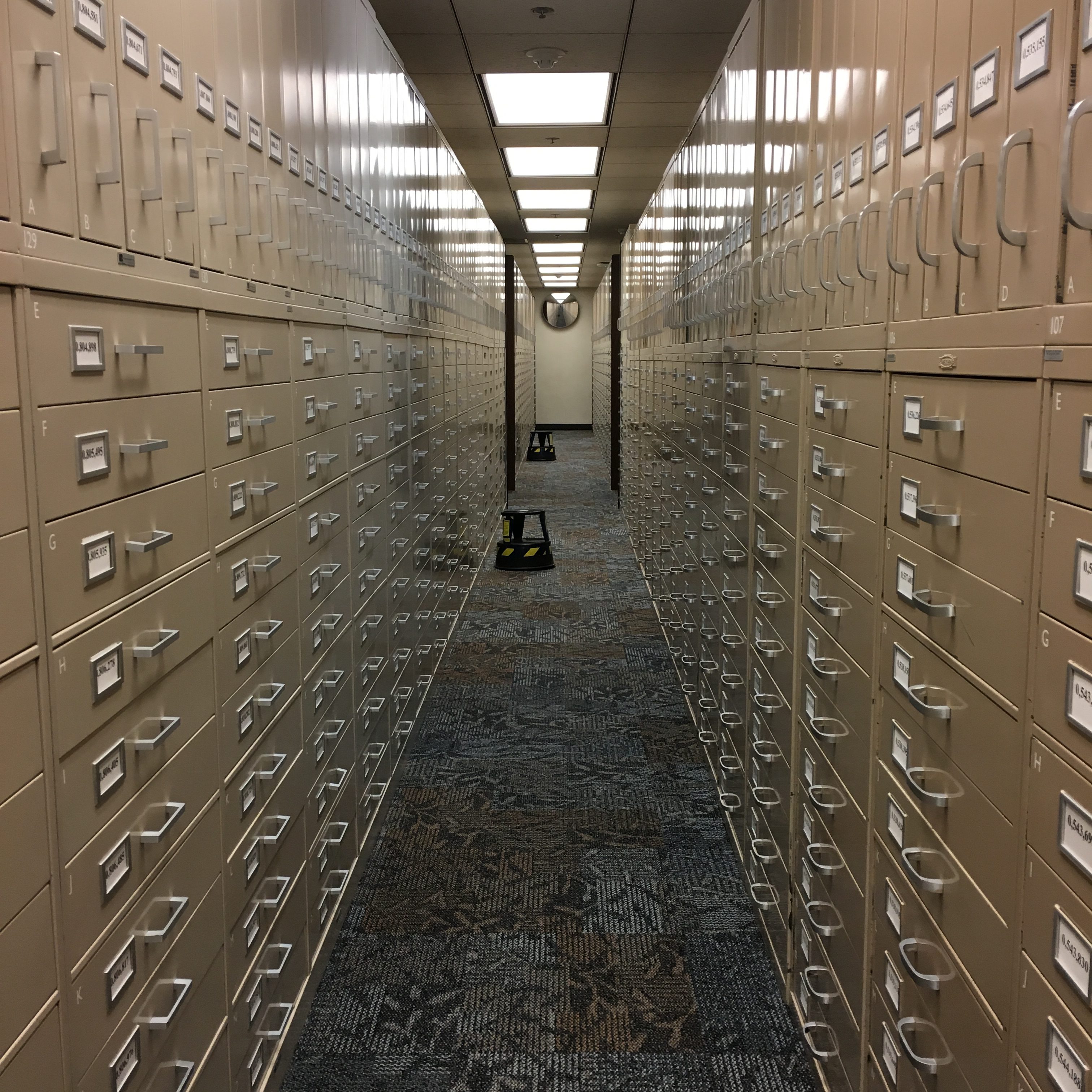
Rows and rows of microfilm storage at the Family History Library

FamilySearch announced today that it has completed its massive project to digitize its microfilm holdings. A staggering 2.4 million rolls of microfilm have been digitized.  The project, which began in 1998, was anticipated to take 50 years. Thanks to the development of faster technology, the timeline was shortened by 27 years. Amazing.

FamilySearch’s archive is freely available to anyone with an internet connection and a free account. This digital archive contains information 11.5 billion individuals in over 200 countries.

According to this informative FamilySearch press release about the achievement, “To explore FamilySearch’s free collections of indexed records and images, go to FamilySearch.org and search both ‘Records’ and ‘Images’. The Images feature enables users to peruse digitized images from the microfilm collection and more. A free FamilySearch account will be required to access the service.” I’ll add that I find a lot of digitized images by searching the Catalog by location.

FamilySearch began microfilming documents in 1938. In the past, duplicates of the microfilms were lent to researchers through local Family History Centers, which was much more convenient than having to travel to see them at the Family History Library. In 2017, FamilySearch ended that program when it began to transition to all-online access. It couldn’t be more convenient. (The microfilm collection will be preserved.)

Today’s freely available archive has been in the works for 83 years now. Modern genealogists are the beneficiaries!

Check out this video describing the achievement:

Filed Under: Excitement, Genealogy tips, Technology Tagged With: excitement, family search, genealogy tools, research, resources

Quick Tip #25: Take another look at handwritten documents

September 7, 2021 By Janine Adams 2 Comments

Here’s the next in my occasional series of bite-size Quick Tips. Click on the Quick Tips tag for my other Quick Tips. Because I tend to write longer posts, I wanted to provide a quick-to-read (and quick-to-write) post every couple of weeks on a small topic that pops into my head. I have to remind myself of this one with more frequency than I’d like to admit.

Take another look at handwritten documents

We’ve all encountered names that have been poorly indexed. That’s because handwriting can be hard to transcribe. I find that I sometimes misinterpret handwritten words or numbers and enter them incorrectly into my Reunion software. That can lead to wrong assumptions and wild goose chases.

If you find you have conflicting evidence, take another look at the original document to make sure you recorded the evidence accurately. (It happened to me just yesterday, where I discovered that I’d written down that a woman had three living children, when in fact the number written on the census was five.) You may find a transcription error on your part that clears things up.

Photo by Sam Dan Truong on Unsplash

Filed Under: Challenges, Genealogy tips Tagged With: quick tips, research

Revisit: Exploring ICD codes on death certificates

August 3, 2021 By Janine Adams 7 Comments

Today, I was processing a death certificate for a collateral relative (thank you, 30 x 30 challenge!) and as I squinted at the cause of death I thought it said pneumonia. But I wasn’t sure. I didn’t know if I should risk a wrong assumption and decided to check the ICD code. I did a quick google search to see if I could find what that ICD code 92 would have represented in 1929 and didn’t come up with an easy answer. And then I remembered I’d blogged about it. So I looked on my blog and found the post, from May 1, 2020, which contains a link to the International Classifications of Diseases page at Wolfbane. That got me thinking that re-running my 2020 post about ICD codes might help my readers. So here it is again, in its entirety. P.S. 92 did indicate pneumonia in 1929!

Death certificates can provide such great information, which is why I always try to track them down. Often my eye makes a bee-line for the names of the parents of the deceased, but of course there’s much more information to be found. One area, cause of death, is always of interest. Unfortunately, that information seems to often be the most illegible. In the past, if I could make out the words I would add them to my database. But if I couldn’t, I’d just move along.

But I’ve learned that with a little more effort you can decipher the cause of death and learn more about your ancestor. Often, in addition to the written-out words describing cause of death, there’s a ICD (International Classification of Diseases) code as well. If you can’t read the words, you can look up the ICD code to get more information. Just visit the International Classification of Diseases page at Wolfbane.com to track down the meaning of the code.

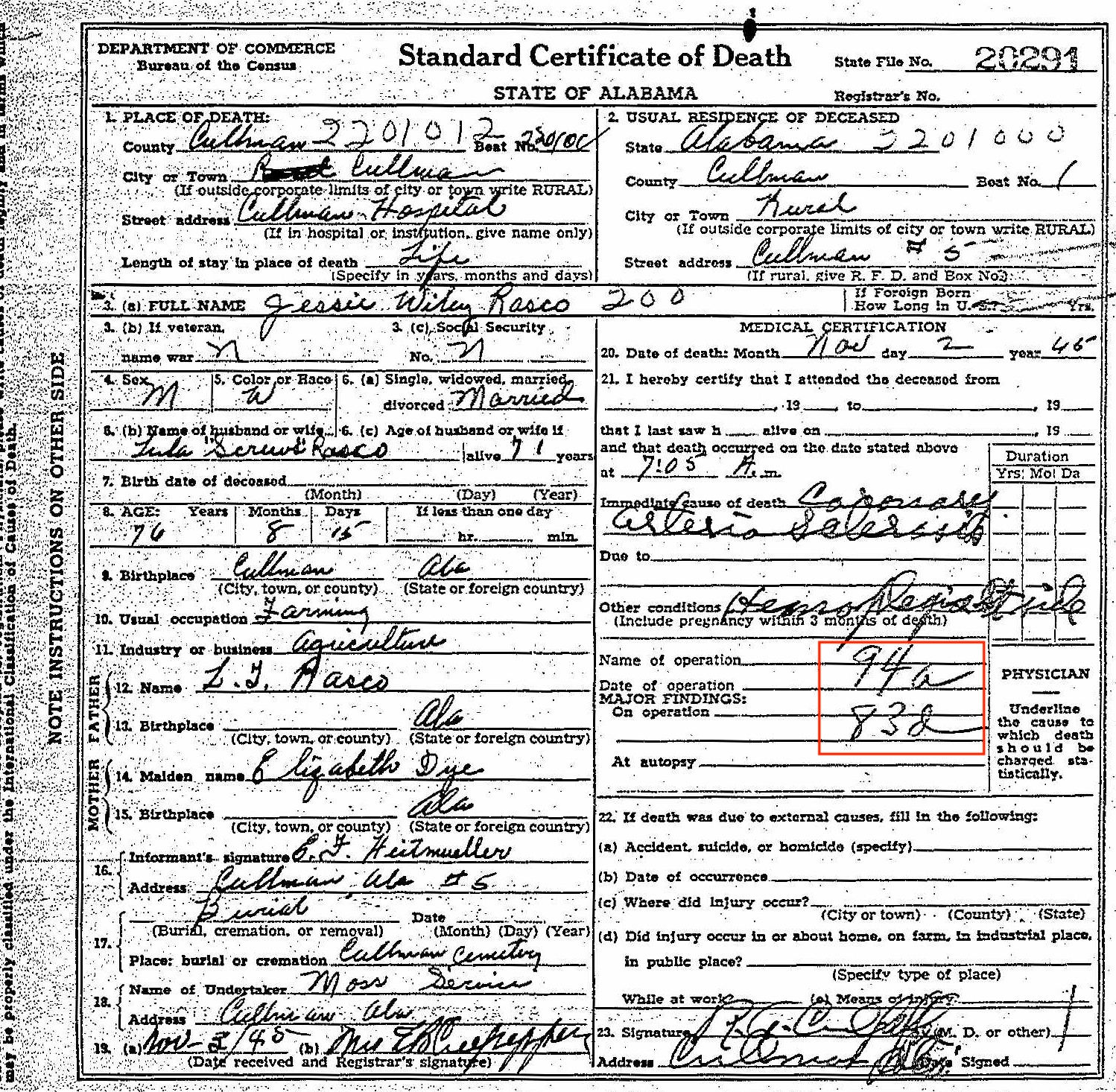
Let’s use a death certificate from my great grandfather’s brother, Jesse Wiley Rasco (1978-1957), to illustrate this.

Here’s his 1945 death certificate. I’ve put a red border around the ICD codes.

Death certificate for Jesse Wiley Rasco


As you can see, the ICD code for the primary cause of death is 94a. And the ICD code for the secondary cause of death is 83d. I could read the words for the primary cause of death. To me, it looks like Coronary Arteriosclerosis. Ordinarily, I would have stopped there. But the secondary cause of death was hard to decipher and I was curious.

I went to the International Classification of Disease page at Wolfbane.com and clicked on ILCD Revision 5 (1938), which would have been the version in use in 1945, since the next revision came out in 1948. The codes are listed in numerical order, so it was easy for me to find 94a, “diseases of the coronary arteries.” The secondary cause of death, 83d, is “hemiplegia and other paralyses of unstated origin.” Once I read that, I could see the word hemiplegia in the handwriting. It’s hard to make out the word after, but it looks to me like it could be “stroke.” I looked up the word hemiplegia and learned that it means “Paralysis on one side of the body.” [Edited to add: I received a note from reader Dennis Young suggesting that the handwriting says “Rt. side.” That makes complete sense and now seems obvious! The plot thickened a little when I received a note from reader Brad Pierce suggesting that the words say Lt. side, not Rt. side. Brad’s a physician himself so is probably good at deciphering doctor’s handwriting! I can’t tell whether it’s left or right, but I’m so glad to accept the “side” part. Thank you Dennis and Brad!]

Knowing that this 76-year-old farmer was living with paralysis on one side of his body at the time of his death gives me a bigger picture of what his life experience (or least the end of his life) was like.

As you can see, taking time to look up ICD codes when you see them might provide you with more information about your ancestor or might even solve a mystery. Just be sure you’re looking at the pertinent Revision!

Filed Under: Challenges, Genealogy tips Tagged With: genealogy tips, genealogy tools, research, revisit, vital records

  • « Go to Previous Page
  • Page 1
  • Interim pages omitted …
  • Page 5
  • Page 6
  • Page 7
  • Page 8
  • Page 9
  • Interim pages omitted …
  • Page 43
  • Go to Next Page »

about me

I'm Janine Adams, a professional organizer and a genealogy enthusiast. I love doing family history research, but I find it's very easy for me to get overwhelmed and not know where to turn next. So I'm working hard to stay organized and feel in control as I grow my family tree.

In this blog, I share my discoveries and explorations, along with my organizing challenges (and solutions). I hope by sharing what I learn along the way I'll be able to help you stay focused and have fun while you do your research, too.

tags

30 x 30 Adams amy johnson crow anniversary Brown cemetery census Civil War conferences connections dna electronic files Evernote excitement Family Curator family photos genealogy tools getting started goals How They Do It Igleheart Jeffries keepsakes learning opportunities maps newspapers NGS organizing aids overwhelm paper files planning quick tips rasco record keeping research research log research trip resources RootsTech social history source documentation Stacy Julian technology time management vital records

join the facebook community!

join the facebook community!

My organizing business

Learn more about my organizing business, Peace of Mind Organizing®.

Subscribe by RSS

  • RSS - Posts
  • RSS - Comments

© 2026 Janine Adams


Loading Comments...