• BLOG
  • ABOUT
    • Privacy Policy

Organize Your Family History

Stay focused and happy while exploring your roots

A time-saving addition to my digital workflow

May 11, 2018 By Janine Adams 12 Comments

I’ve posted before about how I process documents that I download from online sources. In an ideal world, I follow my workflow from start to finish as soon as I download a document. But in the real world, it’s not unusual for me to run out of time to process the document immediately. (By “process” I mean, create a source, extract facts, add those facts to my genealogy software and properly file the document on my hard drive). That’s an inevitable outcome in researching in short, frequent sessions, as I do.

When I download a document, without fail I rename the file using my file-naming protocol (Year Document Type-Ancestor Name-Location) and file it in my Surnames folder. But all too often I don’t have time to properly process it and the document languishes in the Surnames holding pen until I do have time.

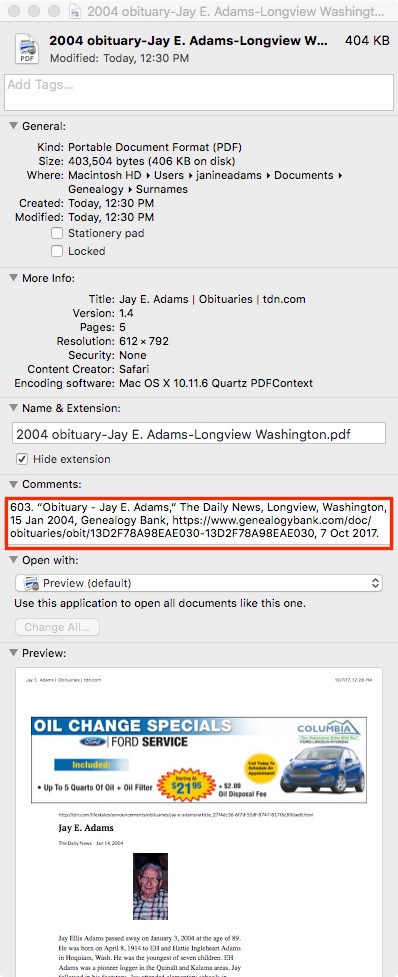
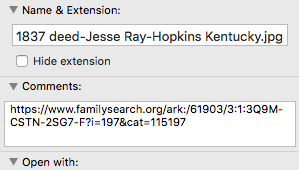
Today, I added a small item to my digital workflow. As soon as I download a document and rename it, I right-click on the file in my Mac’s Finder, select Get Info, then in the Comments section, I paste the URL of where I found the document. That way, if I need more information to create a source, it’s simple for me to get back to the online source. Per my workflow, once the source citation is created, I replace the URL in the Comments area with the citation itself (which includes the URL).

It’s a small thing, but I know this is going to save me time in finding the document online again. And it will reduce aggravation. Sometimes little things can make a big difference!

For more in-depth information on going digital with your genealogy research, check out The Paperless Genealogy Guide, a 44-page downloadable guide written by paperless expert Brooks Duncan and me and available for $9.
Filed Under: Challenges, Organizing, Technology Tagged With: electronic files, organizing aids, record keeping, source documentation

How I process a downloaded document

October 20, 2017 By Janine Adams 14 Comments

Last March, I wrote a post called My digital workflow that detailed what I do with a document I find on the Internet. (I never print it.) My digital workflow has not changed since then and it’s working out really well for me.

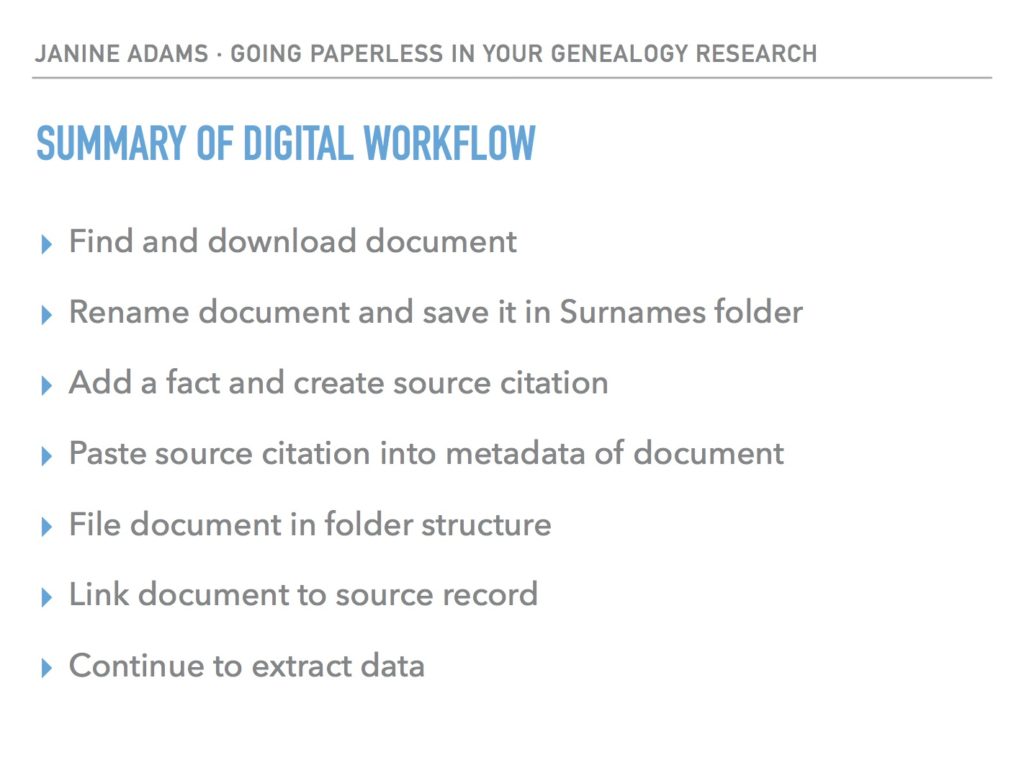
Last weekend, I did a talk at the St. Louis Genealogy Conference about going paperless and in my Powerpoint I included screenshots of the digital workflow and also a summary slide. The attendees asked for copies of the summary slide, so I decided to post it here.

The process is basically the same as my March post but I switched up the steps a little.

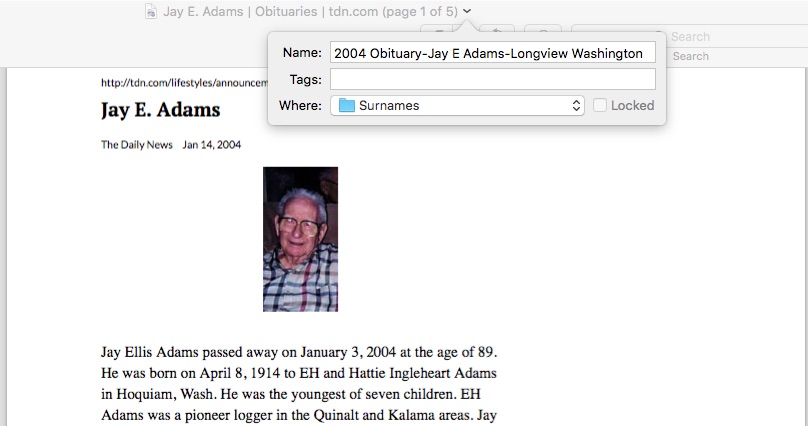
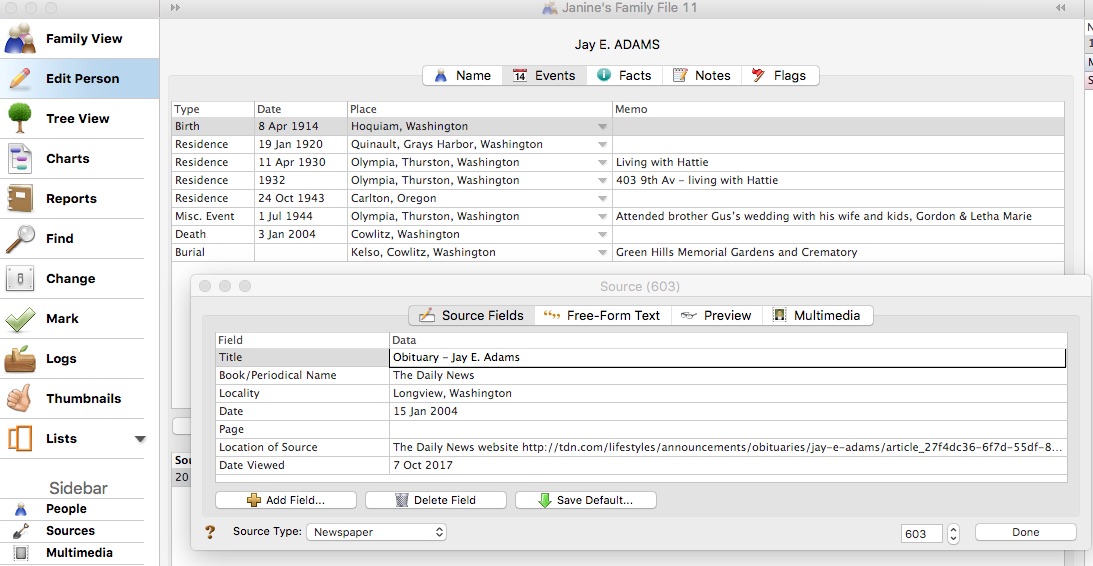
The example I used in my talk was my father’s uncle, Jay Ellis Adams (1914-2004). I had found his obituary online at the newspaper’s website. Here’s the workflow:

1. I click Print and, in the printer dialog box, Open in Preview (my Mac’s default pdf reader), which downloads the document to my computer. (If it had been a document at Ancestry, I would have clicked Save, then Save to My Computer.)

2. I immediately rename the file, using my file-naming protocol, which is Date Type of Document-Ancestor Name-Locality. I stick it into my Surnames folder, as a temporary holding place until I file it in step 6. I know that any unfiled documents in the Surnames folder require processing.


3. I select a fact from the document, add it to Reunion and create a source citation for it.


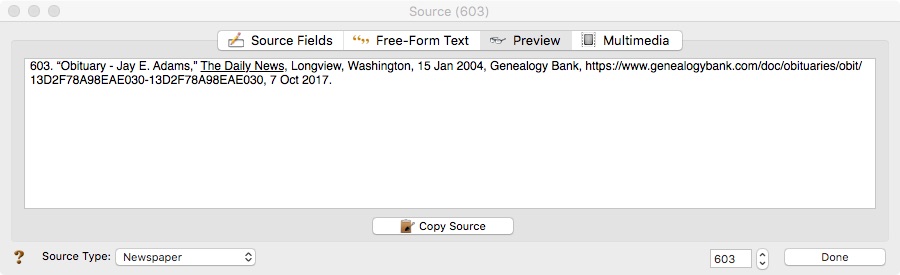
4. In Reunion, I click the Preview tab in the source record and then click Copy Source. (For the eagle-eyes among you, I originally found a transcript at Genealogy Bank and used that as the source citation. Then I decided to go to the newspaper’s website and download it from there, so I changed the source citation. But I was too lazy to take a new screenshot.)

5. I paste the source citation into the metadata of the source document (the obituary) by Ctrl-clicking on the file and selecting Get Info from the menu that appears, then pasting into the Comments area.


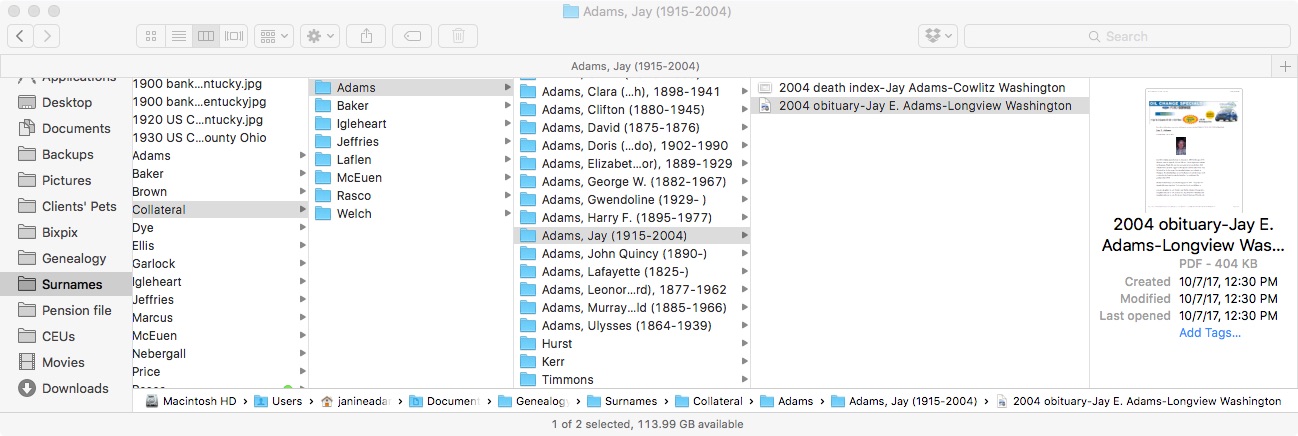
6. Then I file the document into my folder structure. My folder structure for collateral relatives is Genealogy/Surnames/Collateral/[Surname]/[Name of Ancestor (YOB-YOD)]. If the document  applies to multiple people, I duplicate it for each person and then drag it into the appropriate folder for each person. But I don’t take the trouble to rename it.

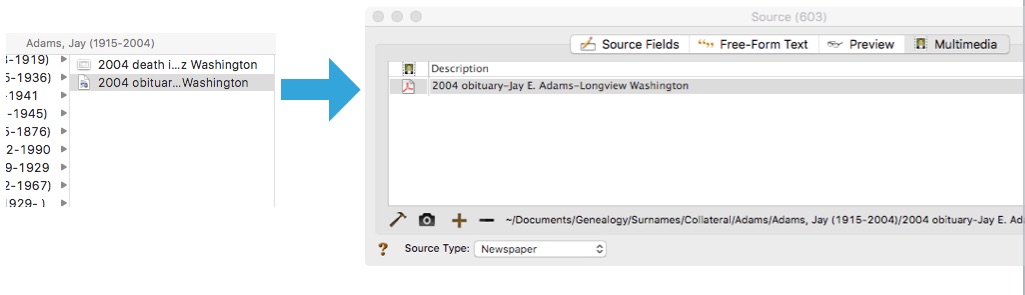
7. The final step is to drag the document into the Multimedia area of the source record in Reunion. This creates a link to the document so that I can open it up inside Reunion, which is very handy.


From there, I continue to extract information from the source document and add that it to Reunion. Every piece of information I glean from a single source document uses the same source number, no matter what person it applies to.

Here’s the summary slide:

This is the way I do and it works well for me. Of course, it’s not the only way to do it or perhaps the best way to do it. But I’m hoping you’ll find it useful to see my workflow. I’ve been processing documents this way for almost a year now and it’s working very well.

For more in-depth information on how I organize my own genealogy, check out How I Do It: A Professional Organizer’s Genealogy Workflow, a 37-page downloadable pdf available for $19.99.

Filed Under: Challenges, My family, Organizing, Technology Tagged With: Adams, electronic files, organizing aids, record keeping, source documentation

Processing newspaper articles (screencast)

August 27, 2017 By Janine Adams 6 Comments

Last week I blogged about how I’ve been finding newspaper articles about my father’s family in Olympia, Washington, in the first part of the 20th century. Despite being the state capital, Olympia’s newspaper has a decidedly small-town feel. I was able to find a couple of dozen (if not more) articles about my family, each of which gives me a little nugget of information and a little more of a sense of how they lived.

This morning, I created a twelve-minute screencast of how I process these articles. If you haven’t set up a process yourself, you might find it helpful.

As I said in the screencast, this is one of probably many ways to do it and it’s not necessarily the best way, but it works for me.

To summarize the steps, here’s what I do:

  • Click on the article in Genealogy Bank
  • Click the PDF button to get a pdf of the full page
  • Open the page in Preview
  • Zoom in on the article itself
  • Use Grab to take a screenshot of just the article, in an easily readable size
  • Name the full-page pdf, using my file-naming protocol, and file it in the Surnames folder
  • Copy the name and paste into the filename of the zoomed-in snip, adding the word “snip” to the first part of the file name
  • Add one fact from the article in Reunion, creating a source record for the article
  • Paste the source information from the Reunion source record into the Comments section of the two image files in Finder
  • Move the full-page and the snip file from the Surnames folder to the appropriate subfolder for the person mentioned in the article
  • Drag the image files into the Multimedia area of the source record in Reunion
  • Glean the rest of the information, attaching the newly created source to each fact

Watching the screencast will probably make that more understandable.

I hope you find it helpful. Please let me know if you have any questions!

Filed Under: Challenges, Genealogy tips, My family, Organizing, Technology Tagged With: Adams, electronic files, newspapers, organizing aids, research, source documentation, technology

Formal citations: Do it for those who follow

June 9, 2017 By Janine Adams 18 Comments

In response to my blog post, How Important are Formal Citations?, reader Karen Cavanaugh sent me an excellent email about why she’s taken the trouble to format her sources in the format prescribed by Evidence Explained and how she makes it easier on herself. I liked it so much, I asked whether I could turn it into a guest post. She graciously said yes, so I present to you Organize Your Family History’s  first guest post. Take it away, Karen!

I had been aware of the Evidence Explained book and used the website in the past but resisted implementing the standard in documenting my sources as it seemed so demanding and required more detail than I was accustomed to doing.  I found it too tedious to master and just the weight and scope of the book made it harder to commit.

But one day as I was organizing some files I found an old family history created by a distant cousin using the old Family Tree Maker.  It included some new information on my family and boy, was I excited.  Until I looked at sources.  Dismay!  The sources were so skimpy as to be useless – I had a hard time deciphering them.  I made calls to libraries and repositories in the respective area but no one could identify the one citation I needed.  As a last resort I went down to the Allen County Public Library and found a very helpful person who was able to guess at the reference it was alluding to, took me to the shelf and there is was!  Lesson learned.

I have always documented my sources (I have about 950 in Reunion) but this experience made me wonder if I was doing the best I could in my own work and convinced me to look at EE again.  Like you, I tried the templates in Reunion but found them restrictive and especially difficult to modify the punctuation so they printed in a readable and standard manner.

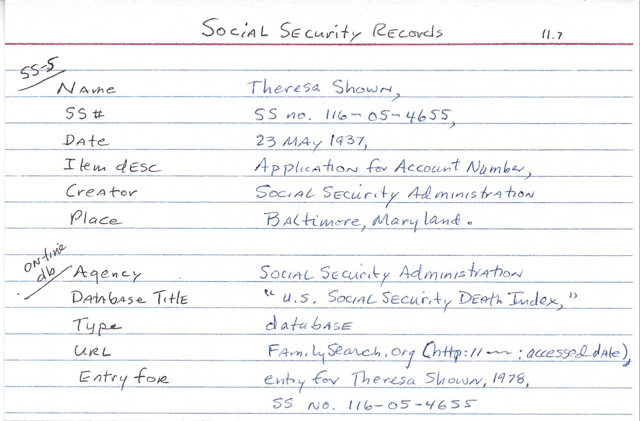
Even after studying many of the sections of the book and trying to understand the logic behind it all, I still struggled to find an efficient way to implement it.  Then one day I tried creating a 4” x 6” cards (see photo) for each major kind of source and rather than having to pick up the heavy book and look it up each time, I could use the cards as guides.  And so I did and it worked.  After adopting this aid and entering all my new sources using these cheat cards I was able to remember many of the formats without consulting the cards and now can write many of the sources from memory.

Making Evidence Explained easier

I put the cards in one of those cheap 4″ x 6” photo books that cost about a dollar and can flip through them quickly.  I love not having to return to looking them up in EE.

On the sample card the top portion guides a citation for a SS-5 (application for SS number) and is substantially different than the second citation for an on-line entry found in the SS Death Index.  Why is that important?  Because the application will contain the applicant’s birth date and place, the names of mother and father, and date of application.  The SS Death Index just provides the name, SS number, date of death and state where SS was issued.  If I were reviewing the sources in a book or report, the citation for the application would jump out at me.  I’d definitely want to consult that record!

In Reunion I now use the free form format to create a source.  I also do a lot of copy and pasting the citations from on-line sites into Reunion, particularly FamilySearch as they seem to have adopted much of the EE standard.  Often I use your idea of copy and paste in the preview section in the source window.  Over couple of days I was able to edit all 950 sources in my family file and am very pleased with the results.

The most important benefit to me is that my sources now are standard and consistent when I use the Book feature or report features in Reunion.  I am confident any researcher coming behind me will be able to locate the source without difficulty.

Another benefit is the EE citation will include the access date and this has been helpful on several sites such as Find A Grave because contributors often come back to add more information and that helps prompt me to remember to return to the site periodically for a particular ancestor.  And last, I noticed the EE citation often includes the birth and death dates of the person to help tell same-name ancestors apart.  For example, I have many John Boyers in my tree and now when I review sources it is clear to which person it refers (John Boyer 1785-1826).

I don’t hesitate to modify the EE format when I need to.  Often I will add a brief comment such as “this book contains four sections the pages of which are renumbered at the start of each section.”

A brief note about me: I am a “Roots generation” genealogist and the daughter of a career officer who served in WW II and a mother born in Texas.  I am retired from Parkview Health System in Fort Wayne, Indiana.  My current project is digitizing my father’s 300 letters he wrote home during the war.  I give presentations on my journey to discover his service record to genealogy groups, Air Force associations, and anyone else who cares to listen!  I have a son in Denver and twin sister in Indianapolis.

I think this is great food for thought and makes the idea of using the Evidenced Explained format less daunting and more compelling. I think I would probably use Evernote, rather than index cards, but the idea of using a “cheat sheet” to make it easier remains the same. Thank you, Karen!

Filed Under: Challenges, Genealogy tips, Organizing Tagged With: evidence explained, genealogy tools, guest post, karen cavanaugh, source documentation

  • « Go to Previous Page
  • Page 1
  • Interim pages omitted …
  • Page 3
  • Page 4
  • Page 5
  • Page 6
  • Page 7
  • Interim pages omitted …
  • Page 9
  • Go to Next Page »

about me

I'm Janine Adams, a professional organizer and a genealogy enthusiast. I love doing family history research, but I find it's very easy for me to get overwhelmed and not know where to turn next. So I'm working hard to stay organized and feel in control as I grow my family tree.

In this blog, I share my discoveries and explorations, along with my organizing challenges (and solutions). I hope by sharing what I learn along the way I'll be able to help you stay focused and have fun while you do your research, too.

tags

30 x 30 Adams amy johnson crow anniversary Brown cemetery census Civil War conferences connections dna electronic files Evernote excitement Family Curator family photos genealogy tools getting started goals How They Do It Igleheart Jeffries keepsakes learning opportunities maps newspapers NGS organizing aids overwhelm paper files planning quick tips rasco record keeping research research log research trip resources RootsTech social history source documentation Stacy Julian technology time management vital records

join the facebook community!

join the facebook community!

My organizing business

Learn more about my organizing business, Peace of Mind Organizing®.

Subscribe by RSS

  • RSS - Posts
  • RSS - Comments

© 2026 Janine Adams


Loading Comments...