
• BLOG
  • ABOUT
    • Privacy Policy

Organize Your Family History

Stay focused and happy while exploring your roots

Backing up Evernote on a Mac (updated)

November 28, 2017 By Janine Adams 4 Comments

I like storing important files on my hard drive, not in the cloud. Call it unreasonable, but I have a distrust of the cloud. Yet I love Evernote, the cloud-based note-taking and information storing app. In fact I depend on it for many facets of my personal, business, and genealogy lives. So I was thrilled when reader Corbin Dodge, J.D., was kind enough to spell out instructions for backing up Evernote to your hard drive, after I expressed my fear of what would happen if Evernote vanished, in a comment on my blog post How I store my genealogy information. I went through all the steps of Corbin’s clear and detailed instructions and now have such peace of mind knowing that my notes are safe and easily accessible outside of the Evernote app. (I back up my hard drive to an external hard drive and to the cloud.) I didn’t want this valuable information to remain buried in the comments, so Corbin has graciously agreed to let me reprint them here. [Note: Evernote issued an update which changed the way the backup is created. This post has been updated to include the new instructions.]

I share your concerns re: what if an app goes belly up (what nightmares are made of!).

One thing I admire about Evernote is that it is easy to backup your notes so they’re accessible even if the app goes away. To do this on Mac:

(1) select the “Notes” heading in the sidebar

(2) On mac, hold down the command key and the “A” key at the same time, which will select all notes (on PC, hold down the control key and the “A” key at the same time)
(3) On the main menu bar, click “File”, then select “Export notes…”
(4) A window will pop up. There is a drop-down box labeled “Format”. It gives you 2 options. Choose “HTML”
(5) Save*

To access the backups, click on any note in the folder. It will open in your default browser. You can backspace out the note name in the url to get the full table of contents of every note that was backed up. Not as smooth to browse as the app, but reassuring to know your notes are accessible even if Evernote goes away! It also saves the images, albeit as a separate image file

*I’ve found this folder structure works well to organize backups for my various apps:
Dropbox / Backups / Evernote / 2017-09-27 Evernote Backup

Selecting the HTML format is a safeguard in case Evernote ceases to exist. The alternate option is to save them as “Evernote XML Format (.enex)”, which is an Evernote-specific file format which saves more metadata about each note (e.g., notebooks, tags, author), so this choice could be useful if you ever need to restore lost notes into Evernote (i.e., if their sync ever messes up). The downside to .enex is that it’s not a universally-friendly file format, so it wouldn’t do you much good if Evernote ever goes kaput.

p.s., an added benefit of backing your notebooks up in HTML format is that you can easily go back and retrieve a previous version of any single note without affecting all of your Evernote notebooks (which would be the case if you didn’t select “HTML” in step 3.

You can learn about Corbin’s digital marketing business at corbin-dodge.com and read about his adventures renovating his 100+ year home at eastwoodbungalow.com. Thank you, Corbin!
 

Filed Under: Genealogy tips, Technology Tagged With: Evernote, genealogy tools, organizing aids, technology

Creating history for our descendants

November 22, 2017 By Janine Adams Leave a Comment

I wrote this Thanksgiving post last year and still really appreciate its message. I’m reposting it today in honor of Thanksgiving. (Perhaps I’ll make it an annual tradition!) Happy Thanksgiving to all my U.S. readers.

This Thanksgiving week, I’ve been thinking about how the ordinary lives of my ancestors are endlessly fascinating to me. As I slowly plow through my great great grandfather’s Civil War pension file, I get very excited when I come to a form he filled out 125 years ago that has a little extra information in it (like the names and birth dates of his children). Any peek into what his life was like is a special treat.

It got me thinking about how mundane aspects of our lives today might be really interesting 100 years from now to the people below us on the family tree.

Of course, we fill out fewer paper forms now. And genealogy will probably look very different in the twenty-second century. But I think photos and records will always be valuable.

This year, as we celebrate Thanksgiving (or really just go about our lives), we have the opportunity to create history for our descendants. We can be mindful of our legacy as we’re taking pictures. We can take care to label them (or add metadata to digital photos) so future generations know who the people in the photos are. We can do oral history interviews and carefully preserve them with labels for future generations.

If you have older relatives around your Thanksgiving table, I urge you to ask questions and preserve those conversations for generations to come (as well as for your own genealogy research). I sure wish I had. Wouldn’t it be great to put your hands on a recorded interview with one of your ancestors? You could be the person making that possible for your descendants.

Thanks to smartphone technology, it’s so easy for us to record conversations and take videos. Let’s do that while we can and mindfully tag and back up those recordings. (And hope that the medium will still be readable decades from now.)

As much as I urge my organizing clients to part with paper or other items that don’t serve any purpose any longer, I do sometimes encourage them to hang on to documents or photographs that might be of interest to their descendants. I encourage you to be mindful of that and store those items that so that they might be passed on to family-history-minded descendants when you pass.

Remember: Every day we have the opportunity to create history.

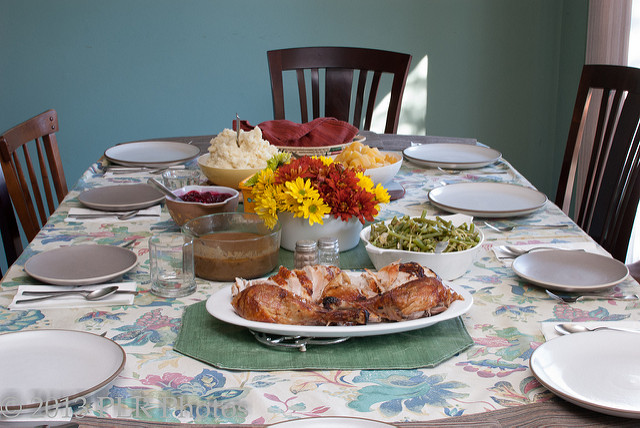
Photo by Robert and Pat Rogers via Flickr. Used under Creative Commons License.

Filed Under: Challenges, Preservation, Reflections Tagged With: family photos, keepsakes, planning, social history

I’m loving the Florida State Genealogical Society virtual conference

November 17, 2017 By Janine Adams 2 Comments

As I mentioned earlier this week, the Florida State Genealogical Society is hosting the 2017 Fall Virtual Conference today and tomorrow. I listened to all four talks today and they were great! Such interesting topics, great presenters, and lots of new ideas for my research.

I’m liking it so much I decided to blog again about it because it’s being recorded so you still have a chance to hear the content. If you register for the conference today ($59.95 for non-members) you’ll have access to the recordings for three weeks and you can download the handouts. It’s a great opportunity and I’m glad I didn’t miss out out on it.

Case in point: Today’s talk by Daniel Earl on using funeral records was so interesting and new to me. I had never thought about how funeral records, like bills of sale and programs of funeral services, could help my genealogy research. Now I not only know about them I know where to look for them and even how to contact funeral directors to ask for help.

If you have the money in your genealogy budget, I’d urge you to sign up for this conference, listen in tomorrow live and listen to the recordings of today’s talks over the next three week. I think it’s a well worth the time and a great value.

Filed Under: Excitement, Genealogy tips Tagged With: conferences, learning opportunities

Florida State Genealogical Society’s Fall Virtual Conference is this weekend!

November 14, 2017 By Janine Adams Leave a Comment

I’m not sure how this escaped my notice, but I was glad to learn today that it’s not too late to sign up for The Florida State Genealogical Society’s 2017 Fall Virtual Conference, this Friday and Saturday, November 17 and 18, from 9:00 am to 3:30 pm (eastern time) each day.

FSGS has lined up eight hours of lectures, from notable genealogy presenters, including Michael Lacopo and Diahan Southard, who have been participants in my How They Do It series. Topics include DNA, tax records, funeral homes, and newspaper research. You can see the full lineup on the conference registration page. If you’re not able to watch the whole webinar live, recordings will be available to registrants for three weeks after the conference.

Conference registration is $54.95 for FSGS members and $59.95 for non-members. I just signed up–the topics interest me and I actually like that there’s a three-week deadline on the recordings. That should ensure I actually watch them. I do hope to catch some of the presentations live, however.

Are you planning to attend? Which talk(s) excites you most?


Filed Under: Excitement, Genealogy tips Tagged With: conferences, learning opportunities

  • « Go to Previous Page
  • Page 1
  • Interim pages omitted …
  • Page 118
  • Page 119
  • Page 120
  • Page 121
  • Page 122
  • Interim pages omitted …
  • Page 219
  • Go to Next Page »

about me

I'm Janine Adams, a professional organizer and a genealogy enthusiast. I love doing family history research, but I find it's very easy for me to get overwhelmed and not know where to turn next. So I'm working hard to stay organized and feel in control as I grow my family tree.

In this blog, I share my discoveries and explorations, along with my organizing challenges (and solutions). I hope by sharing what I learn along the way I'll be able to help you stay focused and have fun while you do your research, too.

tags

30 x 30 Adams amy johnson crow anniversary Brown cemetery census Civil War conferences connections dna electronic files Evernote excitement Family Curator family photos genealogy tools getting started goals How They Do It Igleheart Jeffries keepsakes learning opportunities maps newspapers NGS organizing aids overwhelm paper files planning quick tips rasco record keeping research research log research trip resources RootsTech social history source documentation Stacy Julian technology time management vital records

join the facebook community!

join the facebook community!

My organizing business

Learn more about my organizing business, Peace of Mind Organizing®.

Subscribe by RSS

  • RSS - Posts
  • RSS - Comments

© 2026 Janine Adams


Loading Comments...
