• BLOG
  • ABOUT
    • Privacy Policy

Organize Your Family History

Stay focused and happy while exploring your roots

October 30 x 30 challenge – who’s in?

September 30, 2019 By Janine Adams 41 Comments

Boy do I need a 30 x 30 challenge. I barely did any genealogy research in September–my priorities kept shifting away from genealogy. I did spend one day at the library with my genealogy buddy (more on that next week), which was great. But otherwise, my research log for September is pathetic.

So clearly I need a 30 x 30 challenge to elevate genealogy on my priority list. Who would like to join me? This month, I vow to spend 30 minutes a day working on genealogy research every day for 30 days. My focus will be finishing up (or at least making great progress on) processing the documents I obtained on my Kentucky research trip in June. And I’m committing to creating an entry in my Evernote research log each day.

If you’d like to join me, please just leave a note in the comments. If you’d like to mention what you’ll be focusing on, all the better.

I have high hopes for October!

Edited to add: Apologies if you tried to comment and were blocked (and thank you to the readers who told me about it). The firewall issue is now fixed.
Filed Under: Challenges, Excitement Tagged With: 30 x 30, time management

Where does perfectionism trip you up?

September 27, 2019 By Janine Adams 5 Comments

How does perfectionism get in your way?I think about perfectionism a lot. It’s the topic of the podcast I co-host with my friend and life coach Shannon Wilkinson every week. But lately I’ve been thinking about it particularly in relation to genealogy, since I’m working on my RootsTech talk next year, called “The Imperfect Genealogist.”

I have about ways perfectionism can cause genealogists to stall in their research. Here are a few examples:

  • You don’t know how to do source citations correctly, so you don’t do them at all.
  • You haven’t come up with the perfect way to organize your research, so you just keep doing research without organizing it.
  • You don’t have a whole weekend to devote to your genealogy research, so you don’t do any
  • You don’t know the very best way to preserve your archival documents, so you let them languish in an unsafe, non-archival environment (we discussed this very thing on Episode 20 of Getting to Good Enough.)

It’s your turn. You guys always provide such great insights I thought I’d ask you. Does perfectionism ever get in the way of your genealogy life? If so, please share what things you tend to get perfectionistic about and the impact it can have. (If you’ve figured out strategies for getting past that, I’m all ears!) Just leave a comment on this post. I’d sure appreciate your help. I’m sure you’ll contribute things I haven’t even thought of!

Edited to add: I wrote this post after I installed a new firewall on my site but before I learned that the firewall by default blocked comments! If you tried to comment, I apologize. It’s fixed now; please do try again!

Filed Under: Challenges Tagged With: perfectionism, podcasts, research, Shannon Wilkinson

The scanner that comes with your iPhone

September 24, 2019 By Janine Adams Leave a Comment

I recently learned on one of the many terrific Facebook genealogy groups I belong to (I apologize that I don’t remember which one), about a little gem hiding in the iPhone and iPad. I’ve been using an iPhone since I bought a 4S back in 2012 (the same year I started this blog!), but I had never heard about this feature. It’s the scanner feature on the native Notes app.

I don’t use the Notes app much, since I tend to use Evernote to actually keep notes, but I’ve used it off and on over the year. Since I learned about the scanner feature, I’ve using it every time I have a piece of paper I want to capture. I’ve found it easier than using a dedicated scanning app. And it’s handy sometimes that creates a pdf, rather than a jpg.

Here’s how it works:

Let’s say you’re in a library or repository and find a document you want to save.

  1. Open the Notes app on your iPhone or iPad.
  2. Press the icon to create a new note.
  3. Touch the icon that looks like a + sign inside a circle.
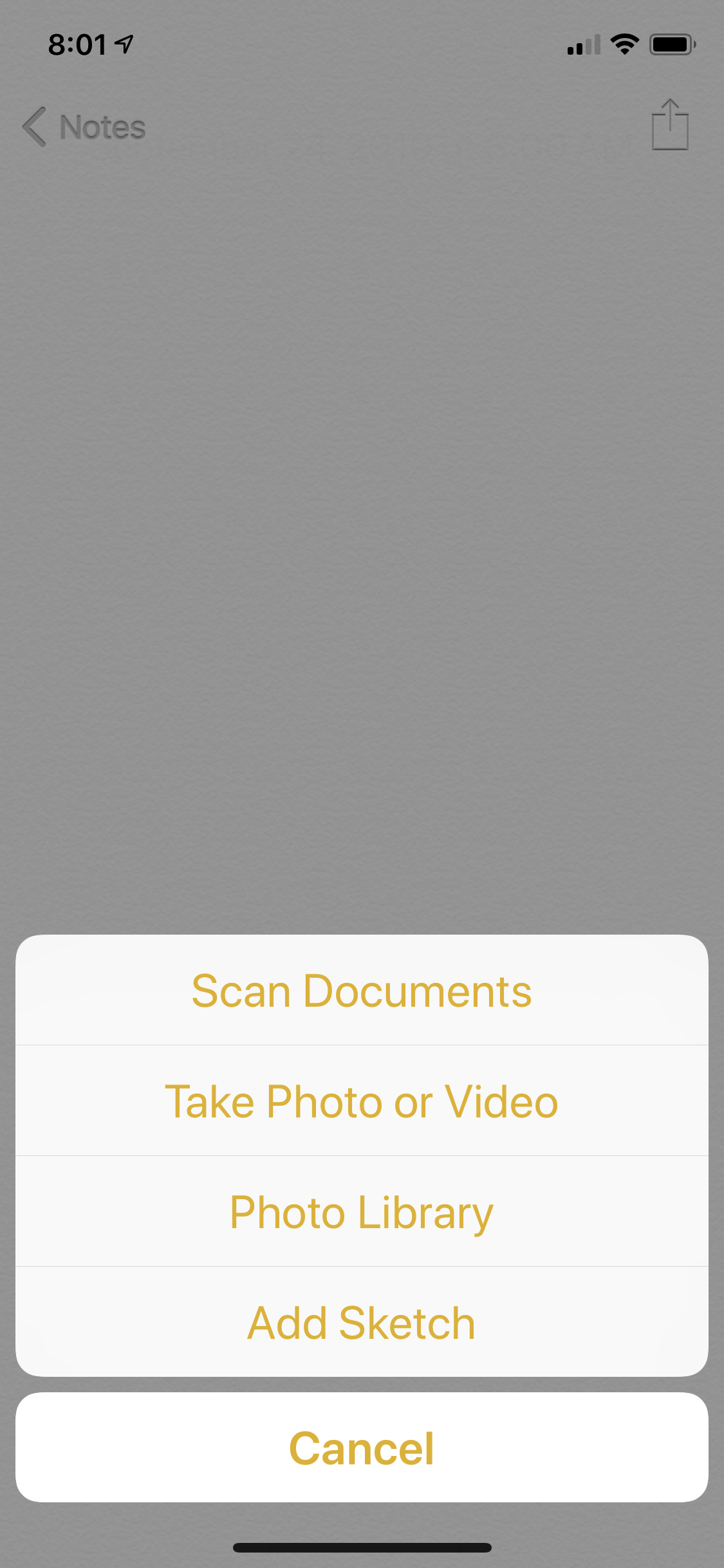
  4. Touch Scan Documents
  5. Position your phone above the document.

The app will try to locate the edges of the document and take the picture automatically. (It’s like my bank’s app when I’m doing a mobile deposit of a check.) If it can’t find the corners quickly, you can press the round shutter-release icon (like on the camera app) and take the picture and then adjust the corners as necessary. For books that aren’t lying flat, that’s more likely to happen.

For pieces of paper, the photo tends to get taken automatically. It’s really fast and easy–it feels like magic.

Once you have the scan, you can press Save, or you can press the little icon of the picture and then retake it. Once you press Save, you can keep it in your Notes app for processing later or use the Share icon to either email it to yourself or save it in Evernote, Dropbox, Google Drive or other apps that might work for you.

On my next research trip, I will give it a try. I think it will save time over just using my phone’s camera, as I did on my Kentucky trip.

One caveat: I understand that in the latest iOS iteration from Apple, the iPad has its own operating system, rather than sharing the iPhone’s. I have not downloaded iOS 13 yet (I like to wait until the kinks are worked out before downloading) and I don’t use an iPad. I’m assuming this feature will exist in the new iOS for the iPhone and the iPad, but I haven’t tried it.


Filed Under: Genealogy tips, Technology Tagged With: electronic files, genealogy tools, organizing aids, technology

Registration for RootsTech 2020 is open!

September 20, 2019 By Janine Adams 2 Comments

Registration has opened for RootsTech 2020, to be held in Salt Lake City February 26 to 29! As I mentioned, I will be speaking at this conference. Right now, my talk, The Imperfect Genealogist, is scheduled for Friday afternoon, February 28, but that’s subject to change. (You can see the current schedule here.) In a communication to speakers, we learned that 600 people signed up within the first few hours of registration opening on Wednesday. That bodes well for a well-attended conference as usual!

You can purchase a RootsTech pass for all four days ($169), or a one-day pass for a particular day ($99). And, if you’re feeling flush, you can also purchase an Ultimate Experience Pass (for $799) that gives you reserved seating, and behind-the-scenes opportunities, including a main stage rehearsal opportunity. You can check out this comparison chart of the various pass options.

RootsTech also offers Family Discovery Day on Saturday, February 29, for members of the LDS church. It’s free, but registration is required.

If you know you’ll attend, I urge you to register now (the early bird pricing above ends until October 11) and book a hotel room at the same time. The RootsTech block of rooms at the conference hotels are already selling out. You might consider booking a hotel room even if you’re still on the fence, since you can cancel it later if you decide not to attend. But be sure and make a note of it. Last year, I didn’t attend RootsTech, but I did book a hotel room months before–and promptly forgot. Imagine how shocked I was when I received an email suggesting I could check in for my Salt Lake City room online just a couple of days before the conference. Thankfully, I was able to cancel without penalty.

In addition to the the over 300 breakout sessions and daily general sessions with keynote speakers, RootsTech also features a giant Expo Hall where you can see the latest and greatest products and services for genealogists and talk with representatives from those companies. The conference is sponsored by Family Search, which typically has a huge booth staffed by their personnel to help you learn to take full of advantage of Family Search. Exhibitors also offer talks in the Expo Hall.

If you need more convincing, check out 10 Reasons to Attend RootsTech. And here’s an 11th reason. If you go, you can meet me! If you decide to attend, please let me know in the comments, if you haven’t already in a previous post, and we’ll arrange to meet up.

Filed Under: Challenges, Excitement, Organizing, Technology Tagged With: conferences, learning opportunities, RootsTech

  • « Go to Previous Page
  • Page 1
  • Interim pages omitted …
  • Page 83
  • Page 84
  • Page 85
  • Page 86
  • Page 87
  • Interim pages omitted …
  • Page 219
  • Go to Next Page »

about me

I'm Janine Adams, a professional organizer and a genealogy enthusiast. I love doing family history research, but I find it's very easy for me to get overwhelmed and not know where to turn next. So I'm working hard to stay organized and feel in control as I grow my family tree.

In this blog, I share my discoveries and explorations, along with my organizing challenges (and solutions). I hope by sharing what I learn along the way I'll be able to help you stay focused and have fun while you do your research, too.

tags

30 x 30 Adams amy johnson crow anniversary Brown cemetery census Civil War conferences connections dna electronic files Evernote excitement Family Curator family photos genealogy tools getting started goals How They Do It Igleheart Jeffries keepsakes learning opportunities maps newspapers NGS organizing aids overwhelm paper files planning quick tips rasco record keeping research research log research trip resources RootsTech social history source documentation Stacy Julian technology time management vital records

join the facebook community!

join the facebook community!

My organizing business

Learn more about my organizing business, Peace of Mind Organizing®.

Subscribe by RSS

  • RSS - Posts
  • RSS - Comments

© 2026 Janine Adams


Loading Comments...