• BLOG
  • ABOUT
    • Privacy Policy

Organize Your Family History

Stay focused and happy while exploring your roots

Building genealogy into a vacation

May 5, 2017 By Janine Adams 1 Comment

Building genealogy into a vacationI’m writing this from New York City, where I’ve been since Sunday. I’m having a fabulous time with my college buddies, one of whom has moved to the Upper East Side. Early in the week, I had the pleasure of doing some organizing in her apartment (you can see my post on my organizing blog about the products I used in her kitchen cupboard) while she was at work.

On Wednesday, before my other buddies arrived, I had some time to myself. I purposely didn’t plan anything because I was so confident I’d win the Hamilton ticket lottery. Amazingly, I did not receive $10 tickets for the Wednesday matinee of Hamilton, so I decided to spend a little time focusing on my genealogy.

I thought I’d go to the New York Public Library, which has a great genealogy collection. I took a look at my family tree to see my New York-born ancestors. I looked at the sources I had for them and saw an index I’d found at FamilySearch.org and used WorldCat to see if I could find the book that contained that index in New York. Sure enough, it was available at the NYPL, but it was also available at the Patricia D. Klingenstein Library at the New-York Historical Society Museum and Library, at 77th and Central Park West, quite a bit closer to my Upper East Side digs than the 42nd street main branch of the public library. It was smaller and less overwhelming and therefore more appealing to me.

I learned from the website that the library is open to the public and has some strict security guidelines, in terms of what you can bring in. I also learned that it has an online ordering system that allowed me to research what I was looking for from home (well, from my friend’s apartment) and request it so that the books and manuscript collection were waiting for me when I got there.
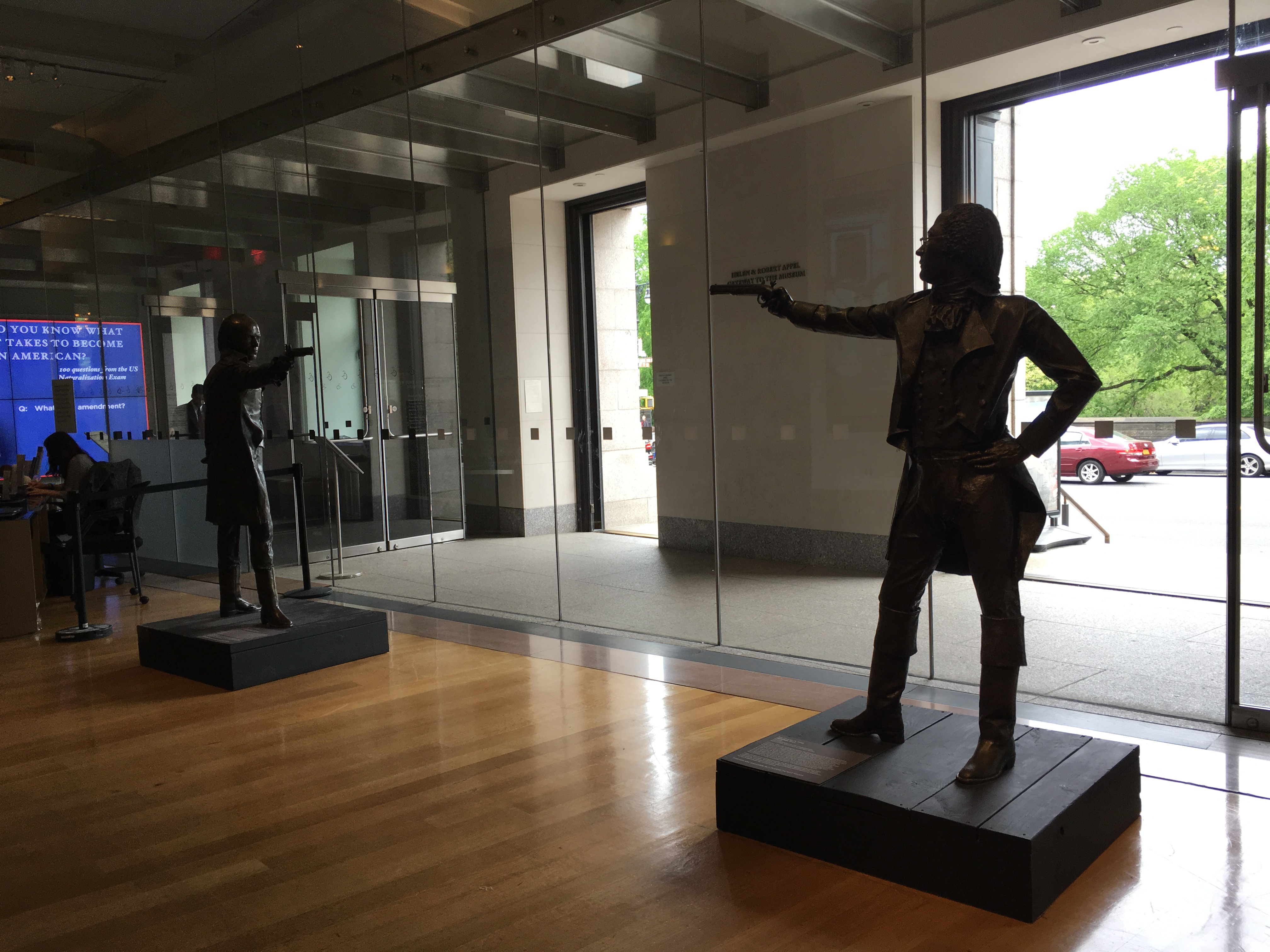
It was a stroke of genius on my part to spend the afternoon this way. When I got to the Historical Society, located right next door to the American Museum of Natural History, I was immediately thrilled with the grandeur of the building. And while I wasn’t able to see Hamilton on Broadway, I did see the famous statues of Hamilton and Burr facing off in their duel, which is housed in the building.

Inside the library, my books awaited me and I immediately found some information that made the trip worth my while. Once I was through looking at the books, I moved to the manuscript collection for Coenties Slip, an area in lower Manhattan that was owned by my ancestor, Conraedt Ten Eyck, in the 17th century. (I blogged a little about Conraedt and Coenties Slip when I visited Manhattan with my niece a couple of years ago.)

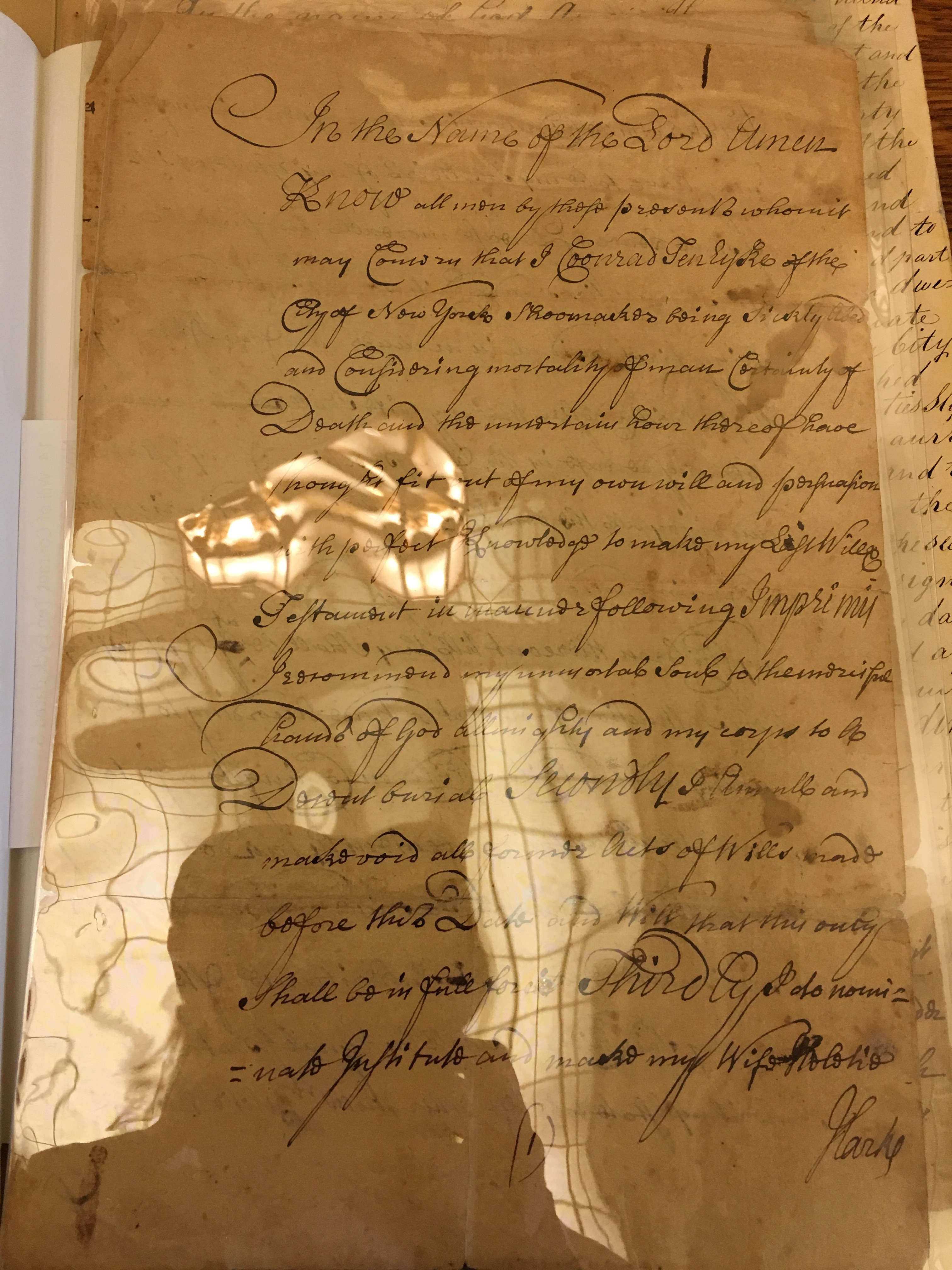
The manuscript collection was comprised of original, handwritten documents. It contained Conraedt’s handwritten will. Not a facsimile of the will, the real deal. I photographed it through the shiny sheet protectors the pages were encased in, which created a reflection that will make it a little challenging to transcribe, but I’ll be able to do it. (That’s a picture of the first page of the will at the top of this post.)

What a satisfying afternoon. It was a delight to be in the gorgeous surroundings of this library, getting in touch with history and learning about my family. My friends don’t share my interest in genealogy, so I was so happy to be able to snatch this little pocket of time for my research while I was here. (And yes, I did log my research!)

I think I’m going to try to always find a little time for research when I travel, ideally using in-person resources available locally. I’m so glad I was able to build research into this vacation!
Filed Under: Excitement, Genealogy tips, My family Tagged With: Brown, excitement, research, research trip, Ten Eyck, travel

How They Do It: Pat Richley-Erickson (DearMYRTLE)

May 2, 2017 By Janine Adams 10 Comments

Grab a cup of coffee or tea and settle in for a great read. Today’s installment of How They Do It features Pat Richley-Erickson, known to genealogy enthusiasts as DearMYRTLE. Pat is a prolific writer and educator. She has the DearMYRTLE Genealogy blog, the DearMYRTLE YouTube channel, her own Google+ genealogy community and hosts frequent hangouts. She is one of the administrators of the wildly popular The Organized Genealogist Facebook group. So she knows more than a little about organizing genealogy. She generously shares her insights and workflow (!) in today’s interview.

How They Do It: Dear Myrtle

How They Do It: Pat Richley-Erickson

How long have you been doing genealogy?

My first foray into genealogy was in early middle school where I learned calligraphy and created an illuminated manuscript of my five generation pedigree.

What’s your favorite part of doing genealogy?

Uncovering stories of the life and times of an ancestor. Historical context is everything when it comes to understanding why someone moved, joined the army, took up a profession, etc. Mr. Myrt once hired a professional guide as we toured Gettysburg. The guide was a specialist who knew the precise troop movements for my ancestor in the 19th Indiana, part of the Iron Brigade. I had assumed the Union retreat through the town of Gettysburg was a frantic mess, but the guide explained not so for the units in the Iron Brigade. They took up the rear, laying a suppressing fire to defend the troops from Confederate attack at the rear. The guide also took us to Culp’s Hill and explained how my Union soldier’s regiment did not engage in battle against Cousin Russ’ Confederate Marylander. The hill is more of a ridge, where the battle with Russ’ ancestor took place on the south and southeast, while my ancestor’s unit was bivouacked on the north side of the ridge and did not engage.

Do you consider your genealogy research well organized?

Seriously? This must be a trick question. 🙂

What type of software do you use for organizing your genealogy research?

I organize my research findings in my genealogy management program and have networked my computers, tablets and printers. If I get the urge to look something up on any device, it can be printed and saved to a network drive. I use alternate trees, online and in my RootsMagic for “possibly related”  individuals and family units. Sometimes it takes research on several generations before I can distinguish the difference between two men with the same name living in the same locality. It is only then that I drag and drop the appropriate individuals to my main database. Unlike a GEDCOM file, the drag and drop feature in RootsMagic can bring one, all or some ancestors along with the digital files I’ve attached. (The current data transfer protocol known as GEDCOM has no containers for transferring the actual images.)

Do you keep a research log? If so, what format?

Research logs are essential for planning what to do next, and postulating where to look for applicable record sets. I’ve progressed from Word/Excel (in Dropbox) to Google Docs/Sheets simply because regardless of the device I choose to access the cloud-based research logs, that device doesn’t require Word or Excel to view it. See comments below under One Note where I’ve described a new change in my field research process rolling out these past few months.

Do you have a tree on Ancestry? If so, is it public or private? Why?

Yes, I have several private Ancestry member trees, in addition to those at FamilySearch, FindMyPast, MyHeritage, and WikiTree. I do this because I want to get the low-lying fruit of shaky leaf hints whenever possible. I have a big problem with “one big tree” sites where other researchers can indiscriminately modify my data. Three times someone has added a deceased Uncle Jack to my paternal grandparents on FamilySearch, though my true Uncle Jack is alive and well. I don’t have time to go around repairing the mistakes of others. The Ancestry trees were changed to “private” status when I noticed living individuals were clearly in full view to a cousin on her computer as she looked at my public tree.

What’s your biggest challenge when it comes to organizing your genealogy?

Does a backlog of digitizing paper files ring a bell with any of your readers? That’s my biggest challenge. Though my daughter and I spent a week of 8-hour days digitizing records, I think we’re only 20% finished.

What’s your biggest piece of advice to beginning genealogists in terms of keeping track of their research?

Develop a work flow consistent with the Genealogical Proof Standard, learning more about the GPS by attending as many genealogical institute courses as possible. There’s a difference between classes you pick and choose to fit your conference schedule, and dedicating a solid week of in-person or virtual institute classes designed by a coordinator who knows what you need to learn. We don’t know what we don’t know.

My work flow is this this:

  • Decide on a question to answer, i.e. what’s the bride’s maiden name, or who are the parents?
  • Read up on the locality – its history, culture, laws and various church and government jurisdictions for the time period my known ancestors lived there.
  • List possible record groups to research.
  • Review those records – most are offline at this point.
  • Analyze info from each document, correlating with info from other documents.
  • Work through conflicting evidence logically. Dr. Thomas W. Jones, CG has taught the most likely scenario is usually correct.
  • Summarize conclusions, or as Cousin Russ likes to call it “current thinking.”
  • Enter the conclusion narrative in notes for an individual or family unit in my genealogy management program.
  • Attach all documents, properly cited to the individuals in question.
  • Recognize that the narrative may change if new info comes to light. At least, the narrative will get me up to speed with my thinking when I return to the research later.
  • Proceed to the next research question.

What do you think is the most important thing for people to do to stay organized when it comes to family history research?

Digitize what you find immediately so it is easier to cite and then review all collected about a family or individual. Our dining room tables are only so big. Digital copies are also easier to share with distant cousins at a moment’s notice.

If you were starting out new as a genealogist what would you do differently?

I’d make notations about a record set even when I didn’t find anything applicable to my ancestors, and I’d learn to craft citations immediately, so I can find that record set again. Citations would include these elements: author, title, publication info, who it’s about and date of event, volume and page number and a little information about the repository. If the document is online include the URL and the date accessed. Elizabeth Shown Mills, noted author of Evidence Explained: Citing history sources from artifacts to cyberspace said in a forum post at EvidenceExplained.com: “Bottom line: As researchers, we may add anything to our citations that we feel will help us as we proceed with the project—recognizing that the citations may be trimmed at publication time.” So, don’t be afraid to annotate. I have rogue documents from research 30 years ago, usually pages from books, where I didn’t take the time to also copy the title and copyright page(s). At home I make a copy of the title page and write “no Fromans, no Goerings, no Phillips,” filing a copy with each surname folder on my hard drive.

Are you folder or binder person for your paper files?

When I moved from folders to binders, Ol’ Myrt here ended up with 122 four-inch 3-ring binders! Now I safely store in Hollinger metal edge boxes only precious, one of a kind documents, like original marriage records and family bibles.

Do you use Evernote, One Note or any other electronic organizing system for your genealogy? If so, how do you use it?

Last fall I learned from a friend’s husband how he does on-site research as a fire inspector. He uses a Microsoft Surface Pro – a highly portable computer that acts like a tablet. He takes pic with the device, adds them to One Note, where he uses a stylus to scribble field notes, and can tap to type as desired. I could see the immediate use in my genealogical research.

I’ve installed a full-version of RootsMagic, using my databases in a Dropbox folder shared on my home network. At an archive, I take a photo of the file folder label, and then the contents, The “paper” in One Note isn’t confined to any paper size, so you can draw mini pedigree charts when trying to figure out the relationship of people in the will. I am also careful to “bookend” all images from a file with the folder or box label. That way if I consult multiple files that day, I know which photos below to which folder.

This would also work well in a cemetery. I’d take a picture of the cemetery entrance sign, then the tombstones in question. I could add those images to One Note and then transcribe the text with my stylus. I could move around until I could decipher every letter, before moving on to the next image. When leaving the cemetery, I’d take another picture of the cemetery entrance sign. That would set apart those images from the next cemetery visited that day.

Do you have a dedicated space in your home for doing genealogy research? What’s it like?

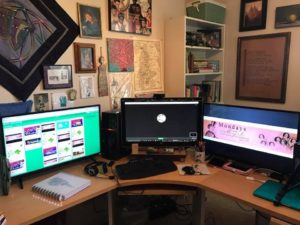
My genealogy office has four full-height shelves, a four-drawer lateral file, and a closet with built-in shelves. Our big library is shared with Mr. Myrt, also a genealogist. My computer desk has three monitors. This works well since I provide most all-day seminars virtually to a distant society or library group. When researching, I keep RootsMagic open on my right screen, website research in the middle screen, and research log in Google Doc or Google Sheet on the left screen. I can zoom in on the document in question as I transcribe it word for word. I recently added an external hard drive strictly for artwork and my embroidery machine graphics. Everything is backed up to BackBlaze. All documents, images, handouts and PowerPoint slides are in Dropbox.

I’ve had to add a bookshelf outside my office in the hallway, so I guess you could say the books have gotten out of hand. At least they are basically organized by topic – Rev War, Civil War, WWI, WWII, African American, Quakers, general reference, British research, etc. Above that hangs what Mr. Myrt like to call a lesson in provenance. Not only do I have my father’s bear-skin rug, but I have the image of him hunting it at the Olympic Peninsula and the framed taxidermy receipt.

Yup! We eat, sleep and breathe family history.

I’m so grateful to Pat for sharing her insights, particularly her workflow and her recent use of One Note. I am inspired by the interview to give serious consideration to signing up for a genealogical institute course! Thank you so much, Pat!

Filed Under: Challenges, Excitement, Genealogy tips, Organizing Tagged With: DearMYRTLE, How They Do It, organizing aids, Pat Richley-Erickson

Filling in the history in your ancestors’ timelines

April 19, 2017 By Janine Adams 7 Comments

A couple of years ago, at RootsTech, I learned about HistoryLines. I was intrigued and signed up for a subscription. Then I pretty much forgot about it. (I blogged about it back then.)

HistoryLines creates a timeline for your ancestor (after you upload a GEDCOM or fill in data on an ancestor), referencing the historical events and social history of the time in which your ancestor lived.

This week I received a notification that my subscription was going to autorenew. I went to the site, intending to cancel since I never used it. But once I started exploring, I realized that this really is a tool I’d like to use.

This past quarter I focused almost exclusively on my great great grandfather, George Washington Adams (1845-1938) and his children. When I called up a HistoryLines story for him today I really enjoyed the context it placed his life in. I can see doing this for many of my ancestors, especially those I’ve studied more in depth. (So many of my ancestors seem like just names and dates to me, though I’m trying to change that.)

If you’re intrigued, here’s a promotional video from HistoryLines.

If you try it out, let me know what you think!

Filed Under: Excitement, Genealogy tips, Technology Tagged With: excitement, genealogy tools, organizing aids, resources, social history, technology

How They Do It: Diahan Southard

April 7, 2017 By Janine Adams Leave a Comment

I’m so happy to present the fourth installment in my How They Do It series, in which I ask well-known genealogists how they organize their own research. The series runs the first Tuesday of each month, though this week I forgot! (Yes, even professional organizers mess up their schedules sometimes.)

This month I interview Diahan Southard, Your DNA Guide. Diahan is an expert in genetic genealogy and is a regular speaker at genealogy conferences. She manages to make the confusing topic of using DNA in genealogy understandable, no small feat, in my opinion. I’ve  had the pleasure of doing a consultation with her about my own autosomal DNA results, which was a very valuable experience! For this interview, we focused on Diahan’s genetic genealogy research.

How They Do It: Diahan Southard

How long have you been doing genealogy?

I have been involved in genetic genealogy since the beginning, so about 17 years.

What’s your favorite part of doing genetic genealogy?

My favorite part about genetic genealogy is the unexpected tangible connection that I feel with my DNA cousins that I have never met.

Do you consider your genealogy research well organized?

I honestly spend more time helping others than I do on my own research at this point, so while I feel like I have some good organization in the DNA realm, I know my traditional research could use some help.

What type of software do you use for organizing your genetic genealogy research?

Each testing company does offer some limited means for keeping track of your matches in the form of notes. When I look at a match, I just make a quick note in that person’s profile about what I did and what I found, especially if I was able to find the common ancestor. This makes it easy for me to remember when I go back weeks later.

Do you have a tree on Ancestry? If so, is it public or private? Why?

I do have a public tree on Ancestry as it gives me access to all of the best genetic genealogy tools at AncestryDNA. With a public tree I get access to the DNA circles and New Ancestor discoveries features, as well as the shaky leaf hints. Having my tree public also allows me to take advantage of other people’s research time, meaning that my tree is out there for them to peruse so that my DNA matches might be able to identify our connection even if I haven’t had a chance to look yet.

What’s your biggest challenge when it comes to organizing your genetic genealogy?

The biggest challenge in genetic genealogy is figuring out what to do with all of those fourth cousins! Most of us have so many. The best thing to do is to pull your Best Matches out of the longer list and focus on those. Your best matches have shared surnames, shared locations, or are your best genetic matches.

What’s your biggest piece of advice to beginners in genetic genealogy in terms of keeping track of their research?

If you are just getting started in genetic genealogy, please don’t get overwhelmed by the more experienced people telling you that you HAVE to have this fancy tool or you HAVE to transfer your data to another database. Spend at least a year getting to know the database you were tested in and don’t worry about anything else for now.

What do you think is the most important thing for people to do to stay organized when it comes to family history research?

Stay focused on one goal. Don’t get distracted by other shiny objects.

If you were starting out new in genetic genealogy what would you do differently?

I would test more of my ancestors before they passed away. If you have parents or grandparents, or aunts or uncles still around, go order them a DNA test!!

Do you keep paper or electronic files (or both)?

All my genetic genealogy is electronic.

Do you use Evernote, One Note or any other electronic organizing system for your genealogy? If so, how do you use it?

I do use Evernote to clip particularly helpful articles or charts to help me make sense of my genetic genealogy results. I also use it to save screenshots of DNA circles and New Ancestor discoveries, or important matches.

Do you have anything to add?

While the ins and outs and ups and downs of genetic genealogy can take you down many paths with many twists and turns, keep in mind that it really comes down to a simple concept: if you share DNA, you are family.

Diahan obviously has a lot to teach those of us struggling with knowing what to do with our DNA results! I really love her advice to stayed focused and to spend a year getting to know the database you’ve tested with before branching out to other databases or trying new tools. And, of course, her advice to test your older relatives now, while they’re still with you, is so important.

Filed Under: Challenges, Excitement, Genealogy tips, Organizing Tagged With: Diahan Southard, dna, How They Do It, organizing aids

  • « Go to Previous Page
  • Page 1
  • Interim pages omitted …
  • Page 51
  • Page 52
  • Page 53
  • Page 54
  • Page 55
  • Interim pages omitted …
  • Page 80
  • Go to Next Page »

about me

I'm Janine Adams, a professional organizer and a genealogy enthusiast. I love doing family history research, but I find it's very easy for me to get overwhelmed and not know where to turn next. So I'm working hard to stay organized and feel in control as I grow my family tree.

In this blog, I share my discoveries and explorations, along with my organizing challenges (and solutions). I hope by sharing what I learn along the way I'll be able to help you stay focused and have fun while you do your research, too.

tags

30 x 30 Adams amy johnson crow anniversary Brown cemetery census Civil War conferences connections dna electronic files Evernote excitement Family Curator family photos genealogy tools getting started goals How They Do It Igleheart Jeffries keepsakes learning opportunities maps newspapers NGS organizing aids overwhelm paper files planning quick tips rasco record keeping research research log research trip resources RootsTech social history source documentation Stacy Julian technology time management vital records

join the facebook community!

join the facebook community!

My organizing business

Learn more about my organizing business, Peace of Mind Organizing®.

Subscribe by RSS

  • RSS - Posts
  • RSS - Comments

© 2026 Janine Adams


Loading Comments...
