• BLOG
  • ABOUT
    • Privacy Policy
  • CONTACT

Organize Your Family History

Stay focused and happy while exploring your roots

Making military research a little easier

May 26, 2023 By Janine Adams 2 Comments

Before Memorial Day in 2016, I wrote this post on figuring out which ancestors might have fought in which war. I’ve run it a couple more times and it seemed like a good time to run it again. Incidentally, MyHeritage is offering free access to its 83 million military records this weekend, May 25-30, 2023.

Whenever I read about a records collection for a certain conflict (which seems to happen around military-related holidays, like Memorial Day, Veteran’s Day or anniversaries of conflicts) I get excited about researching my ancestors in those collections, which can be such a treasure trove of information. But in the past sometimes I would have difficulty remembering which ancestor might have fought in which war and I’d become overwhelmed and abandon the effort.

So I created a document that shows me the prospective ancestors for each conflict, based on the dates they were born. At the time, I used a table from Family Tree Magazine but when I went looking for it to share in this post, I couldn’t find it. However, I did find an even-better table called Ages of Servicemen in Wars that lists 20 military conflicts, the years they were fought, the typical birth dates for soldiers and the  typical ages of soldiers. Thank you, FamilySearch!

Armed with that information, I created a simple spreadsheet (pictured, in part, above) with the following column headers:

  • Conflict
  • Likely Birth Year of Soldiers
  • Prospective Ancestor
  • Confirmed Ancestor

For each conflict, I entered the names of the ancestors who were born during the birth-year window listed in column 2. After I ascertained that one had indeed fought in that war, I entered an X in the Confirmed Ancestor column. What I should have done and will from here forward, is place a dash or an N in the Confirmed Ancestor column to indicate that I’d ruled that ancestor out.

This is a simple way to see at a glance who I might research when I’m looking at military collections at the National Archives, Fold3 or elsewhere. It’s easy to create and I think it’s well worth the time spent.
 

Filed Under: Genealogy tips, Organizing Tagged With: genealogy tools, military, organizing aids

My process for downloaded documents

May 5, 2023 By Janine Adams 4 Comments

Life’s a little nuts right now, so rather than creating a new post, I’m re-running this post from October 20, 2017 in which I describe my workflow for a document I downloaded from the internet. Almost six years later, the process hasn’t really changed! For more detailed information on how I process digital documents, check out How I Do It: A Professional Organizer’s Genealogy Workflow, a 37-page downloadable pdf available for $19.99.

Last March, I wrote a post called My digital workflow that detailed what I do with a document I find on the Internet. (I never print it.) My digital workflow has not changed since then and it’s working out really well for me.

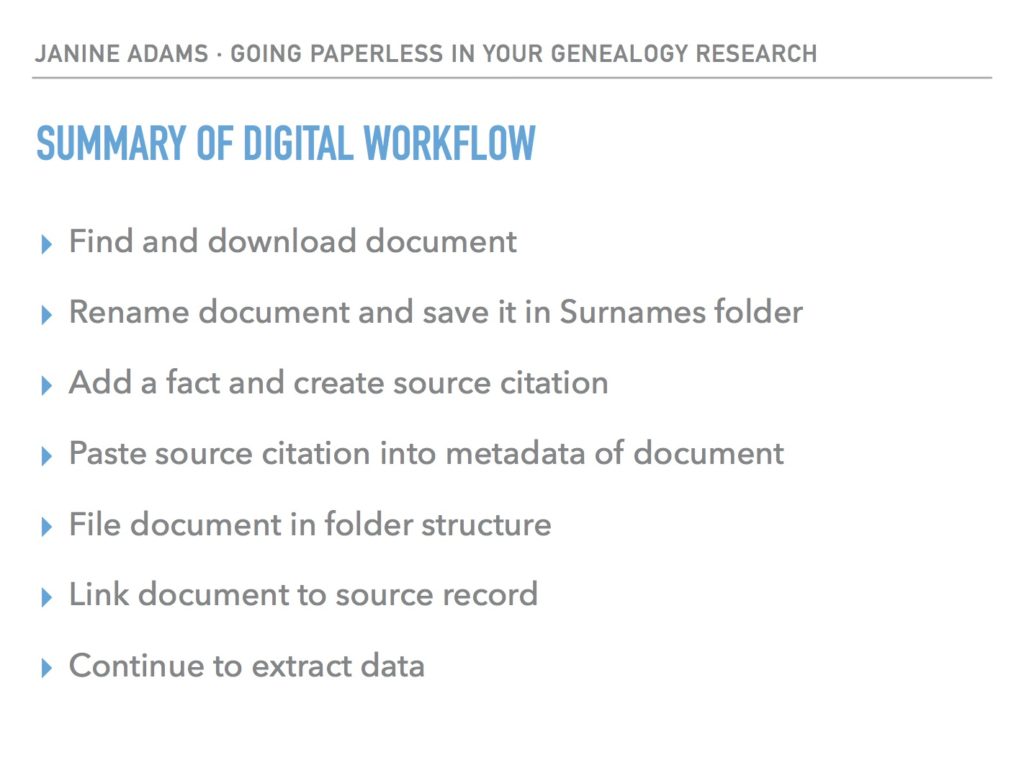
Last weekend, I did a talk at the St. Louis Genealogy Conference about going paperless and in my Powerpoint I included screenshots of the digital workflow and also a summary slide. The attendees asked for copies of the summary slide, so I decided to post it here.

The process is basically the same as my March post but I switched up the steps a little.

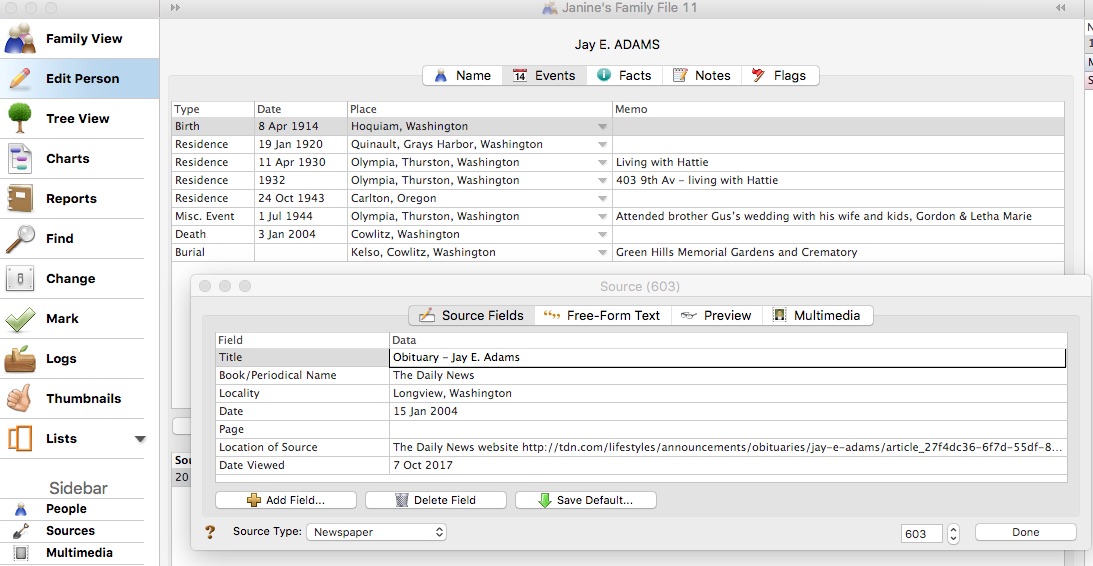
The example I used in my talk was my father’s uncle, Jay Ellis Adams (1914-2004). I had found his obituary online at the newspaper’s website. Here’s the workflow:

1. I click Print and, in the printer dialog box, Open in Preview (my Mac’s default pdf reader), which downloads the document to my computer. (If it had been a document at Ancestry, I would have clicked Save, then Save to My Computer.)

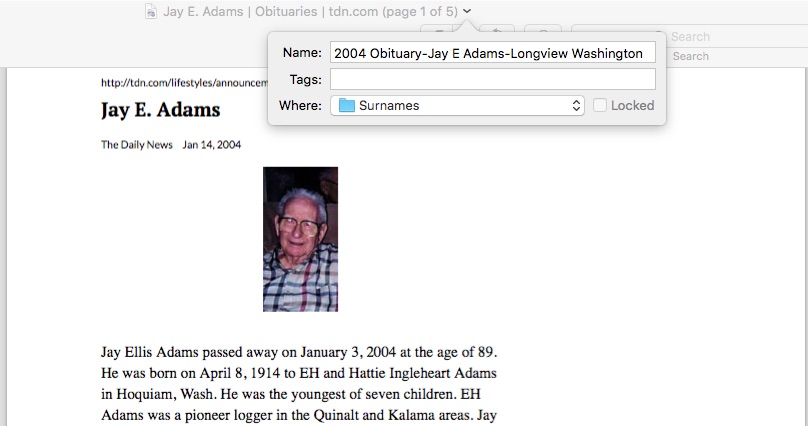
2. I immediately rename the file, using my file-naming protocol, which is Date Type of Document-Ancestor Name-Locality. I stick it into my Surnames folder, as a temporary holding place until I file it in step 6. I know that any unfiled documents in the Surnames folder require processing.


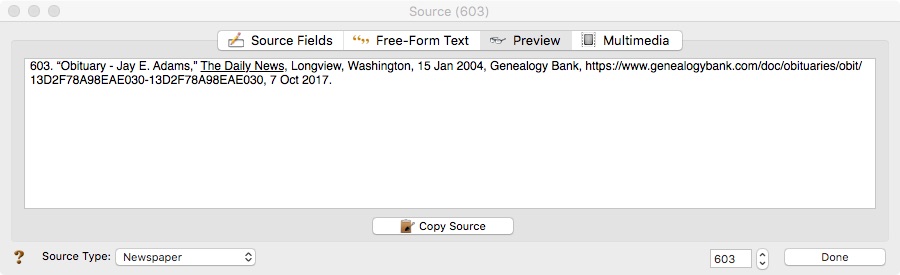
3. I select a fact from the document, add it to Reunion and create a source citation for it.


4. In Reunion, I click the Preview tab in the source record and then click Copy Source. (For the eagle-eyes among you, I originally found a transcript at Genealogy Bank and used that as the source citation. Then I decided to go to the newspaper’s website and download it from there, so I changed the source citation. But I was too lazy to take a new screenshot.)

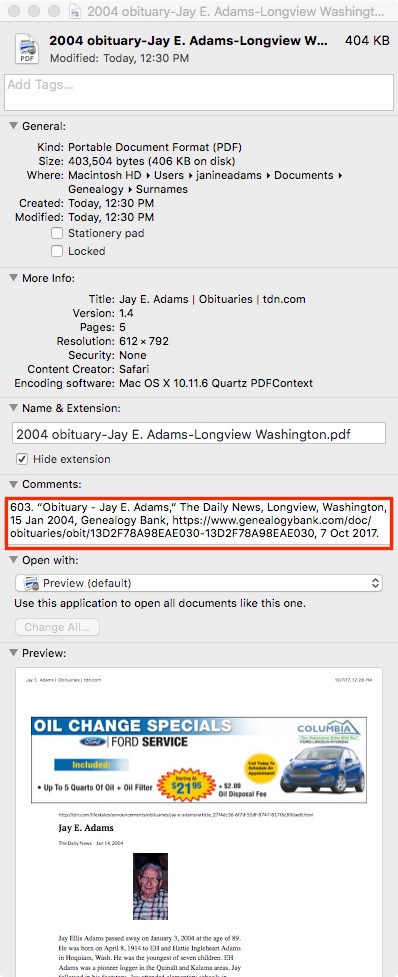
5. I paste the source citation into the metadata of the source document (the obituary) by Ctrl-clicking on the file and selecting Get Info from the menu that appears, then pasting into the Comments area.


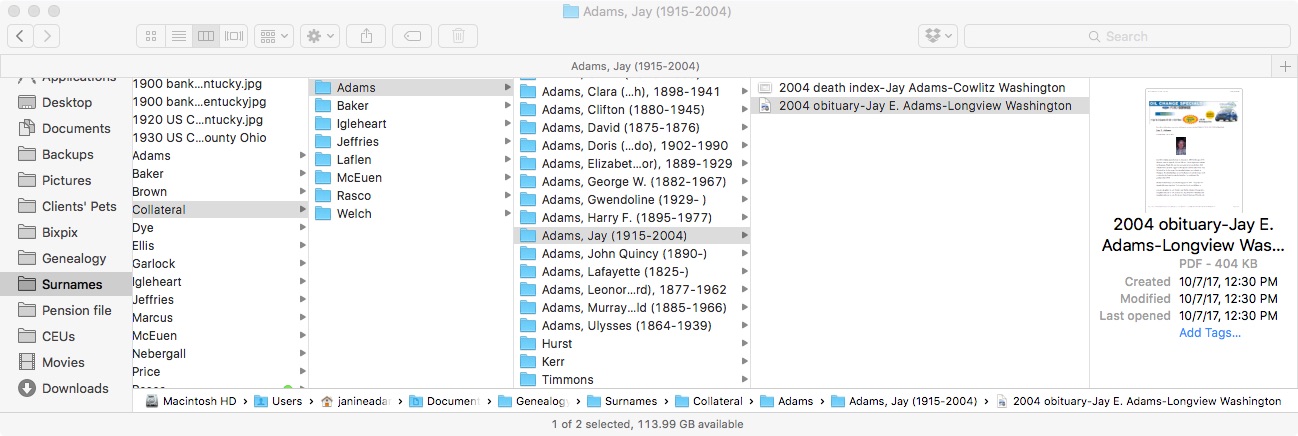
6. Then I file the document into my folder structure. My folder structure for collateral relatives is Genealogy/Surnames/Collateral/[Surname]/[Name of Ancestor (YOB-YOD)]. If the document  applies to multiple people, I duplicate it for each person and then drag it into the appropriate folder for each person. But I don’t take the trouble to rename it.

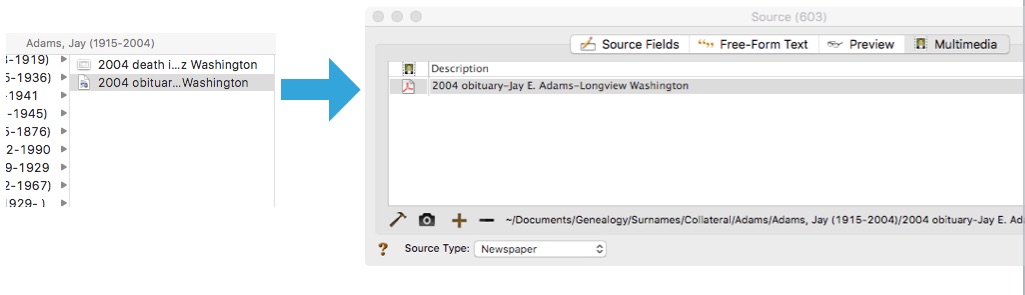
7. The final step is to drag the document into the Multimedia area of the source record in Reunion. This creates a link to the document so that I can open it up inside Reunion, which is very handy.


From there, I continue to extract information from the source document and add that it to Reunion. Every piece of information I glean from a single source document uses the same source number, no matter what person it applies to.

Here’s the summary slide:

This is the way I do and it works well for me. Of course, it’s not the only way to do it or perhaps the best way to do it. But I’m hoping you’ll find it useful to see my workflow. I’ve been processing documents this way for almost a year now and it’s working very well.

Again, for more in-depth information on how I organize my own genealogy, check out How I Do It: A Professional Organizer’s Genealogy Workflow, a 37-page downloadable pdf available for $19.99.

Filed Under: Challenges, My family, Organizing, Technology Tagged With: Adams, electronic files, organizing aids, record keeping, source documentation

Four genealogy habits to create now

February 7, 2023 By Janine Adams 4 Comments

I’m a huge fan of creating beneficial habits. When you have a habit going, it becomes automatic–at least for awhile! And when that happens, life gets easier. (You might enjoy listening to Episode 22 of the podcast I co-host, Getting to Good Enough, called Creating Helpful Habits.)

I got to thinking about the genealogy habits that benefit me and four jumped to mind. Your future self will thank you if you do these four things every time you research:

  1. Rename the files you download. Having a consistent file-naming protocol will help make sure you don’t lose valuable documents on your hard drive. (See this blog post if you’re interested in my file-naming protocol and folder structure.)
  2. Process each document right after you download it. By process, I mean extract all the data from it and enter it in your genealogy software. Be sure to create a source citation (see #3 below). If you do this, you won’t have an ever-present backlog of unprocessed documents nagging at you. And you get to further your research!
  3. Create a source citation for every document and assign a source to every fact. In my genealogy life no fact goes into my database (I use Reunion) without a source citation. That’s how I know I can trust my research. (And so can other people.)
  4. Log your research during each session or, at the very least, write out your next steps. It is so useful to be able to pull up your research log and see where you left off. It eliminates that overwhelming question, “What should I research today?” (Here’s a post on my very informal research log.)

The good news is that while these habits are important, they’re not hard. I encourage you to work on creating great genealogy habits. It can take some of the frustration out of the research process. You want your genealogy research to be as frustration-free as possible!

For detailed information on how I organize my own genealogy research, check out my Orderly Roots Guide, How I Do It: A Professional Organizer’s Genealogy Workflow, available for $19.99.

Filed Under: Genealogy tips, Organizing Tagged With: habits, organizing aids, research

Two-part program on Zotero for genealogy starts tomorrow

February 3, 2023 By Janine Adams 2 Comments

Reader Donna Cox Baker is an enthusiastic advocate for using the tool Zotero to organize genealogy research. She wrote a guest post about it for this blog and also described it in her How I Do It interview from 2018.

So I was interested when I received an email yesterday from about a two-part program that Donna is teaching for the Bucks County (Pennsylvania) Genealogy Society (BCGS) called “Zotero for Genealogy: Harnessing the Power of Your Research.” The first part is tomorrow, February 4, from 10 am to 12 pm eastern. The second part will be on March 4. Donna says, “Part I will be about the essential core of Zotero and why genealogists need it. Part II will be about various creative ways I’ve expanded on the Zotero basics to make it a real powerhouse tool–such things as timelines, map legends, ticklers, research planning, thought mapping, and more.”

I still haven’t explored Zotero, so I’m interested in watching her programs. The fee is $10 per workshop for non-members of BCGS and $5 for members. The presentations are being recorded and will be available, to members only, for 30 days. I’m not able to attend live tomorrow, so I elected to join the Bucks County Genealogical Society for only $20 and then I’ll have $5 access to the two workshops (and any future workshops in 2023.) It’s worth it to me to pay an extra $10 for access to the recordings for 30 days.

If you’re interested too, go to this page on the BCGS website to learn about the program and this page to register as a non-member. If you’d rather join first, you can read about membership benefits or skip right to the online membership application form. It’s worth noting that when I joined this morning, I did not instantly gain access to registering for the program at the members’ rate. (I’m waiting for a welcome email with a login.) So if you’re planning to go this route, you might want to join today rather than waiting for tomorrow.

Filed Under: Genealogy tips, Organizing, Technology Tagged With: Donna Cox Baker, genealogy tools, learning opportunities, organizing aids, record keeping, research log, resources, source documentation, technology, Zotero

  • « Go to Previous Page
  • Page 1
  • Interim pages omitted …
  • Page 3
  • Page 4
  • Page 5
  • Page 6
  • Page 7
  • Interim pages omitted …
  • Page 69
  • Go to Next Page »

about me

I'm Janine Adams, a professional organizer and a genealogy enthusiast. I love doing family history research, but I find it's very easy for me to get overwhelmed and not know where to turn next. So I'm working hard to stay organized and feel in control as I grow my family tree.

In this blog, I share my discoveries and explorations, along with my organizing challenges (and solutions). I hope by sharing what I learn along the way I'll be able to help you stay focused and have fun while you do your research, too.

tags

30 x 30 Adams amy johnson crow anniversary Brown cemetery census Civil War conferences connections dna electronic files Evernote excitement Family Curator family photos genealogy tools getting started goals How They Do It Igleheart Jeffries keepsakes learning opportunities maps newspapers NGS organizing aids overwhelm paper files planning quick tips rasco record keeping research research log research trip resources RootsTech social history source documentation Stacy Julian technology time management vital records

join the facebook community!

join the facebook community!

My organizing business

Learn more about my organizing business, Peace of Mind Organizing®.

Subscribe by RSS

  • RSS - Posts
  • RSS - Comments

© 2026 Janine Adams


Loading Comments...