• BLOG
  • ABOUT
    • Privacy Policy

Organize Your Family History

Stay focused and happy while exploring your roots

It’s Preservation Week! What should you keep?

April 30, 2014 By Janine Adams Leave a Comment

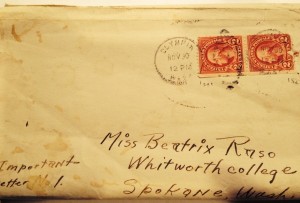
davebealetterThis week is Preservation Week, according to the Association for Library Collections and Technical Services. That makes it a great time to think about preserving our inherited items.

Denise Levenick, The Family Curator, has a tremendous post on her blog about how to decide what to keep and what to throw away when it comes to inherited items. I strongly urge you to take a look.

Her post really resonated with me, because I work with clients all the time on deciding on what to keep and what to let go of. Usually, it’s stuff they purchased, not inherited. That’s tough enough. Inherited items are much more challenging to decide about. Denise’s blog post provides some great guidelines and great questions to ask yourself as you make these decisions.

There are two principles that I say to clients all the time and that I think hold true with inherited items as well:

  • Less is more
  • When you keep everything, nothing is special

When I read this statement in Denise’s blog post, I said “Yes!”

 Sometimes, it’s ok to give yourself permission to hold on to the memory and let go of the clutter.

If you struggle with deciding what to keep among your inherited items, you’ll get some great insight with Denise’s post.
Filed Under: Preservation Tagged With: Family Curator, learning opportunities, organizing aids

Where are your family treasures?

April 24, 2014 By Janine Adams 7 Comments

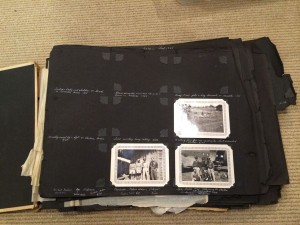
Where are your family treasures?This week, I was working with a wonderful organizing client. As she gave me a tour of the storage spaces in her home, she said, “This is my most treasured possession!” And she bent down and pulled a plastic bin out from under the bed. Inside was her father’s World War II photo album, along with a few other war artifacts. The photo album had small black-and-white photos mounted onto black paper with meticulous white handwritten captions. The pages were deteriorating and some of the photos had fallen out of their mounting.
I oohed and ahhhed because it was an amazing heirloom. But I challenged her a little by saying, “Why is your most treasured possession stored under the bed in a non-archival plastic bin?” One day (soon, I hope), we will work together to get this item and some other heirlooms into safer storage.

That very same day, my mother’s cousin asked me for a photo of my grandfather for the genealogy poster he is putting together. So I rifled through the box of family photos that my mother gave me, trying to locate a good picture for him. As I did that, I realized that these photos are among my most treasured possessions, yet I am not treating them with the respect they deserve. They’re not archivally stored, nor are they organized.

When I acquired this box in December, I blogged about my plan to deal with them. But I’ve done nothing. I keep waiting for a free block of time.  should know by now that the free time is never going to materialize on its own. I have to set aside time for this project. Luckily for me, this branch of the family is having a reunion in a couple of months, so I can get some help identifying the people in these photos!

How about you? Do you have treasured inherited items that are languishing in unsafe conditions? If you need information on how to handle and store them, check out Sally Jacobs of The Practical Archivist and Denise Levenick of The Family Curator. Don’t wait for something bad to happen. Carve out some time to deal with them now.

Filed Under: Challenges, Organizing, Preservation Tagged With: Family Curator, family photos, keepsakes, practical archivist, time management

Are you attending Midwestern Roots Family History and Genealogy Conference?

April 17, 2014 By Janine Adams 2 Comments

Midwestern Roots 2014 ConferenceI’m very excited! I just registered for the Indiana Historical Society’s Midwestern Roots Family History and Genealogy Conference, August 1 and 2 in Indianapolis. Indy is within driving distance for me, so when I saw the caliber of the offerings at this conference, it was a no-brainer to sign up. Presenters include Thomas MacEntee of Geneabloggers and High Definition Genealogy; Lisa Louise Cooke of Genealogy Gems (in fact, I found out about the conference through Lisa’s newsletter); Anne Gillespie Mitchell of Ancestry.com, and Warren Bittner, genealogical researcher and trustee for the Board for Certification of Genealogists, among other great speakers.

I also signed up for a pre-conference session on preserving original family documents, presented by Romana Duncan-Huse, senior director of conservation at the Indiana Historical Society. I’m very interested in continuing my education on preserving inherited items.

If you’re an avid conference-goer like me and live near Indianapolis or wouldn’t mind traveling there, I encourage you to check out the program at the link above. At only $150, it’s a very moderately priced conference.

If you plan to attend, please let me know!

Filed Under: Excitement, General, Preservation Tagged With: conferences, excitement, learning opportunities

Find genealogy files on your computer with metadata

March 18, 2014 By Janine Adams Leave a Comment

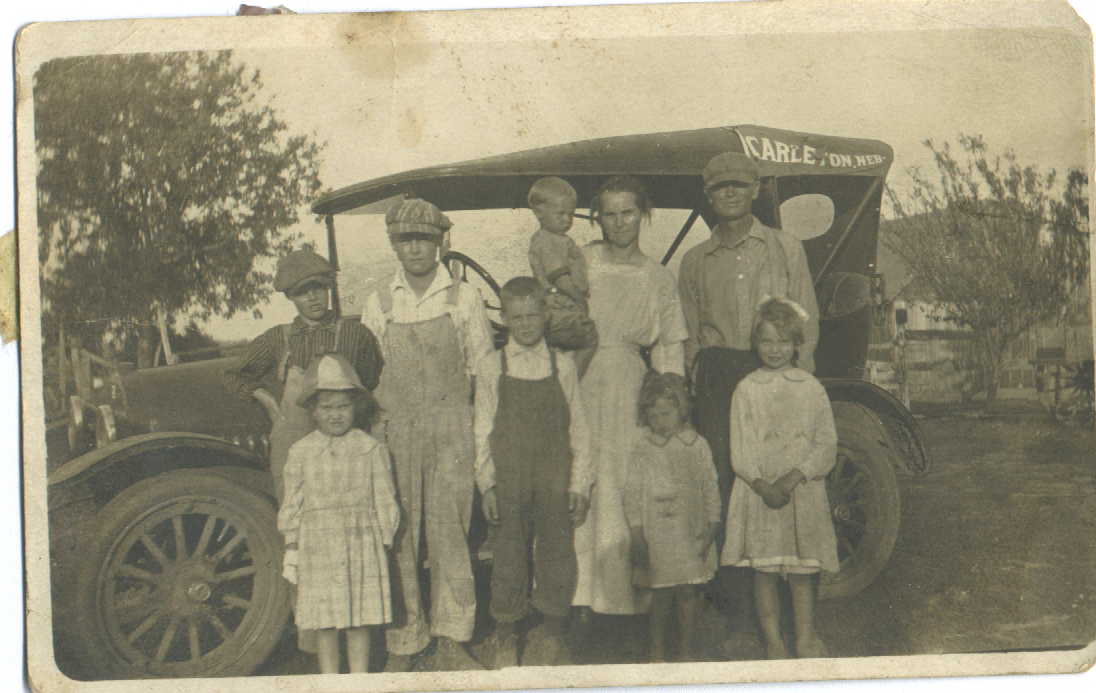
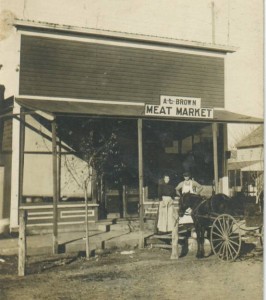
Brown family, before trip to Nebraska, 1922Brown family, before trip to Nebraska, 1922AJ Brown meat marketAs I mentioned in my last blog post, being able to easily access my genealogy research findings is critical to me. I’m creating a reasonable file structure on my hard drive, but I can’t put a ton of information about a document in the file name. Happily, there’s a way I can find all the documents or photographs pertaining to one thing (like a location or a surname) and that’s by tagging my files with metadata.

When I went to RootsTech last month, I heard a couple of talks on metadata (one Mac focused, one PC focused). So I know more than I did  before the conference, but I’m certainly no expert. Here’s a brief primer on metadata, with links to more in-depth information.

What is metadata?

The word metadata literally means “data about data.” So it’s information about what’s in a file or a photo. Think about a caption with info scribbled beneath is or on the back, saying who is in the picture, where it was taken, and when. That’s metadata. You can attach the same sort of information to your digital photos and scans, embedded in the file, without marring the photo.

If you’re familiar with tagging a document with keywords in Evernote or Springpad, you’ll understand the concept. Think also how you tag people in photographs in Facebook. Just use terms you can imagine searching on.

How do you add metadata?

Very generally, you add metadata by right-clicking on a file within the Windows Explorer or Mac Finder, then clicking on Properties (Windows) or Get Info (Mac). On a Windows machine, you’d then click on Properties, then on the third tab, Details. You’ll see a form you can fill in with varying types of data. On a Mac, it’s a little more free form. After clicking Get Info, you fill in the tags you want in the Spotlight Comments section at the top of the info window. Use a semicolon to separate tags.

You can also download software specifically for adding metadata. I need to research that more for my own files. I do know that I want to keep this as simple as possible.

Why bother using metadata?

Even in the most organized file structure, you can only fit so many characters in a file name. And long file names can become unwieldy. Embedding metadata allows you to easily find the files you’re looking for, even if the search terms aren’t those you’d put in a filename. Also, the information stays with the file when you share it. The photo above, of my great grandfather’s meat market in Nebraska, has no metadata attached to it, except that the name of the cousin who sent it to me. I have many photos like that and I hope to make them more meaningful by embedding metadata.

How can you learn more about metadata?

I know I’m not giving you a whole lot of information here, partly because I use a Mac and don’t have a Windows machine at my fingertips to test things on.  Here are some online resources to help you get started.

  • Metadata for Digital Images, presentation by Flip-Pal Scanner at 2013 RootsTech (handout)
  • Understanding Metadata and Genealogy, Lisa Louis Cooke’s Genealogy Gems podcast (video interview with Randy Whited)
  • Labeling Digital Photos, on All About Digital Photos (more in-depth information on metadata and software)
  • Labeling Photos with IPTC, Kimberly Powell, About.com Genealogy (info on the IPTC metadata standard)

My goal with this post was to make you aware of the concept and the utility of metadata and urge you to consider tagging your documents. Don’t worry about being perfect. Any data you add will be helpful.

Filed Under: Genealogy tips, Preservation, Technology Tagged With: Brown, family photos, genealogy tools, keepsakes, metadata, RootsTech

  • « Go to Previous Page
  • Page 1
  • Interim pages omitted …
  • Page 7
  • Page 8
  • Page 9
  • Page 10
  • Page 11
  • Go to Next Page »

about me

I'm Janine Adams, a professional organizer and a genealogy enthusiast. I love doing family history research, but I find it's very easy for me to get overwhelmed and not know where to turn next. So I'm working hard to stay organized and feel in control as I grow my family tree.

In this blog, I share my discoveries and explorations, along with my organizing challenges (and solutions). I hope by sharing what I learn along the way I'll be able to help you stay focused and have fun while you do your research, too.

tags

30 x 30 Adams amy johnson crow anniversary Brown cemetery census Civil War conferences connections dna electronic files Evernote excitement Family Curator family photos genealogy tools getting started goals How They Do It Igleheart Jeffries keepsakes learning opportunities maps newspapers NGS organizing aids overwhelm paper files planning quick tips rasco record keeping research research log research trip resources RootsTech social history source documentation Stacy Julian technology time management vital records

join the facebook community!

join the facebook community!

My organizing business

Learn more about my organizing business, Peace of Mind Organizing®.

Subscribe by RSS

  • RSS - Posts
  • RSS - Comments

© 2026 Janine Adams


Loading Comments...