• BLOG
  • ABOUT
    • Privacy Policy

Organize Your Family History

Stay focused and happy while exploring your roots

Walking the paperless walk

August 26, 2016 By Janine Adams 16 Comments

nofilesI’ve been blogging here through the years about my growing disenchantment with paper. I’ve stopped printing out documents I find digitally and instead save them to my computer and file them by surname. (That’s what works for me…you may choose to file differently.) I’ve started scanning notes and other genealogy paper that comes across my desk and discarding much of it after scanning. I do keep original documents as well as documents I’ve sent away for. But the vast majority of my genealogy information is not in my paper files

Last week when I was at the Allen County Public Library–I promise I’ll stop talking about that trip soon–I didn’t photocopy a single thing. Instead, I used the library’s copying machines to scan the documents I wanted to take home. I brought along a flash drive for that purpose and the process was very easy. The machines even allowed me to put all the documents from one source into a single file, rather than a file for each page. It does mean I had to rename each file and drag it to the appropriate folder on my hard drive. But I didn’t have a bunch of paper to process when I got home! Nor did I have paper to lug home. Or carry to the hotel from the library. Moreover, I was able to easily zoom in text to read it more easily. Not once did I wish I had a magnifying glass.

And here’s the kicker: The library (understandably) charges for paper copies. But they don’t charge a thing to scan to a hard drive, which was literally no more challenging than making a photocopy.

I feel better and better about limiting  paper in my genealogy research. It’s kind of amazing to me that just 3.5 years ago I was still printing much of what I found.

I was really pleased that my paperless inclinations were reinforced on my library trip!

Photo by Tom Woodward via Flickr. Used under Creative Commons License.
Filed Under: Challenges, Genealogy tips, Organizing, Technology Tagged With: electronic files, organizing aids, record keeping, technology

Resisting the urge to print

July 12, 2016 By Janine Adams 16 Comments

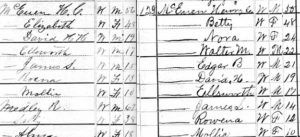
1800sidebysideI used to print all my source documentation and then analyze the printed version and add facts to my Reunion software on my computer. In fact, as recently as 2013 I blogged about how printing gave me comfort.
But that’s changed and these days I’m not even tempted to print. In November, I posted 8 reasons not to print and I stand by it. Organizing my research is much easier now that I’m not looking at a lot of printed documents. Every now and then I pull out a paper file and look at something I printed years ago, but I bet that happens fewer than ten times a year.

Right now I’m going through all my source documentation and in the process cleaning up my electronic files. In doing so, I found the family who had been counted twice on the 1880 census. I needed to compare the two census documents side by side. That’s when I felt the urge to print. My initial thought was that it would be easier to look at the documents on paper, rather than on my computer. One of the documents had already been printed and was in my file. I came really close to printing out the other one, when I realized that looking at the paper documents would be harder for me, not easier. The type is so small on the printed document that I might have had to get out my magnifying glass and squint. That’s the opposite of easy!

I had originally found the census documents on Ancestry and saved them to my hard drive. So I just opened the documents on my computer in Preview (that’s the Mac default pdf and jpg viewer), zoomed in on the family in question and sized each of them so that they fit side by side on my screen easily–I didn’t need to see the entire document at a glance, after all. And then I was able to easily compare them, line by line. I had Reunion open as well, so it was simple for me to enter data into my ancestors’ records and source each fact properly.

What I’m learning in my research, over time, is that going paperless is just plain easier. When I transcribe my ancestors’ Civil War pension files, I use an electronic version, which allows me to zoom in when the handwriting is a little puzzling. And I’m not shuffling a lot of long pieces of paper. (Those documents came from the National Archives in paper form. I put source information on each and then scanned the whole file into one long pdf. I detail that process here.)

The keys to successfully eschewing printing, I believe, are twofold:

  1. A good file naming protocol and folder structure, so that I can easily see what I have for each ancestor. I file by surname and individual, which is working well for me.
  2. A solid backup protocol, in  case of hard drive failure. I use CrashPlan Pro to back up to the cloud and Time Machine to back my Mac onto an external hard drive that sits on my desk.

As commenter Maria Tello mentions, having a large monitor makes viewing electronic documents easier.

I was glad I resisted the urge to print that 1880 census document. It made analysis easier–and I’m sure it was easier on my eyes!

Filed Under: Challenges, Genealogy tips, Organizing, Technology Tagged With: electronic files, organizing aids, record keeping, technology

8 reasons not to print

November 3, 2015 By Janine Adams 32 Comments

8 reasons not to print genealogy documentsWhen I started this blog in 2012, I printed everything. I did a lot of research online, but I would print out the documents I found online and read the printed version. Then I would  file them in my paper filing system after recording the information into my family tree software. Gradually, I’ve stopped that practice. I think the turning point was when I created an electronic filing system that I was confident in. Before that, I was afraid I wouldn’t find the document on my hard drive.
Now, the only paper that goes into file folders are documents that came to me in hard copy form. And even some of those are scanned and discarded.

In an effort to encourage others to consider giving up printing, I’ve come up with a list of eight advantages to going paperless:

  1. It’s less expensive. When you print, you’re using paper, toner (or ink) and electricity. And you’re creating wear and tear on your printer.
  2. It takes up less space. As your paper files (or binders) grow, they take up more space. (And certainly piles of unfiled paper take up a lot of space!)
  3. It’s easier to file. More effort goes into filing a piece of paper into a physical file folder or binder than into an electronic folder.
  4. Electronic documents are easier to find. If you misfile a paper file or leave it in a pile, it can take a lot of effort to find it.
  5. Electronic documents are searchable (usually). With a few keystrokes you can find all your electronic documents that share certain attributes (like a surname).
  6. Electronic files are easier to read. You can zoom, adjust contrast, brighten and do all sorts of things to electronic documents that make them easier to read. And that makes your research easier on your eyes. (I can’t remember the last time I used my lighted magnifier!)
  7. Electronic documents are easily backed up. I recommend using both an external hard drive and a cloud backup.
  8. Electronic files are easier to share. No photocopying or mailing necessary!

Do you have any reasons to add? I’m convinced, but I’d love to hear from anyone who would like to make a case for keeping paper copies of everything!

Photo of printer by Sir Adavis via Flickr. Used under Creative Commons License. (Red X added using PicMonkey.)

Filed Under: Genealogy tips, Organizing, Technology Tagged With: electronic files, organizing aids, record keeping, technology

Are you backing up your genealogy data?

November 4, 2014 By Janine Adams 29 Comments

externalharddriveI have a good friend who recently lost most of her data on Dropbox. She was using Dropbox instead of her computer for storing work-related files (not genealogy related). She felt they were safe there. Until they weren’t. One day she realized that most of her files on Dropbox seemed to have vanished. She hesitated to contact them immediately, figuring it was some sort of temporary glitch or user error.

When she did contact Dropbox, they confirmed that the files and folders were gone. They offered no explanation. And they informed her that they delete files that haven’t been touched in 30 days. They offered her nothing in terms of assistance. And they did all that via email, declining to give my friend a telephone number for customer support. I was really shocked and disappointed.

Luckily, my friend uses Carbonite and her Dropbox account was included in the backup. So she was able to restore the files lost by Dropbox to her computer.

That got me thinking about how horrible I would feel if I lost my digital genealogy records (or most of my digital files, for that matter). I’ve developed a back-up scheme that makes me comfortable, but I’d be very interested to hear from you about how you ensure that your data are protected.

I store all my data on my hard drive. (I have a perhaps irrational fear of storing things only in the cloud.) My family tree info is in Reunion. My scanned files are in my Genealogy folder, filed by surname. I do have an Ancestry.com tree, but it’s a supplement to what I have on my hard drive.

I back up my hard drive every 15 minutes with CrashPlan Pro. When my MacBook is at my desk at home, I have it plugged into an external hard drive. I use Time Machine to back up hourly as well.

There are some things in my genealogy life that aren’t fully backed up. Some of my items on Evernote, for example, aren’t stored on my hard drive. This blog is backed up to Dropbox daily. (I felt better about that before my friend’s Dropbox experience.)

I feel secure with this system, but I fear it’s a false sense of security. I’d love to hear from you. How do you back up your genealogy data?

Photo by Karen via Flickr. Used under Creative Commons License.

Filed Under: Challenges, Technology Tagged With: electronic files, technology

  • « Go to Previous Page
  • Page 1
  • Interim pages omitted …
  • Page 11
  • Page 12
  • Page 13
  • Page 14
  • Page 15
  • Go to Next Page »

about me

I'm Janine Adams, a professional organizer and a genealogy enthusiast. I love doing family history research, but I find it's very easy for me to get overwhelmed and not know where to turn next. So I'm working hard to stay organized and feel in control as I grow my family tree.

In this blog, I share my discoveries and explorations, along with my organizing challenges (and solutions). I hope by sharing what I learn along the way I'll be able to help you stay focused and have fun while you do your research, too.

tags

30 x 30 Adams amy johnson crow anniversary Brown cemetery census Civil War conferences connections dna electronic files Evernote excitement Family Curator family photos genealogy tools getting started goals How They Do It Igleheart Jeffries keepsakes learning opportunities maps newspapers NGS organizing aids overwhelm paper files planning quick tips rasco record keeping research research log research trip resources RootsTech social history source documentation Stacy Julian technology time management vital records

join the facebook community!

join the facebook community!

My organizing business

Learn more about my organizing business, Peace of Mind Organizing®.

Subscribe by RSS

  • RSS - Posts
  • RSS - Comments

© 2026 Janine Adams


Loading Comments...