• BLOG
  • ABOUT
    • Privacy Policy

Organize Your Family History

Stay focused and happy while exploring your roots

The scanner that comes with your iPhone

September 24, 2019 By Janine Adams Leave a Comment

I recently learned on one of the many terrific Facebook genealogy groups I belong to (I apologize that I don’t remember which one), about a little gem hiding in the iPhone and iPad. I’ve been using an iPhone since I bought a 4S back in 2012 (the same year I started this blog!), but I had never heard about this feature. It’s the scanner feature on the native Notes app.

I don’t use the Notes app much, since I tend to use Evernote to actually keep notes, but I’ve used it off and on over the year. Since I learned about the scanner feature, I’ve using it every time I have a piece of paper I want to capture. I’ve found it easier than using a dedicated scanning app. And it’s handy sometimes that creates a pdf, rather than a jpg.

Here’s how it works:

Let’s say you’re in a library or repository and find a document you want to save.

  1. Open the Notes app on your iPhone or iPad.
  2. Press the icon to create a new note.
  3. Touch the icon that looks like a + sign inside a circle.
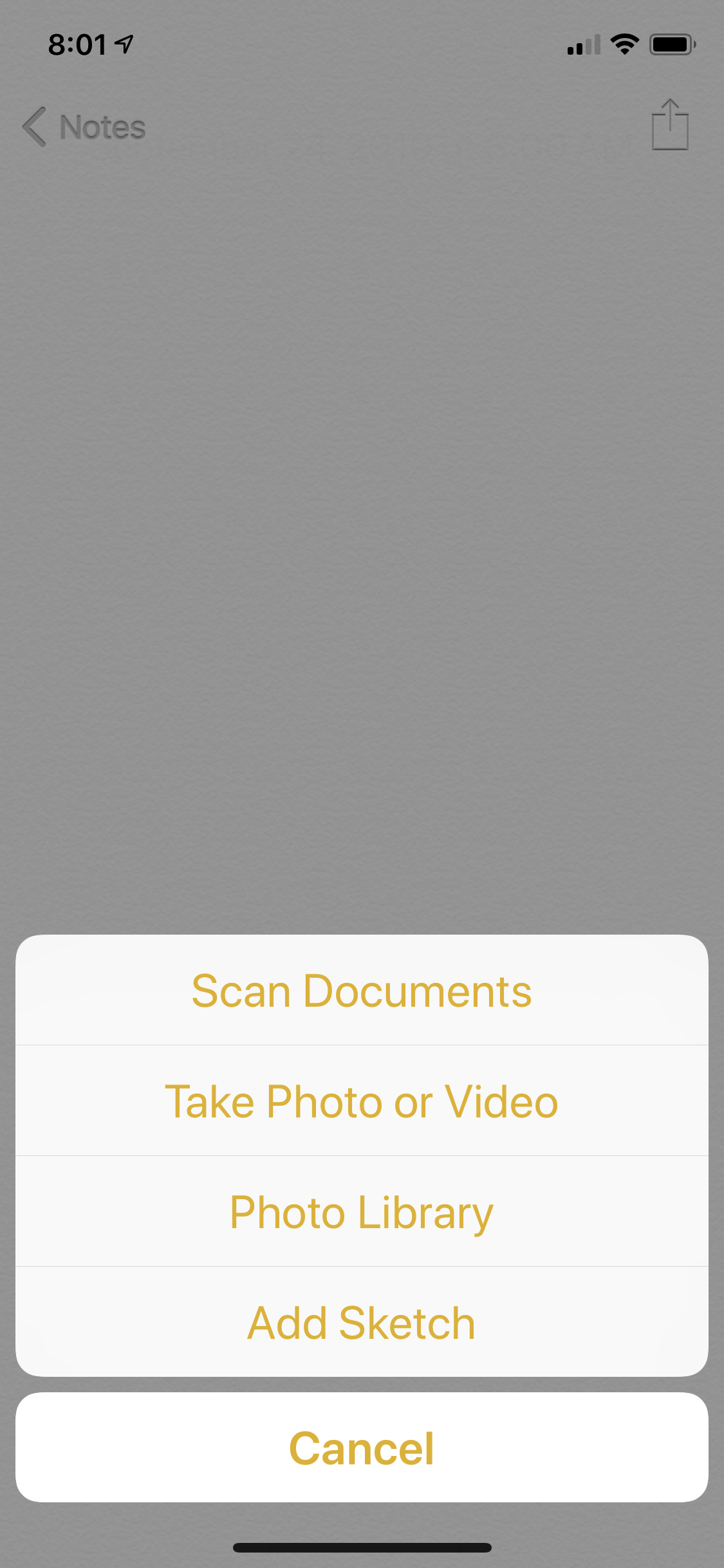
  4. Touch Scan Documents
  5. Position your phone above the document.

The app will try to locate the edges of the document and take the picture automatically. (It’s like my bank’s app when I’m doing a mobile deposit of a check.) If it can’t find the corners quickly, you can press the round shutter-release icon (like on the camera app) and take the picture and then adjust the corners as necessary. For books that aren’t lying flat, that’s more likely to happen.

For pieces of paper, the photo tends to get taken automatically. It’s really fast and easy–it feels like magic.

Once you have the scan, you can press Save, or you can press the little icon of the picture and then retake it. Once you press Save, you can keep it in your Notes app for processing later or use the Share icon to either email it to yourself or save it in Evernote, Dropbox, Google Drive or other apps that might work for you.

On my next research trip, I will give it a try. I think it will save time over just using my phone’s camera, as I did on my Kentucky trip.

One caveat: I understand that in the latest iOS iteration from Apple, the iPad has its own operating system, rather than sharing the iPhone’s. I have not downloaded iOS 13 yet (I like to wait until the kinks are worked out before downloading) and I don’t use an iPad. I’m assuming this feature will exist in the new iOS for the iPhone and the iPad, but I haven’t tried it.
 

Filed Under: Genealogy tips, Technology Tagged With: electronic files, genealogy tools, organizing aids, technology

Keeping track of learning resources

June 12, 2019 By Janine Adams 17 Comments

I don’t know about you, but I’ve purchased a lot of educational products surrounding genealogy. And I somehow hope I’m not alone when I confess that I have not read/viewed the majority of what I’ve purchased.

A big part of the problem is that the products are typically downloaded and I don’t have a great system for storing them where I’ll find them again. I also don’t have a great memory, so I often forget I’ve even made the purchase.

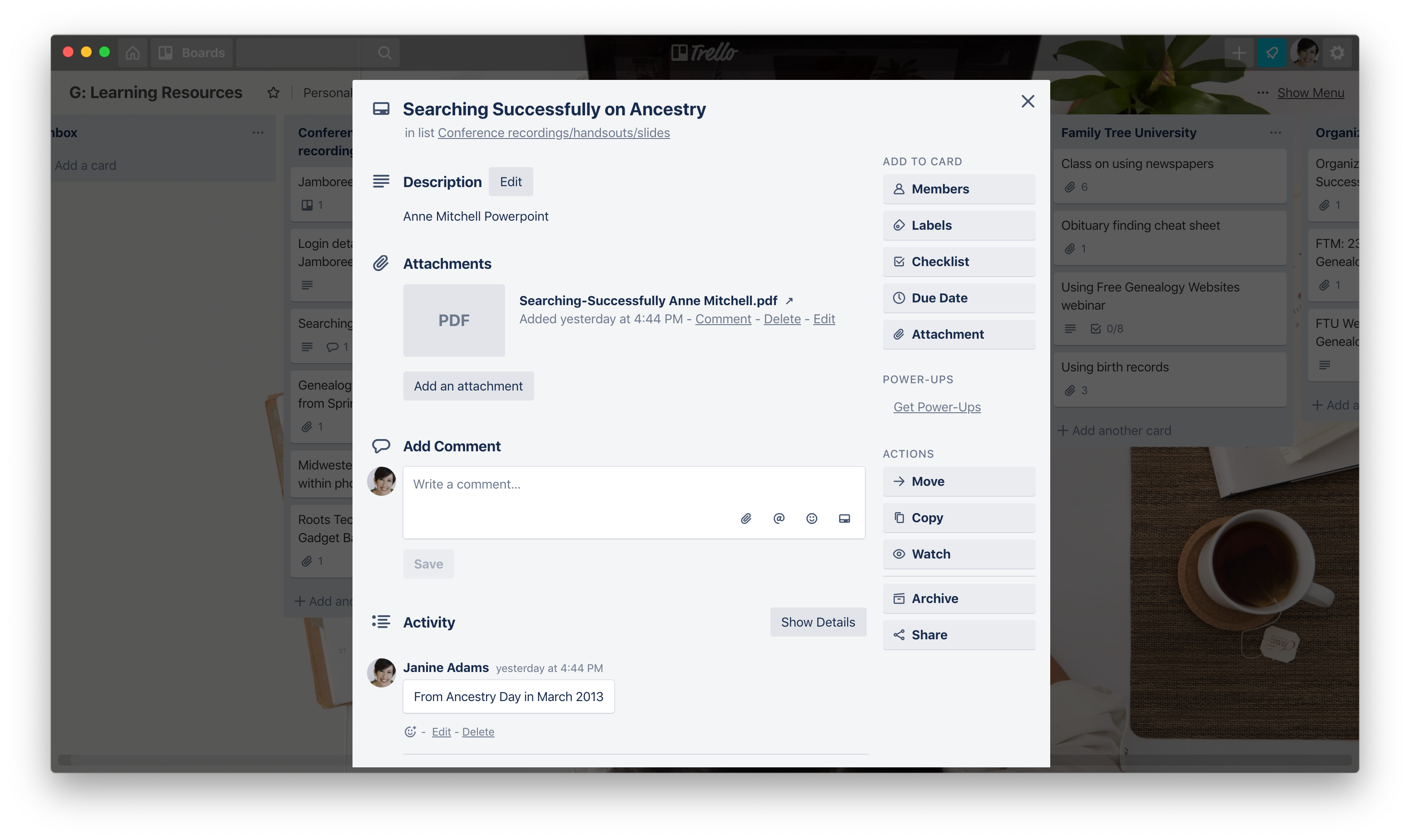
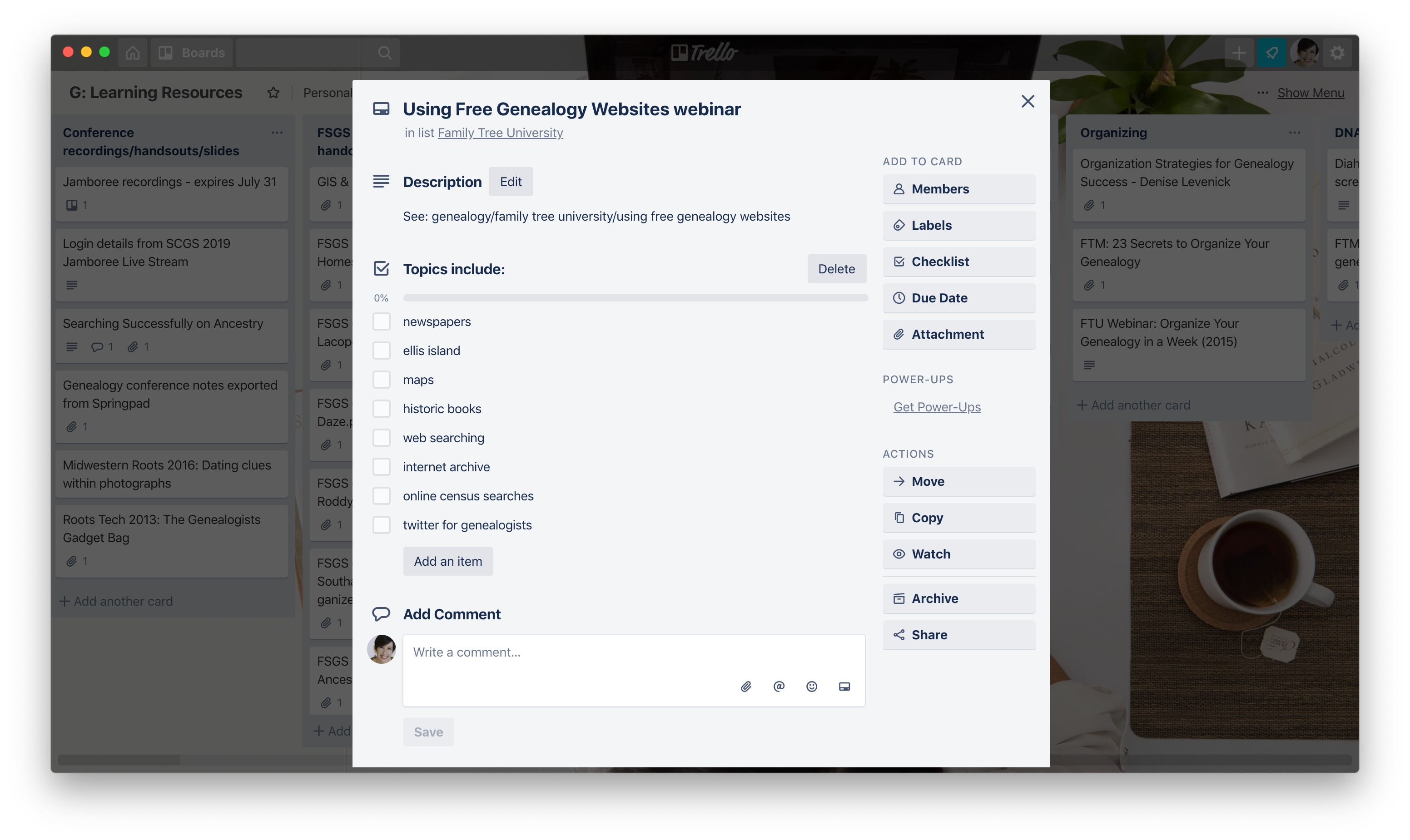
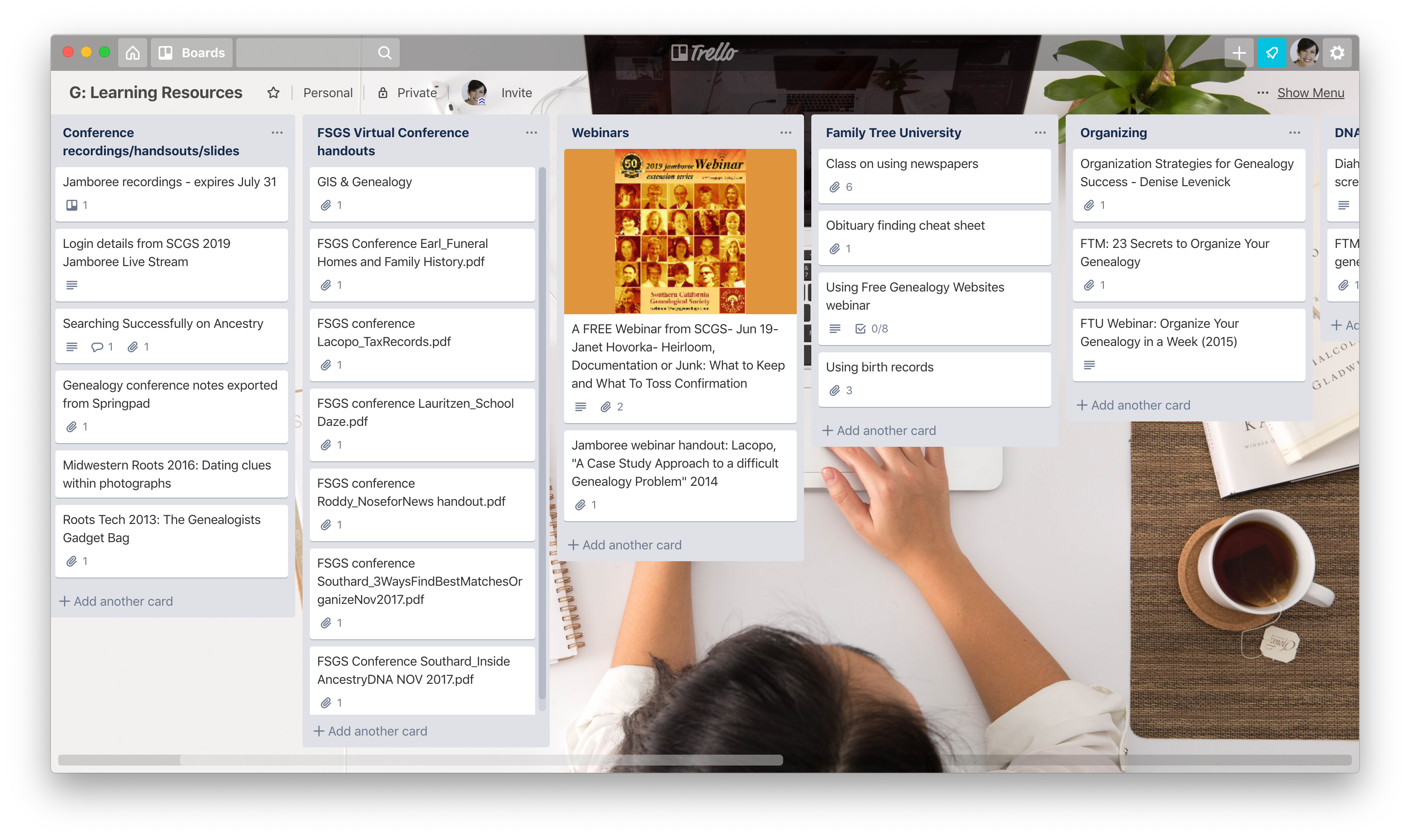
I decided to try to do something about this. I created a Trello board called G: Learning Resources. (I use the G prefix before all my genealogy-related Trello boards.) Within that board, I created some lists, by topic or source. Then I combed my hard drive for these downloaded documents. I’m not finished yet, but I found a lot in my Genealogy folder. Some were in subfolders, so there was at least an attempt at organization. (I even had one called Learning Resources to Read that I don’t remember creating and haven’t looked at in years.) I created notes for each of the individual resources and attached either the document or a path to the document to each note. For smaller documents, like short pdfs, I attached the document itself to the note in Trello. For resources larger than 10 megabytes (the Trello limit for attachments for the free version), I’ve added the path to the file on my hard drive in the description area of the note.

I’m just getting started but here’s a portion of that Trello board. (You can click on the image to see a larger version.)

Janine's Learning Resources Trello Board


And here’s an example of an individual note. It’s for the slide deck from a talk on Ancestry. At the top of this post is another note I created for a webinar that consisted of bunch of different files on different topics.

Now that my resources are together I think I have a fighting chance of actually benefiting from them. A giant find today was the screencast that Diahan Southard had made of a personal consultation we had back in 2015. I knew she’d sent it to me and had tried unsuccessfully to find it on my hard drive last year. (The problem was that it had my name, not hers, in the file name, since she had created it.) So I renamed it, added it to my Trello board and am take great comfort in knowing I’ll be able to find it when I turn my attention back to my DNA research.

Trello allows for Labels (like tags) to be added to individual notes. So when I have more time to spend with it, I’ll think I’ll add some labels, including a “Read” one so I can mark the resources I actually read.

This has been great for corralling my backlog and making it accessible. As a bonus, I think it will help me be more mindful about future purchases. Since I’ll easily be able to see what I already have, I may purchase less (and money). And now I have a place to put those purchases. I can add newly purchased resources to my Learning Resources Trello board and tag them with a “New” or “2019” label so they don’t get lost among the older stuff.

I feel like this will work for me. I’m interested, though, in how you keep track of your learning resources. Please share in the comments!

Filed Under: Challenges, Genealogy tips, Organizing Tagged With: electronic files, genealogy tools, organizing aids, resources, Trello

Discussing digital files on Genealogy Happy Hour

February 15, 2019 By Janine Adams 2 Comments

I’m a guest on the most recent episode of Genealogy Happy Hour, published today. I had a great time talking with with hosts Amy Gabrill Lay and Penny Burke Bonawitz about organizing digital files in genealogy research (a favorite topic of mine!).
Genealogy Happy Hour is a fun monthly “genealogy podcast with two blondes and a bottle,” to quote its tagline. It’s mostly about genealogy and a little bit about wine. These are two of my favorite things to talk about (and participate in), so I jumped at the chance to talk with these fun folks when they invited me!

You can listen to Episode 38 here. I hope you enjoy listening to it as much as I enjoyed doing it!

Filed Under: Excitement, Genealogy tips Tagged With: electronic files, genealogy happy hour, podcasts, record keeping, technology

Appreciating my digital lifestyle

February 8, 2019 By Janine Adams 11 Comments

For the past week, as I promised I would in this blog post, I’ve been going through a largish stash of genealogy-related paper that I found when I went in search of some tax documents. I vowed not to continue my online research (where I print nothing and don’t have to process paper) until this paper backlog was gone.

I’ve spent 30 minutes a day reducing the paper pile ever since. I’ve recycled a lot and I’ve scanned some documents. (I’m proud of myself that I scanned on the spot, rather than creating a “to scan” pile to deal with later.) It’s starting to get kind of tedious, but I’m really thrilled with my progress.

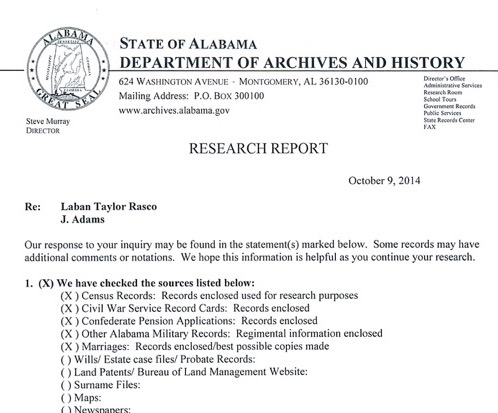
But here’s the thing that really hit me these last couple of days. Dealing with paper genealogy records puts a real strain on my eyes. I had sent away to the Alabama Archives for the Confederate pension records of my second great grandfather, Laban Taylor Rasco (1844-1926). They had kindly sent a whole bunch of paper, most of it downloaded from Ancestry. I think when I received it, I was overwhelmed and probably daunted by the fact that much of it was comprised of black-and-white prints of documents that were on yellowed paper at the time they were digitized. Very hard to read. That’s why the papers landed in the pile.

I’ve spent the last couple of days with these Alabama pension records, looking to see which of them I already have on my hard drive and then going to Ancestry to download better copies of the documents I didn’t already have digitally. (And I’m downloading a bunch of new-to-me pension documents from that collection at Ancestry while I’m at it.) In order to compare what I have (or what I find) with the paper version, I have to squint, dust off my magnifying glass, or move the paper to better light in order to read it. My eyes aren’t getting any better with age and this not my idea of fun.

Once the documents are on my hard drive, I can simply zoom in on them to read them. So easy. So painless. And a huge reason I favor digital over paper.

This little project has shown several benefits already: A reduction in paper hanging around my house (yay!) and an appreciation for the decision I made several years ago to eschew paper. I’m so glad I’m doing it!

If any of you who are joining me on this quest have enjoyed some benefits, please share in the comments!

Filed Under: Challenges, Genealogy tips, My family, Technology Tagged With: electronic files, organizing aids, rasco, record keeping, technology

  • « Go to Previous Page
  • Page 1
  • Interim pages omitted …
  • Page 6
  • Page 7
  • Page 8
  • Page 9
  • Page 10
  • Interim pages omitted …
  • Page 15
  • Go to Next Page »

about me

I'm Janine Adams, a professional organizer and a genealogy enthusiast. I love doing family history research, but I find it's very easy for me to get overwhelmed and not know where to turn next. So I'm working hard to stay organized and feel in control as I grow my family tree.

In this blog, I share my discoveries and explorations, along with my organizing challenges (and solutions). I hope by sharing what I learn along the way I'll be able to help you stay focused and have fun while you do your research, too.

tags

30 x 30 Adams amy johnson crow anniversary Brown cemetery census Civil War conferences connections dna electronic files Evernote excitement Family Curator family photos genealogy tools getting started goals How They Do It Igleheart Jeffries keepsakes learning opportunities maps newspapers NGS organizing aids overwhelm paper files planning quick tips rasco record keeping research research log research trip resources RootsTech social history source documentation Stacy Julian technology time management vital records

join the facebook community!

join the facebook community!

My organizing business

Learn more about my organizing business, Peace of Mind Organizing®.

Subscribe by RSS

  • RSS - Posts
  • RSS - Comments

© 2026 Janine Adams


Loading Comments...