• BLOG
  • ABOUT
    • Privacy Policy

Organize Your Family History

Stay focused and happy while exploring your roots

My “good enough” research log

January 10, 2020 By Janine Adams 8 Comments

My good enough research logWe’re in the midst of a 30 x 30 challenge this month so I’ve been researching every day. It feels great. I have no more than 30 minutes (sometimes less) to research most days this month, so I rely on my research log to help me start each session.

I’ve blogged before about my research log and its value. This month, because I’m working on my RootsTech talk “The Imperfection Genealogist,” I’ve been reflecting on the fact that my very informal research log is far from perfect. But it’s certainly good enough.

How do I know it’s good enough? It’s because I’m in touch with why I want to keep a research log and the ways I use it. For me, it’s about knowing what I’ve researched in a given session and (perhaps more importantly) what my next steps are. It also tells me at a glance how frequently I’m researching. I keep my research log in Evernote, but I track of all my documents and family tree elsewhere, so I’m not creating source citations or storing documents in my research log. You might have a research log for different reasons. And yours may be very different from mine. And that’s great.

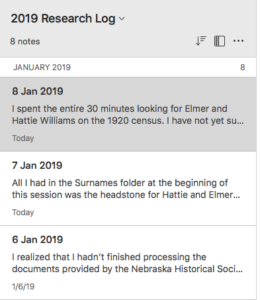
My good-enough research log is an Evernote notebook by year (I started the 2020 research log notebooks ten days ago), pinned as a shortcut in the sidebar. Each time I research, I open the notebook, create a new note with today’s date, and then write in free from what I worked on that day. I write down the questions that come up. I write down any discoveries. And I end the session by writing down the next steps. That way, when I start the next session, whether it’s the next day or the next month, I know where to start. That’s been a huge time saver for me. (I blogged in more detail about my research log in this post. About a year ago, I wrote a post about how my research log keeps me focused.)

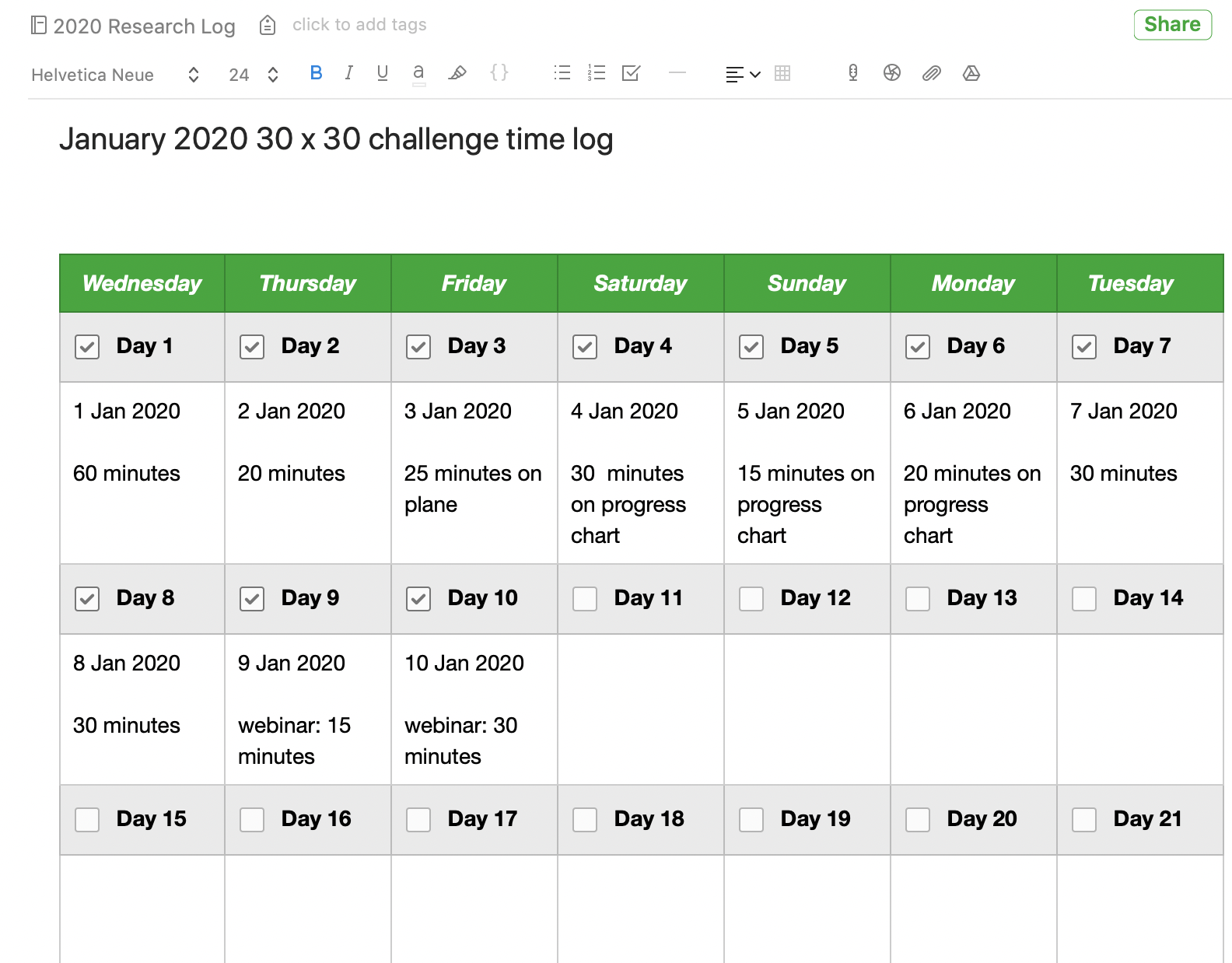
This month, I’ve added an Evernote template that allows me to check off that I completed a session and I also add how many minutes I researched, because I’m hoping that I’ll get in 900 minutes in the 30 x 30 challenge, even if I don’t manage 30 minutes in some individual sessions. This is motivating to me, because when I see the checkmarks each day it makes me want to not break the chain. I also jot down in a couple of words what type of work I did. The picture at the top of this post is screenshot of the note that contains the template, which is in addition to my usual daily note but also stored in the 2020 research log notebook. (To get that template, I clicked on New Note, then on Template right in the note, then Habit Tracker in the Template Gallery. That inserted the template into the note and I edited it a bit.)

When I first started contemplating creating a research log in 2012, I could understand its value but I got wrapped up in trying to do it perfectly. Predictably, my first attempts failed. But as soon as I got in touch with what I really wanted out a research log and I made it easy to accomplish, things fell into place. Now, I’m glad to say that I’ve developed a habit of logging my session every day.

A couple of years ago, I created a Facebook group called Genealogy Research Loggers. We’re a pretty quiet group, but if you’d like some help and accountability for creating a research log habit, please join us!

For detailed information on how I organize my own genealogy research (including my research log), check out my Orderly Roots Guide, How I Do It: A Professional Organizer’s Genealogy Workflow, available for $19.99.
Filed Under: Challenges, Organizing Tagged With: Evernote, genealogy tools, research, research log

How my research log keeps me focused

January 8, 2019 By Janine Adams 12 Comments

Ever since I got serious about genealogy in 2012, I’ve struggled with keeping a research log. (Before that, I didn’t even consider keeping one.) In March 2017, after a few unsuccessful attempts at other formats, I settled on keeping my research log in Evernote with a simple note per session where I take free-form notes and always end the note with next steps. The notes are kept in a notebook by year. In April 2017, I blogged in detail about my informal research log. And in March 2017, I blogged about why keeping a research log is important. (If you click on that link, be sure and read the comments, which are really insightful.)

I’m in the middle of a 30 x 30 challenge and therefore researching daily in short sessions. I’m proud that there is a note for each day this month in my 2019 Research Log notebook. One benefit I’m seeing of my research log is that it’s keeping me focused and saving me time. And I appreciate that!

I always write next steps at the bottom of each entry. (True confession: Sometimes, during unproductive sessions, I just copy and paste the next steps from the previous day.) That means that when I sit down to research, all I have to do is pull up the previous day’s session notes and I know exactly what to work on. No more paralysis with the question “What should I work on today?”

Also, writing down what I’m doing seems to keep on task. I try to write as I go with frequent notes in my log each session. Sometimes, though, I end up doing a brain dump at the end of the session. Writing down what I’m doing or have done, keeps my research question top of mind.

When I come across a clue that I want to explore in the future (about a different research question or a different family than the one I’m researching today), I write it down in a follow up folder. I keep follow folders by surname and check them every now and then.

Staying focused is so hard in genealogy research with so many wonderful things to explore and so many temptations put right in front of us. A research log–in concert with follow-up folders to jot down future tasks–is my secret weapon for staying focused. My research log is far from perfect. But it’s consistent and, I’m finding, very helpful.

I have a Facebook group called Genealogy Research Loggers. Please join if you’re interested in research logs!

Filed Under: Challenges, Organizing Tagged With: Evernote, genealogy tools, research, research log

Do you have unread resources on your hard drive?

December 19, 2017 By Janine Adams 16 Comments

Earlier today, I was entering my PayPal transactions into my financial software and I saw that I had purchased a document from Sassy Jane Genealogy last month that I had not read and don’t even remember purchasing. So I looked in my Mac’s Finder to see what I’d downloaded from that website and saw that it was a pdf called Ten Skills Every Genealogist Needs. That sounds fantastic! I can’t wait to read it.

I knew there were doubtless other forgotten documents on my hard drive, so I created a notebook in Evernote called Downloaded items to read/watch NOW and put it in my genealogy stack. Then I went on a hunt for other unread or underutilized resources hanging around on my computer. I bought them with the best of intentions and then moved on to the next shiny object.

I found digital copies of Family Tree Magazine. At least one webinar I haven’t watched. A research guide to Kentucky research. Another Sassy Jane Genealogy guide. And I feel like I’ve barely scratched the surface!

In these next couple of low-key weeks, I’m going to try to actually read or watch these valuable resources. And I vow to do a better job of keeping track of what I buy/download. Evernote should be my friend with this.

How about you? Do you have any learning resources you’ve downloaded but forgotten about? Happy hunting!


Filed Under: Challenges, Genealogy tips Tagged With: Evernote, learning opportunities, resources

Backing up Evernote on a Mac (updated)

November 28, 2017 By Janine Adams 4 Comments

I like storing important files on my hard drive, not in the cloud. Call it unreasonable, but I have a distrust of the cloud. Yet I love Evernote, the cloud-based note-taking and information storing app. In fact I depend on it for many facets of my personal, business, and genealogy lives. So I was thrilled when reader Corbin Dodge, J.D., was kind enough to spell out instructions for backing up Evernote to your hard drive, after I expressed my fear of what would happen if Evernote vanished, in a comment on my blog post How I store my genealogy information. I went through all the steps of Corbin’s clear and detailed instructions and now have such peace of mind knowing that my notes are safe and easily accessible outside of the Evernote app. (I back up my hard drive to an external hard drive and to the cloud.) I didn’t want this valuable information to remain buried in the comments, so Corbin has graciously agreed to let me reprint them here. [Note: Evernote issued an update which changed the way the backup is created. This post has been updated to include the new instructions.]

I share your concerns re: what if an app goes belly up (what nightmares are made of!).

One thing I admire about Evernote is that it is easy to backup your notes so they’re accessible even if the app goes away. To do this on Mac:

(1) select the “Notes” heading in the sidebar

(2) On mac, hold down the command key and the “A” key at the same time, which will select all notes (on PC, hold down the control key and the “A” key at the same time)
(3) On the main menu bar, click “File”, then select “Export notes…”
(4) A window will pop up. There is a drop-down box labeled “Format”. It gives you 2 options. Choose “HTML”
(5) Save*

To access the backups, click on any note in the folder. It will open in your default browser. You can backspace out the note name in the url to get the full table of contents of every note that was backed up. Not as smooth to browse as the app, but reassuring to know your notes are accessible even if Evernote goes away! It also saves the images, albeit as a separate image file

*I’ve found this folder structure works well to organize backups for my various apps:
Dropbox / Backups / Evernote / 2017-09-27 Evernote Backup

Selecting the HTML format is a safeguard in case Evernote ceases to exist. The alternate option is to save them as “Evernote XML Format (.enex)”, which is an Evernote-specific file format which saves more metadata about each note (e.g., notebooks, tags, author), so this choice could be useful if you ever need to restore lost notes into Evernote (i.e., if their sync ever messes up). The downside to .enex is that it’s not a universally-friendly file format, so it wouldn’t do you much good if Evernote ever goes kaput.

p.s., an added benefit of backing your notebooks up in HTML format is that you can easily go back and retrieve a previous version of any single note without affecting all of your Evernote notebooks (which would be the case if you didn’t select “HTML” in step 3.

You can learn about Corbin’s digital marketing business at corbin-dodge.com and read about his adventures renovating his 100+ year home at eastwoodbungalow.com. Thank you, Corbin!


Filed Under: Genealogy tips, Technology Tagged With: Evernote, genealogy tools, organizing aids, technology

  • « Go to Previous Page
  • Page 1
  • Page 2
  • Page 3
  • Page 4
  • Page 5
  • Go to Next Page »

about me

I'm Janine Adams, a professional organizer and a genealogy enthusiast. I love doing family history research, but I find it's very easy for me to get overwhelmed and not know where to turn next. So I'm working hard to stay organized and feel in control as I grow my family tree.

In this blog, I share my discoveries and explorations, along with my organizing challenges (and solutions). I hope by sharing what I learn along the way I'll be able to help you stay focused and have fun while you do your research, too.

tags

30 x 30 Adams amy johnson crow anniversary Brown cemetery census Civil War conferences connections dna electronic files Evernote excitement Family Curator family photos genealogy tools getting started goals How They Do It Igleheart Jeffries keepsakes learning opportunities maps newspapers NGS organizing aids overwhelm paper files planning quick tips rasco record keeping research research log research trip resources RootsTech social history source documentation Stacy Julian technology time management vital records

join the facebook community!

join the facebook community!

My organizing business

Learn more about my organizing business, Peace of Mind Organizing®.

Subscribe by RSS

  • RSS - Posts
  • RSS - Comments

© 2026 Janine Adams


Loading Comments...