• BLOG
  • ABOUT
    • Privacy Policy

Organize Your Family History

Stay focused and happy while exploring your roots

What to do with original documents after scanning

June 10, 2022 By Janine Adams 9 Comments

I do most of my research online, so this hasn’t come up a lot. But this week I’m going through documents that had lived in my parents’ home and my aunt’s home and some of them are original vital records. I did my first group of ten a couple of days ago and scanned and processed them. And then I had to decide what to do with the originals.

This morning I went through the little stack one by one and followed my gut about those I wanted to file into the paper files I have left over from before I processed everything digitally and those I would feel comfortable discarding.

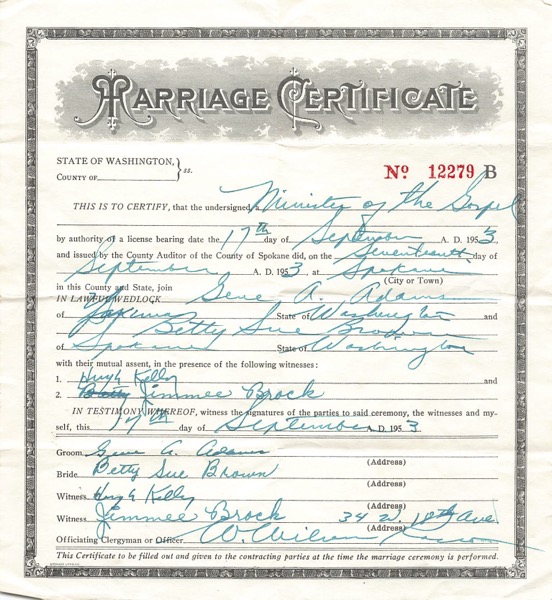
In truth, I could discard any of them, since I’ve captured the images. But my gut tells me to hang on to those documents that have original writing or signatures. An example is my parents’ marriage certificate, shown above. They were married by father’s uncle and I think he filled out the form. I don’t have a good, logical reason for this decision. It just feels right because these documents feel special. I have the space in my file cart and the files are already created, so it will be a simple matter to file them. If I have to create a new file folder label and put it on a folder to file something, I might feel like more trouble than it’s worth.

This is a matter of personal preference and I understand that my preferences might change. (And you may have a completely different preference.) If I end up with a lot more and it feels too laborious, I may revisit this criterion!
Filed Under: Challenges, Organizing, Preservation Tagged With: Adams, paper files, vital records

My top five reasons to organize digitally

February 15, 2022 By Janine Adams Leave a Comment

Regular readers of this blog know that I prefer organizing my genealogy files digitally. I almost never print anything I find online and things that come to me on paper get scanned and organized on my hard drive.

Today, I wanted to simply share the top reasons for my preference for digital organizing of genealogy records:

  1. It’s more portable. I love that my research is with me wherever I go. I use Reunion genealogy software on my Mac and attach my source documents to each source record. The data is stored in Dropbox and easily accessible on my phone through the ReunionTouch app.
  2. It’s easier on my eyes. Early on, I would print census records on 8.5″ x 11″ paper and have to use a magnifying glass to read them. My eyes aren’t getting any younger and I really appreciate that I can just zoom in on documents in Preview, the app I use to read pdfs and jpgs.
  3. It takes less effort to file digitally. It is so much easier to rename a file, then drag it file to a folder on my computer than it it so open a file cabinet drawer and locate and open a folder and file (or open a binder to the right place and insert a piece of paper).
  4. It creates less clutter. I don’t have a pile of genealogy papers waiting to be filed. I don’t have unruly paper files or binders. I just have a nice neat hard drive. (True confession: I do, sometimes, I have a tidy digital backlog of files waiting to be processed into my software.)
  5. It’s less expensive. Since I’m not printing documents I find online, I save money on paper and toner. And I may save a tree or two while I’m at it.

I could go on; there are more than five reasons I love digital organization for my genealogy research! An important note: since I know that hard drives can fail, I backup my genealogy files in three places (Dropbox, an external hard drive and in the cloud via Backblaze.) A good back-up routine is critical.

If you’re interested in making the switch, check out my blog post Getting started going digital. And if you’d like a deep dive into exactly how I organize my research digitally, you can my purchase my Orderly Roots guide, How I Do It: A Professional Organizer’s Genealogy Workflow.

Filed Under: Challenges, Genealogy tips, Organizing, Technology Tagged With: electronic files, organizing aids, paper files, record keeping, technology

Getting started going digital

November 26, 2021 By Janine Adams 10 Comments

If you’ve been pondering transitioning to digital organization of your genealogy records, you may be stymied about how to get started. It can feel overwhelming and perfectionism might be paralyzing you.

If you’ve been reading this blog for awhile, you know that I’m almost completely paperless in my genealogy research. I started out printing and filing everything but transitioned over a few years to digital. I didn’t make a decision to go paperless on a certain date. Rather, once I had a trustworthy digital folder structure and file-naming protocol in place, I didn’t feel like I needed to print anything out. I’m lucky, in a way. I came to this after just a couple of years of serious research. So I didn’t have a huge backlog to contend with.

I get a good number of questions from folks who have been researching for years and have a whole of lot paper to show for it. They want to go digital but don’t know where to start digitizing their research. If that’s something you think about, here’s a post designed to help you get started.

Here’s what I recommend as the first steps to organizing your genealogy research digitally.

  1. Create a folder structure and a file-naming protocol. This is critical so you easily find your documents. I describe my folder structure and file-naming protocol in step six of this blog post.
  2. From this point forward, stop printing and start downloading documents you find online, using your new folder structure and file-naming protocol. If you start now, you’ll familiarize yourself with your the new file system and you won’t add to your backlog of documents to be scanned and filed.
  3. Start scanning, renaming and filing your paper documents. What I did was go through my paper file folders, which were organized by couple, one by one, evaluating each piece of paper and scanning documents any that I didn’t already have in electronic form. I blogged about it in a post called Marrying my electronic and paper files. This may sound tedious, but I urge you to think about this as an opportunity to check your research. Looking at each paper, you may come across evidence that you overlooked when you first filed those papers. Here’s the good news: you don’t have to take a vacation to get it done. You can do it little by little, person by person or couple by couple (depending on how your paper documents are organized).
  4. Recycle or shred paper after you scan it. I see no reason to hang onto the paper files you have scanned, unless they have some historical value. For example, after I carefully scanned it, I kept the epic handwritten letter my grandfather wrote my grandmother before they married.
  5. If you find yourself pulling a paper document out of your files to help you in your current research, go ahead and scan and file it electronically. Then toss the paper.
  6. It should go without saying, but I’ll say it anyway. If you’re organizing your genealogy research digitally it’s imperative that you have a routine in place for backing up your hard drive. (Look no further than my recent experience of my backup saving my bacon when my computer died without warning.) It’s a good idea to have more than one back up.

This process reminds me of that age-old question: “How do you eat an elephant?” One bite at a time. Once you get your folder structure and file-naming protocol set up, you just take it paper by paper. Acknowledge that it will take awhile. Recognize the value of going through your old papers. And keep your eye on the prize: An easily accessible, readable and sharable archive of your genealogy records.

For detailed information on the digital organizing system I created for my research, check out my 2021 Orderly Roots Guide, How I Do It: A Professional Organizer’s Genealogy Workflow. The downloadable pdf is 37 pages and available for $19.99.

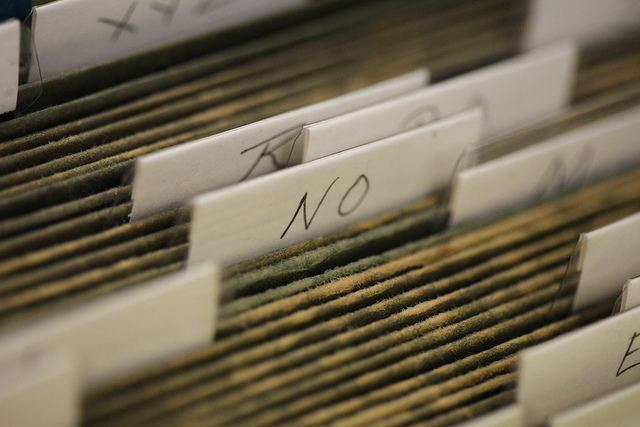
Photo by Tom Woodward via Flickr. Used under Creative Commons License.

Filed Under: Challenges, Genealogy tips, Organizing, Technology Tagged With: electronic files, organizing aids, paper files, record keeping, technology

Going through my box of inherited items: step two

October 5, 2021 By Janine Adams Leave a Comment

In August, I blogged about taking the first step to process a box of inherited items. I’m using the process I learned from Stacy Julian in her terrific RootsTech talk last year (you can read all about it in her blog post How to BEGIN with the BOX). Her process allows you get started on something that can feel very overwhelming.

I promised that when I took step two, I would post about it.

According to Stacy’s methodology, step two (after sorting the contents of the box into categories in step one) is to go through the items in a category and assess the value of each item, then note the needed actions. Here’s the secret sauce of the whole thing: You put the items that you most want to take action on–the most interesting or thrilling or beneficial finds–and put them in an Action file. And you’re allowed to have no more than 10 items in the Action file. Once you have that many items, you stop the assessment process and take action.

I want to take a moment to say how brilliant I think that is. Since you put the best stuff in the Action file and limit the number you can put there, then the Action file pretty much only contains stuff you really want to do. And there’s a built-in trigger (10 items) to get started taking action. Stacy says in her blog post that you should follow your heart and intuition in terms of deciding what goes into the Action file.

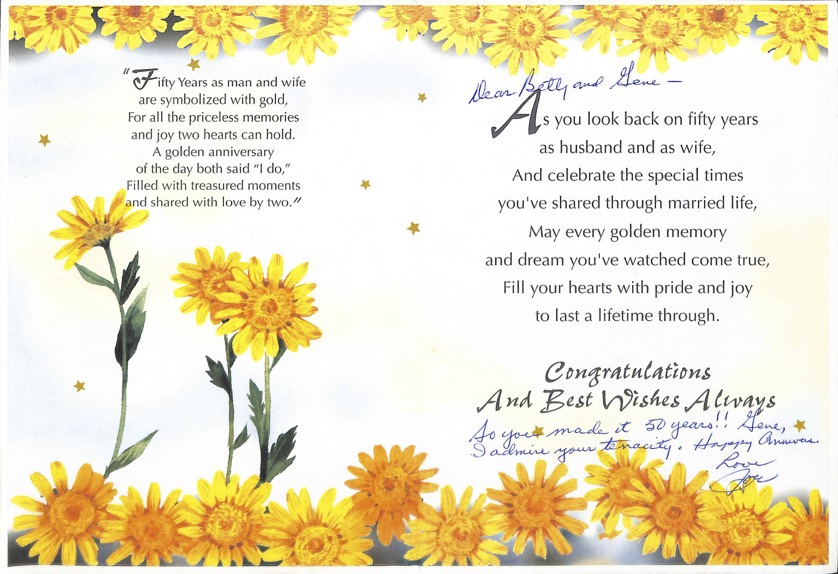
So in my efforts, I immediately gravitated to the Written Stuff file, as opposed to the Picture Stuff. That’s just my nature. I found a 50th anniversary card (pictured at the top of this post) from my mother’s brother with a snarky inscription that was so typical of my Uncle Joe. You can click on the image to see it larger, but I’ll tell you that the inscription says, “So you made it to 50 years!! Gene, I admire your tenacity. Happy anniv. Love, Joe”. I scanned the card and sent it to his kids.

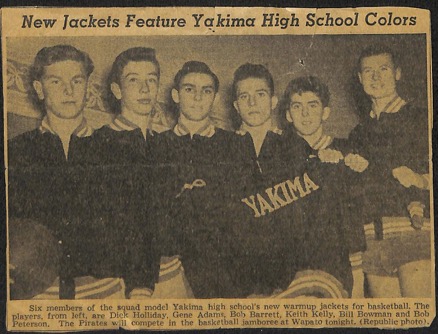
Among the Written Stuff were some old newspaper clippings that were fun, though of little genealogical value, including one that shows the new jackets of the Yakima (Washington) High School basketball team circa 1949, with basketball players, including my father, Gene Adams (who is 91!), modeling them. I decided to scan the clipping and email it to my brother (who is a big fan of sports uniforms) and then put it aside to take to my father when I see him later this month.

Here’s that clipping. My dad is second from left.

I just kept going through the stuff, noting the actions and putting some of them in the Action folder. I actually ended up taking action on all the Written Stuff (I don’t think there were even 10 items) because when I started looking at the Picture Stuff I got overwhelmed.

I’m feeling great about the Written Stuff and will systematically start going through the Picture Stuff. Since the photos overwhelm me, I know that I will benefit from using Stacy’s methodology and I know that a timer will be my best friend. I’ll work on it just 10 or 15 minutes at a time. When I get finished, I’ll post again!


Filed Under: Challenges, Excitement, My family, Organizing, Preservation Tagged With: family photos, organizing aids, overwhelm, paper files, resources, Stacy Julian

  • « Go to Previous Page
  • Page 1
  • Page 2
  • Page 3
  • Page 4
  • Interim pages omitted …
  • Page 6
  • Go to Next Page »

about me

I'm Janine Adams, a professional organizer and a genealogy enthusiast. I love doing family history research, but I find it's very easy for me to get overwhelmed and not know where to turn next. So I'm working hard to stay organized and feel in control as I grow my family tree.

In this blog, I share my discoveries and explorations, along with my organizing challenges (and solutions). I hope by sharing what I learn along the way I'll be able to help you stay focused and have fun while you do your research, too.

tags

30 x 30 Adams amy johnson crow anniversary Brown cemetery census Civil War conferences connections dna electronic files Evernote excitement Family Curator family photos genealogy tools getting started goals How They Do It Igleheart Jeffries keepsakes learning opportunities maps newspapers NGS organizing aids overwhelm paper files planning quick tips rasco record keeping research research log research trip resources RootsTech social history source documentation Stacy Julian technology time management vital records

join the facebook community!

join the facebook community!

My organizing business

Learn more about my organizing business, Peace of Mind Organizing®.

Subscribe by RSS

  • RSS - Posts
  • RSS - Comments

© 2026 Janine Adams


Loading Comments...