
• BLOG
  • ABOUT
    • Privacy Policy

Organize Your Family History

Stay focused and happy while exploring your roots

Transpose eliminating free plans

August 12, 2016 By Janine Adams Leave a Comment

transposelogoI’ve written here about Transpose, the app that allows you to create and use custom forms. I use it for taking notes at genealogy conferences and for abstracting genealogy data from documents. I use it for lots and lots of non-genealogy information as well, including keeping inventories, getting feedback, and keeping track of my blood pressure and the books I read.

When I first met Transpose, it was in Beta mode and was free. Then they added a paid plan, but still had a limited free plan. As of August 15, it will be out of Beta mode and will no longer offer a free plan. Instead, there are three tiers of paid plans: Individual ($9.99 a month), Team ($14.99 a month) and Enterprise ($29.99 a month).  If you have a free Transpose account, your free account will become read-only, and you won’t be able to add additional Records or Solutions.

The company actually gave me a paid plan for a year, as a thank you for being an early booster. But if they hadn’t, I’m confident I would purchase an Individual plan because I use it so much.

It can be disappointing when formerly free apps start charging, but to me that’s preferable to their going belly up, as happened in 2014 with my dear, departed Springpad.

Unfortunately, Transpose announced on November 8, 2016 that it is shutting down on December 9, 2016.
Filed Under: Genealogy tips, Organizing, Technology Tagged With: genealogy tools, organizing aids, record keeping, research, technology

Resisting the urge to print

July 12, 2016 By Janine Adams 16 Comments

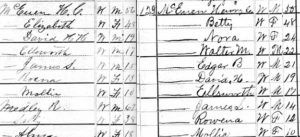
1800sidebysideI used to print all my source documentation and then analyze the printed version and add facts to my Reunion software on my computer. In fact, as recently as 2013 I blogged about how printing gave me comfort.
But that’s changed and these days I’m not even tempted to print. In November, I posted 8 reasons not to print and I stand by it. Organizing my research is much easier now that I’m not looking at a lot of printed documents. Every now and then I pull out a paper file and look at something I printed years ago, but I bet that happens fewer than ten times a year.

Right now I’m going through all my source documentation and in the process cleaning up my electronic files. In doing so, I found the family who had been counted twice on the 1880 census. I needed to compare the two census documents side by side. That’s when I felt the urge to print. My initial thought was that it would be easier to look at the documents on paper, rather than on my computer. One of the documents had already been printed and was in my file. I came really close to printing out the other one, when I realized that looking at the paper documents would be harder for me, not easier. The type is so small on the printed document that I might have had to get out my magnifying glass and squint. That’s the opposite of easy!

I had originally found the census documents on Ancestry and saved them to my hard drive. So I just opened the documents on my computer in Preview (that’s the Mac default pdf and jpg viewer), zoomed in on the family in question and sized each of them so that they fit side by side on my screen easily–I didn’t need to see the entire document at a glance, after all. And then I was able to easily compare them, line by line. I had Reunion open as well, so it was simple for me to enter data into my ancestors’ records and source each fact properly.

What I’m learning in my research, over time, is that going paperless is just plain easier. When I transcribe my ancestors’ Civil War pension files, I use an electronic version, which allows me to zoom in when the handwriting is a little puzzling. And I’m not shuffling a lot of long pieces of paper. (Those documents came from the National Archives in paper form. I put source information on each and then scanned the whole file into one long pdf. I detail that process here.)

The keys to successfully eschewing printing, I believe, are twofold:

  1. A good file naming protocol and folder structure, so that I can easily see what I have for each ancestor. I file by surname and individual, which is working well for me.
  2. A solid backup protocol, in  case of hard drive failure. I use CrashPlan Pro to back up to the cloud and Time Machine to back my Mac onto an external hard drive that sits on my desk.

As commenter Maria Tello mentions, having a large monitor makes viewing electronic documents easier.

I was glad I resisted the urge to print that 1880 census document. It made analysis easier–and I’m sure it was easier on my eyes!

Filed Under: Challenges, Genealogy tips, Organizing, Technology Tagged With: electronic files, organizing aids, record keeping, technology

Checking my sources

June 29, 2016 By Janine Adams 30 Comments

Verifying my sourcesThis year I’ve been having the hardest time figuring out what I want to focus on in my genealogy research sessions. I think part of the problem is that I’ve also had trouble finding time to research, so it’s been more sporadic. And when I do have time, then I don’t know what to work on.
A couple of years ago, I tried focusing on a different line each quarter. That was successful, but this year I’m not researching frequently enough to make that work. Last year, I was really focused on processing and transcribing my ancestors’ Civil War pension files. That was great too, but I’m wanting to mix it up a bit more these days.

I know I need to figure out what I want to focus on during my week at the Allen County Library in August, which means that I feel the need to revisit my ancestors and remind myself of my mysteries.

So I lit on a strategy that, for the moment anyway, is working well for me. (And I also came up with a strategy that’s allowing me to research more frequently–more on that in the next post.) Here’s what I’m doing:

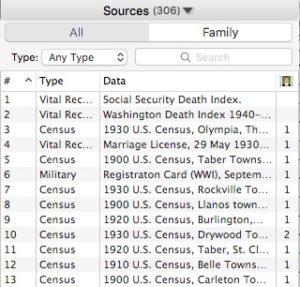
I’m going through all my sources in the Reunion family-tree software, checking the format, and attaching an image of the source to the source entry.

I exported the list of my 300 sources as an rtf file then opened the file in Evernote. I made the type big enough to read easily, then turned it one long bullet list with checkboxes for bullets. One by one, I’m going down the list and looking at each source and at the document that goes with the source. I’m checking the usage of the source. I attach the document as a multimedia file (leaving it on my hard drive in its folder, organized by surname and individual).  I’m getting reacquainted with my ancestors. And it’s been really fun.

I’m seeing several benefits to this process:

  • I know exactly where to start when I sit down to do research.
  • I’m cleaning up some formatting issues, since I became better at source documentation over time (so I’ve been able to make entries more consistent).
  • I’m making a list of things to investigate further, which will be helpful in planning my research trip.
  • I’m finding things I missed in the source documents the first time around.
  • I’m making new discoveries as I go along.
  • I get to work on a variety of ancestors every day, which suits me these days.
  • I see tangible progress every session.
  • I can make progress in just a few minutes, which is great when I don’t have a lot of time to research.
  • I’ve found that some electronic files had not been filed correctly and I’ve been able to refile them.
  • I end up with a wonderfully organized source list.
  • It’s systematic and enjoyable. I love checking off the box when I’m finished with that source!

If I wanted to focus on the sources of a single family, Reunion makes that easy for me. (I just click on “Family” rather than “All” in the sources list.) But for me, right now, mixing up the families by checking the sources in the order in which I entered them is working out nicely.

So far, I’ve checked off 20 of my now-306 sources. (I’ve made a few discoveries in the process, so I’ve added a few sources.) I’ve been doing a little a day for the last five days or so. Clearly it’s not fast work (though it may get faster as my sourcing gets better). But it’s beneficial and enjoyable. Hooray!

Filed Under: Challenges, Excitement, Organizing Tagged With: record keeping, research, source documentation, time management

Taking notes at genealogy conferences

January 29, 2016 By Janine Adams 6 Comments

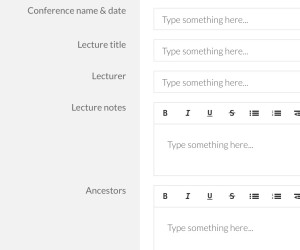
Template for taking notes at a genealogy conferenceIf you’re going to RootsTech next week (or any other genealogy conference this year) I encourage you to check out the free template I created in Transpose.

Transpose is a business platform/website that I wrote about last year. It allows you to create templates (which they now call “solutions”) to create customized forms. You can also download solutions that others have created and uploaded into the Transpose Public Library.

I’ve created a bunch of solutions for my own use and uploaded seven solutions to the Transpose Public Library. One of these is a solution called Genealogy Conference Notes. It’s designed to make it easy to take notes at a genealogy conference.

I’ve only been to one genealogy conference since I created this solution (the Genealogy Society of Southern Illinois conference last August). Using the template, I created a new record for each lecture. The template allowed me to capture general notes from the lecture and also jot down which ancestors the information might apply to, along with action ideas. It worked out really well for me–I love having a structured place to take notes. When I got home, I had a list of concrete action steps.

I chose to take notes on my laptop, because I prefer a full keyboard. Transpose has an app you can use on a tablet or smartphone, but I haven’t yet tried out taking notes with my solution on a mobile platform.

If you’re interested in trying it, you’ll need a free account at Transpose. Go to the Genealogy Conference Notes solution in the library and just copy it into your account. There it will be among any other solutions you copy or download. Just click on the solution and create a new record for each lecture you attend. All the information you capture will be saved for you in Transpose, in a searchable and filterable database.

You can also use it as a basis creating your own solution that works better for your needs. The folks at Transpose work hard to make it easy for you to use the platform. Here’s a great getting started tutorial.

I can’t wait to use it for the next genealogy conference I attend!

Unfortunately, Transpose announced on November 8, 2016 that it is shutting down on December 9, 2016.

Filed Under: Genealogy tips, Organizing, Technology Tagged With: conferences, genealogy tools, organizing aids, record keeping, research, technology

  • « Go to Previous Page
  • Page 1
  • Interim pages omitted …
  • Page 8
  • Page 9
  • Page 10
  • Page 11
  • Page 12
  • Interim pages omitted …
  • Page 15
  • Go to Next Page »

about me

I'm Janine Adams, a professional organizer and a genealogy enthusiast. I love doing family history research, but I find it's very easy for me to get overwhelmed and not know where to turn next. So I'm working hard to stay organized and feel in control as I grow my family tree.

In this blog, I share my discoveries and explorations, along with my organizing challenges (and solutions). I hope by sharing what I learn along the way I'll be able to help you stay focused and have fun while you do your research, too.

tags

30 x 30 Adams amy johnson crow anniversary Brown cemetery census Civil War conferences connections dna electronic files Evernote excitement Family Curator family photos genealogy tools getting started goals How They Do It Igleheart Jeffries keepsakes learning opportunities maps newspapers NGS organizing aids overwhelm paper files planning quick tips rasco record keeping research research log research trip resources RootsTech social history source documentation Stacy Julian technology time management vital records

join the facebook community!

join the facebook community!

My organizing business

Learn more about my organizing business, Peace of Mind Organizing®.

Subscribe by RSS

  • RSS - Posts
  • RSS - Comments

© 2026 Janine Adams


Loading Comments...