• BLOG
  • ABOUT
    • Privacy Policy

Organize Your Family History

Stay focused and happy while exploring your roots

Transpose shutting down December 9

November 8, 2016 By Janine Adams 4 Comments

I have posted here about Transpose, the app I have used to create custom forms, including some forms for my genealogy research.

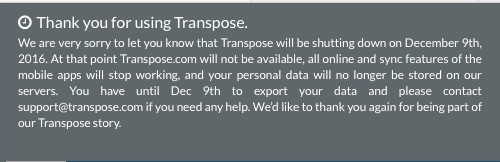
When I logged in this morning to access some information, I was really disappointed to see the following banner at the top of the site:
transposeclose

I wasted no time exporting my data into spreadsheets or pdfs, as appropriate, so I’ll lose nothing. But I will miss this very easy way to to gather information.

I am getting so tired of hopping on the bandwagon of great apps that then fold (see Springpad). I hope and trust that Evernote is here to stay because I have loads of information stored there. I am encouraged by its popularity and the fact it has a multi-tiered paid model.

But still. This strengthens my resolve to store as much data as possible on my hard drive, rather in the cloud. (Though my resolve was shaken a little a couple of weeks ago when I had to do a clean reinstall of my operating system. It all worked out, though.)

If you starting using Transpose on my recommendation, I’m sorry. Please don’t forget to export your data before December 9!
Filed Under: Genealogy tips, Organizing, Technology Tagged With: genealogy tools, organizing aids, record keeping, research, technology

Figuring out what’s relevant

September 27, 2016 By Janine Adams 24 Comments

Figuring out what's relevantWhen you’re doing genealogy research, it’s easy to stumble on facts you’re not looking for. Let’s say you’re researching your great grandfather. Ancestry gives you all sorts of information about his brother. Do you take the time to carefully document the information on the brother?
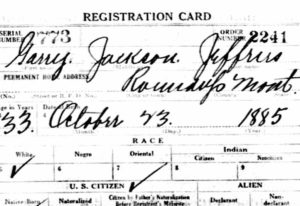
This isn’t exactly hypothetical. This happened to me this morning. Five years ago, I would have skipped that information and kept my focus on my great grandfather. Now I know better.

After about ten years of genealogy research, there’s one thing I’m pretty sure about.

Every documented fact is relevant. Or might be some day.

Why should I bother to document the marriage certificate and draft registrations for Garry Jeffries (brother of my great grandfather James E. Jeffries)? Here are a few reasons that pop to mind:

  • I get a clearer picture of my family.
  • I might be able to help one of his descendants, a cousin of mine, one day by including this information in my family tree.
  • Down the road I may learn something about the relationship between my great grandfather and his brothers and this information might help connect the dots.
  • As commenter Marcia Philbrick said, “Those brothers, sisters and their descendants may be the clue to break through brick walls.” (Thank you, Marcia!)

I’m sure that’s just the beginning. Basically, I’ve come to the conclusion that since I can’t see what puzzle pieces I’m going to need in the future, it benefits me to take the time to record and download all the documents I come across, even if they’re not for my direct line ancestors. (Here’s how I process that information.) It can feel tedious and also feel like it’s taking me away from my “real” research. But I think it’s worth it.

After all, genealogy research is a marathon, not a sprint.

Filed Under: Challenges, Genealogy tips, My family Tagged With: Jeffries, organizing aids, planning, record keeping, research

How I store my genealogy information

September 16, 2016 By Janine Adams 36 Comments

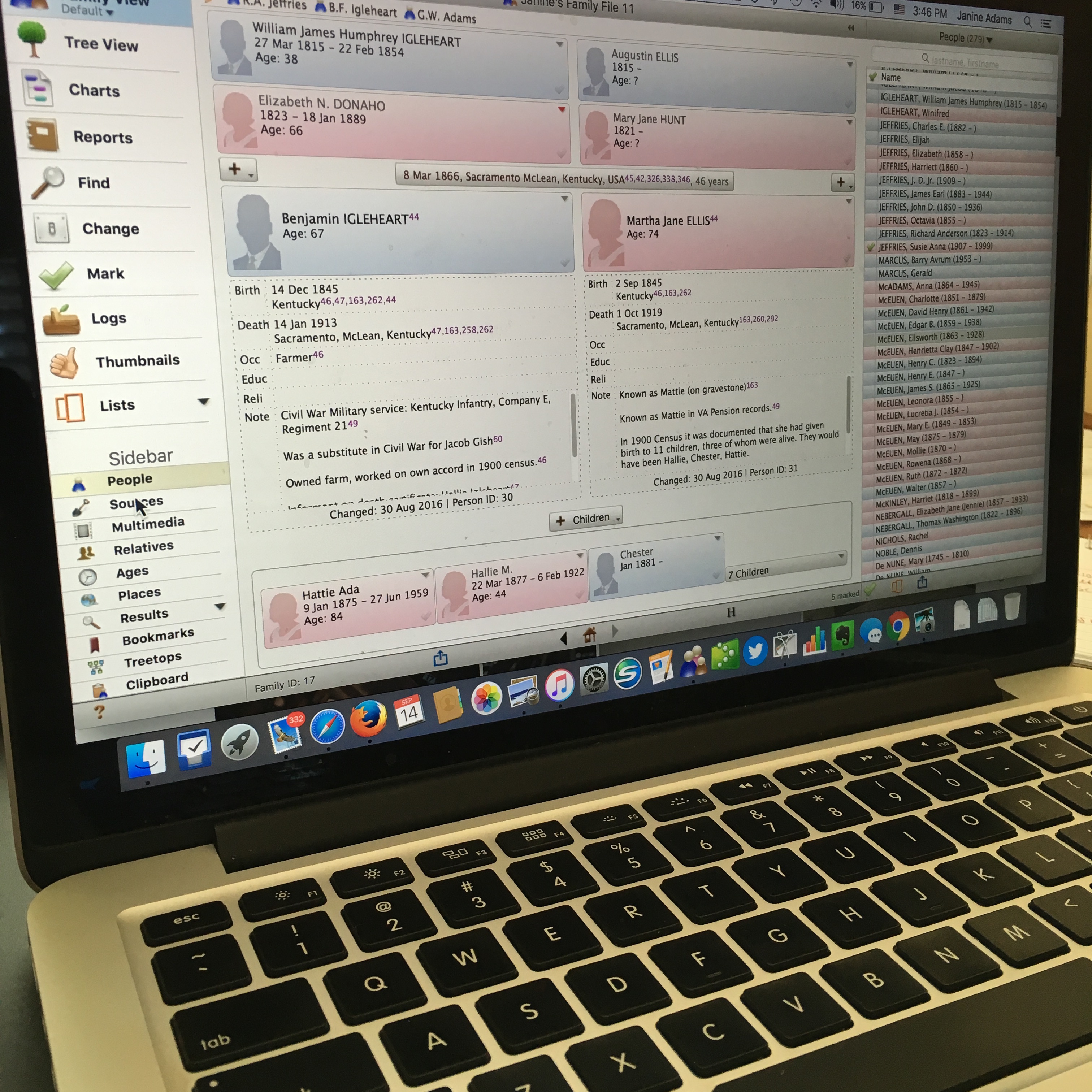
reuniononmac90I love organizing my family history research electronically. As I’ve mentioned here many times, I try not to print digital documents and instead store everything electronically where I can have easy access to it.

I don’t think I have been clear when I talk about storing my genealogy data electronically that I’m not talking about storing it as a family tree on Ancestry or Family Search. I’m talking about storing it on my hard drive.

To me, it would be folly to rely on an outside service to store my precious genealogy data. If the only copy of my information was at Ancestry, I would be required to renew my subscription to access my own data. Even storing all my information at a free site like Family Search feels risky to me. It’s conceivable that they could change their terms of service to something unacceptable to me. Or start charging for access. Or simply vanish. Another place that some people store their genealogy documents is Evernote. I think that can be a great way to have easy, searchable access to information. But I wouldn’t store genealogy documents on Evernote that I don’t also have on my hard drive. They could go belly up. (It happened with Springpad.)

I enter all of my data into family-tree software that resides on my laptop’s hard drive. I use Reunion 11, a Mac program. It can sync with the iPhone and iPad using the ReunionTouch app. I haven’t yet installed ReunionTouch because I take my Mac with me on research trips. I like that storing my data on my computer, rather than an online service, is that the information is accessible even when I don’t have an internet connection (if I have my computer with me).

Of course, I back up my hard drive, both on an external hard drive and with an online backup service (CrashPlan Pro). Backing up is critical.

I’m not saying that my way is the right way or the best way. But I’ll share with you my process for storing info, in case you find it helpful or interesting. So far, it’s working well for me.

When I find a sourced piece of information pertinent to my research this is what I do:

  1. Add the information to the appropriate person(s) in Reunion (or add a person if need be).
  2. Cite the source in Reunion.
  3. Download the information (or scan it if I found it in paper form).
  4. Attach an image of the source document to the source citation in Reunion.
  5. File the digital document in that ancestor’s electronic folder on my hard drive, copying it if it applies to more than one ancestor.
  6. Scour the source for further information.
  7. Make a note in Evernote if it sparks potential further research.

So far this feels good to me and I haven’t second guessed it.

How do you store your family tree information?

Filed Under: Challenges, Organizing, Technology Tagged With: electronic files, organizing aids, record keeping, technology

Walking the paperless walk

August 26, 2016 By Janine Adams 16 Comments

nofilesI’ve been blogging here through the years about my growing disenchantment with paper. I’ve stopped printing out documents I find digitally and instead save them to my computer and file them by surname. (That’s what works for me…you may choose to file differently.) I’ve started scanning notes and other genealogy paper that comes across my desk and discarding much of it after scanning. I do keep original documents as well as documents I’ve sent away for. But the vast majority of my genealogy information is not in my paper files

Last week when I was at the Allen County Public Library–I promise I’ll stop talking about that trip soon–I didn’t photocopy a single thing. Instead, I used the library’s copying machines to scan the documents I wanted to take home. I brought along a flash drive for that purpose and the process was very easy. The machines even allowed me to put all the documents from one source into a single file, rather than a file for each page. It does mean I had to rename each file and drag it to the appropriate folder on my hard drive. But I didn’t have a bunch of paper to process when I got home! Nor did I have paper to lug home. Or carry to the hotel from the library. Moreover, I was able to easily zoom in text to read it more easily. Not once did I wish I had a magnifying glass.

And here’s the kicker: The library (understandably) charges for paper copies. But they don’t charge a thing to scan to a hard drive, which was literally no more challenging than making a photocopy.

I feel better and better about limitingĀ  paper in my genealogy research. It’s kind of amazing to me that just 3.5 years ago I was still printing much of what I found.

I was really pleased that my paperless inclinations were reinforced on my library trip!

Photo by Tom Woodward via Flickr. Used under Creative Commons License.

Filed Under: Challenges, Genealogy tips, Organizing, Technology Tagged With: electronic files, organizing aids, record keeping, technology

  • « Go to Previous Page
  • Page 1
  • Interim pages omitted …
  • Page 7
  • Page 8
  • Page 9
  • Page 10
  • Page 11
  • Interim pages omitted …
  • Page 15
  • Go to Next Page »

about me

I'm Janine Adams, a professional organizer and a genealogy enthusiast. I love doing family history research, but I find it's very easy for me to get overwhelmed and not know where to turn next. So I'm working hard to stay organized and feel in control as I grow my family tree.

In this blog, I share my discoveries and explorations, along with my organizing challenges (and solutions). I hope by sharing what I learn along the way I'll be able to help you stay focused and have fun while you do your research, too.

tags

30 x 30 Adams amy johnson crow anniversary Brown cemetery census Civil War conferences connections dna electronic files Evernote excitement Family Curator family photos genealogy tools getting started goals How They Do It Igleheart Jeffries keepsakes learning opportunities maps newspapers NGS organizing aids overwhelm paper files planning quick tips rasco record keeping research research log research trip resources RootsTech social history source documentation Stacy Julian technology time management vital records

join the facebook community!

join the facebook community!

My organizing business

Learn more about my organizing business, Peace of Mind OrganizingĀ®.

Subscribe by RSS

  • RSS - Posts
  • RSS - Comments

© 2026 Janine Adams


Loading Comments...