• BLOG
  • ABOUT
    • Privacy Policy

Organize Your Family History

Stay focused and happy while exploring your roots

A simple tip for accessing Family Search documents

January 26, 2018 By Janine Adams 14 Comments

Last weekend I went to the St. Louis County Library’s genealogy room to access some documents I’d found on Family Search that were only available for viewing from the Family History Library or an affiliate library. I had stored links to these documents in Evernote until I had a few lookups to do.

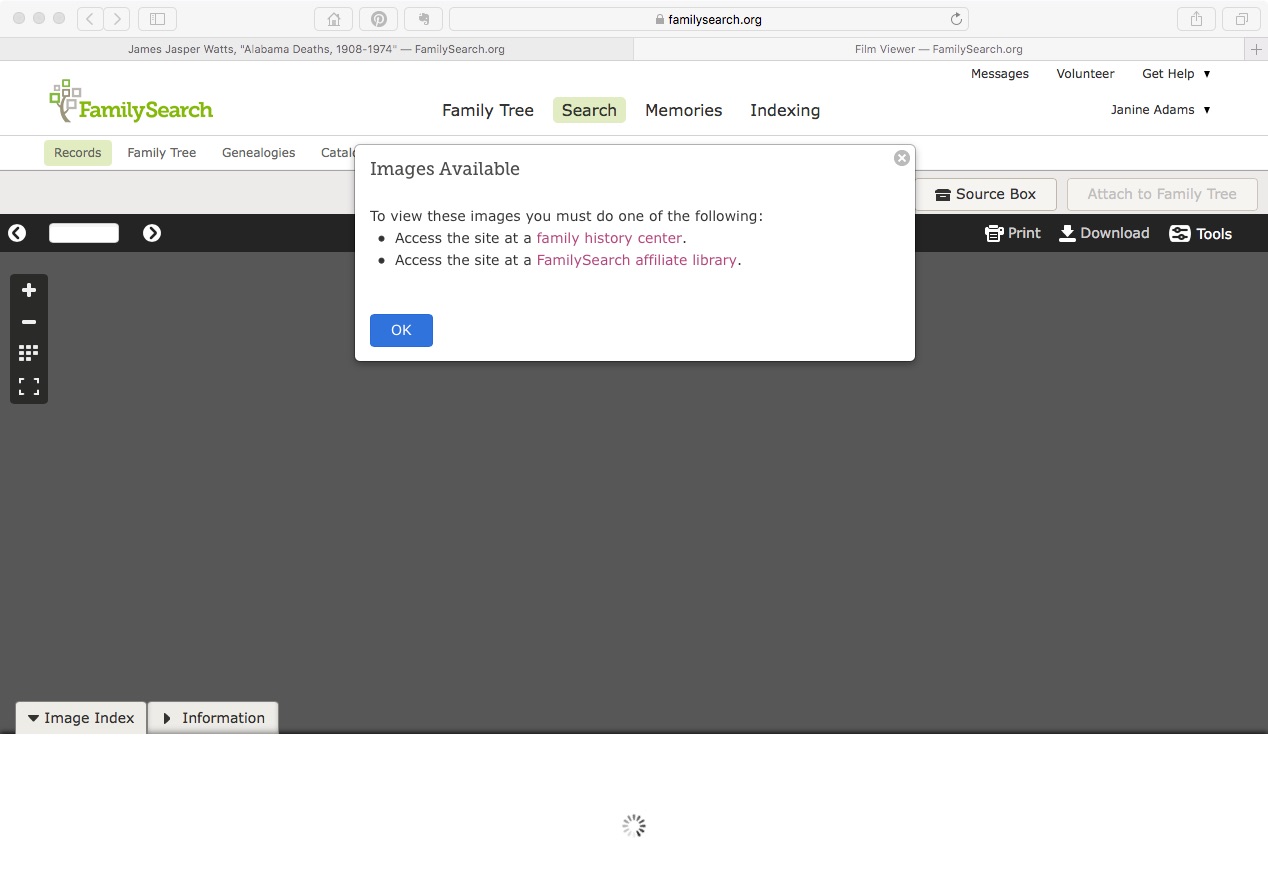
When I got there and logged on to the library’s wifi, I was disappointed to get the same message I’d received at home (pictured above). I consulted with the librarian, who was able to access the first document on her computer. She didn’t know why I couldn’t access it on mine, but suggested I use the library’s computers. I did that, but I would have much preferred being on my own laptop, since the documents I was trying to access were hyperlinked on my computer. (I didn’t think of accessing my Evernote account on the library’s computer.) I also would have much preferred to download the documents directly to my computer, rather than onto a flash drive. And I didn’t enjoy fumbling around with Windows when I’m used to a Mac.

When I got home, I realized I’d not properly captured the source information. So back I went to the library three days later.

I had the same problem accessing the documents and I asked a different librarian for help. He made a brilliant suggestion:

Try another browser.

I don’t know why I hadn’t thought of it. I like to use Safari on my Mac, but Safari sometimes doesn’t play well with others. When I tried to access the document on Chrome, there it was.

So if you’re in a library where you should be able to access a Family Search document and can’t, just try another browser.

Edited to add: According to some comments I received on Facebook, this browsing-switching phenomenon as it relates to Family Search might be specific to the St. Louis County Library. So your mileage may vary.
Filed Under: Challenges, Genealogy tips, Technology Tagged With: research, technology, vital records

How far on the branches do you go?

January 23, 2018 By Janine Adams 32 Comments

Five years ago, I blogged about my quandary over whether to research my collateral lines, rather than focusing on my direct-line ancestors. That I even hesitated to explore collateral lines amazes me because the benefits are now obvious. These collateral lines provide valuable clues. They help verify that the person I’m researching is my person. My family tree is very obviously not complete without them.

Two years ago, I blogged that was rededicating myself to the task of adding siblings; that is, I going back to the censuses or other information I’d downloaded previously and filling in the blanks.

Now I have a new quandary on the other side of the spectrum: Should I limit my research when it comes to the collateral lines? In 2017 and so far in 2018 I’ve focused my research on my Adams line, barely even looking at the other three lines. In doing so, I’ve been able to really explore the collateral lines without feeling any pressure to return to my direct-line ancestors. It’s been really rewarding and fun.

This has added a little complexity in terms of organizing, but nothing I can’t handle. A year ago, I simply had a Collateral subfolder in my Surnames folder with all the source documents I’d downloaded for collateral relatives mixed together–I didn’t have enough to merit subfolders. But when the number of documents started to grow, I created subfolders for the surnames and the individuals, like I do with my direct-line ancestors, except that they fall under the Collateral folder. So the path looks like this:

Genealogy/Surnames/Collateral/[Surname]/[Name of Ancestor (YOB-YOD)]/Document name

I just checked. I have 419 documents in the Collateral folder.

I’m going to the library this afternoon, where I can access certain documents on Family Search that I can’t access at home, because the library is affiliated with the Family History Library. As I was creating the list of look ups in Evernote I realized that they’re for ancestors that are a bit far afield:

  • A marriage document for my 2nd great grandfather’s stepdaughter
  • A marriage document for my great grandfather’s half-brother’s wife’s parents

So I’m wondering whether I should ratchet things back closer to my direct-line ancestors or just continue happily exploring the folks who cross my path.

I thought I’d turn to you and ask. Do you limit who you research, or do you research anyone who is somehow related to you?

Photo by Anders Sandberg via Flickr. Used under Creative Commons License.

Filed Under: Challenges, My family, Reflections Tagged With: Adams, electronic files, research, time management

Keeping track of my progress

October 10, 2017 By Janine Adams 16 Comments

Keeping track of genealogy researchThis year, I’ve been focusing on one family line, the Adams line. I’ve been trying to gather as much information as possible not just on my direct-line ancestors (my focus in past years) but also on the siblings of my direct-line ancestors. It’s fun and fulfilling. But it’s also a bit overwhelming because there are so many people I can’t remember all of them.

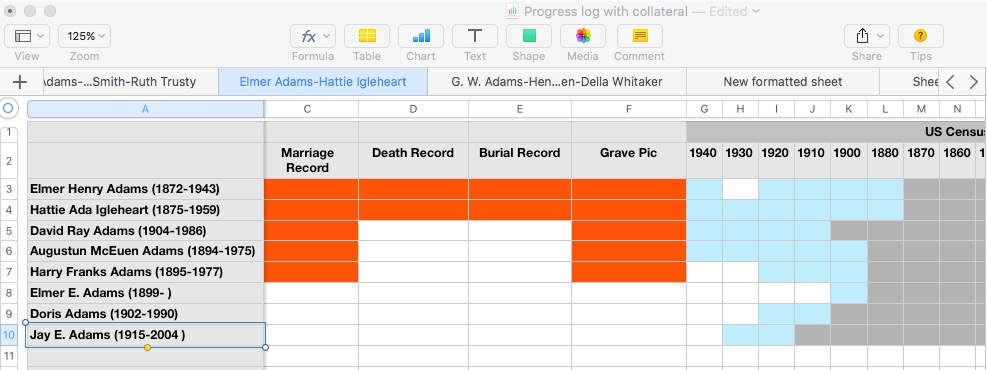
I keep track of everything in my family-tree software, Reunion. But I also like having an at-a-glance summary of where I stand in my research on each person. Three years ago, I created a progress chart, which had a series of tabs on a spreadsheet in which I marked the documents I had found on each of my direct-line ancestors. That worked pretty well and gave me an at-a-glance summary I craved.

I find myself wanting a similar chart for all my research subjects, including the collateral lines, and I’m struggling with getting my arms around that. Part of my problem, I think, is that I want to be able to see everything at the same time, which is challenging when your family tree’s branches stretch wide.

Here’s what I’ve settled on. I’m creating a single spreadsheet for all the data I’m looking for for each family group (B/M/D, censuses, newspaper, military, wills, land, etc.). In my previous progress chart, I’d had all my direct-line ancestors listed on each sheet, with a separate sheet for each type of data. In this new chart, I have all my data types across the top, with a row for each member of the family group. I have a separate sheet (a tab) for each family group. I decided to start with my parents in the first sheet and work back in time by generation.

I’ve spent a little time with it and I think it’s going to be really helpful. As I started filling it out, I paid attention to how it made me feel and I had two conflicting feelings:

  • Overwhelm because there are so many people to enter into it and so many data types to research
  • Excitement as I realized how many opportunities for research there are

I think the key to making this useful and not overwhelming is putting one family group on each sheet. That narrows the focus and allows me to see what I have and what I can still research. It also helps me avoid feeling overwhelmed.

Having each family group on a separate sheet makes it easier to fill out the chart initially as well. I ordinarily enjoy filling out forms and updating progress charts. But this one was so large it felt like it might turn into a big exercise in tedium. So if I take it one family group at a time, it feels like fun, not drudgery.

I’ll keep you posted. Once I have it in shape where I think it might be useful to others, I’ll blog again and offer to send it to anyone who might want to use it.

If you have a similar chart and/or have any suggestions for mine, please share in the comments. I’m all ears!

Filed Under: Challenges, Genealogy tips, My family, Organizing Tagged With: organizing aids, overwhelm, planning, progress log, research, research log, resources

Using the card catalog to find elusive documents on Family Search

September 22, 2017 By Janine Adams 6 Comments

Using the card catalog at Family SearchI use both Ancestry and Family Search regularly for online research. I tend to start with Ancestry because I find it easier to find indexed documents there. But when I’m looking for a document that’s more elusive, the catalog at Family Search often comes through for me.

I will sometimes do a Records search on Family Search but most often I start with a card catalog search. And I frequently come up with some great results.

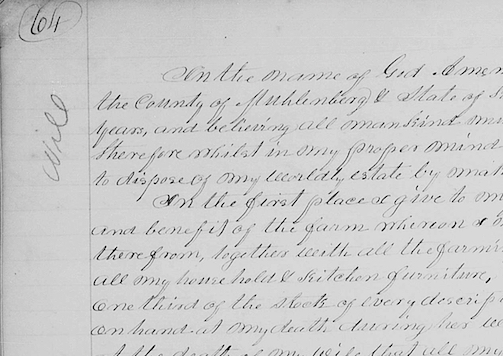
I’ll give you a real-life example. I was doing research yesterday at the Saint Louis County Library and found an index to a Will Book. I wanted to see if I could find the actual document it referenced (an 1843 will for my 5th great grandfather, Jacob S. Baker, 1766-1845). Here’s what I did:

  1. I went to www.familysearch.org and logged in, then clicked Search, then Catalog.
  2. Under Place, I filled in the location from biggest to smallest (i.e. United States, Kentucky, Muhlenberg) then clicked Search.
  3. In the search results, I clicked on the type of document I wanted, in this case Court Records.
  4. In those search results, I clicked on a collection called Court Orders, 1799-1912.
  5. When I scrolled down under Film Notes, I was delighted to see that of the 12 rolls of microfilm, two had been digitized. And the year I was interested in was on one of those two rolls. (It seems like that never happens!)
  6. I clicked on the little camera icon, which opened the images of the film reel. And just as though I were using a microfilm reader, I was able to find the document I was looking for, based on the information in the index. Hooray!

If I had simply done a Records search on Jacob S. Baker I would not have found this image. (This is another argument for getting away from my computer and going to a library or other repository.)

Here’s another way the a Catalog search can be helpful. Sometimes at Family Search, you can do a Records search and find an entry that doesn’t have an image. But that image may indeed be available, with a Catalog search.

For example, I was looking for the death certificate for the second wife of my 2nd great grandfather, George Washington Adams. Her name was Della or Idella Adams and she died in Olympia, Washington, in 1943. On Family Search, through a Records search, I found an entry for her death certificate in the collection Washington Death Certificates, 1907-1960. But there was the dreaded “No image available” message.

But I didn’t give up. Instead, I copied the GS Film Number (2024117) and started a new search, this time of the Catalog. I pasted the film number in the box that says Search For Film/Fiche Number. (When I entered location as well, it didn’t produce results, so I deleted the location and left just the film number.)

That gave me a link to the whole collection of Washington state death certificates. I clicked on film number 2024117, even though its description didn’t seem to fit the county I was looking for. Then I went to the index record I’d found in the Record search and looked for the image number, 2348. I simply entered that number at the top of the screen for microfilm roll number 2024117 and it took me right to an image of Della’s death certificate.

I love searching the catalog at Family Search. I know a catalog search is an option at Ancestry, too, but I find it less enjoyable and productive.

Next time you can’t find an image of a document you have some information for, I heartily suggest using the catalog!

Filed Under: Challenges, Genealogy tips, Technology Tagged With: Adams, excitement, family search, genealogy tools, research, resources, technology

  • « Go to Previous Page
  • Page 1
  • Interim pages omitted …
  • Page 20
  • Page 21
  • Page 22
  • Page 23
  • Page 24
  • Interim pages omitted …
  • Page 43
  • Go to Next Page »

about me

I'm Janine Adams, a professional organizer and a genealogy enthusiast. I love doing family history research, but I find it's very easy for me to get overwhelmed and not know where to turn next. So I'm working hard to stay organized and feel in control as I grow my family tree.

In this blog, I share my discoveries and explorations, along with my organizing challenges (and solutions). I hope by sharing what I learn along the way I'll be able to help you stay focused and have fun while you do your research, too.

tags

30 x 30 Adams amy johnson crow anniversary Brown cemetery census Civil War conferences connections dna electronic files Evernote excitement Family Curator family photos genealogy tools getting started goals How They Do It Igleheart Jeffries keepsakes learning opportunities maps newspapers NGS organizing aids overwhelm paper files planning quick tips rasco record keeping research research log research trip resources RootsTech social history source documentation Stacy Julian technology time management vital records

join the facebook community!

join the facebook community!

My organizing business

Learn more about my organizing business, Peace of Mind Organizing®.

Subscribe by RSS

  • RSS - Posts
  • RSS - Comments

© 2026 Janine Adams


Loading Comments...